Paste your notes, a speech or an article into the chat and write "make a presentation from this". Entro splits the text into slides and writes the outline in the chat; you download it as PowerPoint (.pptx) from the Download menu under the answer. The file uses one plain theme, with no images or animations.
Draft a 10-slide presentation outline from the text below. Audience: the company's sales team. Put the deck title at the top; give each slide a short title and 3-6 short bullet points, and trim long sentences. Add no facts or figures that are missing from the text. Keep the tone plain and direct and make the last slide a list of next steps. Under each slide add a one-sentence line starting with "Speaker notes:".
Text: paste your text here
Blue parts are the places to fill in with your own details. Tab selects the next one, Enter sends, Shift and Enter starts a new line.
Paste the text, fix the outline, download it as PowerPoint
Entro decides where the slides break
Entro reads how the text flows and splits it into a cover, sections and a closing. Each slide gets a title and 3-6 short bullets, so a paragraph is never dumped on a slide whole. If you want your own order, give the slide titles yourself.
Entro
Mobile App Project Status Update
Executive Summary
• Payment flow implementation is complete
• Push notifications are delayed by two weeks due to late design approval
• Overall budget remains fully on track with no overruns
• Final app store submission target remains the end of the month
Feature Progress and Status
• Payment screen developed, integrated, and verified
• Core checkout workflows ready for end-to-end testing
• Push notification system delayed by two weeks
• Design sign-off now resolved, unblocking notification…
Draft a 5-slide presentation outline from these notes, with a title and 3-5 short bullets per slide: The payment screen of the mobile app is done. Notifications are two…
Entro
The file is plain and yours to edit
Pick PowerPoint (.pptx) in the Download menu: each heading becomes a slide and tables stay tables. There is one theme, a white background with legible type. Images, animations and brand themes are absent; you add them in the program you open the file with.
Entro
New Under-Counter Water Filter: Reseller Presentation
Product Overview
• Compact water filtration system designed to fit under the counter
• Space-saving design that keeps counters clear
• Practical solution for household water filtration needs
Tool-Free Maintenance
• Replacement cartridge lasts six months
• Quick, tool-free cartridge changes
• Simple routine maintenance for the end user
Built-In Leak Protection
• Integrated automatic leak detection
• Shuts off the water supply immediately upon leak detection
• Prevents water damage and…
Draft a 6-slide presentation outline for resellers from this product text: Our new water filter fits under the counter. The cartridge is changed every six months and…
Entro
Fix it in chat before you download
Write "cut it to 8 slides", "add an example to every slide" or "switch the language to Spanish". Entro remembers the earlier version and rewrites the outline. Download once it reads the way you want.
Entro
Photosynthesis: How Plants Make Food
What Is Photosynthesis?
• Plants cannot walk to the kitchen for food.
• They make their own food using sunlight.
• This process is called photosynthesis.
• It is the reason plants are green and healthy.
The Plant's Kitchen: The Chloroplast
• Photosynthesis happens inside plant leaf cells.
• Special tiny parts called chloroplasts do the work.
• Chloroplasts act like mini solar panels.
• They catch sunlight and start making food.
What Goes In? (Ingredients)
• Plants absorb water through their…
Draft a 6-slide presentation outline for seventh graders from these lesson notes, in short sentences: Photosynthesis is how plants make food using light energy. It…
Entro
A long paragraph can't be read on a screen, so Entro trims it
A paragraph that reads well on paper turns into a wall of text on a slide. Entro moves the main idea of each section into the title and the supporting points into short bullets; ask and the detail goes into speaker notes. If your wording must stay, say "leave my sentences alone and only split them into slides". Entro can get things wrong, so compare the outline with your text before downloading and point out anything it skipped.
Entro
Book Club Discussion: A School Revived
Slide 1: Welcome and The Return
• Setting the scene: life in a quiet coastal town
• Introducing the protagonist: a teacher returning to her roots
• The mood of nostalgia, belonging, and homecoming
• Initial impressions of the town and its community
• Discussion question: Why do you think the protagonist chose to return now, and what does this homecoming signify?
Slide 2: The Catalyst: Looming Closure
• The sudden announcement that the local school will shut down
• The stakes for the children…
Draft a 5-slide presentation outline for a book club from this summary: The novel follows a teacher who returns to a small coastal town. In the first part she learns…
Entro
For a designed deck, hand the outline to Builder
The PowerPoint file carries the content; the design is yours to do in PowerPoint or Keynote with your own template. If you want an animated deck that plays full screen and is shared by link, copy the outline into Builder. Builder builds a web presentation that opens in the browser, and that route produces no PowerPoint file. The AI presentation maker page has the details.
Entro
Workshop Expansion and Growth
Slide 1: Welcome to Our Third Workshop
• Opening of our brand new facility
• A major milestone in our journey
• Expanding our capacity and reach
Konuşmacı notu: Today marks an exciting day as we officially open the doors to our third workshop.
Slide 2: From Four to Thirty
• Started our first workshop with just four people
• Grown into a dedicated team of thirty
• Celebrating the hard work and passion behind this journey
Konuşmacı notu: We started the first one with four people, and now…
Draft a 4-slide presentation outline from this speech and add a 'Speaker notes:' line under each slide: Today we open our third workshop. We started the first one with…
Entro
For people whose text is ready and needs to go on slides
Paste the scattered notes you took during the week. Entro sorts finished work, late items and next steps onto separate slides. Ask for the decisions as a table slide with an owner next to each one.
Hand over the talk you wrote and ask for one idea per slide for each section. Your sentences stay in the speaker notes while the screen shows a title and a few bullets.
If you're presenting a piece you published, paste the text. Subheadings become slide titles and paragraphs become bullets. Check quotes and figures against the original piece.
A teacher pastes the lesson, a student pastes an assignment. Name a level such as "for seventh graders, in short sentences" and the language is simplified to match. You can have a review-questions slide added at the end.
Paste an email thread that got out of hand and ask for a short deck showing who asked for what, what was agreed and what is still open. Check names and dates before you share it.
Entro
Volunteer Program Announcement
Program Launch
• Our volunteer program starts in September.
Application Deadline
• Applications are open until the end of August.
Weekly Commitment
• Volunteers give four hours a week.
Orientation
• The first week is training.
Completion
• A certificate of participation is issued at the end.
Split this announcement into slides without changing my sentences and write it as a presentation outline, with a short title on each slide: Our volunteer program starts…
Entro
Entro
Mobile App Project Status Update
Executive Summary
• Payment flow implementation is complete
• Push notifications are delayed by two weeks due to late design approval
• Overall budget remains fully on track with no overruns
• Final app store submission target remains the end of the month
Feature Progress and Status
• Payment screen developed, integrated, and verified
• Core checkout workflows ready for end-to-end testing
• Push notification system delayed by two weeks
• Design sign-off now resolved, unblocking notification…
Draft a 5-slide presentation outline from these notes, with a title and 3-5 short bullets per slide: The payment screen of the mobile app is done. Notifications are two…
Entro
Entro
New Under-Counter Water Filter: Reseller Presentation
Product Overview
• Compact water filtration system designed to fit under the counter
• Space-saving design that keeps counters clear
• Practical solution for household water filtration needs
Tool-Free Maintenance
• Replacement cartridge lasts six months
• Quick, tool-free cartridge changes
• Simple routine maintenance for the end user
Built-In Leak Protection
• Integrated automatic leak detection
• Shuts off the water supply immediately upon leak detection
• Prevents water damage and…
Draft a 6-slide presentation outline for resellers from this product text: Our new water filter fits under the counter. The cartridge is changed every six months and…
Entro
Entro
Photosynthesis: How Plants Make Food
What Is Photosynthesis?
• Plants cannot walk to the kitchen for food.
• They make their own food using sunlight.
• This process is called photosynthesis.
• It is the reason plants are green and healthy.
The Plant's Kitchen: The Chloroplast
• Photosynthesis happens inside plant leaf cells.
• Special tiny parts called chloroplasts do the work.
• Chloroplasts act like mini solar panels.
• They catch sunlight and start making food.
What Goes In? (Ingredients)
• Plants absorb water through their…
Draft a 6-slide presentation outline for seventh graders from these lesson notes, in short sentences: Photosynthesis is how plants make food using light energy. It…
Entro
Entro
Book Club Discussion: A School Revived
Slide 1: Welcome and The Return
• Setting the scene: life in a quiet coastal town
• Introducing the protagonist: a teacher returning to her roots
• The mood of nostalgia, belonging, and homecoming
• Initial impressions of the town and its community
• Discussion question: Why do you think the protagonist chose to return now, and what does this homecoming signify?
Slide 2: The Catalyst: Looming Closure
• The sudden announcement that the local school will shut down
• The stakes for the children…
Draft a 5-slide presentation outline for a book club from this summary: The novel follows a teacher who returns to a small coastal town. In the first part she learns…
Entro
Slide outlines Entro has drafted from text
Entro's answer
Mobile App Project Status Update
Executive Summary
• Payment flow implementation is complete
• Push notifications are delayed by two weeks due to late design approval
• Overall budget remains fully on track with no overruns
• Final app store submission target remains the end of the month
Feature Progress and Status
• Payment screen developed, integrated, and verified
• Core checkout workflows ready for end-to-end testing
• Push notification system delayed by two weeks
• Design sign-off now resolved, unblocking notification…
Draft a 5-slide presentation outline from these notes, with a title and 3-5 short bullets per slide: The payment screen of the mobile app is done. Notifications are two weeks late because design sign-off slipped. We need three people for testing. Store submission is at the end of the month. No budget overrun. Make the last slide next week's tasks.
Entro's answer
New Under-Counter Water Filter: Reseller Presentation
Product Overview
• Compact water filtration system designed to fit under the counter
• Space-saving design that keeps counters clear
• Practical solution for household water filtration needs
Tool-Free Maintenance
• Replacement cartridge lasts six months
• Quick, tool-free cartridge changes
• Simple routine maintenance for the end user
Built-In Leak Protection
• Integrated automatic leak detection
• Shuts off the water supply immediately upon leak detection
• Prevents water damage and…
Draft a 6-slide presentation outline for resellers from this product text: Our new water filter fits under the counter. The cartridge is changed every six months and needs no tools. The unit shuts off the water when it detects a leak. Two-year warranty, free installation. Give each slide a title and short bullets and do not invent figures.
Entro's answer
Photosynthesis: How Plants Make Food
What Is Photosynthesis?
• Plants cannot walk to the kitchen for food.
• They make their own food using sunlight.
• This process is called photosynthesis.
• It is the reason plants are green and healthy.
The Plant's Kitchen: The Chloroplast
• Photosynthesis happens inside plant leaf cells.
• Special tiny parts called chloroplasts do the work.
• Chloroplasts act like mini solar panels.
• They catch sunlight and start making food.
What Goes In? (Ingredients)
• Plants absorb water through their…
Draft a 6-slide presentation outline for seventh graders from these lesson notes, in short sentences: Photosynthesis is how plants make food using light energy. It happens in the chloroplast. Water and carbon dioxide go in, food and oxygen come out. Light, water and temperature affect its rate. Put three review questions on the last slide.
Entro's answer
Book Club Discussion: A School Revived
Slide 1: Welcome and The Return
• Setting the scene: life in a quiet coastal town
• Introducing the protagonist: a teacher returning to her roots
• The mood of nostalgia, belonging, and homecoming
• Initial impressions of the town and its community
• Discussion question: Why do you think the protagonist chose to return now, and what does this homecoming signify?
Slide 2: The Catalyst: Looming Closure
• The sudden announcement that the local school will shut down
• The stakes for the children…
Draft a 5-slide presentation outline for a book club from this summary: The novel follows a teacher who returns to a small coastal town. In the first part she learns the school is set to close. In the middle the townspeople split into two camps. At the end the school reopens as a cooperative. Add one discussion question to each slide.
Entro's answer
Workshop Expansion and Growth
Slide 1: Welcome to Our Third Workshop
• Opening of our brand new facility
• A major milestone in our journey
• Expanding our capacity and reach
Konuşmacı notu: Today marks an exciting day as we officially open the doors to our third workshop.
Slide 2: From Four to Thirty
• Started our first workshop with just four people
• Grown into a dedicated team of thirty
• Celebrating the hard work and passion behind this journey
Konuşmacı notu: We started the first one with four people, and now…
Draft a 4-slide presentation outline from this speech and add a 'Speaker notes:' line under each slide: Today we open our third workshop. We started the first one with four people and now there are thirty of us. We owe this growth to our customers' patience. The new workshop will host woodworking and training sessions.
Entro's answer
Volunteer Program Announcement
Program Launch
• Our volunteer program starts in September.
Application Deadline
• Applications are open until the end of August.
Weekly Commitment
• Volunteers give four hours a week.
Orientation
• The first week is training.
Completion
• A certificate of participation is issued at the end.
Split this announcement into slides without changing my sentences and write it as a presentation outline, with a short title on each slide: Our volunteer program starts in September. Applications are open until the end of August. Volunteers give four hours a week. The first week is training. A certificate of participation is issued at the end.
How to convert text to a PowerPoint presentation
1
Write the request and add your text
Edit the highlighted parts of the request above: slide count, audience, tone. Paste your text at the end. Sending it takes the request to Entro, the chat on the Entrobase home screen; without an account you sign up first, and your request is kept.
2
Read the outline and ask for changes
Entro writes the deck title and the slides in the chat. Have the order, the slide count and the language adjusted as you like. If it added something your text doesn't say, tell it to take that out.
3
Download it as PowerPoint
Pick PowerPoint (.pptx) in the Download menu under the answer. Open the file in PowerPoint, Keynote or a similar program and add your template and images there.
Entro
Workshop Expansion and Growth
Slide 1: Welcome to Our Third Workshop
• Opening of our brand new facility
• A major milestone in our journey
• Expanding our capacity and reach
Konuşmacı notu: Today marks an exciting day as we officially open the doors to our third workshop.
Slide 2: From Four to Thirty
• Started our first workshop with just four people
• Grown into a dedicated team of thirty
• Celebrating the hard work and passion behind this journey
Konuşmacı notu: We started the first one with four people, and now…
Draft a 4-slide presentation outline from this speech and add a 'Speaker notes:' line under each slide: Today we open our third workshop. We started the first one with…
Entro
Frequently asked questions
How does the text to PPT converter work?
You paste your text into Entro, the chat on the Entrobase home screen, and say you want a presentation. Entro reads it and writes the deck title, the slide titles and short bullets for each slide in the chat. When the outline looks right, pick PowerPoint (.pptx) in the Download menu under the answer and each heading becomes a slide.
Does the downloaded deck have a design, images or animations?
No. The file comes in one plain theme: a white background, legible type, titles and bullets. There are no images, animations, transitions, brand colors or custom layouts. Open it in PowerPoint or Keynote, apply your own template and add your images. The content arrives ready, so the work left for you is the design.
Can I type a topic and get a presentation?
Yes. Entro also drafts an outline from a topic alone; it comes with titles and short bullets and downloads from the same menu. In that case the content comes from Entro's general knowledge and can contain mistakes. For current figures or dates, put them into your request or turn on "Search the web"; Entro runs a single search and links the sources it used. Check every figure that goes on a slide against its source.
Can it put my text on slides without shortening it?
You can ask: write "leave my sentences alone and only split them into slides". A long paragraph on a single slide still can't be read from the room. For most texts, short bullets on the slide and the full wording in the speaker notes work better. Whichever way you go, compare the outline with your own text before downloading.
Does it add speaker notes?
If you ask. Tell Entro to write a line starting with "Speaker notes:" under each slide; those lines go into the notes section of the slide in the downloaded file. Open the file and check a slide or two to confirm the notes are there. Download the same answer as Word and you have the outline and notes in one document to print.
How long can my text be?
A short note works and so does a long article. If you attach the text as a file, about 80,000 characters are read per message; the rest is cut off and you're told. With a long text, approve the slide titles first, then have the bullets written. The Download menu sits under each answer, so ask for the final version in a single answer to get one file.
Can I also get an animated deck that I share by link?
Yes, and that job belongs to Builder. Copy the outline Entro wrote into Builder, and it builds a designed web presentation that opens in the browser, plays full screen and is shared by its address. That route produces no PowerPoint file. You can take both from the same outline: a .pptx to edit and a web presentation to show.
Is the text to PPT converter free?
You can use it on the Free plan. Every outline you have written in chat counts toward your plan's AI usage limits, which differ by plan. Your chat history stays in your account, so you can return to a half-finished outline in the same chat later and keep refining it from where you stopped.
More AI tools
Entro
Release 2.4 Overview
New Features
• Added dark theme support across the application
• Enabled direct CSV export for user data and reports
• Improved overall user interface customization
Bug Fixes and Performance
• Resolved issue causing session drops during sign-in
• Optimized report page queries for significantly faster load times
• Enhanced platform stability and authentication flow
What is Next
• Implementing mobile push notifications
• Continued performance monitoring and feedback collection
• Preparation…
Draft a presentation outline for a team meeting from these Markdown release notes, one slide per ## heading: # Release 2.4 ## New - Dark theme - CSV export ## Fixed -…
Paste Markdown or attach a .md file and Entro drafts a deck from your headings. Download it as PowerPoint (.pptx). Plain theme; images are not carried over.
Project Scope
• Full configuration and deployment of the warehouse management software
• Comprehensive staff training tailored to operational roles
• Data migration support and workflow alignment
• System testing before going live
Timeline & Phasing
• Total project duration of 8 weeks
• Phase 1: Assessment and system configuration
• Phase 2: Pilot testing and user training
• Phase 3: Final deployment and go-live handover
Implementation Team
• Dedicated Project Manager as the single point of…
Draft a 5-slide presentation outline for a client meeting from this proposal text copied out of a Word document: 1. Scope: setup and training for the warehouse…
Attach a Word document (.docx) and Entro drafts a deck from its sections: slide titles, short bullets, tables. Download as PowerPoint (.pptx), plain theme.
Entro
Q3 Executive Summary
1. Executive Overview
• Revenue grew 12% compared to the previous quarter
• Successfully onboarded 46 new customers
• Operations faced logistical hurdles, shifting timelines by 30 days
• Key leadership decision required regarding fulfillment capacity
2. Commercial Performance & Growth
• Top-line revenue up 12% quarter over quarter
• Customer acquisition delivered 46 new enterprise and mid-market accounts
• Healthy pipeline indicates sustained demand heading into next quarter
3. Operational…
Draft a 5-slide presentation outline for management from this quarterly report summary (result, findings, risk, open decisions): Revenue rose 12 percent on the previous…
Attach a report, proposal or article and Entro drafts a deck you download as PowerPoint (.pptx). Reads PDF, Word, Excel and text files; design is not kept.
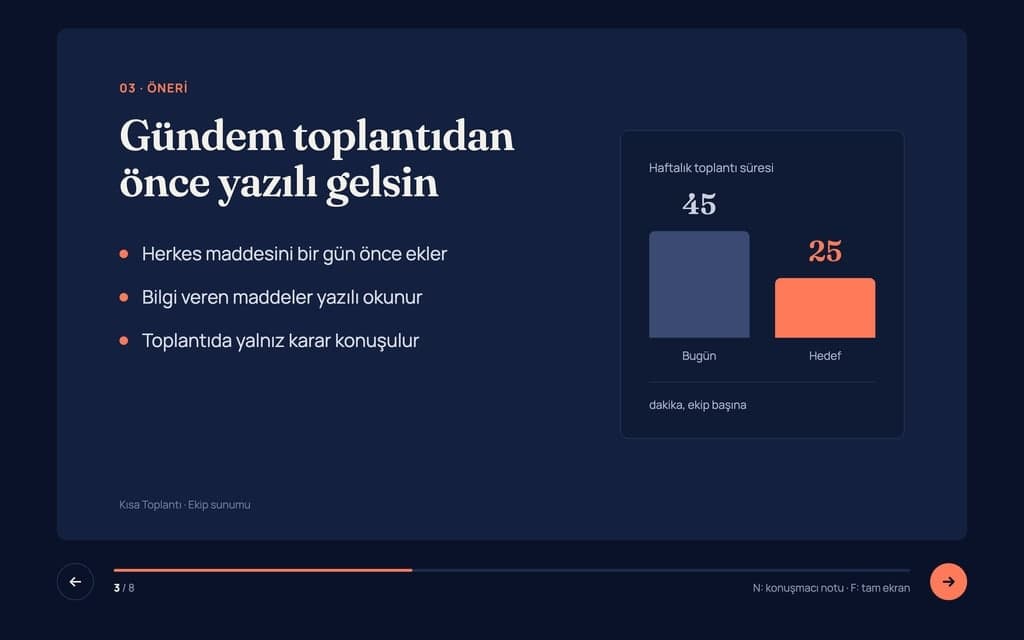
Build a 8-slide web presentation about cutting the weekly meeting time of remote teams for an internal team meeting. Format: a one-page Next.js site; every slide fills…
Give Builder a topic and it drafts the outline and slide text, then builds a web presentation you run in the browser and share by link. No .pptx file.
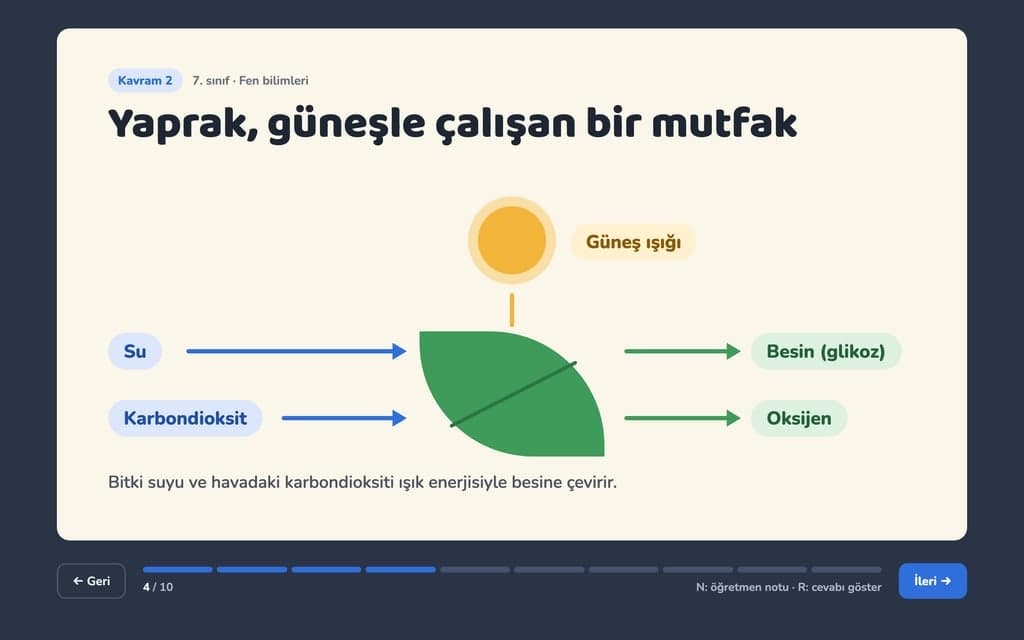
Build a 10-slide interactive lesson presentation that teaches "Photosynthesis: how plants make their food" to 7th grade students. Format: a one-page Next.js site…
Build an animated presentation website with Entrobase: every slide is a full-screen section, headings slide in, and you share it as a link.
Entro
Website Redesign Proposal: Dental Clinic
Prepared for: Dental Clinic Management
Project: Website Redesign & Patient Intake Modernization
Date: March 30, 2026
Document Version: 1.0
1. Project Overview & Scope
This proposal outlines the strategy, deliverables, and timeline to redesign and launch a modern, responsive website for the clinic. The objective is to enhance patient experience, improve search engine visibility, and streamline new patient inquiries through digital appointment requests in both English and Spanish.
Included in…
Write a proposal to redesign a dental clinic's website. Scope: an 8-page site, an appointment form, content in English and Spanish. It takes 5 weeks and costs $9,000…
Tell Entro what you need, from a proposal to meeting minutes, and it writes the document in chat with headings and tables. Download it as Word or Markdown.