


Free Website Builder
Build a website for free: describe it, Entrobase builds it and publishes it on an entrobase.site address. No credit card; the Free plan limits are listed here.
Write a few sentences about your business, your visitors and the pages you need. Entrobase builds a first version and previews it next to the chat; you keep changing it by asking, then publish when it's ready.
Blue parts are the places to fill in with your own details. Tab selects the next one, Enter sends, Shift and Enter starts a new line.
This tool runs on Entro Builder.
A website builder lets you make a site without writing code. A classic website maker hands you an empty page and a list of blocks: you drop in the heading, the image and the form one by one and write every line yourself. An AI website builder starts from the other end. You describe what you want in plain sentences, and the first version arrives with pages, menu, copy and a form already in place. Changes work the same way: “move services above pricing”, “shorten the headline”.
In Entrobase the first version is previewed next to the chat, the preview is exactly what visitors will see, and one button puts it live. You can download the code as a ZIP on any plan, so the site stays yours.
Say what you do, who it's for and which sections you want. You can attach your logo or a screenshot of a site you like, and Entrobase sets up the pages, menu and copy around it.
What you see on the right is exactly what visitors get when you publish. Switch between desktop, tablet and phone sizes and decide what to change right there.

Entrobase checks each change it makes and fixes most of the problems it finds in the same reply. If you don't like a step, Restore this version under any reply takes you back.

Make the heading bigger, add a services page, darken the colors: type the change and it happens. Press Select above the preview and click any element to drop it into the chat, so you never have to explain where it is. Want to fix a headline yourself? Edit text changes it directly and doesn't touch your AI usage.

Hit Publish and your site usually goes live within 1-3 minutes at yoursite.entrobase.site. On paid plans you connect your own domain, and the SSL certificate is set up for you. Later edits reach the live site each time you publish again.

These are screenshots of the Entrobase app itself. Every site follows the same path: you type in the chat, check the preview, press Publish, and connect a domain if you want one.
When the Builder opens, the chat sits on the right. On a new project you can start from a suggestion such as a hero section, a blog page, a contact form or a new color palette, or write your own request. You can attach images (up to 5 per message) and pick the mode and model; leave it on Automatic and Entrobase decides based on the request.
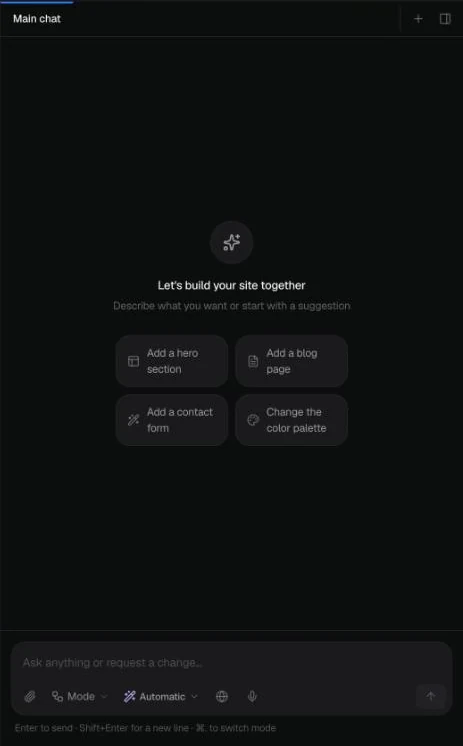
The preview on the left refreshes after every request. The buttons above it switch between desktop, tablet and phone sizes. Press Select and click any element to drop it into the chat, or use Edit text to fix a headline yourself without using AI.
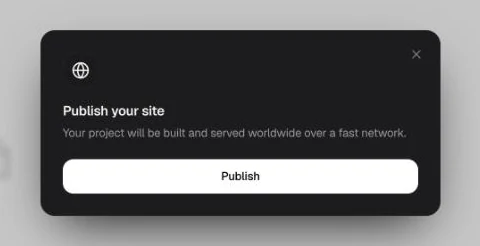
Publish at the top right opens this window. Confirm it and the project is built; the site usually goes live within 1-3 minutes at yoursite.entrobase.site. Later edits reach the live site each time you publish again.
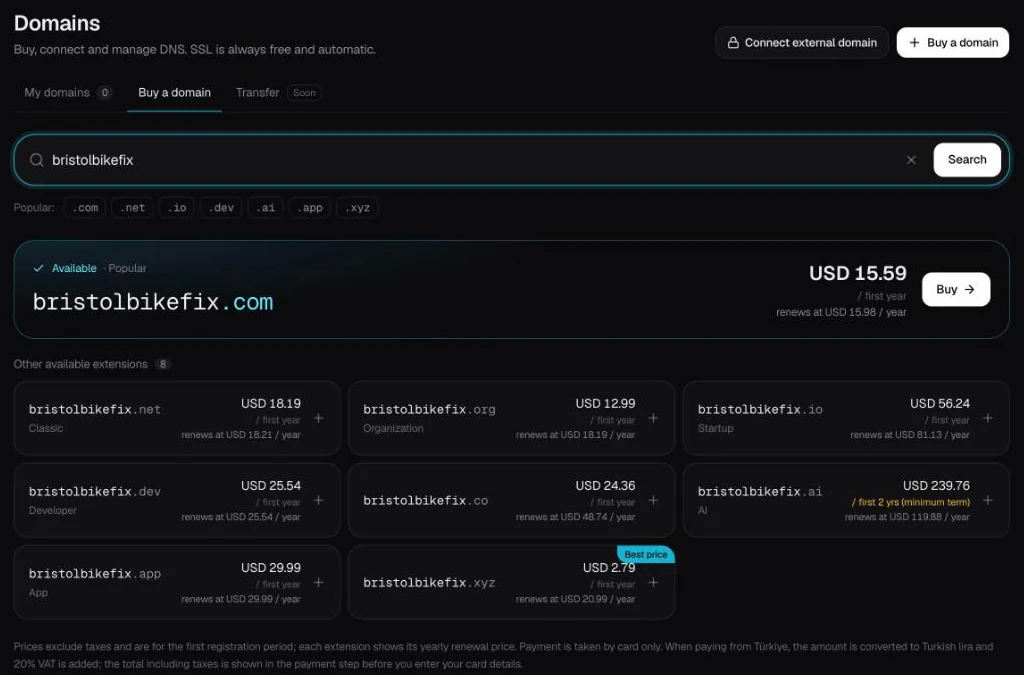
In Domains you search for a name and see the available extensions with first-year and renewal prices. You connect your own domain on paid plans, and the SSL certificate is set up for you. Stuck on a name? Start with the domain name generator.
List your services, opening hours and address, then ask for a booking or quote form. Every submission lands on the Forms page of your panel and you get an email.
Put who you are, what you've worked on and how to reach you on one page. When you finish something new, add it in the chat and publish again.
A wedding, conference or workshop page with the schedule, venue details and an RSVP form. Once the event is over you can unpublish the site in one click and keep the project.
Announcements, the board, a volunteer sign-up form. If you plan to post regularly, the AutoBlog plugin adds a blog on paid plans.
A single page for one product or service: screenshots, features, FAQs and a waitlist form.


| What | Free | Starter |
|---|---|---|
| Web projects (drafts included) | 1 | 5 |
| Live sites at the same time | 1 (on entrobase.site) | 2 |
| Your own domain | No | 2 |
| Model | EntroCoder Mini | EntroCoder Pro included |
| Image credits per month | 10 | 50 |
| Form submissions per month | 100 | 500 |
| Download the code as a ZIP | Yes | Yes |
| Mobile apps | No | No (Pro and above) |
The Free plan is enough to publish one site on an entrobase.site address; the free website builder page walks through it. Move to Starter when you need your own domain, a second live site or a stronger model. Prices are on the Pricing page.
A good prompt says three things: what you do, who visits the site and what you want them to do. Add the colors and tone up front and you'll spend less time on fixes. Here is a weak and a strong prompt for the same business; the button under each strong prompt opens it in the Builder so you can swap in your own details.
Weak: “Make a site for my salon.” No services, no pages, no way to book, so the result is generic.
Edit the text to fit your business, then start.
Weak: “Need a clinic website.” Without treatments and dentists, the page structure is left to guesswork.
Edit the text to fit your business, then start.
Weak: “Site for my cafe.” It's unclear whether you want a menu, bookings or events.
Edit the text to fit your business, then start.
Your published site opens at its own address. On paid plans you shape how it appears in search with the Entro SEO plugin from the Market. It scores your site's SEO setup out of 100 and lists the missing steps in order:
The Entro SEO page explains how the score works, and the AI SEO tool page covers writing titles and descriptions. Entro SEO isn't on the Free plan; it installs on every paid plan, Starter included.
Change the highlighted parts of the prompt above to fit your business, or write your own on the new app screen. Leave Website selected and attach a logo or a sample design if you have one.
Press Create and the Builder opens with the chat on the left and the preview on the right. Ask for one change at a time; the preview rebuilds after each request.
Publish at the top right puts the site on an entrobase.site address. Connect your own domain from Domains in the left menu.

Build a website for free: describe it, Entrobase builds it and publishes it on an entrobase.site address. No credit card; the Free plan limits are listed here.
Design a website with AI: describe the colors, tone and sections or attach a design you like. Entrobase designs a working site and you refine it by chatting.
Build a company website with service pages, team, clients and a quote form. Connect your own domain and track every enquiry from one panel.
Build a landing page with AI: describe the offer, get a one-page site with a form and collect sign-ups in your Forms inbox. Preview it, then publish.
Turn a screenshot, sketch or logo into a working website. Attach up to 5 images, say what to keep, and Entrobase builds pages you can preview and publish.
Describe your business and Entro suggests domain name ideas. Check the one you like in a click and see free extensions with first-year and renewal prices.
You describe it, Entrobase builds it.
Create with Entrobase