Gym Website Templates: Two Live Designs and Two Member Apps
Entrobase has two gym website templates and two gym app templates, each with a live demo. Entrobase is an AI platform where you build websites and mobile apps by typing. The gym website template is built for a gym with a weights floor and group classes, the yoga and pilates studio website for a hot yoga and reformer studio; the gym member app handles entry and class booking, and the workout tracker app is a strength training log. Picking a template is free and uses no credits, and you make it your own by typing your timetable, prices and photos into the chat. Below is who each template suits, which sections it has and what actually works today.

By: Yunus Emre Sak
- Published:
- 11 min read
Which gym template fits your gym?
In short
- Entrobase has two gym website templates: the Gym Website for a gym or fitness club and the Yoga and Pilates Studio Website for a studio.
- Both website templates come with a weekly class timetable, membership prices and a free trial form.
- Names and phone numbers sent through the trial form land in your email and in the Forms inbox of your Entrobase panel.
- The Gym Member App and Workout Tracker App templates need the Pro plan or higher; trying them on your phone with Expo Go is free.
- Class booking and payment choices in the timetable are a demo; there are no real bookings or payments.
Pick a template by the first question your members ask. Someone looking at a gym with a weights floor wants opening hours and the monthly fee. Someone looking at a hot yoga studio wants to know how hot the room is, what to bring and whether the first class will suit them. The two templates open with answers to those two different questions.
| Template | Type | Best for | First screen |
|---|---|---|---|
| Gym Website | Website | Gyms, fitness clubs, boxing and HIIT studios | Today's next three classes and spots left |
| Yoga and Pilates Studio Website | Website | Yoga, hot yoga and reformer pilates studios | Today's classes and a first-week pack |
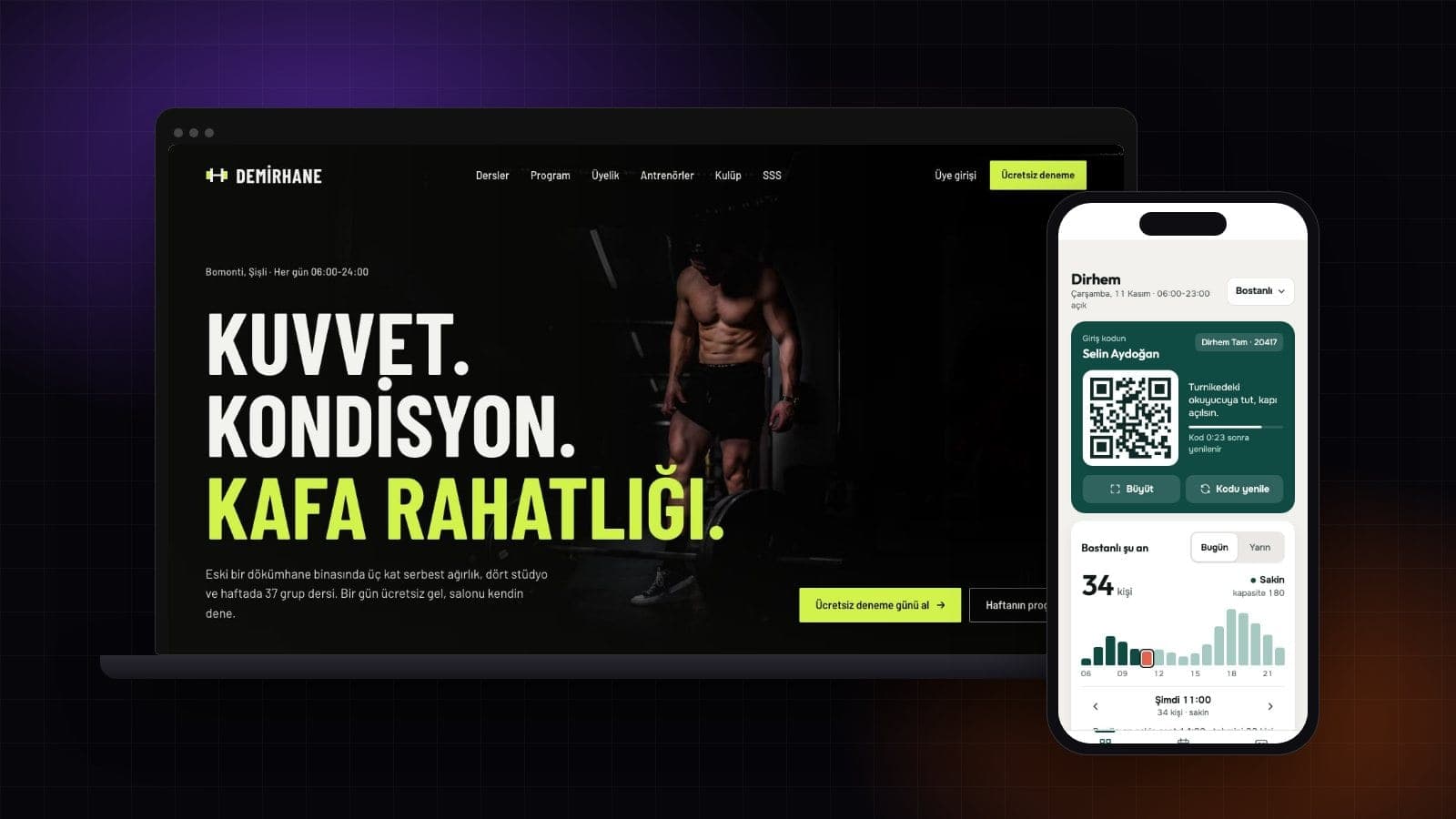
| Gym Member App | Mobile app | Gyms that want to give members an app | Turnstile entry code and an occupancy chart |
| Workout Tracker App | Mobile app | Personal trainers and strength coaches | This week's days and today's workout |
Gym and studio website templates


Gym website: for a gym or fitness club
This template is built for a single gym with a free weights floor and group studios. A dark background, one lime accent and tall condensed headings set the tone before anyone scrolls. A strip under the hero photo lists today's next three classes and how many spots are left, so a visitor knows what's on tonight straight away.
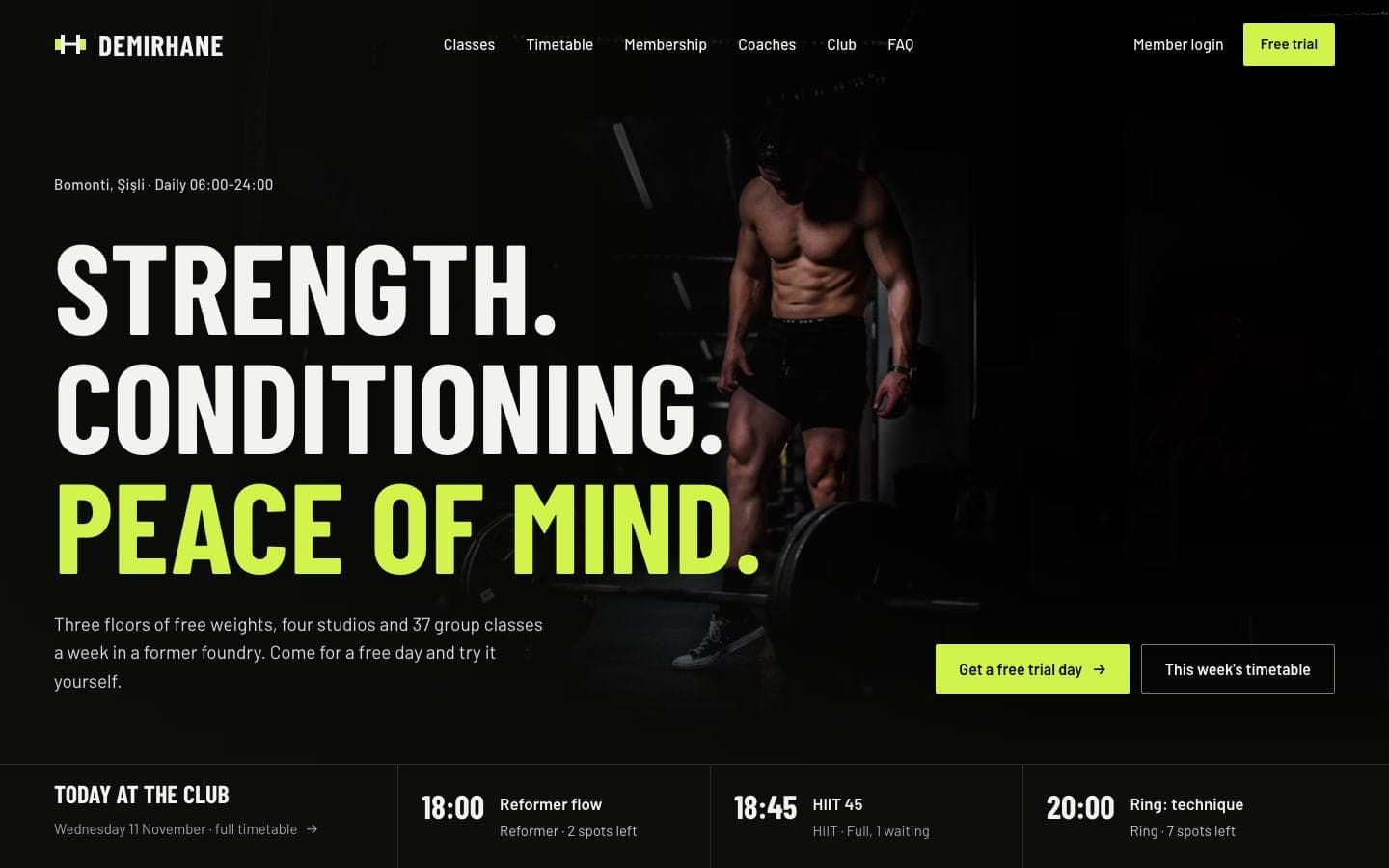
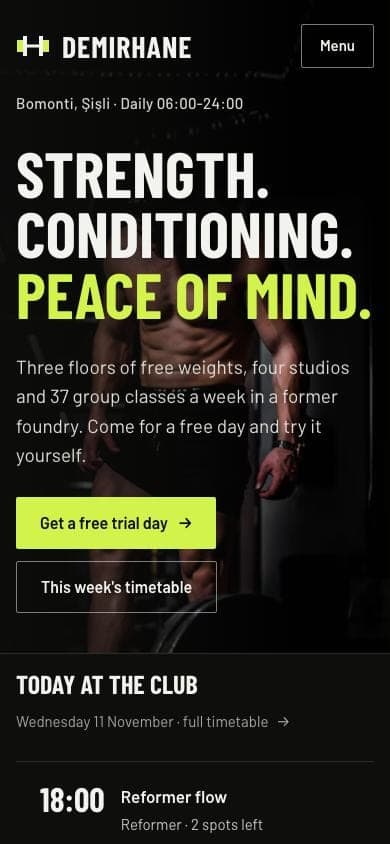
- Sections: about the club, five class families (Strength, HIIT, Reformer, Ring, Stretch), a weekly timetable you can filter by day and type, three membership plans, four coaches, facility photos and amenities, FAQ and a free trial day form.
- Best for: independent gyms, fitness clubs, boxing and HIIT studios, personal training centres.
- What works on the page: the membership toggle switches between 12-month contract and monthly prices and works out the yearly total; the timetable's day tabs move forward with the date.
- Good to know: booking a spot and joining the waitlist in the timetable is an on-page demo and sends nothing to anyone. There is no member login on the site.
No boxing ring at your gym? Type "Remove the Ring class family and add functional training instead" in the builder, check the preview and publish again. Gym Website template · live demo
Yoga and pilates studio website
This template is made for a three-room studio running hot yoga, flow and reformer classes. There's no hero photo: the studio name runs the full width of the page, with today's classes and a first-week pack button underneath. A pale pink background and a coral accent feel more like a calm studio than a gym.
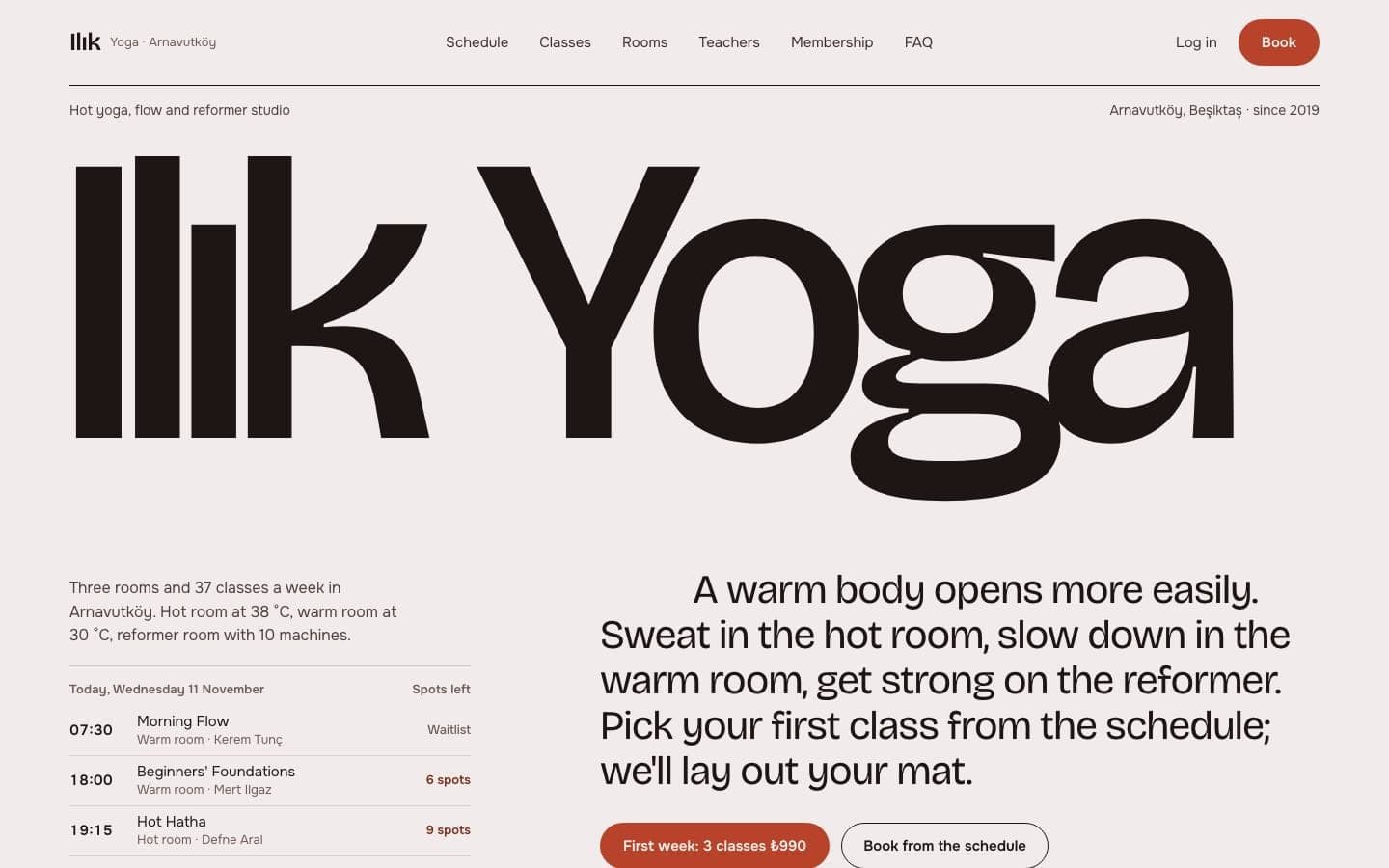
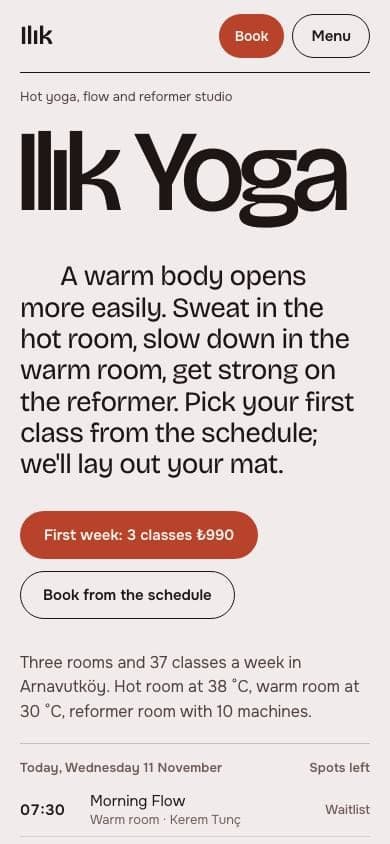
- Sections: a weekly schedule filtered by day, room and level, four class types with heat and pace scales, a room guide with heat, humidity and capacity, a beginner first-week pack, teachers, membership packs, workshops, FAQ and a trial class form.
- Best for: yoga studios, hot yoga and hot pilates studios, reformer pilates studios, yoga schools that run workshops.
- What works on the page: the filters narrow the schedule instantly; picking Beginner also lists open-level classes, and if nothing is left the page says what to try next.
- Good to know: the booking panel that opens on a class shows payment options and a mat number, but it takes no payment and holds no spot.
Only one room? Ask the builder to remove the room filter and the room table; heat and humidity rows don't help a studio that doesn't teach hot yoga. Yoga and Pilates Studio Website template · live demo
How does a gym website get visitors to a free trial?
The main job of a gym website is to collect trial requests. A visitor checks the timetable, sees the price, leaves a name and phone number, and you call them to book a visit. The gym template has this path ready from start to finish; in the yoga and pilates studio template the trial class form does the same job.

The trial form needs no setup. Once the site is live, every request is saved in the Forms inbox of your Entrobase panel and you get an email. The Free plan takes 100 submissions a month, Starter takes 500.
Want the day and time too?
The day and time slot picked with buttons on the form are not included in the email; text fields and dropdowns are. Type "make the day and time on the trial form dropdowns" in the builder and requests arrive complete.
Gym app templates: member app and workout tracker
If you also want an app on your members' phones, there are two templates. Mobile apps are built on the Pro plan and higher. Trying a template on your phone with Expo Go is free and needs no account.
Gym member app
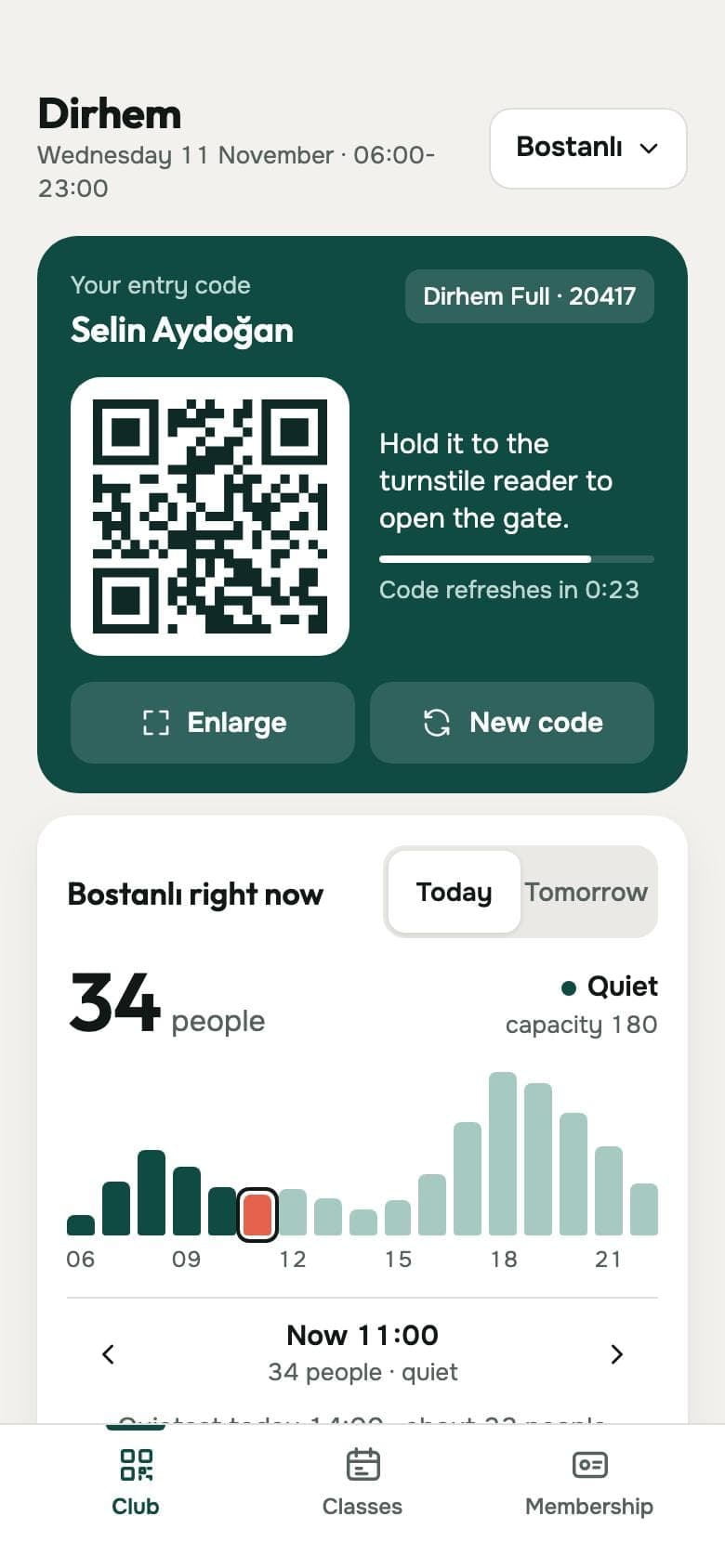
This template is the app a gym with three clubs gives its members. The Club screen shows a turnstile entry code that refreshes every 30 seconds, the gym's hour-by-hour occupancy and the next class. Classes has a four-day timetable with spots left and a waitlist; Membership holds the plan, freezing, guest codes and personal training sessions.
Workout tracker app: a strength training log
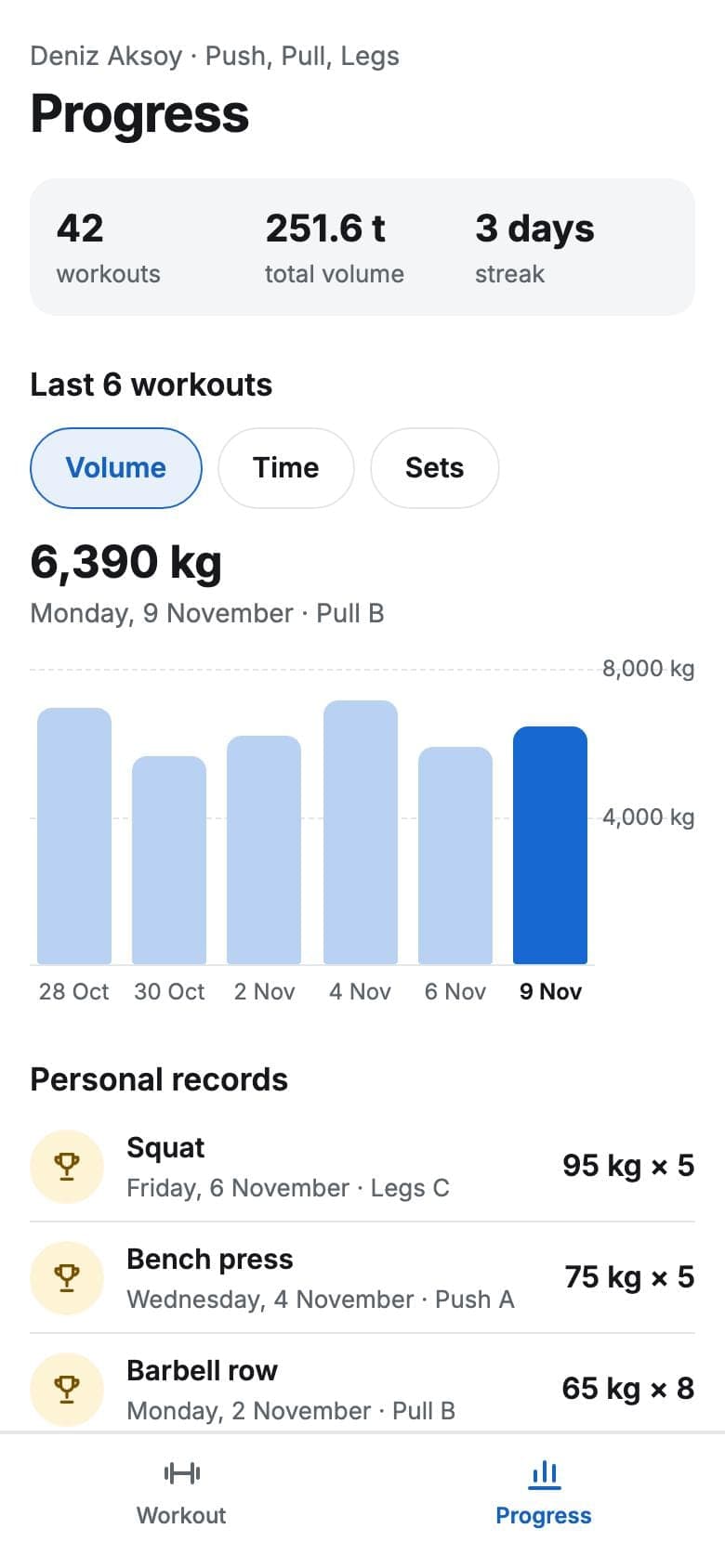
This template is a training log that follows a weekly Push, Pull, Legs split. During a session each set is logged in one tap next to last time's numbers, rest counts down on its own, and barbell sets show which plates to load. The Progress screen has a volume chart, personal records and history. It suits a personal trainer's clients or a strength coach's group.
What is real in the apps and what is sample data?
Sets logged in the workout tracker are saved on the phone and stay there after the app closes. The member app's entry code is a screen design with no link to a turnstile; occupancy and the timetable come from sample data. A booked class shows only on the member's phone, not at the gym. For the gym to see it, you connect your own database account in the builder.


What should a gym website include?
The timetable, prices and trial form carry the site. These details are what usually tip a visitor into booking, and both website templates already have a place for them.
Hours and address
Weekday, weekend and front desk hours in the footer. Ask the builder for a directions link and the address opens in a map app.
Coach profiles
Name, specialty, years coaching and certification. New members know who they'll train with.
Real facility photos
Weights floor, studios, changing rooms. Swap the template photos for photos of your own gym.
Straight FAQ answers
Freezing, cancellation fees, guest passes, what to bring. Answer the front desk's daily questions once, on the site.
WhatsApp button
People who won't fill in a form can message you in one tap. The WhatsApp Button plugin is free on every plan.
Your own domain
The site opens on an entrobase.site address first. On Starter and higher you connect your own domain.
If your team changes often, keep coach profiles simple: a name, a specialty and a photo are enough. Adding or removing one is a one-line request in the builder.
How do you build a gym website from a template?
- Open the live demos of the gym and yoga studio templates from the templates page and pick the one closest to your gym.
- Click Start with this template and name your project. A free account is enough, and copying a template uses no credits.
- Type your class timetable, membership prices, coaches, hours and address into the chat, and swap in photos of your own gym.
- Check the desktop and phone views in the preview, then click Publish. The site opens on an entrobase.site address.
If neither template fits, you can start from a blank project. Edit this prompt to match your studio:
Example prompt:
How much does a gym website cost?
Copying a template into your project is free. On 11 November 2026 the Free plan is $0: one web project, one published site on an entrobase.site address and 10 image credits a month, with no credit card. Connecting your own domain starts with Starter at $14 a month, and mobile apps need Pro at $20 a month (taxes extra). Current prices are in the pricing page.
After that, AI edits you make in the builder come out of your account's credits. If you'd rather not do it yourself, PNZ Medya can build the site through EntroLab and set it up in your Entrobase account.
Frequently asked questions
Are these gym website templates free?
Yes. Picking a template and copying it into your project is free and uses no credits; a free Entrobase account is enough. On the Free plan you publish the site on an entrobase.site address. AI edits you make later in the builder come out of your credits.
Does booking a class in the timetable take real bookings?
No. Booking and the waitlist in both website templates are an on-page demo; the spots left go down, but nothing is sent anywhere. Use the trial form for class requests: each request lands in your email and in the Forms inbox of your panel.
Can I sell memberships and take payments on the site?
No, the site doesn't take payments. Membership plans and prices are shown as information; visitors leave a trial or membership request through the form and you take payment at the gym. If you already use a payment link, the builder can put it on a button.
Does the Member login button work?
No, the site has no member login or members-only pages; the button is part of the design. If you use gym management software, point the button at its login page, or ask the builder to remove it. For member-only screens, look at the gym member app template.
Which template suits a pilates or boxing studio?
For a reformer or mat pilates studio, the yoga and pilates studio template is closer: the room table, level filter and first-week pack are ready. For boxing, HIIT or a gym with several class types, the gym template's class families and timetable fit better. In both you rename classes by typing in the chat.
How do I update the class timetable each week?
Type the change into the builder chat, for example "move Thursday's 7 pm HIIT class to 7:30". The change shows in the preview and goes live when you click Publish. The timetable's day tabs move forward with the date on their own, and you don't need to code.
Sources
- Entrobase fiyatlar (TR) / pricingChecked on November 11, 2026
- Entrobase pricing (EN)Checked on November 11, 2026
- Entrobase şablon galerisi / template galleryChecked on November 11, 2026
- Spor Salonu Web SitesiChecked on November 11, 2026
- Yoga ve Pilates Stüdyosu Web SitesiChecked on November 11, 2026
- Spor Salonu Üye UygulamasıChecked on November 11, 2026
- Antrenman Takip UygulamasıChecked on November 11, 2026
Founder of Entrobase
Yunus Emre Sak is the founder of Entrobase. He has been building websites and software for businesses since 2018 and writes here about what he has built and tested with Entrobase.