Paste your Markdown notes into the chat or attach the .md file. Entro turns the heading hierarchy into slides: # becomes the deck title and ## a slide title. Have the outline adjusted, then take PowerPoint (.pptx) from the Download menu. Linked images and diagrams are not carried onto slides, and there is one plain theme.
Draft a presentation outline from the attached Markdown file. The # heading is the deck title and every ## heading is a slide; use ### headings as subheadings inside a slide. Keep bullet lists, cut long paragraphs down to 3-6 short bullets and leave tables as tables. Stay within 12 slides and merge sections that don't fit. The audience is the product team and the language is English. Add nothing that is missing from my notes.
Blue parts are the places to fill in with your own details. Tab selects the next one, Enter sends, Shift and Enter starts a new line.
Your headings become slides, your lists become bullets
The heading hierarchy becomes the deck structure
The split you already made in Markdown is the skeleton of the deck: # is the deck title, ## a slide title, and the list underneath becomes the bullets. Entro follows that structure and splits long sections without headings by topic.
Entro
Release 2.4 Overview
New Features
• Added dark theme support across the application
• Enabled direct CSV export for user data and reports
• Improved overall user interface customization
Bug Fixes and Performance
• Resolved issue causing session drops during sign-in
• Optimized report page queries for significantly faster load times
• Enhanced platform stability and authentication flow
What is Next
• Implementing mobile push notifications
• Continued performance monitoring and feedback collection
• Preparation…
Draft a presentation outline for a team meeting from these Markdown release notes, one slide per ## heading: # Release 2.4 ## New - Dark theme - CSV export ## Fixed -…
Entro
Tables stay tables
A Markdown table sits on the slide as a table in the downloaded file. When a table is too wide or too long for a screen, ask Entro to keep the columns and rows you plan to talk about.
Entro
Inventory Service: Developer Onboarding
Overview
• Core internal service for warehouse operations
• Tracks real-time stock levels across facilities
• Powers inventory visibility for upstream systems
• Critical path for daily fulfillment workflows
Local Environment Setup
• Clone the repository to your local workspace
• Copy and configure the environment variables file
• Verify system dependencies and runtimes are installed
• Ensure local database and cache connections are active
Testing and Verification
• Run the entire test suite…
Draft a 5-slide presentation outline for developers joining the team from this README section: # Inventory Service Internal service that tracks warehouse stock. ##…
Entro
Images and diagrams are left out
Image links, math formulas and diagram code in your Markdown are not drawn on slides. The downloaded file has one plain theme, a white background with legible type. You add images yourself in the program you open the file with.
Entro
Trade Show Planning Update
Executive Summary
• Key decisions finalized regarding booth footprint and marketing collateral
• Critical deadlines established for print materials
• Action items identified for logistics and staffing
Confirmed Decisions
• Booth size officially locked at 18 square meters
• Collateral production scheduled for completion by May 5
• Core responsibilities assigned to department leads
Open Items & Blockers
• Shipping quote pending review and final approval
• On-site booth staffing requirements…
Turn these Markdown meeting notes into a 4-slide presentation outline and put the decisions in a table with their owners: ## Decisions - The trade show booth will be 18…
Entro
If your notes are slide-ready, convert them untouched
If you already wrote your notes slide by slide, tell Entro "don't change the text, only fix the heading levels" and the outline comes back in your own sentences. With a messy notes file you ask for the opposite: drop repeats, shorten bullets, add missing headings. Either way, compare the outline with your notes before downloading. The same answer also downloads as Markdown (.md), so the text version of the deck lives in your notes folder.
Entro
Introduction to Probability
Basic Terms
• An experiment is any repeatable activity with uncertain results
• An outcome is a single possible result of that experiment
• An event is a specific outcome or set of outcomes you are looking for
• Example: Tossing a standard coin is the experiment; getting heads is one specific outcome and event
Calculating Probability
• The probability of an event shows how likely it is to happen
• Value always falls between 0 (impossible) and 1 (certain)
• Calculated by dividing the number of…
Draft a presentation outline for high school students from these Markdown lecture notes and add one example to each slide: # Probability ## Basic terms - Experiment…
Entro
Builder for a deck that plays in the browser
The .pptx carries the content and the design is up to you. If you want the deck to open in a browser, play full screen and be shared with a link, paste the outline into Builder. Builder builds a designed web presentation; the animated presentation maker page explains transitions and bullets that appear one at a time. That route produces no PowerPoint file.
Entro
Plan Comparison and Recommendation
Overview of Available Plans
• Three distinct tiers designed for different team sizes
• Scalable limits covering users and cloud storage
• Clear upgrade path from individual use to large organizations
Plan Breakdown
Plan · Users · Storage
Starter · 3 · 10 GB
Team · 15 · 100 GB
Enterprise · Unlimited · 1 TB
Recommendation
• Team plan offers the best balance of capacity and cost for small teams
• Sufficient user ceiling to accommodate initial hiring rounds
• Generous 100 GB…
Draft a 3-slide presentation outline from this Markdown and keep the table as a table: # Plan comparison | Plan | Users | Storage | |---|---|---| | Starter | 3 | 10 GB…
Entro
For anyone who keeps notes in Markdown
Paste the changelog and what's new, what's fixed and what's next land on separate slides. Before the release meeting, ask Entro to tone down the technical detail.
Attach the project's README and ask for a short intro deck for people joining the team. Setup steps arrive as numbered bullets, and you tell Entro to keep only the lines of code that matter.
Export the notes you took in Markdown during class and attach them. Each topic heading becomes a slide. For revision before an exam, have a question added to every slide.
Turn a section of your product docs into slides for customer training. Entro shortens the steps. Have it leave a marker where screenshots belong and place the images yourself later.
If you're presenting a post you wrote in Markdown at a meetup, attach the draft. Subheadings become slide titles and paragraphs go into speaker notes, leaving the main idea on screen.
Entro
Management Roadmap Presentation
Q1 Focus: Checkout Optimization
• Launch the redesigned checkout experience to reduce drop-off
• Streamline payment gateway integrations and one-click options
• Improve mobile checkout conversion rates
• Establish baseline conversion metrics for the new flow
Q2 Focus: Mobile App Launch
• Release the initial version of the native mobile app (iOS and Android)
• Enable core purchasing and account management features on mobile
• Drive user onboarding and encourage initial app adoption
• Set up…
Draft a management presentation outline from this Markdown roadmap; one slide per quarter, and add a summary table with quarter and goal columns at the end: # Roadmap…
Entro
Entro
Release 2.4 Overview
New Features
• Added dark theme support across the application
• Enabled direct CSV export for user data and reports
• Improved overall user interface customization
Bug Fixes and Performance
• Resolved issue causing session drops during sign-in
• Optimized report page queries for significantly faster load times
• Enhanced platform stability and authentication flow
What is Next
• Implementing mobile push notifications
• Continued performance monitoring and feedback collection
• Preparation…
Draft a presentation outline for a team meeting from these Markdown release notes, one slide per ## heading: # Release 2.4 ## New - Dark theme - CSV export ## Fixed -…
Entro
Entro
Inventory Service: Developer Onboarding
Overview
• Core internal service for warehouse operations
• Tracks real-time stock levels across facilities
• Powers inventory visibility for upstream systems
• Critical path for daily fulfillment workflows
Local Environment Setup
• Clone the repository to your local workspace
• Copy and configure the environment variables file
• Verify system dependencies and runtimes are installed
• Ensure local database and cache connections are active
Testing and Verification
• Run the entire test suite…
Draft a 5-slide presentation outline for developers joining the team from this README section: # Inventory Service Internal service that tracks warehouse stock. ##…
Entro
Entro
Trade Show Planning Update
Executive Summary
• Key decisions finalized regarding booth footprint and marketing collateral
• Critical deadlines established for print materials
• Action items identified for logistics and staffing
Confirmed Decisions
• Booth size officially locked at 18 square meters
• Collateral production scheduled for completion by May 5
• Core responsibilities assigned to department leads
Open Items & Blockers
• Shipping quote pending review and final approval
• On-site booth staffing requirements…
Turn these Markdown meeting notes into a 4-slide presentation outline and put the decisions in a table with their owners: ## Decisions - The trade show booth will be 18…
Entro
Entro
Introduction to Probability
Basic Terms
• An experiment is any repeatable activity with uncertain results
• An outcome is a single possible result of that experiment
• An event is a specific outcome or set of outcomes you are looking for
• Example: Tossing a standard coin is the experiment; getting heads is one specific outcome and event
Calculating Probability
• The probability of an event shows how likely it is to happen
• Value always falls between 0 (impossible) and 1 (certain)
• Calculated by dividing the number of…
Draft a presentation outline for high school students from these Markdown lecture notes and add one example to each slide: # Probability ## Basic terms - Experiment…
Entro
Slide outlines Entro has drafted from Markdown
Entro's answer
Release 2.4 Overview
New Features
• Added dark theme support across the application
• Enabled direct CSV export for user data and reports
• Improved overall user interface customization
Bug Fixes and Performance
• Resolved issue causing session drops during sign-in
• Optimized report page queries for significantly faster load times
• Enhanced platform stability and authentication flow
What is Next
• Implementing mobile push notifications
• Continued performance monitoring and feedback collection
• Preparation…
Draft a presentation outline for a team meeting from these Markdown release notes, one slide per ## heading:
# Release 2.4
## New
- Dark theme
- CSV export
## Fixed
- Session dropping at sign-in
- Slow report page
## Next
- Mobile notifications
Entro's answer
Inventory Service: Developer Onboarding
Overview
• Core internal service for warehouse operations
• Tracks real-time stock levels across facilities
• Powers inventory visibility for upstream systems
• Critical path for daily fulfillment workflows
Local Environment Setup
• Clone the repository to your local workspace
• Copy and configure the environment variables file
• Verify system dependencies and runtimes are installed
• Ensure local database and cache connections are active
Testing and Verification
• Run the entire test suite…
Draft a 5-slide presentation outline for developers joining the team from this README section:
# Inventory Service
Internal service that tracks warehouse stock.
## Setup
1. Clone the repository
2. Fill in the environment file
3. Run the tests
## Rules
- Write a test for every change
- Never push straight to main
Entro's answer
Trade Show Planning Update
Executive Summary
• Key decisions finalized regarding booth footprint and marketing collateral
• Critical deadlines established for print materials
• Action items identified for logistics and staffing
Confirmed Decisions
• Booth size officially locked at 18 square meters
• Collateral production scheduled for completion by May 5
• Core responsibilities assigned to department leads
Open Items & Blockers
• Shipping quote pending review and final approval
• On-site booth staffing requirements…
Turn these Markdown meeting notes into a 4-slide presentation outline and put the decisions in a table with their owners:
## Decisions
- The trade show booth will be 18 square meters (Sara)
- Brochures printed by May 5 (Owen)
## Open items
- Waiting for the shipping quote
- Number of booth staff still undecided
Entro's answer
Introduction to Probability
Basic Terms
• An experiment is any repeatable activity with uncertain results
• An outcome is a single possible result of that experiment
• An event is a specific outcome or set of outcomes you are looking for
• Example: Tossing a standard coin is the experiment; getting heads is one specific outcome and event
Calculating Probability
• The probability of an event shows how likely it is to happen
• Value always falls between 0 (impossible) and 1 (certain)
• Calculated by dividing the number of…
Draft a presentation outline for high school students from these Markdown lecture notes and add one example to each slide:
# Probability
## Basic terms
- Experiment, outcome, event
## Calculating probability
- Favorable outcomes divided by all outcomes
## Independent events
- One does not affect the other
Entro's answer
Plan Comparison and Recommendation
Overview of Available Plans
• Three distinct tiers designed for different team sizes
• Scalable limits covering users and cloud storage
• Clear upgrade path from individual use to large organizations
Plan Breakdown
Plan · Users · Storage
Starter · 3 · 10 GB
Team · 15 · 100 GB
Enterprise · Unlimited · 1 TB
Recommendation
• Team plan offers the best balance of capacity and cost for small teams
• Sufficient user ceiling to accommodate initial hiring rounds
• Generous 100 GB…
Draft a 3-slide presentation outline from this Markdown and keep the table as a table:
# Plan comparison
| Plan | Users | Storage |
|---|---|---|
| Starter | 3 | 10 GB |
| Team | 15 | 100 GB |
| Enterprise | Unlimited | 1 TB |
## Recommendation
- Team plan for small teams
Entro's answer
Management Roadmap Presentation
Q1 Focus: Checkout Optimization
• Launch the redesigned checkout experience to reduce drop-off
• Streamline payment gateway integrations and one-click options
• Improve mobile checkout conversion rates
• Establish baseline conversion metrics for the new flow
Q2 Focus: Mobile App Launch
• Release the initial version of the native mobile app (iOS and Android)
• Enable core purchasing and account management features on mobile
• Drive user onboarding and encourage initial app adoption
• Set up…
Draft a management presentation outline from this Markdown roadmap; one slide per quarter, and add a summary table with quarter and goal columns at the end:
# Roadmap
## Q1
- New checkout page
## Q2
- Mobile app
## Q3
- Reseller portal
## Q4
- Spanish version
How to convert Markdown to a PowerPoint presentation
1
Attach or paste the Markdown
Edit the highlighted parts of the request above and send it. In the Entro chat that opens, attach your .md file or paste the notes directly. Without an account you sign up first, and your request is kept.
2
Check the slides
Entro writes the outline in the chat. See which headings became slides, whether the table is still there and whether a section was skipped. Ask for fixes such as "merge slides 4 and 5" in the same chat.
3
Download as PowerPoint or Markdown
Pick PowerPoint (.pptx) in the Download menu and each heading becomes a slide. Open the file in PowerPoint or Keynote and apply your template. To keep the text version of the outline, take Markdown (.md) from the same menu.
Entro
Plan Comparison and Recommendation
Overview of Available Plans
• Three distinct tiers designed for different team sizes
• Scalable limits covering users and cloud storage
• Clear upgrade path from individual use to large organizations
Plan Breakdown
Plan · Users · Storage
Starter · 3 · 10 GB
Team · 15 · 100 GB
Enterprise · Unlimited · 1 TB
Recommendation
• Team plan offers the best balance of capacity and cost for small teams
• Sufficient user ceiling to accommodate initial hiring rounds
• Generous 100 GB…
Draft a 3-slide presentation outline from this Markdown and keep the table as a table: # Plan comparison | Plan | Users | Storage | |---|---|---| | Starter | 3 | 10 GB…
Entro
Frequently asked questions
Does Entrobase turn my notes into slides itself?
Yes. You give your Markdown notes to Entro, the chat on the Entrobase home screen. Entro reads them and writes a presentation outline with slide titles, short bullets and tables. Pick PowerPoint (.pptx) in the Download menu under the answer and each heading turns into a slide. There is nothing to install; it all happens in the browser.
Which Markdown syntax is supported?
Headings, bulleted and numbered lists, tables and plain paragraphs are carried onto slides. Check on your first download how emphasis such as bold and italics comes out in the file. Task checkboxes, footnotes and markers specific to one notes app may stay as plain text; if they matter, ask Entro to turn them into ordinary bullets.
Do image links in my Markdown appear on the slides?
No. Entro reads the text of the Markdown; images given as links or sitting in a folder are not carried over, and the downloaded deck contains no images. Have Entro leave a marker such as "screenshot goes here" on the slide. When you open the file in PowerPoint or Keynote, you place the image there yourself.
Do math formulas and diagram code work?
They are not drawn. Formula syntax and diagram code do not show up rendered on a slide; they stay as text, or Entro describes them in words. For a formula-heavy deck you will need to write the equations with your presentation program's equation tool after downloading, and add diagrams as images.
How do code blocks look on a slide?
A code block lands on the slide in plain monospaced type, with no syntax coloring. A long piece of code can't be read on a screen, so ask Entro to keep the lines you will talk about. Entro does not run code; try the commands and the output in your own environment before you present them.
Will it convert my notes without changing them?
If you ask. Left to itself, Entro cuts long paragraphs down to short bullets and arranges the flow for a talk. If your sentences must stay, write "don't change the text, only split it into slides". It may still skip a line or merge two bullets, so check the outline side by side with your notes.
Can I attach the .md file, and is there a limit?
Yes. Attach the Markdown file to the chat as a document, or paste its content. A message takes up to 3 documents and about 80,000 characters in total are read; the rest is cut off and you're told. To combine several notes files in one deck, attach them together and say what order they go in.
Can I get an animated deck or one I share by link?
The PowerPoint file has no animations and no design. For a deck that opens in the browser, plays full screen and is shared by link, hand the outline to Builder, which builds a designed web presentation. That route produces no .pptx. Which one suits you depends on where you will show the deck.
Can I use it on the free plan?
Yes, the chat works on the Free plan too. Each outline you have written counts toward your plan's AI usage limits, which differ by plan. Chat history stays in your account, so to make next week's deck from the same notes you return to the old chat and paste the sections that changed.
More AI tools
Entro
Mobile App Project Status Update
Executive Summary
• Payment flow implementation is complete
• Push notifications are delayed by two weeks due to late design approval
• Overall budget remains fully on track with no overruns
• Final app store submission target remains the end of the month
Feature Progress and Status
• Payment screen developed, integrated, and verified
• Core checkout workflows ready for end-to-end testing
• Push notification system delayed by two weeks
• Design sign-off now resolved, unblocking notification…
Draft a 5-slide presentation outline from these notes, with a title and 3-5 short bullets per slide: The payment screen of the mobile app is done. Notifications are two…
Paste your text and Entro drafts a deck with slide titles and short bullets. Download it as PowerPoint (.pptx): one plain theme, no images or animations.
Project Scope
• Full configuration and deployment of the warehouse management software
• Comprehensive staff training tailored to operational roles
• Data migration support and workflow alignment
• System testing before going live
Timeline & Phasing
• Total project duration of 8 weeks
• Phase 1: Assessment and system configuration
• Phase 2: Pilot testing and user training
• Phase 3: Final deployment and go-live handover
Implementation Team
• Dedicated Project Manager as the single point of…
Draft a 5-slide presentation outline for a client meeting from this proposal text copied out of a Word document: 1. Scope: setup and training for the warehouse…
Attach a Word document (.docx) and Entro drafts a deck from its sections: slide titles, short bullets, tables. Download as PowerPoint (.pptx), plain theme.
Entro
Q3 Executive Summary
1. Executive Overview
• Revenue grew 12% compared to the previous quarter
• Successfully onboarded 46 new customers
• Operations faced logistical hurdles, shifting timelines by 30 days
• Key leadership decision required regarding fulfillment capacity
2. Commercial Performance & Growth
• Top-line revenue up 12% quarter over quarter
• Customer acquisition delivered 46 new enterprise and mid-market accounts
• Healthy pipeline indicates sustained demand heading into next quarter
3. Operational…
Draft a 5-slide presentation outline for management from this quarterly report summary (result, findings, risk, open decisions): Revenue rose 12 percent on the previous…
Attach a report, proposal or article and Entro drafts a deck you download as PowerPoint (.pptx). Reads PDF, Word, Excel and text files; design is not kept.
Entro
Weekly Meeting
Decisions
• Launch moved to March 3
• Budget raised by 10 percent
To do
• [ ] Send the brief to the agency (Dana)
• [x] Book the venue (Mark)
You can download this note as a Word document (.docx) using the download menu below the message.
Write this Markdown note as a Word document and keep the headings and the task checkboxes: # Weekly Meeting ## Decisions - Launch moved to March 3 - Budget raised by…
Paste Markdown or attach a .md file and its headings, lists, tables and code blocks carry over to Word. Download the answer as a Word (.docx) file.
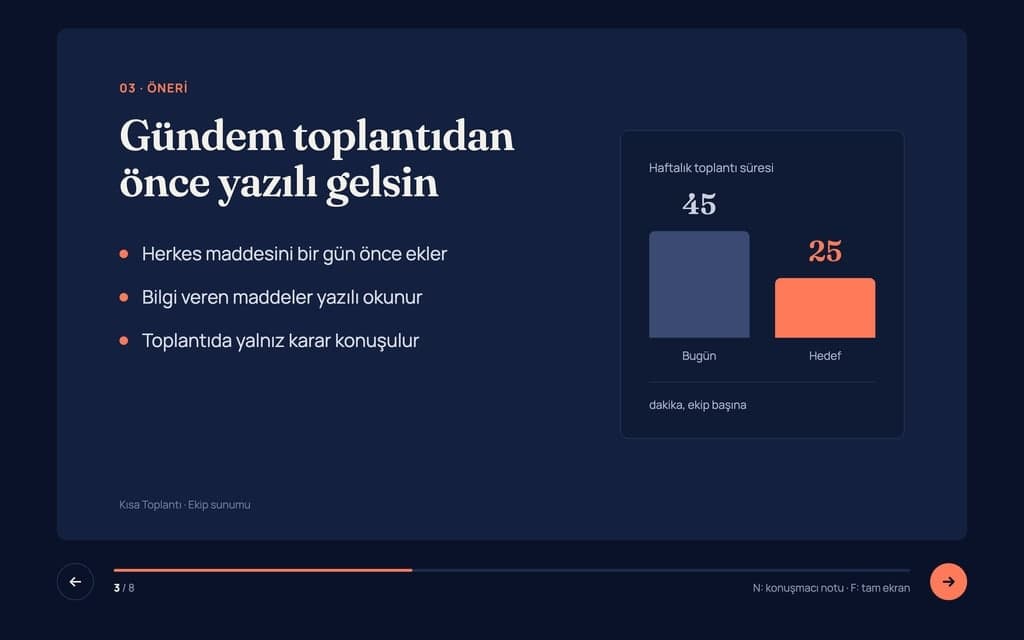
Build a 8-slide web presentation about cutting the weekly meeting time of remote teams for an internal team meeting. Format: a one-page Next.js site; every slide fills…
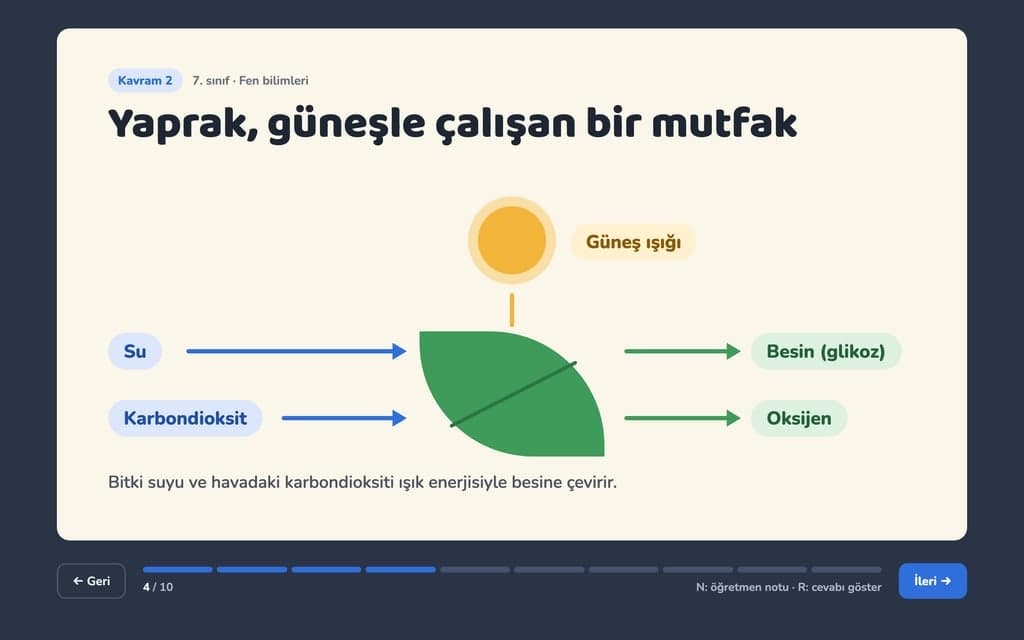
Give Builder a topic and it drafts the outline and slide text, then builds a web presentation you run in the browser and share by link. No .pptx file.
Build a 10-slide interactive lesson presentation that teaches "Photosynthesis: how plants make their food" to 7th grade students. Format: a one-page Next.js site…