


AI Website Builder
An AI website builder that builds what you describe. Write a few sentences, preview the site next to the chat, fix it by asking and publish it for free.
On the Free plan you get 1 web project and publish it at yoursite.entrobase.site, with no credit card. Your own domain and mobile apps aren't part of this plan; the table below shows exactly what is and isn't included.
Blue parts are the places to fill in with your own details. Tab selects the next one, Enter sends, Shift and Enter starts a new line.
This tool runs on Entro Builder.
| What | On the Free plan |
|---|---|
| Web projects (drafts included) | 1 |
| Live sites | 1, at yoursite.entrobase.site |
| Your own domain | No (Starter and above) |
| Mobile apps | No (Pro and above) |
| Database | No (paid plans) |
| Model | EntroCoder Mini |
| Image credits per month | 10 |
| Form submissions per month | 100 |
| Builds per day (preview and publish together) | 20 |
| Download the code as a ZIP | Yes |
| Online payments and cart | Not on any plan yet (EntroCommerce is coming) |
No credit card is needed, and the Free plan has no time limit. For the full picture with more pages and options, see the AI website builder.
Write what you do and which sections you want, and Entrobase builds the first version. Changes work the same way; to fix a headline yourself, Edit text changes it without using AI.
Press Publish and the site usually goes live within 1-3 minutes at yoursite.entrobase.site. The address needs no setup and works right away.

Add a contact or order form; up to 100 submissions a month land on the Forms page of your panel. You also get 10 credits a month to make images for your site in Canvas.

Open a site that fits your business in Templates and check the live preview. Press Use this template and all its pages are copied into your project; you change the rest by chatting. Using a template costs no credits, and the project you open from it becomes your one Free plan project.

Open and read your site's files in the Builder and download the code as a ZIP, on the Free plan too. If you upgrade later, the project stays where it is; you don't rebuild the site to connect your own domain.

Your first publish gives the site a free address: yoursite.entrobase.site. It works right away with no setup. Publishing starts from Publish at the top right of the Builder and is confirmed in this window:
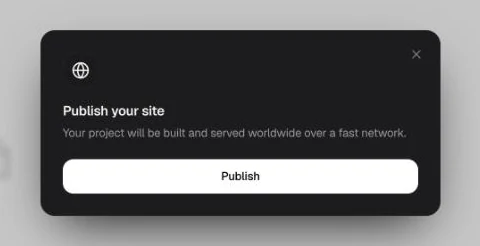
Once the site is live the button becomes Update, with a marker next to it when there are unpublished changes. When you upgrade, you connect your own domain to the same site; once the connection completes the site opens on your domain without publishing again.
Putting your shop or service online for the first time? One page is enough: what you do, opening hours, address and a contact form. As things grow, add pages to the same project and connect a domain.
Put your work, price ranges and a quote form on one site, then send the yoursite.entrobase.site link to anyone who asks for a quote.
Build a page with a schedule and a sign-up form for a workshop, a wedding or an enrollment period. When it's over, unpublish the site and keep the project.
Publish a page about a product idea and use a waitlist form to see how many people are interested. Download the sign-ups from the Forms page as a CSV.


The Free plan is enough to keep one site live. Look at a paid plan when one of these comes up:
Prices and every limit are on the Pricing page. When you upgrade, your project and live site stay exactly as they are.
Change the highlighted parts of the prompt above to fit your business, or write your own. You can attach your logo or a screenshot of a site you like.
Press Create to open your free account and the Builder opens with the preview on the left and the chat on the right. Ask for one change at a time; the preview refreshes after each one.
Publish at the top right puts the site on an entrobase.site address. Later edits reach it each time you publish again; the live site never changes on its own.

An AI website builder that builds what you describe. Write a few sentences, preview the site next to the chat, fix it by asking and publish it for free.

Design a website with AI: describe the colors, tone and sections or attach a design you like. Entrobase designs a working site and you refine it by chatting.

Build a website without code or design tools: type it, fill in a step-by-step form or start from a template. Edit text right in the preview, then publish.

Cafe, salon, garage or workshop: describe your business and get a site with your price list, opening hours and a booking form. Start on the Free plan.

Describe your business and Entro suggests domain name ideas. Check the one you like in a click and see free extensions with first-year and renewal prices.
Add a contact, booking or quote form to your site by chatting. Submissions collect on your Forms page, and you get an e-mail for each new one.
You describe it, Entrobase builds it.
Create with Entrobase