Product photography prompt: handmade soap photoshoot
A ready-made product photography prompt for an AI soap photoshoot: handmade soap in soft morning light with room for your text. Works in Gemini, ChatGPT and Entrobase Canvas.
Prompt
Fill in the fields below and the prompt updates instantly. Copy it and use it in any AI tool.
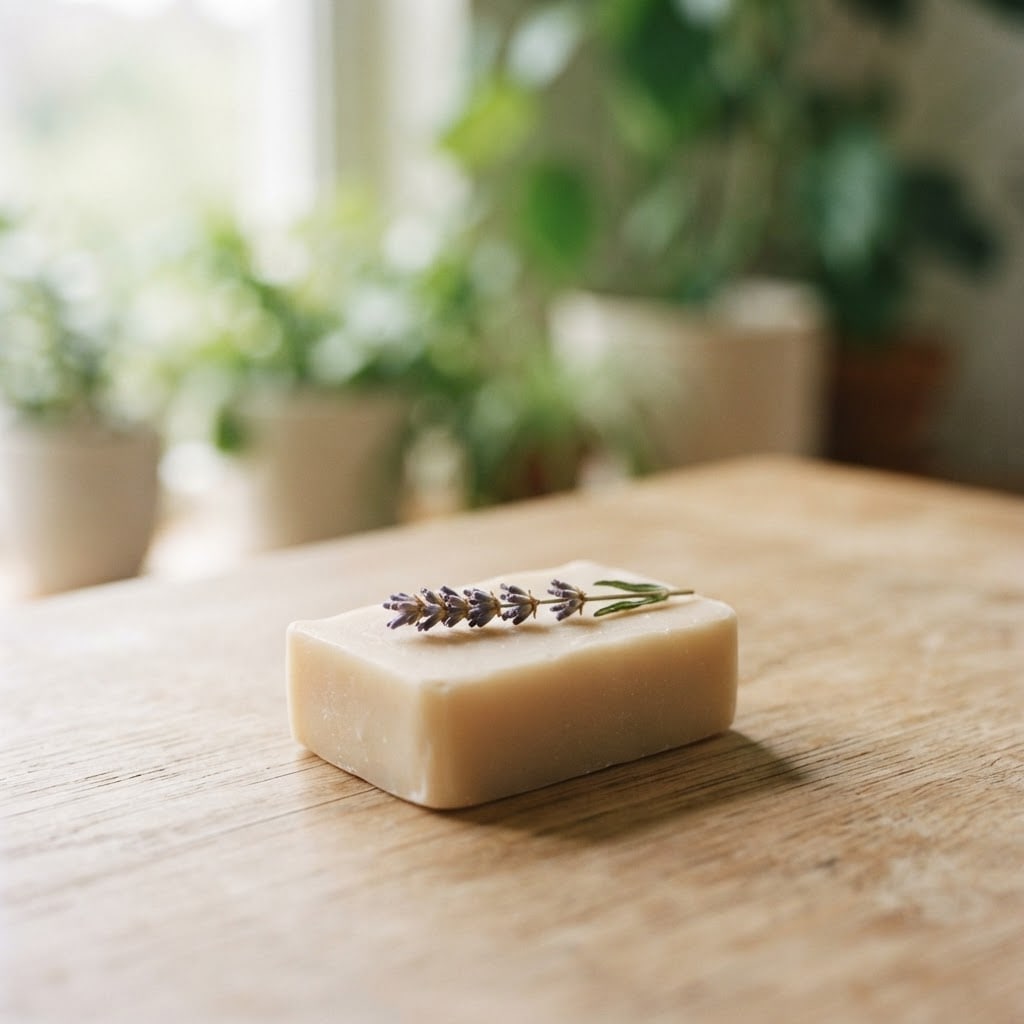
Lavender olive oil soap: a handmade, unbranded bar of soap with softly rounded edges and a smooth matte surface, a single dried lavender sprig resting on top. Setting: a light oak table with blurred green plants behind. Light: soft morning window light from the left, a short soft shadow falling to the right. Camera: 30 degrees from above, 85 mm lens feel, shallow depth of field; the front of the soap sharp and in focus, the background gently blurred. Style: editorial magazine product photo, natural and calm. Color palette: warm cream, light sand and #8a7bb8 as the accent color. Composition: the soap sits in the lower middle third, the upper half stays a plain, clean, text-free space (copy will be added later). Aspect ratio 4:5.
Image made with this prompt
What this prompt does
This prompt generates a single product photo of a handmade bar of soap as if it were shot in soft morning window light from the left, 30 degrees from above, with a shallow depth of field. The soap sits in the lower middle third and the upper half stays empty for your copy. It is built for small makers selling soap, candles or natural skincare online or on social media.
Where to use it
- Online store product image
- Instagram post or story
- Marketplace shop banner
- Background for a promo graphic
- Product catalog page
Fields you can fill in
The fields you can change in the form above and their default values.
- ProductFree text
- Lavender olive oil soap
- SettingOne of 4 options
- a light oak table with blurred green plants behind
- StyleOne of 3 options
- editorial magazine product photo, natural and calm
- Accent colorColor
- #8a7bb8
- Aspect ratioOne of 4 options
- 4:5
Step by step
- 1
Put your own soap in the Product field
Type the soap's name and key ingredient in the Product field (for example "Rosemary goat milk soap"). The rest of the prompt describes a matte bar with a dried lavender sprig on top; if your soap has no lavender, swap that sprig for your own ingredient after copying.
- 2
Pick a Setting and a Style
Setting offers a light oak table, a white marble counter, off-white linen or wet dark slate. Style switches between an editorial look, a warm analog photo with film grain and a clean catalog shot. Marble with catalog gives the cleanest frame; slate with analog gives the moodiest.
- 3
Set the Accent color and Aspect ratio
The accent color is the one hue added to the cream and sand palette, so choose something that hints at the scent (purple for lavender, green for mint). Match the Aspect ratio to where the image goes: 4:5 for a feed post, 9:16 for stories, 16:9 for a site banner, 1:1 for listings.
- 4
Copy it or generate in Canvas
Use "Copy" to paste the prompt into Gemini or ChatGPT. "Generate in Canvas" opens it in Entro Canvas with your values filled in; you pick a ratio and a style there and generate (an account is required). Keep the Canvas ratio the same as the form's Aspect ratio.
- 5
Check the result
Look for a sharp front face on the soap, a blurred background, a shadow falling to the right and a truly empty upper half. If letters or a logo show up on the bar, run the prompt again, and add your headline in the empty space later with a design tool.
Tips and variations
- Keep the Setting and Style fixed and change only the Product field; every bar in your range then shares the same light and framing, and your shop page looks consistent.
- To shoot a candle, a shampoo bar or a ceramic soap dish instead, change "bar of soap" and "softly rounded edges" to match the object's shape after copying, and leave the light and camera parts alone.
- For a livelier shot, add a single detail such as "a broken piece of soap and a little foam beside it". Adding several objects at once scatters the composition.
- At 9:16 the empty space at the top gets taller; if a promo line is going there, choose the catalog Style so the background stays simpler.
- To light the soap from the right, change "from the left" to "from the right" and the shadow to "falling to the left" in the same edit; changing only one makes the light look wrong.
Frequently asked questions
Does this prompt work in ChatGPT and Gemini?
Yes. Fill in the form, press "Copy" and paste the text into any tool that can generate images. Each tool reads light and composition a little differently; if yours has a ratio setting, pick the same value as the form's Aspect ratio.
Can an AI product photo replace a real photoshoot?
It captures the general look and mood of the soap, but not the product's exact color, texture or label. Shoppers want to see the real item on a product page, so use this image for covers, ads or social posts and show a real photo next to it.
Why is the top of the image empty?
The prompt deliberately keeps the upper half plain and text-free so you can add a headline, product name or price tag later. AI tools often misspell text inside images, so adding it afterwards gives a cleaner result.
Can I remove the lavender sprig from the soap?
Yes. In the copied text, delete "a single dried lavender sprig resting on top" or replace it with your own ingredient, such as an orange slice or a pinch of oats. The Product field does not change this detail.
Which aspect ratio is best for a product photo?
Use 4:5 for an Instagram feed post, 9:16 for stories and Reels covers and 16:9 for a website banner. Marketplace listings mostly use square 1:1 images.