Cinematic prompts: 10 ready-to-use prompts for ChatGPT and Gemini
Cinematic prompts for ChatGPT and Gemini: turn your photo into a movie still, moody shots for boys and girls, Instagram frames, cinematic portraits, AI video and a prompt generator. 10 prompts.
Prompt
Fill in the fields below and the prompt updates instantly. Copy it and use it in any AI tool.
Create a cinematic still that looks like a frame from a movie.
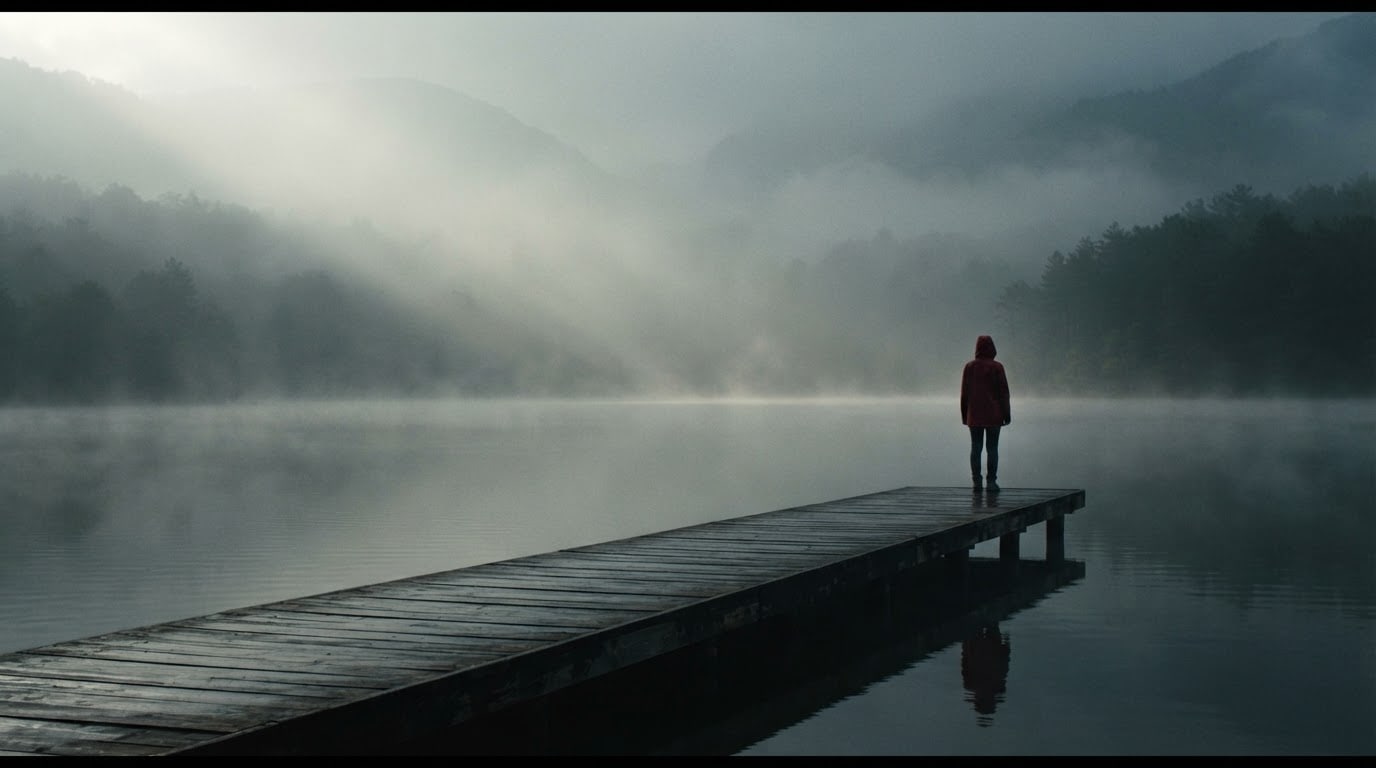
Scenea misty morning, someone in a red raincoat at the end of a wooden lake pier.
Personthe only person in the scene; fictional, back to the camera or too far away to see the face.
Lightfrom a single direction, strong light and shadow contrast; a faint haze in the air makes the light beams visible.
Camerawide shot, 40 mm anamorphic lens, the person a small part of the frame; shallow depth of field, a subtle horizontal lens flare, fine film grain.
Stylerealistic cinema footage, a paused frame from a drama film.
Color gradeteal shadows and orange highlights, blockbuster look; slightly lifted blacks.
Compositionthe person on the right third, the rest of the frame given to the setting's depth; the film frame itself, edge to edge.
Textthe image is completely text-free; signs, vehicles and every surface are plain and letter-free.
Aspect ratio 16:9.
Image made with this prompt
9 more ready-to-use prompts
Different takes on the same topic. Copy any of them as is and replace the parts in square brackets.
1.Cinematic prompt for ChatGPT photo editing: turn your photo into a movie still
When to use: You want to upload your photo to ChatGPT and keep your face and outfit while the whole image becomes a frame from a film; this is the most searched use.
Turn the photo I uploaded into a cinematic frame that looks like it was taken from a movie.
- Identity
- keep my facial features, hairstyle and outfit recognizable, exactly as in the photo.
- Scene
- [e.g. a night street right after the rain, warm streetlights reflecting on wet asphalt]
- Light
- dramatic light from one direction, one half of my face lit, the other half in soft shadow.
- Camera
- 50 mm, shallow depth of field, softly blurred background, fine film grain.
- Color
- teal shadows and warm orange highlights, slightly lifted blacks.
- Ratio
- [e.g. 16:9, or 4:5 for posting]
Keep the image free of text and watermarks.
2.Cinematic prompt for Gemini: put your photo in a neon night scene
When to use: You want to upload a photo to Gemini (Nano Banana) and see yourself in a night scene from a thriller or sci-fi film.
Place the person in the photo I uploaded into a cinematic frame from a neon-lit night film.
- Identity
- do not change my face, hair or clothes; change only the light and the setting.
- Setting
- a rainy night, wet pavement, blurred text-free neon lights in the background.
- Light
- magenta neon from one side and cyan neon from the other on my face; raindrops glowing in the light.
- Camera
- eye level, 35 mm anamorphic look, horizontal lens flare, shallow depth of field.
- Pose
- [e.g. half turned from the camera, looking into the distance]
- Ratio
- [e.g. 9:16]
3.Cinematic prompt for boys and men: moody rain-soaked street shot
When to use: You want a dark, moody movie-style photo of yourself for a profile or post, the look most 'cinematic prompt for boys' searches ask for.
Turn the photo I uploaded into a moody cinematic movie still.
- Identity
- keep my face, facial hair (or lack of it), hairstyle and build exactly as in the photo.
- Outfit
- [e.g. a dark long coat over a black turtleneck]
- Scene
- a narrow city street at night in light rain, wet cobblestones, blurred warm lights far behind me.
- Light
- a single streetlight above and to one side, hard shadows, rain catching the light.
- Camera
- 35 mm, low angle, shallow depth of field, fine film grain.
- Color
- cold blue and steel gray with small warm amber highlights.
- Ratio
- [e.g. 4:5]
4.Cinematic prompt for girls: golden hour field scene
When to use: You want a soft, warm cinematic photo of yourself that feels like a scene from a coming-of-age film, for a post or profile.
Turn the photo I uploaded into a soft cinematic frame from a romantic drama.
- Identity
- keep my face, hair and outfit as in the photo; natural makeup only.
- Scene
- [e.g. a tall grass field at golden hour, wind moving the grass]
- Light
- low sun behind me, a warm glow outlining my hair, soft bounce light on my face.
- Camera
- 85 mm, shallow depth of field, gentle lens flare, fine film grain.
- Color
- warm gold, peach and soft green, slightly faded like film stock.
- Composition
- me on the right third, open sky and field on the left.
- Ratio
- [e.g. 4:5 or 9:16]
5.Cinematic prompt for Instagram: vertical story and Reels cover
When to use: You need a vertical movie-style frame of your photo for an Instagram Story, a Reels cover or a feed post with room for text.
Turn the photo I uploaded into a vertical cinematic frame for Instagram.
- Identity
- keep my face, hair and outfit as in the photo.
- Scene
- [e.g. a coastal road at sunset, the sun dropping into the sea behind me]
- Framing
- vertical, me in the lower half; sky and open space in the upper part, leaving room for story text.
- Light
- golden hour backlight, a thin rim of light around my hair.
- Camera
- 35 mm, shallow depth of field, subtle lens flare.
- Color
- warm orange and peach, soft purple in the shadows.
- Ratio
- 9:16
6.ChatGPT cinematic portrait prompt: single-light dramatic close-up
When to use: You want a close, dramatic portrait from your photo that looks like a still from a film poster shoot, for a profile picture or cover.
Create a cinematic portrait from the photo I uploaded.
- Identity
- keep my facial features and hair the same; a calm, natural expression.
- Framing
- close-up from the shoulders up, face on the right third.
- Light
- one soft key light from the side, a small triangle of light on the shadowed cheek (Rembrandt lighting), background almost black.
- Camera
- 85 mm portrait lens, f/1.8, eyes sharp, background blurred.
- Color
- [e.g. warm amber and dark brown, or cold blue and gray]
- Texture
- fine film grain, natural skin texture.
- Ratio
- 4:5
7.Cinematic prompt for AI video: one shot with camera movement
When to use: You are generating a short video rather than an image (Gemini's video tool or another video model) and want to direct how the camera moves.
Generate an 8-second cinematic video made of a single continuous shot.
- Scene
- [e.g. a misty morning, someone in a red raincoat standing at the end of a wooden pier with their back to us, a still lake]
- Camera move
- a slow, smooth push in from the start of the pier toward the person; in the last second the camera rises slightly.
- Light
- soft sun rising behind the fog, glints on the water.
- Look
- anamorphic lens look, shallow depth of field, fine film grain, cinema frame rate feel.
- Color
- teal shadows and orange highlights.
- Sound
- light wind and water lapping against the pier, no music.
- Ratio
- 16:9
8.Cinematic prompt generator: let ChatGPT write your shot prompts
When to use: You only have an idea and want ChatGPT to turn it into detailed image prompts with camera, light and color, ready to paste into any image tool.
You are a cinematographer. Turn the idea I give you into cinematic prompts for an AI image tool.
- Idea
- [e.g. someone who leaves the city and arrives in an old seaside town]
- Output
- 3 different prompts, each one paragraph.
Each prompt must include
- the scene and one single story moment
- shot size and lens (mm)
- light direction and time of day
- color grade
- aspect ratio
Rules
- do not use the name of a real film, director or celebrity
- do not ask for text in the image
Under each prompt, add one sentence naming the film genre it evokes.
9.Cinematic photo prompt ideas without a photo: empty sci-fi landscape
When to use: You want a cinematic image with no people and no upload, for a wallpaper, a moodboard or concept art.
Create a cinematic landscape frame with no people, like the opening shot of a science fiction film.
- Scene
- [e.g. huge weathered concrete towers rising from a misty valley, a river winding between them]
- Light
- low morning sun breaking through the clouds, visible light beams in the mist.
- Camera
- extreme wide shot, 24 mm, from a high vantage point, sharp all the way to the horizon.
- Color
- cold steel blue and faded green, pale gold where the light hits.
- Composition
- horizon on the lower third, towers in the right half, open sky on the left.
The image is completely text-free.
- Ratio
- 21:9
What this prompt does
Most people searching for cinematic prompts want to upload their own photo to ChatGPT or Gemini and get back a frame that looks like it came out of a movie: dramatic light, a real color grade, film grain. The 9 variants below do exactly that, with versions for photo editing, boys and girls, Instagram, portraits, AI video and a prompt generator. The main prompt above needs no photo: it builds a film still from the scene, shot and color grade you pick.
Where to use it
- Instagram and TikTok posts
- Profile and cover photos
- Short film and music video ideas
- Desktop wallpapers
- Moodboards and shot planning
- Product and ad frames
Fields you can fill in
The fields you can change in the form above and their default values.
- SceneOne of 5 options
- a misty morning, someone in a red raincoat at the end of a wooden lake pier
- Shot and lensOne of 4 options
- wide shot, 40 mm anamorphic lens, the person a small part of the frame
- Color gradeOne of 5 options
- teal shadows and orange highlights, blockbuster look
- Aspect ratioOne of 5 options
- 16:9
Step by step
- 1
Pick a scene
The Scene field holds five ready movie moments: a misty pier, a rainy street, a desert highway, a midnight rooftop and a snowy forest. Each has one person seen from behind or far away, so the result stays consistent without depending on a face.
- 2
Choose the shot and lens
Shot and lens sets the framing: in a wide shot the person is a small part of the world, a medium shot shows them from the waist up, an overhead shot turns them into a small silhouette. A wide shot with an anamorphic lens gives the strongest big screen feel.
- 3
Match the color grade to the scene
The color grade tells the genre: teal and orange blockbuster, cold blue thriller, warm gold nostalgia, faded film stock or neon night. Neon pairs best with the rainy street and rooftop, warm gold with the desert highway, cold blue with the snowy forest.
- 4
Set the ratio, then copy or generate
Use 21:9 or 16:9 for a cinema screen look, 4:5 for the Instagram feed and 9:16 for Stories and Reels. Copy pastes it into ChatGPT or Gemini; Start generates it in Entrobase Canvas.
- 5
Judge it like a film frame
A good cinematic frame has one clear light direction, real shadows, depth between foreground and background and one consistent color grade. If the result looks flat and too bright, reply in the same chat with 'deepen the shadows, lift the blacks slightly, add film grain'.
Tips and variations
- Give the light one direction: naming a single source like 'low sun from the left' or 'a streetlight behind' adds far more movie feel than flat light that reaches everything equally.
- Fog, rain, haze or dust make light beams visible and add depth to the frame; 'a faint haze in the air' is enough for most scenes.
- For photo editing, upload a shot where your face is sharp and lit from one side; flat flash photos change your features more when they are relit into cinematic light.
- For black cinema bars, keep the ratio at 16:9 and replace 'edge to edge' in the Composition line with 'thin black letterbox bars at the top and bottom'; on Instagram the post then reads like a scene from a film.
Frequently asked questions
How do I use a cinematic prompt in ChatGPT for photo editing?
Upload your photo in ChatGPT, paste the ChatGPT photo editing variant and send it. ChatGPT regenerates the image, keeping your identity while changing the light, color grade and background into a movie still. If your face drifts, reply in the same chat with 'keep my facial features exactly as in the photo'.
Does a cinematic prompt work in Gemini?
Yes. Upload a photo in the Gemini app and use the Gemini variant; its image model (Nano Banana) edits your photo into a cinematic frame. The main prompt, which needs no photo, also generates a new image directly in Gemini.
What makes a photo look cinematic?
A cinematic photo looks like a paused movie frame: a wide aspect ratio, one-directional dramatic light, shallow depth of field, fine film grain and a deliberate color grade such as teal shadows with orange highlights. What really separates it from a snapshot is a single moment that suggests a story.
Are there cinematic prompts for boys and for girls?
Yes. The page has a moody rain-soaked street variant written for boys and men and a golden hour field variant written for girls. Both work with your own uploaded photo in ChatGPT or Gemini, and you can swap the scene in the brackets.
How is a cinematic video prompt different from a photo prompt?
A video prompt also describes the camera move, its speed and the length of the shot: a slow push in, a side tracking shot or a rising crane move. The AI video variant describes one scene with one move, for Gemini's video tool or any other video model.