10 Product Photography Prompts for ChatGPT and Gemini
Product photography prompts: 10 ready-to-use prompts for studio, white background listing, lifestyle, jewelry, clothing and photo-to-studio shots in ChatGPT, Gemini and Entrobase Canvas.
Tested: EntroGen Flash, November 2026
Prompt
Fill in the fields below and the prompt updates instantly. Copy it and use it in any AI tool.
Create an e-commerce and social media product photo.
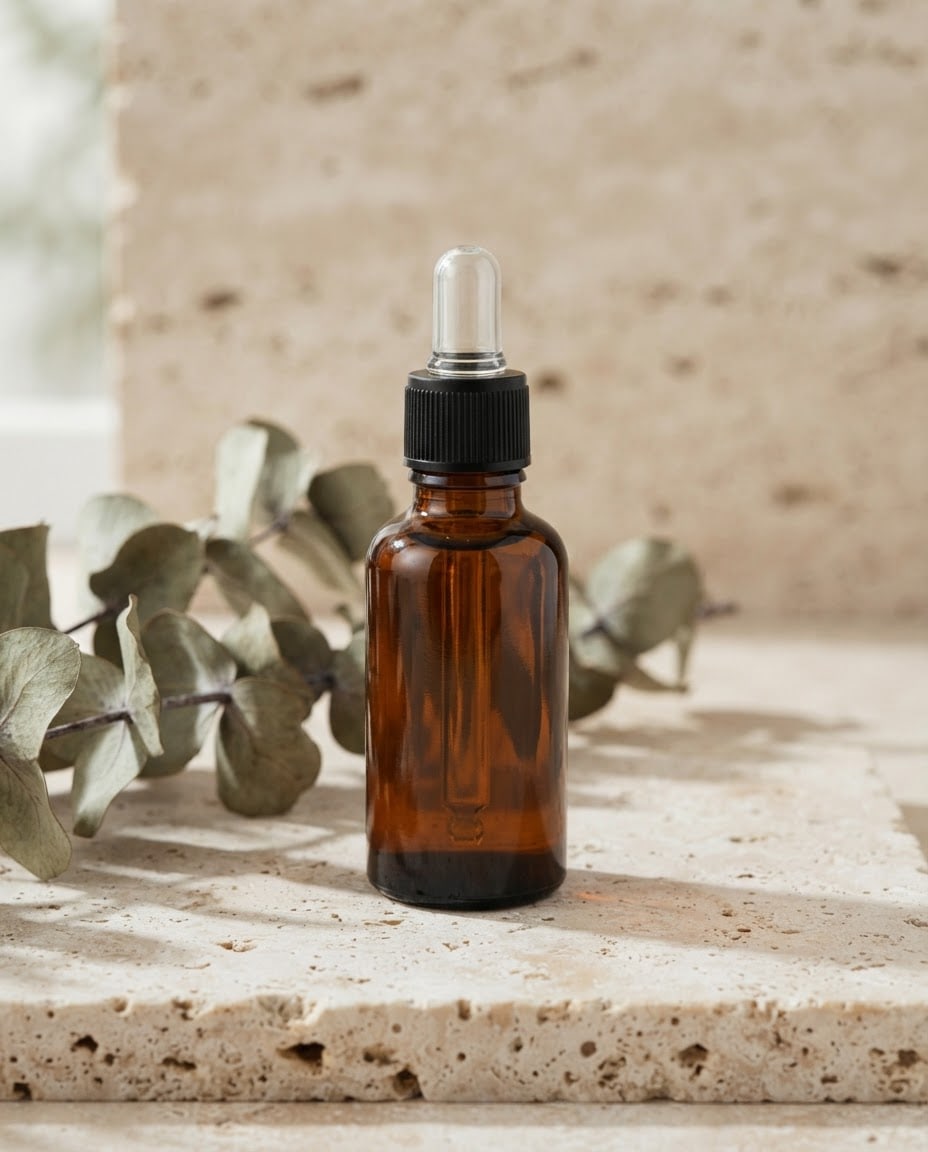
Productan amber glass dropper serum bottle, unlabeled and unbranded, plain text-free surface.
Scenea light beige travertine block with a few dried eucalyptus sprigs.
Lightsoft daylight from the left, with leaf shadows falling across the surface; main light source out of frame, a natural contact shadow under the product.
Camerafrom 45 degrees above, a three-quarter angle, 85 mm, product sharp front to back, background softly blurred.
Stylephotorealistic commercial product photo, real textures, clean reflections.
Palettethe product color plus the scene tones, three main colors at most.
Compositionthe only product in the frame, centered, about half the frame height.
Surfacesfully text-free; no letters, numbers or symbols anywhere.
Framingno people; the photo itself runs to all four edges, no border.
Aspect ratio 4:5.
Image made with this prompt
9 more ready-to-use prompts
Different takes on the same topic. Copy any of them as is and replace the parts in square brackets.
1.Product photography prompt for ChatGPT: turn a phone snap into a studio shot
When to use: You shot your product on a phone and want the same product, unchanged, in a professional studio photo.
Turn the product in my uploaded photo into a professional studio product photo.
- Product
- keep its shape, color, proportions and label exactly as in the photo; do not redesign it.
- Backdrop
- a [e.g. light gray] seamless studio backdrop, floor and wall as one piece.
- Light
- broad, soft light from the left, the light source outside the frame, a natural contact shadow under the product.
- Camera
- slightly above eye level, 85 mm, the product sharp from front to back.
- Composition
- the product centered, filling about two thirds of the frame.
Do not add any text other than the product's own label.
- Aspect ratio
- 1:1
2.Product photography prompt for Gemini and Nano Banana: a lifestyle scene
When to use: You have a plain photo of your product and want it shown in a real setting for Instagram or an ad.
Place the product from my uploaded photo into a realistic lifestyle photo.
- Product
- keep its shape, color, material and label exactly the same; scale it realistically to the scene.
- Scene
- [e.g. a bathroom counter in morning light, a folded linen towel and a small eucalyptus sprig beside it]
- Light
- soft daylight that matches the scene; the product casts a real shadow and reflection on the surface.
- Camera
- from 45 degrees above, 50 mm, the product sharp, the background softly blurred.
- Composition
- the product in the right third; no people in the scene.
Do not add any text other than the product's own label.
- Aspect ratio
- 4:5
3.White background product photo prompt for Amazon and Etsy listings
When to use: You need a clean, prop-free main listing image on a white background for a marketplace or your own store.
Create a product photo to use as a marketplace main image.
- Product
- [e.g. a matte black stainless steel tumbler], unlabeled and unbranded.
- Backdrop
- pure white and seamless; floor and wall the same white, no texture or gradient.
- Light
- soft, even light from all sides; only a faint contact shadow under the product.
- Camera
- eye level, a slight three-quarter angle, 85 mm, the whole product in focus.
- Composition
- only the product in the frame, centered, filling about 80% of the image.
- Surfaces
- completely free of text, watermarks and borders.
- Aspect ratio
- 1:1
4.Amazon listing image set: one product from four angles
When to use: Your product page needs a consistent set of shots from several angles with the same light and backdrop.
Build an e-commerce gallery for the product in my uploaded photos: create four separate images.
- Product
- the same product in every image; shape, color, material and label stay exactly the same.
Images
- 1Straight on, the whole product
- 2From the right, a three-quarter angle
- 3Directly overhead
- 4Close-up of the material and the key detail [e.g. the lid and stitching]
- Backdrop and light
- the same [e.g. light gray] seamless backdrop and the same soft, even light in all four.
Do not invent a side that is not visible in my photos; if it is missing, skip that angle and tell me.
No added text.
- Aspect ratio
- 1:1 for each image
5.Cosmetic product photography prompt: skincare on rippled water
When to use: You sell skincare or beauty products and want a fresh, premium shot that suggests water and clean ingredients.
Create a premium skincare product photo.
- Product
- [e.g. a frosted white cream jar with a silver lid], unlabeled and unbranded.
- Scene
- the jar stands on a smooth pale stone in shallow, clear water with gentle ripples around it.
- Light
- soft daylight from above and behind, light patterns from the water rippling across the stone.
- Camera
- from a low angle just above the water, 85 mm, the jar sharp, the water softly blurred.
- Palette
- white, pale aqua and soft sand.
- Composition
- the jar centered with calm water around it; no people.
The image is completely text-free.
- Aspect ratio
- 4:5
6.Jewelry product photography prompt: macro necklace and ring shots
When to use: You sell necklaces, rings or earrings and want the sparkle of the stone and the shine of the metal in a close-up.
Create a close-up product photo of a piece of jewelry.
- Product
- [e.g. a teardrop green stone pendant on a fine gold chain]
- Surface
- [e.g. soft folds of cream silk]
- Light
- soft key light, small bright sparkles in the stone, clean reflections on the metal.
- Camera
- macro, 100 mm, shallow depth of field; the stone and chain links sharp.
- Composition
- the piece centered, the chain drawing a natural curve through the frame; no people.
The image is completely text-free.
- Aspect ratio
- 4:5
7.Beverage product photo prompt: a cold bottle with water droplets
When to use: You need a refreshing ad image for lemonade, cold brew or sparkling water.
Create an advertising product photo for a cold drink.
- Product
- [e.g. an unlabeled, frosted green glass lemonade bottle] covered in cold water droplets.
- Scene
- crushed ice and [e.g. a halved lemon] on a flat [e.g. pale yellow] backdrop.
- Light
- bright backlight making the bottle glow, soft fill light from the front.
- Camera
- eye level, 85 mm, the droplets sharp.
- Composition
- the bottle upright and centered, a few ice pieces floating in the air around it.
- Surfaces
- the bottle and backdrop are text-free.
- Aspect ratio
- 4:5
8.Clothing flat lay prompt for product photos
When to use: You run a boutique or clothing shop and want clean flat lay photos without a mannequin or model.
Create a flat lay e-commerce photo of a clothing item.
- Product
- [e.g. a sand-colored chunky knit crew neck sweater], unlabeled and without prints; pressed, sleeves neatly spread out.
- Surface
- [e.g. light oak floorboards], the item exactly in the center.
- Props
- [e.g. a folded beanie and a leather belt] beside it, few and tidy.
- Light
- soft daylight, faint and subtle shadows.
- Camera
- directly overhead, the item parallel to the frame; the fabric texture and knit sharp.
- Surfaces
- the image is text-free; no prints or tags on the items.
- Aspect ratio
- 4:5
9.Product photography prompt generator: let ChatGPT write five shot ideas
When to use: You are not sure which shot you need and want several ready prompts for different scenes first.
Write 5 different product photography prompts for my product.
- Product
- [e.g. a lavender solid shampoo bar in paper packaging]
Where it will be used: [e.g. my Etsy shop and Instagram]
- Brand feel
- [e.g. natural, simple, earthy tones]
For each prompt give
- 1A short title (white background, lifestyle, close-up, campaign, flat lay and so on)
- 2A line-by-line prompt: product, scene, light, camera angle and lens, style, color palette, composition, aspect ratio
- 3Where the image will be used
Rules
- No text, prices or brand marks in the image
- No people in the scene
- Each prompt uses a different scene and light
What this prompt does
If you want ChatGPT or Gemini to turn a phone snap of your product into a clean studio shot, or to create a store-ready product photo without a photoshoot, copy one of the 9 variants below: a white background listing image, a lifestyle scene, a four-angle gallery set, skincare, jewelry, beverage and clothing flat lay shots. The main prompt above builds a text-free commercial product photo from your product description, with the scene, light and camera angle you pick.
Where to use it
- Amazon and Etsy main listing image
- Instagram product post
- Online store product gallery
- Ad and campaign visual
- Skincare and jewelry shots
- Handmade product shop
Fields you can fill in
The fields you can change in the form above and their default values.
- ProductFree text
- an amber glass dropper serum bottle
- SceneOne of 6 options
- a light beige travertine block with a few dried eucalyptus sprigs
- LightOne of 4 options
- soft daylight from the left, with leaf shadows falling across the surface
- Camera angleOne of 4 options
- from 45 degrees above, a three-quarter angle
- Aspect ratioOne of 5 options
- 4:5
Step by step
- 1
Describe the product by material and color
In the Product field, write what the product is, what it is made of and its color (for example an amber glass dropper serum bottle or a matte black steel tumbler). Leave out the brand name and label text: image models garble small type, and adding your own label later looks cleaner.
- 2
Pick the scene for where the photo will be used
Choose the pure white studio backdrop for a marketplace main image, travertine, an oak table or pastel pedestals for Instagram and your website, and dark stone or wet stone for premium products. Each scene brings its own surface and props.
- 3
Set the light, angle and aspect ratio
Soft daylight feels natural, even light looks like a clean catalog, and hard side light looks dramatic. Use a 45 degree or eye-level angle for bottles and boxes and an overhead angle for flat items. Ratio: 4:5 for Instagram, 1:1 for listings, 16:9 for websites, 9:16 for stories.
- 4
Copy it or generate in Canvas
Use Copy to paste the prompt into ChatGPT or Gemini, or Start to generate it in Entrobase Canvas. If you already have the product and it must look exactly the same, use the ChatGPT or Gemini variant instead and upload your product photo first.
- 5
Zoom in and review the result
A good product photo has crisp edges, realistic proportions, a shadow that sits the product on the surface and no fake letters or numbers. Zoom in on details like the bottle neck, cap or stitching; if one detail is off, ask the same chat to fix only that part.
Tips and variations
- If the product blends into the backdrop, switch scenes: dark products read better on travertine or white, while light and transparent products stand out on dark stone.
- For glass and shiny metal, pick light from one direction; light from all sides can leave several highlight streaks on a bottle and flatten its shape.
- To keep your Instagram and listing images consistent, stay in the same chat with the result you like and change only the scene and ratio; the product's shape and light carry through the set.
- Google Merchant Center asks for product images of at least 500x500 pixels and recommends around 1500x1500 pixels or more; upscale a small result before you upload it.
- Keep props out of a marketplace main image; lifestyle shots with eucalyptus, linen or pedestals work better as the second and later gallery images.
Frequently asked questions
What makes a good prompt for product photography?
A good product photography prompt names the product and its material, the surface and backdrop, the light direction, the camera angle and lens, the style, the palette, the composition and the aspect ratio. The main prompt on this page puts each one on its own line, which keeps results consistent in ChatGPT, Gemini and Canvas.
Can ChatGPT make product photos from my own photo?
Yes. Upload a clear photo of your product to a ChatGPT chat with image generation and paste the ChatGPT variant, then fill in the backdrop color. Zoom in on the label afterwards; small text is the part that changes most often, so compare it with your real product.
Can Gemini or Nano Banana keep my product exactly the same?
Usually, if you upload the product and ask it to keep shape, color, material and label unchanged, as the Gemini variant does. Google's Gemini image generation docs say Gemini 3.1 Flash Image can use up to 10 object images with high fidelity, so uploading a few angles of the product helps it hold the shape.
What size should product photos be for online stores?
Google Merchant Center's image rules are a useful baseline: at least 500x500 pixels, around 1500x1500 pixels or more recommended, the product filling 75% to 90% of the image, and no promotional text, watermarks or borders. Each marketplace's own seller guidelines have the final word.
Why does the text on my product label come out garbled?
Image models drop or invent letters in small and long text. That is why the main prompt creates an unlabeled, text-free product; add your label afterwards in a design tool and it stays sharp. If the real label must show, upload your product photo and use the ChatGPT or Gemini variant.