Mockup Prompts: 10 Copy-Paste Prompts for ChatGPT and Gemini
Mockup prompts: 10 ready-to-use prompts for product packaging, logo, book cover, business card, app screen and blank packaging mockups in ChatGPT, Gemini and Entrobase Canvas.
Tested: EntroGen Flash, November 2026
Prompt
Fill in the fields below and the prompt updates instantly. Copy it and use it in any AI tool.
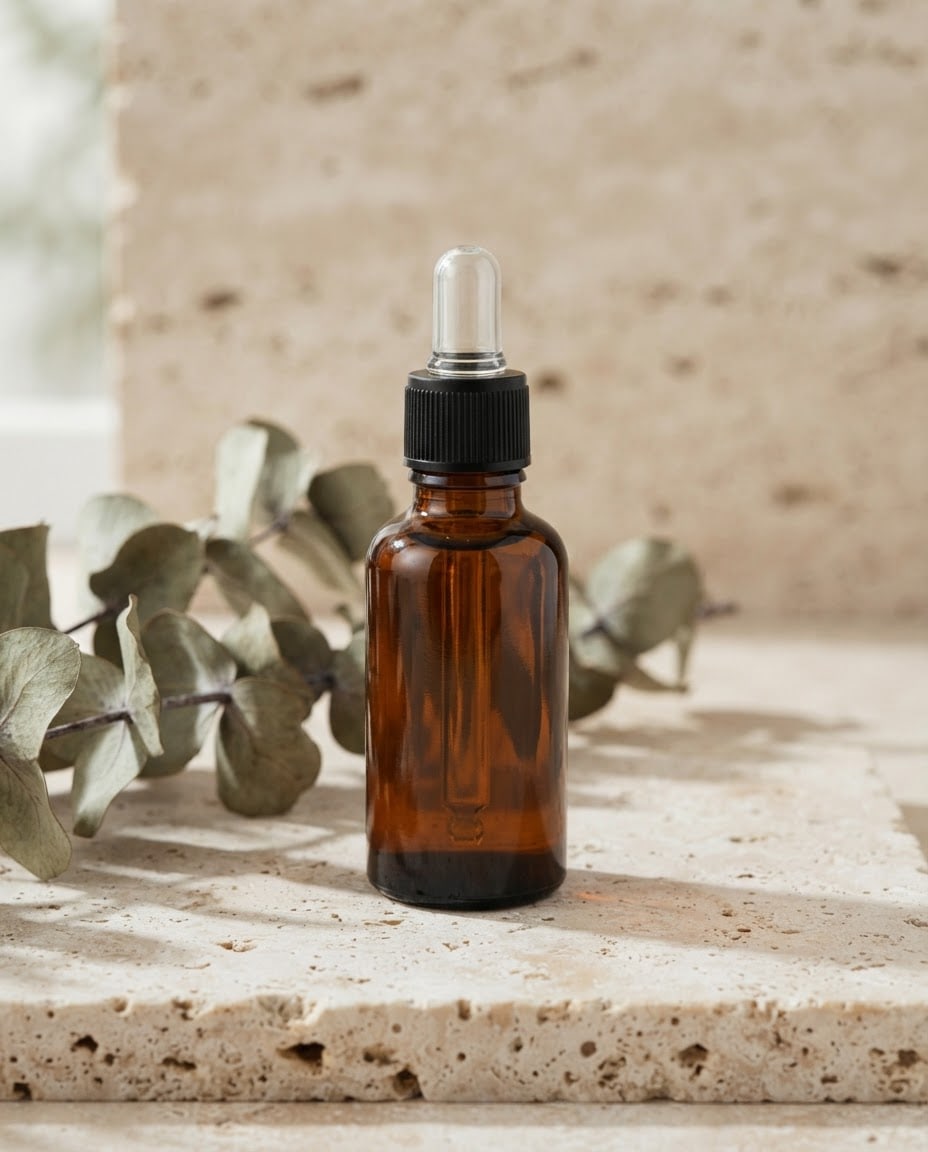
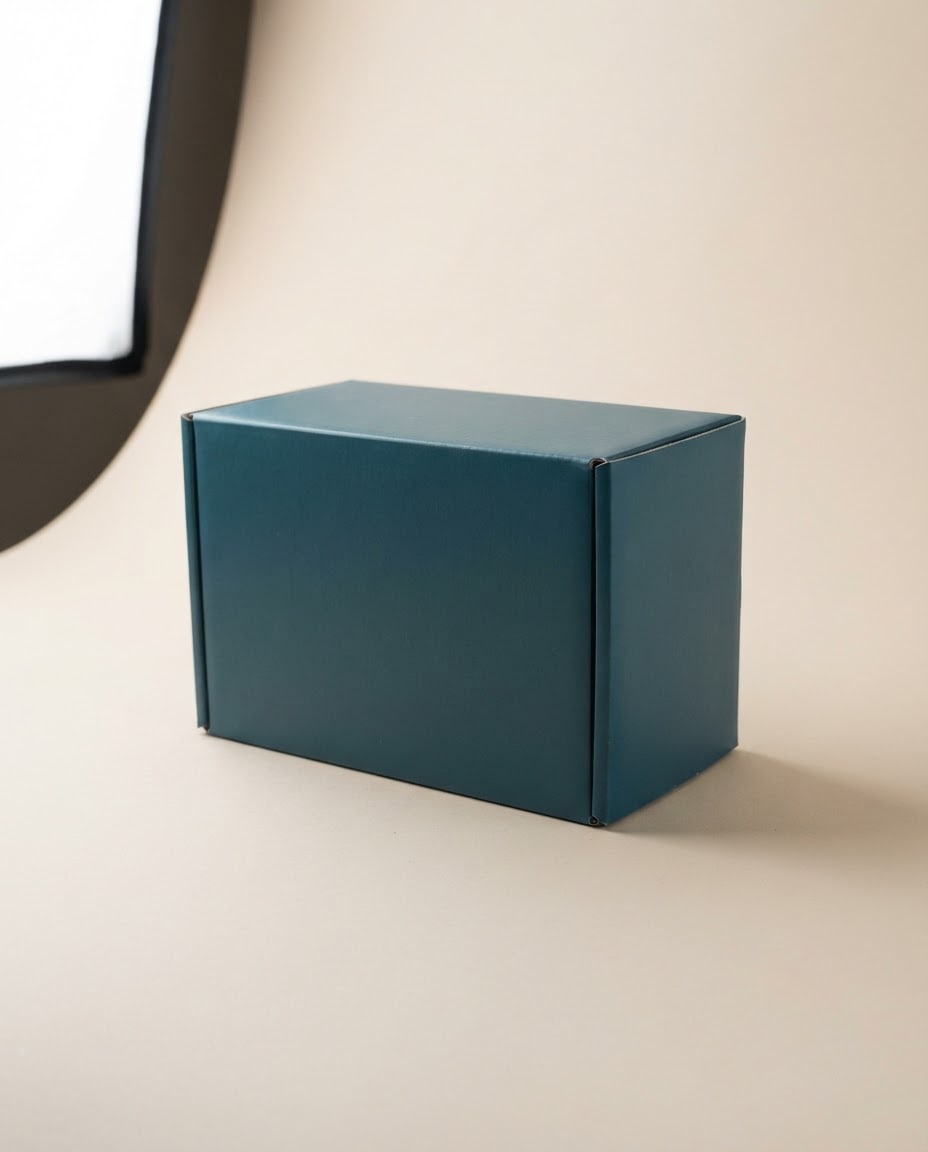
Create a photorealistic product packaging mockup with blank surfaces; the design will be placed on it later.
Packaginga rectangular, matte-coated cardboard product box with its lid closed.
Surfacethe packaging's main color is #1f4e5f, matte and smooth; the front carries a wide, blank, flat design area; every surface is label-free and pattern-free, with no letters, numbers or symbols.
Settinga seamless light beige studio backdrop, floor and wall in one piece.
Lighta large, soft studio light from the left, a gentle fill from the right; a soft contact shadow below.
Camerathree-quarter angle, 30 degrees from above, 85 mm, the whole package sharp and in focus, edges straight and undistorted.
Stylephotorealistic studio product photograph with real material texture.
Palettethe packaging's #1f4e5f color stands out; the surface and backdrop stay in the natural, soft tones of the chosen setting.
Compositionthe packaging sits in the center and fills about half of the frame, with plain empty space around it.
Framingthe scene is people-free; this packaging is the only product in the scene.
Aspect ratio 4:5.
Image made with this prompt
9 more ready-to-use prompts
Different takes on the same topic. Copy any of them as is and replace the parts in square brackets.
1.Product mockup prompt for Gemini: put your logo on packaging
When to use: Use this when you want to upload your logo to Gemini and see it on a real product box or pouch.
Place the logo I uploaded on a realistic product packaging mockup.
- Packaging
- [e.g. matte black cardboard box, lid closed]
- Placement
- the logo sits centered on the front, about [e.g. one third of the width] wide, following the packaging's perspective and surface.
- Logo
- keep its shape, colors and proportions exactly as in my file; do not redraw it.
- Print finish
- [e.g. warm gold foil / embossed / flat print]
- Setting
- [e.g. light gray concrete surface and a plain wall]
- Light
- soft studio light from the left, a natural contact shadow under the package.
- Camera
- three-quarter angle, 85 mm, the whole package sharp.
The rest of the packaging is plain and text-free; the logo is the only mark in the image.
- Aspect ratio
- 4:5
2.Mockup prompt for ChatGPT: wrap your label around a bottle or jar
When to use: Use this when you have a finished label design and want ChatGPT to wrap it around a bottle, jar or cosmetic container.
Show the label design I uploaded wrapped around a [e.g. amber glass dropper bottle] as a realistic product mockup.
- Label
- keep the text, colors and layout exactly as in the design; bend the label to follow the bottle's curve.
- Material
- [e.g. matte paper label], subtle reflections in the glass.
- Setting
- [e.g. white marble counter, softly blurred beige wall behind]
- Light
- soft light from the left and behind, a bright highlight along the edge of the glass.
- Camera
- eye level, 100 mm macro, shallow depth of field, label in sharp focus.
- Style
- photorealistic e-commerce product photo.
The only text in the scene is the label design.
- Aspect ratio
- 1:1
3.Logo mockup prompt for Gemini: present a finished logo
When to use: Use this when your logo is done and you want to present it to a client or in your portfolio across real touchpoints in one shot.
Place the logo I uploaded in a three-piece logo mockup scene for a brand presentation.
- Piece 1
- an embossed [e.g. brushed brass] logo sign on an office wall.
- Piece 2
- a [e.g. kraft] shopping bag on the desk with the logo on the front.
- Piece 3
- a closed, plain-colored notebook next to the bag with a small logo on the cover.
- Logo
- exact shape, color and proportions from my file; do not redraw it or add new elements.
- Palette
- [e.g. off-white, deep green, brass]
- Light
- warm side daylight, soft shadows.
- Camera
- 35 mm, wide shot, all three pieces sharp in one frame.
The logo is the only mark in the scene; every other surface is plain and text-free.
- Aspect ratio
- 16:9
4.ChatGPT book mockup prompt: a hardcover from your cover design
When to use: Use this when you want to show a book or ebook cover as a printed copy standing on a table.
Apply the cover design I uploaded to a realistic hardcover book mockup.
- Book
- [e.g. hardcover novel], the cover design exactly on the front; a plain strip in the cover's color on the spine.
- Pose
- the book stands at a slight angle, a second copy of the same book lies flat beside it.
- Setting
- [e.g. wooden table with a ceramic coffee cup and a dried eucalyptus sprig]
- Light
- window light from the left, soft shadow.
- Camera
- three-quarter angle, 50 mm, cover sharp and legible.
Keep the cover text exactly as in my file; the only text in the scene is on the cover.
- Aspect ratio
- 4:5
5.Mockup prompt for an app or website: your screenshot on a device
When to use: Use this when you want your app or website screenshot shown on a phone or laptop screen for a portfolio or launch post.
Place the screenshot I uploaded into a realistic device mockup.
- Device
- [e.g. an unbranded smartphone with thin bezels / an unbranded laptop open on a desk]
- Screen
- my image fills the whole screen, uncropped and with its colors unchanged; a faint glass reflection on the screen.
- Setting
- [e.g. light oak desk with a ceramic mug and a closed notebook]
- Light
- daylight from the left, screen brightness balanced with the room.
- Camera
- 45 degrees from above, 50 mm, device sharp, background slightly blurred.
The device body is plain with no logos; every surface outside the screen is text-free.
- Aspect ratio
- 16:9
6.Business card mockup prompt: front and back in one shot
When to use: Use this when you want to see the front and back of a business card on real paper before printing, or show it to a client.
Show the business card design I uploaded (front and back) in a realistic business card mockup.
- Layout
- two cards stacked and slightly offset, one showing the front, the other the back; a small stack of cards beside them.
- Card
- [e.g. 350 gsm matte, lightly textured stock], crisp straight edges.
- Print finish
- [e.g. embossed logo / gold foil]
- Surface
- [e.g. dark charcoal stone]
- Light
- soft, low-angle light from the left; the embossing and paper texture are visible.
- Camera
- top-down, 90 mm, cards sharp.
Keep the card design exactly as in my file; the only text in the scene is on the cards.
- Aspect ratio
- 4:5
7.Mockup prompt for Nano Banana: a four-angle product set
When to use: Use this when you want Nano Banana (Google's Gemini image model) to turn one product photo into four consistent angles for a product page.
Create a mockup set showing the product in my photo from four different angles in the same studio.
- Product
- shape, color, label and logo exactly as in the photo; the same product in all four frames.
Frames
- 1straight-on front
- 2three-quarter angle
- 3top-down
- 4close-up of the material texture
- Layout
- the four frames in a 2x2 grid with thin white gaps.
- Backdrop
- [e.g. seamless light beige studio backdrop], identical in all four.
- Light
- soft studio light from the same direction in every frame.
- Style
- e-commerce product photography with real material texture.
- Aspect ratio
- 1:1
8.Blank packaging mockup prompt: text only, no upload
When to use: Use this when you need a blank packaging mockup from text alone, with no file to upload.
Blank product packaging mockup, a [e.g. matte deep teal cardboard box] with a plain, label-free front, no letters or symbols on any surface,
- setting
- [e.g. seamless light beige studio backdrop], soft contact shadow,
- lighting
- large soft key light from the left, gentle fill from the right, thin edge highlights,
- camera
- three-quarter view, 85 mm, everything sharp,
- style
- photorealistic studio product photography, real cardboard texture,
aspect ratio 4:5
9.Mockup prompt generator: let ChatGPT or Gemini write the prompts
When to use: Use this when you would rather have ChatGPT or Gemini write three tailored mockup prompts for your product than build one yourself.
You are a product photographer and packaging designer. Write 3 separate image generation prompts for me.
- Product
- [e.g. natural olive oil soap in a kraft box]
Where it will be used: [e.g. Instagram post and product page]
- Brand feel
- [e.g. natural, simple, warm]
Each prompt must cover these parts on separate lines:
- Packaging and material
- Setting and surface
- Light direction and hardness
- Camera angle and lens
- Color palette (3 colors)
- Aspect ratio
Rules
- One studio shot, one lifestyle shot and one top-down (flat lay) shot.
- No text added to the image; my logo is the only mark.
- Put each prompt in its own code block.
What this prompt does
To see your logo, label or cover design on a real product, upload the file to Gemini or ChatGPT and paste one of the variants below: there are 9 ready prompts for packaging, logo presentations, books, business cards, app screens and blank packaging. The main prompt above needs no upload; it creates a blank packaging mockup from the packaging, color, setting and angle you pick, ready for your design.
Where to use it
- E-commerce product page images
- Packaging design pitches to clients
- Logo and brand identity presentations
- Instagram product launch posts
- Book cover and business card previews
- App and website portfolio shots
Fields you can fill in
The fields you can change in the form above and their default values.
- PackagingOne of 6 options
- a rectangular, matte-coated cardboard product box with its lid closed
- Packaging colorColor
- #1f4e5f
- SettingOne of 5 options
- a seamless light beige studio backdrop, floor and wall in one piece
- Camera angleOne of 3 options
- three-quarter angle, 30 degrees from above
- Aspect ratioOne of 4 options
- 4:5
Step by step
- 1
Pick the packaging type
The Packaging field offers a cardboard box, a stand-up pouch, a dropper bottle, a glass jar, a beverage can and a cosmetic tube. Choose the one closest to your product; the box and the pouch have the widest design area and are the easiest to place a logo on later.
- 2
Set the color and setting
Enter your brand's main color in Packaging color. A studio backdrop gives a clean e-commerce look; concrete, marble, oak and a podium add a lifestyle feel. Dark packaging separates best on a light backdrop, light packaging on concrete or marble.
- 3
Match angle and ratio to where it goes
The three-quarter angle shows the front, side and top of a box at once; the straight-on view makes it easiest to drop your design in flat later; top-down is for flat lay shots. Use 4:5 for product pages and Instagram, 1:1 for marketplaces, 16:9 for web banners and 9:16 for stories.
- 4
Copy it or generate in Canvas
Use Copy to paste the text into Gemini or ChatGPT, or Start to generate it in Entrobase Canvas. If you want your own logo or label on the product right away, pick the Gemini or ChatGPT variant below instead: upload the file first, then paste the prompt.
- 5
Check the result
A good mockup has straight edges, a blank and smooth front, a shadow that falls naturally under the package and no fake letters or barcodes on the surface. If a letter-like mark appears, reply in the same chat with 'remove every mark on the front and leave the surface plain'.
Tips and variations
- If you will place your design later in Photoshop or Figma, choose the straight-on angle: it needs the least perspective correction and the logo sits without warping.
- Gemini and ChatGPT tend to redraw an uploaded logo. Upload it as a transparent PNG and add the line 'do not change the logo's shape, colors or proportions'.
- For a series of shots of the same product, keep the result you like in the same chat and change only the angle or the setting; light and color stay consistent across the series.
- The Surface line carries the material feel: write 'glossy lacquered' instead of 'matte' for a shiny box, or 'natural kraft cardboard texture' for a kraft look.
Frequently asked questions
How do I make a mockup in Gemini?
Open a new Gemini chat, upload your logo or design and paste the Gemini product mockup variant. According to Google's documentation, Gemini 3.1 Flash Image accepts up to 10 object images and 4 character images, 14 reference images in total, per request, so you can upload a logo and a product photo together.
Can ChatGPT make product mockups?
Yes. In a ChatGPT chat with image generation, upload your label or logo and paste the ChatGPT variant. If the label text gets garbled, ask in the same chat to 'keep the label exactly as in my file and only wrap it around the bottle'.
What is a Nano Banana mockup prompt?
Nano Banana is Google's name for its Gemini image models; the documentation lists Gemini 3.1 Flash Image as Nano Banana 2. The Gemini variants on this page work as they are in Nano Banana, and the four-angle set variant turns a single product photo into a consistent product page set.
Why does the text on my mockup look garbled?
Image models try to invent letters whenever they see packaging, labels or signs, but they cannot render long text reliably. That is why the main prompt describes every surface as label-free; uploading your own design file and asking for it to be kept exactly is the safest way to get correct text.
Is there a mockup prompt generator?
Use the prompt generator variant: describe your product, where the image will be used and the brand feel, and ChatGPT or Gemini writes three detailed mockup prompts for a studio, a lifestyle and a top-down shot. You can turn the one you like into an image in the same chat.