Retro prompts: 10 ready-to-use prompts for Gemini and ChatGPT
Retro prompts for Gemini and ChatGPT: turn your photo into a 70s, 80s or 90s film photo, with versions for girls, boys, men, couples, retro saree and 80s neon portraits, plus a prompt generator. 10 prompts.
Prompt
Fill in the fields below and the prompt updates instantly. Copy it and use it in any AI tool.
Create a retro analog film photo.
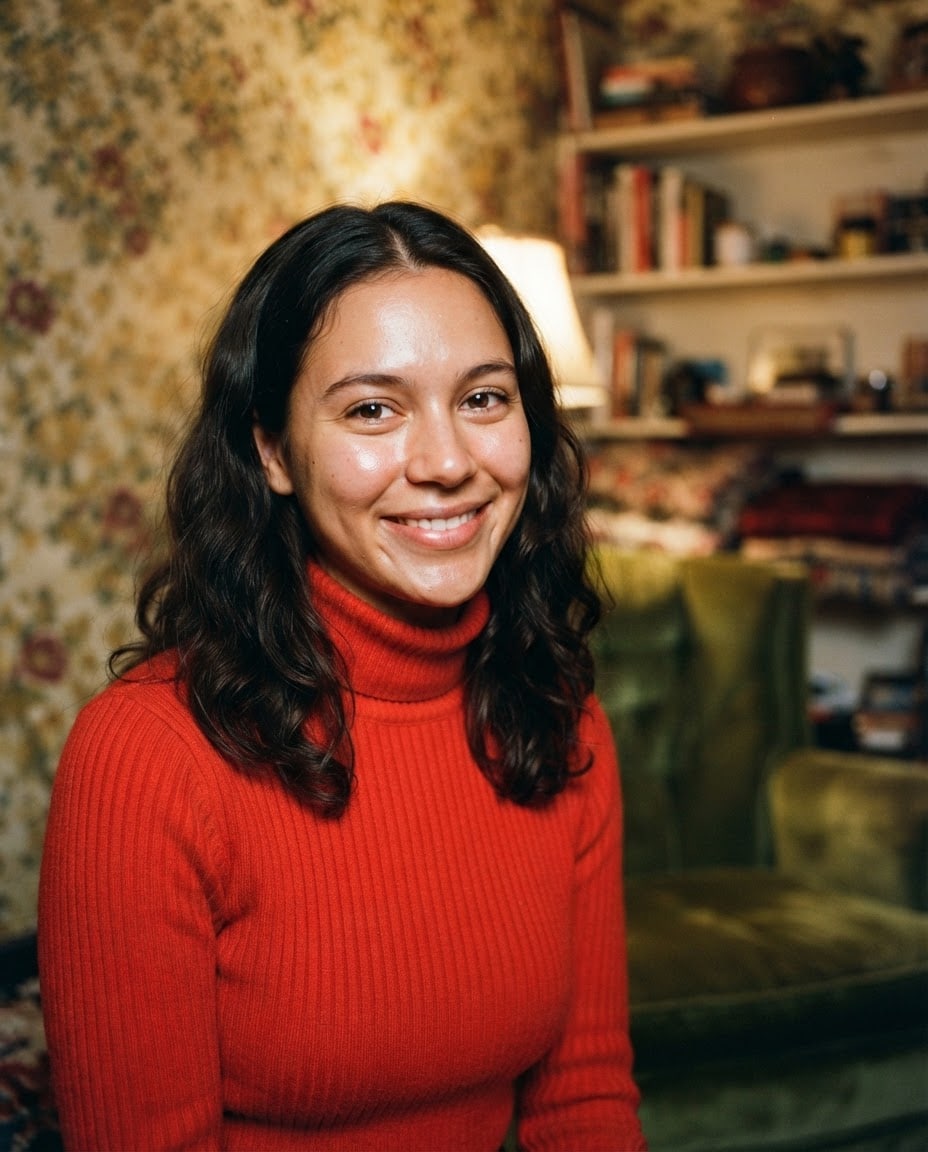
Subjecta young woman with wavy dark hair in a red turtleneck sweater; fictional, the only person in the frame.
Framinghead and shoulders, cropped at the chest; looking at the camera, slight smile.
Settingan old living room with floral wallpaper and a velvet armchair; background softly blurred.
Era and film1990s, warm and slightly faded 35 mm film.
Lightdirect on-camera flash, a slight sheen on the face, warm ambient light behind.
Camera35 mm film camera, 50 mm, eye level.
Stylerealistic analog film photograph, natural skin texture, visible film grain.
Palettethe film colors of the chosen era, mostly warm tones; the outfit color as the most vivid accent.
Compositionface in the upper half, slightly left; the setting visible on the right.
Surfacethe photo itself, edge to edge; the image reaches all four edges.
Textcompletely free of text and numbers.
Aspect ratio 4:5.
Image made with this prompt
9 more ready-to-use prompts
Different takes on the same topic. Copy any of them as is and replace the parts in square brackets.
1.Retro prompt for Gemini: turn your selfie into a 90s film photo
When to use: You want to upload your photo to Gemini and get a 90s film shot where you are still recognizable; this is the most searched use.
Turn the photo I uploaded into an analog film photo taken in the 1990s.
- Identity
- keep my facial features, hair and expression exactly as in the photo.
- Outfit
- [e.g. a cream turtleneck and an oversized denim jacket]
- Setting
- [e.g. an old living room with floral wallpaper]
- Light
- direct on-camera flash, a slight sheen on the face.
- Film
- warm, slightly faded colors, visible film grain, 35 mm.
- Framing
- waist up, eye level.
- Ratio
- [e.g. 4:5]
No text; no date stamp or logo in the corners.
2.Retro prompt for ChatGPT: 80s studio portrait
When to use: You want ChatGPT to restyle your photo as one of those 80s portraits with a colored backdrop and hard flash.
Turn the person in the photo I uploaded into a retro portrait shot in a 1980s photo studio.
- Identity
- keep my face and expression unchanged.
- Hair and outfit
- [e.g. big wavy hair, a bright blue jacket with shoulder pads]
- Backdrop
- [e.g. a plain pastel pink studio backdrop]
- Light
- hard front flash with a visible shadow on the backdrop.
- Film
- saturated color, light grain, soft focus.
- Framing
- head and shoulders, looking at the camera.
- Ratio
- [e.g. 3:4]
3.Retro prompt for couples in Gemini and ChatGPT
When to use: You want a photo of you and your partner rebuilt as a romantic 90s film shot.
Turn the couple photo I uploaded into a romantic film photo taken in the 1990s.
- Identity
- keep both people's facial features, hair and height difference exactly.
- Pose
- [e.g. sitting side by side, shoulders touching, smiling at the camera]
- Setting
- [e.g. a narrow small town street at dusk with warm street lamps]
- Outfits
- [e.g. her in a red dress, him in a white shirt and jeans]
- Light
- direct flash with warm street light behind.
- Film
- warm faded color, film grain, slight motion blur.
- Ratio
- [e.g. 4:5]
No text.
4.Retro prompt for girls: 70s golden hour portrait
When to use: You want your photo turned into a soft, sunlit 70s portrait with flowing hair and warm film tones.
Turn the photo I uploaded into a 1970s film portrait shot at golden hour.
- Identity
- keep my face, hair color and expression exactly.
- Outfit
- [e.g. a flowing floral dress with flared sleeves]
- Setting
- [e.g. a field of tall dry grass with the low sun behind me]
- Light
- warm backlight with a soft glow around the hair.
- Film
- yellowed warm tones, soft grain, gentle lens flare.
- Framing
- waist up, slightly from below.
- Ratio
- [e.g. 4:5]
No text.
5.Retro prompts for men: 70s leather jacket street portrait
When to use: You want a men's retro look: your photo as a 70s street portrait with a leather jacket, wide collar and warm faded film.
Turn the man in the photo I uploaded into a retro street portrait from the 1970s.
- Identity
- keep my face, beard or moustache and hairline unchanged.
- Outfit
- a brown leather jacket, a patterned wide collar shirt, [e.g. sunglasses hooked on the collar]
- Setting
- [e.g. in front of old stone buildings, a blurred bicycle behind]
- Light
- low afternoon sun, warm light on the face.
- Film
- yellowed warm tones, browns and mustard, soft grain.
- Framing
- waist up, slightly low angle.
- Ratio
- [e.g. 4:5]
6.Retro prompt for boys: 90s denim and skate look
When to use: You want a teen or young man's photo turned into a casual 90s shot with denim, a skateboard and point-and-shoot flash.
Turn the boy in the photo I uploaded into a casual film photo from the 1990s.
- Identity
- keep my face and hairstyle exactly as in the photo.
- Outfit
- [e.g. a light blue denim jacket over a plain white tee, baggy jeans]
- Props
- a plain skateboard with no graphics, held under the arm or resting nearby.
- Setting
- [e.g. a quiet parking lot at sunset]
- Light
- direct point-and-shoot flash against warm evening sky.
- Film
- slightly faded color, visible grain.
- Ratio
- [e.g. 4:5]
No text or logos on clothing.
7.Retro saree prompt for Gemini: 90s film star portrait
When to use: You want the viral retro saree look: your photo restyled as a 90s film star portrait with a silk saree and windblown hair.
Turn the woman in the photo I uploaded into a retro portrait with a 1990s film star feel.
- Identity
- keep my face and expression recognizable.
- Outfit
- a [e.g. burgundy] silk saree, white jasmine in the hair, thin gold earrings.
- Pose
- leaning lightly on a wall, head turned to the side, hair blowing in the wind.
- Setting
- [e.g. in front of an old wall in warm light]
- Light
- golden hour light, a soft warm glow on the face.
- Film
- grainy 35 mm, warm and slightly faded color.
- Ratio
- [e.g. 2:3]
No text.
8.80s retro prompt: neon synthwave portrait
When to use: You want yourself, or a new character, in an 80s look lit by pink and purple neon.
Create a retro portrait with a 1980s neon feel.
- Subject
- [if you uploaded a photo: the person in my photo, face unchanged | otherwise: a fictional young woman with short hair]
- Outfit
- a glossy satin bomber jacket.
- Light
- pink neon on one side, purple neon on the other, a two-tone glow on the face.
- Background
- dark, hazy and simple, blurred points of light behind.
- Film
- saturated color, light grain and glow.
- Framing
- head and shoulders.
- Ratio
- [e.g. 9:16]
No text.
9.Retro prompt generator for ChatGPT and Gemini
When to use: You have a retro idea in one sentence and want ChatGPT or Gemini to write detailed prompts for three different decades.
Act as a retro photo prompt writer.
- My idea
- [e.g. a summer day at the beach with friends]
- Write 3 different prompts
- one 1970s, one 1980s, one 1990s.
Each prompt should cover
- Subject and outfit
- Setting
- Light (flash or daylight)
- Film color and grain
- Framing and aspect ratio
Make them ready to paste into an image tool, and do not ask for any text in the image.
What this prompt does
Most people searching for retro prompts want to upload their own photo to Gemini or ChatGPT and get it back as a 70s, 80s or 90s film photo, with grain, direct flash and faded color. The 9 variants below do that for both tools, with versions for girls, men, boys, couples and the retro saree trend, an 80s neon portrait and a prompt generator. The main prompt above needs no photo: it creates a retro film shot from the subject, setting and era you pick.
Where to use it
- Instagram and profile pictures
- The Gemini retro photo trend
- Couple and anniversary posts
- Birthday surprises
- Album and cover art
- Nostalgic family gifts
Fields you can fill in
The fields you can change in the form above and their default values.
- SubjectOne of 5 options
- a young woman with wavy dark hair in a red turtleneck sweater
- SettingOne of 5 options
- an old living room with floral wallpaper and a velvet armchair
- EraOne of 4 options
- 1990s, warm and slightly faded 35 mm film
- Aspect ratioOne of 5 options
- 4:5
Step by step
- 1
Pick the subject and setting
The Subject field holds five fictional people: a young woman in a red turtleneck, a young man in a leather jacket, a woman in a burgundy saree, a man with glasses and a moustache, and a teen in a denim jacket. Setting picks the scene behind them.
- 2
Choose the era
Era changes the film color and mood: the 70s give yellowed warm tones, the 80s saturated color and hard flash, the 90s slightly faded 35 mm film, the 60s pastel color with a vignette. The 80s pair well with the studio, the 70s with the living room.
- 3
Set the ratio, then copy or generate
Use 4:5 for an Instagram post, 1:1 for a profile picture and 9:16 for Stories or a Reels cover. Copy pastes it into Gemini or ChatGPT; Start generates it in Entrobase Canvas.
- 4
Use a variant for your own photo
To make your own photo retro, pick the Gemini or ChatGPT variant below: upload the photo first, then paste the prompt. Swap the bracketed outfit, setting and ratio examples to taste.
- 5
Judge it like a film photo
A good retro result shows film grain, color that is warm or faded for its decade and a slight flash sheen on the face. If it looks too clean and digital, reply in the same chat with 'add more film grain and faded color'.
Tips and variations
- If the result looks too sharp and digital, move 'visible film grain, slightly faded color, direct flash' to the front of the prompt; those three phrases carry most of the retro feel.
- To keep your face, upload a photo where it is sharp and large in the frame and start the prompt with 'keep my facial features exactly'; distant or crowded shots change faces more.
- Let the outfit sell the decade: wide collars and browns for the 70s, shoulder pads and bright colors for the 80s, denim jackets and turtlenecks for the 90s.
- Want an orange date stamp in the corner? Add it afterwards in a photo editing app; AI image tools often garble numbers.
- For a matching set, keep the first result you like and only change the setting or pose in the same chat; the light and film color stay consistent across the series.
Frequently asked questions
How do I use a retro prompt in Gemini?
Upload your photo in the Gemini app, paste the Gemini variant and send it. Gemini's image model (Nano Banana) edits your photo, keeping your face while adding film grain, direct flash and the colors of the decade. If your face drifts, reply with 'keep my facial features exactly as in the photo'.
Is there a retro prompt for ChatGPT?
Yes. Upload a photo in ChatGPT and use the ChatGPT variant to turn it into an 80s studio portrait or another decade. The main prompt, which needs no photo, also creates a brand new retro photo directly in ChatGPT.
What is a good retro prompt for couples?
Upload a photo where both faces are sharp and use the couple variant. It asks the tool to keep both faces, the pose and the closeness between you, and to rebuild the scene as a 90s film photo; change the setting and outfits in the brackets.
Are there retro prompts for men and for boys?
Yes. The men's variant is a 70s street portrait with a leather jacket and wide collar shirt, and the boys' variant is a 90s denim look. Both work with your own photo in Gemini or ChatGPT; in the main prompt you can also pick the man with glasses or the teen.
What is the Gemini retro saree trend?
It is a viral edit where a photo is restyled as a 90s film star portrait: a silk saree, flowers in the hair, warm golden light and grainy film. The retro saree variant on this page recreates that look from your own photo in Gemini or ChatGPT.