3D prompts: 10 ready-to-use prompts for Gemini and ChatGPT
3D prompts for Gemini and ChatGPT: turn your photo into a 1/7 figurine or a boxed action figure, 3D scenes for boys and girls, 3D logos, printable models, interactive 3D and video. 10 prompts.
Prompt
Fill in the fields below and the prompt updates instantly. Copy it and use it in any AI tool.
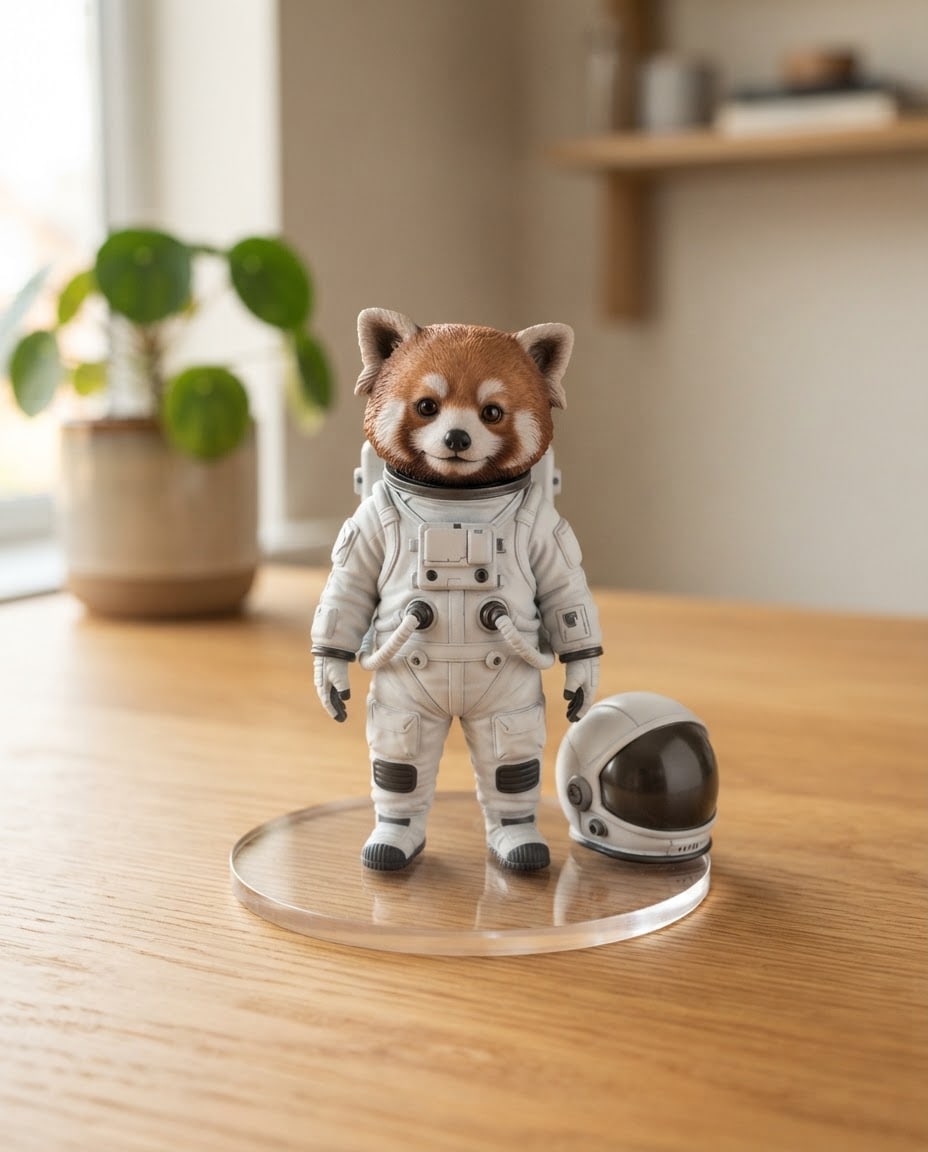
Show a 1/7 scale 3D collectible figurine of a fictional character as a product photo taken in a real setting.
Charactera small red panda in a white, patch-free astronaut suit, helmet beside it, not resembling any known cartoon or game character.
Figurinerealistically painted PVC collectible figure, matte and satin surfaces; fine detail, cute and balanced proportions.
Basea round, clear acrylic base.
Settinga light oak desk with a blurred potted plant and a plain wooden shelf behind.
Lightsoft, diffused light from the left; a short, soft shadow under the figurine.
Cameraslightly from above, 85 mm macro lens, shallow depth of field; the figurine sharp, the background softly blurred.
Stylerealistic product photo; the figurine is a desk-sized miniature object.
Color palettethe figurine's own colors and calm, neutral tones in the setting; the figurine stands out from the background.
Compositionthe figurine on its base in the center, filling about two thirds of the frame height; the frame holds only the figurine, its base and the setting.
Textthe image is completely text-free; the base, figurine, outfit and every surface in the setting are plain and letter-free.
Aspect ratio 4:5.
Image made with this prompt
9 more ready-to-use prompts
Different takes on the same topic. Copy any of them as is and replace the parts in square brackets.
1.3D figurine prompt for Gemini (Nano Banana): a 1/7 scale figure from your photo
When to use: Use it to turn your own photo into a realistic figurine on a desk in Gemini; this is the biggest request behind 3D prompt searches.
Create a 1/7 scale commercialized figurine of the person in my photo, in a realistic style, in a real environment.
- Identity
- keep my facial features, hairstyle, skin tone and outfit recognizable.
- Figurine
- painted PVC, fine detail, standing on a round clear acrylic base with no text.
- Setting
- a computer desk; behind the figurine, a collector's box printed with the figurine's artwork; on the monitor, the 3D modeling view of the figurine.
- Pose
- [e.g. the pose from my photo, or hands in pockets, turned slightly sideways]
- Light
- soft window light from the left, a short shadow under the figurine.
- Camera
- slightly from above, 85 mm, figurine sharp, background softly blurred.
- Aspect ratio
- [e.g. 4:5 for a feed post]
2.ChatGPT 3D action figure prompt: you as a boxed toy with accessories
When to use: Use it in ChatGPT to turn your photo into a toy figure sold in a blister pack, with props that match your job or hobby.
Create a 3D action figure of the person in my photo, displayed in clear plastic blister packaging like a collectible toy.
- Identity
- keep my face, hairstyle and skin tone recognizable; toy proportions.
- Outfit
- [e.g. navy blazer, white T-shirt, jeans]
- Accessories
- in the side compartments, [e.g. a laptop, a coffee cup, headphones, a book]
- Box
- plain [e.g. pastel blue] card backing; the top band shows only the word '[YOUR NAME]' in large white letters.
- Light
- soft studio light from the front, a slight glare on the plastic.
- Framing
- the box straight on, centered, on a plain light gray background.
- Aspect ratio
- [e.g. 4:5]
3.3D prompt for boys: you as an animated film hero in a night city
When to use: Use it when you want a cinematic 3D animated-film portrait of yourself for a profile or post, with a bold city backdrop.
Turn the person in my photo into the hero of a modern 3D animated film.
- Identity
- keep my face shape, hairstyle, skin tone and any glasses or beard recognizable.
- Look
- stylized 3D render, slightly larger eyes, soft skin shading, detailed hair strands.
- Outfit
- [e.g. black bomber jacket, white hoodie, sneakers]
- Scene
- a rainy night street with glowing shop windows and reflections, no readable signs.
- Pose
- [e.g. leaning on a motorbike, looking at the camera with a slight smile]
- Light
- teal and orange city light, a warm rim light on the hair.
- Framing
- from the knees up, me on the right third.
- Aspect ratio
- [e.g. 9:16]
4.3D prompt for girls: a soft pastel room portrait in 3D
When to use: Use it for a cozy, pastel 3D portrait of yourself in a styled room, ideal for an aesthetic profile picture or Story.
Turn the person in my photo into a soft, toy-like 3D character sitting in a cozy pastel bedroom.
- Identity
- keep my face shape, hairstyle and color, skin tone and accessories recognizable.
- Look
- smooth matte 3D render, rounded features, big warm eyes, gentle blush.
- Outfit
- [e.g. oversized cream sweater and a plaid skirt]
- Room
- [e.g. a bed with fluffy pillows, fairy lights, a small plant, a window with soft daylight]
- Pose
- [e.g. sitting cross-legged on the bed, holding a mug of tea]
- Palette
- [e.g. blush pink, cream, sage green]
- Text
- no text or logos anywhere.
- Aspect ratio
- [e.g. 4:5]
5.3D logo prompt for Gemini: your flat logo as a 3D object
When to use: Use it to upload your logo to Gemini or ChatGPT and get a 3D version for a website hero, deck or social post.
Turn the logo I uploaded into a three-dimensional object, keeping its shape and proportions exactly.
- Keep
- do not change the logo's shape, letters or colors; add no new text or elements.
- Material
- [e.g. brushed metal, frosted glass or matte colored plastic]
- Depth
- about 2 cm thick, with a fine bevel on the edges.
- Background
- a plain, single-tone [e.g. deep navy] surface with a soft reflection under the logo.
- Light
- soft studio light from the left and a thin rim light from behind.
- Camera
- straight on or slightly from the side, logo centered.
- Aspect ratio
- [e.g. 16:9]
6.ChatGPT 3D model prompt: printable OpenSCAD code with real dimensions
When to use: Use it when you want ChatGPT or Gemini to give you a model you can 3D print (a pen holder, hook or box), not just a picture.
Write OpenSCAD code for an object I will 3D print.
- Object
- [e.g. a desk pen holder with a hexagon base and three compartments]
- Size
- [e.g. 90 mm tall, 80 mm wide], 2 mm wall thickness.
- Printing
- FDM printer, support-free angles (no overhang beyond 45 degrees), flat bottom.
- Code
- all dimensions defined as variables at the top, each part explained with a comment.
Output
- 1One complete, working OpenSCAD file
- 2Three steps to export it as an STL
- 3Suggested infill and layer height
7.Gemini 3D prompt for an interactive model you can rotate
When to use: Use it in Gemini Canvas when you want an interactive 3D model or scene you can rotate and zoom in the browser, for a class, demo or game idea.
Build an interactive 3D scene in Gemini Canvas that runs in the browser.
- Scene
- [e.g. the solar system with the Sun and eight planets, orbits drawn]
- Interaction
- drag to rotate, scroll to zoom, click an object to show its name and a short fact in a small card.
- Look
- deep navy background, soft lighting, simple but colorful objects.
- Controls
- a pause and play button and a speed slider in the top right.
- Tech
- a single HTML file using three.js, no extra files.
8.ChatGPT 3D animation prompt: an 8-second turntable video
When to use: Use it after you have a figurine or 3D character image, to turn it into a short rotating product video in Sora or Gemini Veo.
Animate the 3D figurine in my image as an 8-second turntable video.
- Subject
- the same figurine, same colors and details, standing on its clear acrylic base.
- Motion
- the base rotates a slow, smooth 360 degrees; the figurine does not move on its own.
- Camera
- fixed, slightly from above, 85 mm look, shallow depth of field.
- Setting
- [e.g. a light oak desk with a blurred bookshelf behind]
- Light
- soft light from the left, a gentle highlight sliding across the figurine as it turns.
- Sound
- quiet room tone, no music or voice.
- Aspect ratio
- [e.g. 9:16]
9.3D prompt generator: get 10 ready 3D image prompts from ChatGPT
When to use: Use it when you want fresh 3D prompt ideas on any theme and prefer to let ChatGPT or Gemini write them in a consistent format.
Act as a 3D image prompt generator.
- Theme
- [e.g. cozy autumn, cute animals, sci-fi gadgets]
Write 10 different 3D image prompts on this theme.
Each prompt has these lines:
- 1Subject: what it is, material and colors
- 2Setting: surface and background
- 3Light: source and direction
- 4Camera: angle and lens
- 5Style: e.g. clay render, glossy vinyl toy, isometric diorama
- 6Aspect ratio
- Rules
- no real people, brands or logos; any text limited to one short word.
What this prompt does
Most people searching for 3D prompts want to upload a photo to Gemini or ChatGPT and see themselves as a 3D collectible figurine on a desk or as a boxed action figure; 3D scenes for boys and girls, 3D logos and printable models come next. The 9 variants below cover these. The main prompt needs no photo: it creates a realistic figurine photo from the character, figurine type and setting you pick.
Where to use it
- The 3D figurine trend on Instagram
- Boxed action figure posts
- Profile pictures and avatars
- 3D logo mockups
- Models for your 3D printer
- Interactive 3D for class or demos
Fields you can fill in
The fields you can change in the form above and their default values.
- CharacterFree text
- a small red panda in a white, patch-free astronaut suit, helmet beside it
- Figurine typeOne of 5 options
- realistically painted PVC collectible figure, matte and satin surfaces
- SettingOne of 4 options
- a light oak desk with a blurred potted plant and a plain wooden shelf behind
- Aspect ratioOne of 5 options
- 4:5
Step by step
- 1
Describe the character like a figurine
In Character, write a species or person type, one outfit and a single accessory: a red panda in an astronaut suit with its helmet beside it. Figurines read best with a few large parts; asking for four or five props shrinks the details and clutters the figure.
- 2
Pick the figurine type for the look you want
PVC collectible gives the most realistic painted result; a vinyl designer toy is simple and glossy, polymer clay feels handmade, gray resin 3D print looks like a prototype and a bronze statuette reads as a trophy or gift.
- 3
Match the setting to where you will post it
Use the oak desk or display cabinet for trend posts, the plain gray studio for product shots and catalogs, and the marble windowsill for a bright feed post. Set 4:5 for a feed post and 9:16 for Stories or Reels.
- 4
Copy it or generate it in Canvas
Press Copy and paste it into Gemini or ChatGPT, or use Generate in Canvas to create it in Entrobase Canvas (account required). For a figurine of yourself, use the Gemini figurine variant below and send your photo with it.
- 5
Check scale and text
Does the figurine look like a small object on the desk, is the base clear, are there stray letters or patches on any surface? If it looks human-sized, add 'desk-sized, a coffee cup beside it for scale' in the same chat.
Tips and variations
- For a figurine of yourself, upload a single-person, well-lit photo that shows your full body from the front; seated or cropped photos throw off the figure's pose.
- If you want a box behind the figurine, keep the text on it to one word; long names and job titles often come out with misspelled letters.
- To compare materials, change only the Figurine type field; PVC and gray resin side by side make a nice 'painted product vs prototype' post.
- For 3D logos and scenes, light from one side ('soft studio light from the left'); light from every direction flattens the depth of the shapes.
- For 3D printing, ask ChatGPT for code, not an image: OpenSCAD code sets dimensions in millimeters, and the free OpenSCAD app exports it as an STL.
Frequently asked questions
What is the viral 3D figurine prompt trend?
It is the viral Gemini (Nano Banana) trend where people upload a photo and get a realistic 1/7 scale figurine of themselves, a couple or a pet on a desk, often with a printed box and a 3D modeling screen behind it. The first variant below is that prompt, ready to paste.
How do I use the 3D figurine prompt in Gemini?
Open the Gemini app, upload a full-body photo, paste the figurine variant and send. If the face drifts, reply in the same chat with 'keep my facial features exactly as in the photo'. The same prompt also works in ChatGPT with image generation turned on.
Can ChatGPT make a 3D model for a 3D printer?
ChatGPT does not hand you an STL file directly, but it can write OpenSCAD code for an object with exact dimensions. The printable model variant asks for the object, sizes and print limits; paste the code into OpenSCAD, preview it and export an STL for your slicer.
Is there a free 3D prompt generator?
Yes. The prompt generator variant turns ChatGPT or Gemini into one: give it a theme and it returns ten 3D prompts with subject, material, light, camera and aspect ratio on separate lines. Both tools have free plans with image generation, with daily limits that vary.
Do these 3D prompts work in Bing Image Creator?
The main prompt and the prompts written by the 3D prompt generator variant are text-only, so they work in Bing Image Creator and other generators. Variants built on your photo, your logo or an existing image need a tool that accepts uploads, such as Gemini or ChatGPT.