Cute cats prompt: realistic AI cat pictures and kitten photos
A cute cats prompt for realistic, text-free AI cat pictures and kitten photos; pick the cat, the scene and the photo style. Works in Gemini, ChatGPT and Entrobase Canvas.
Prompt
Fill in the fields below and the prompt updates instantly. Copy it and use it in any AI tool.
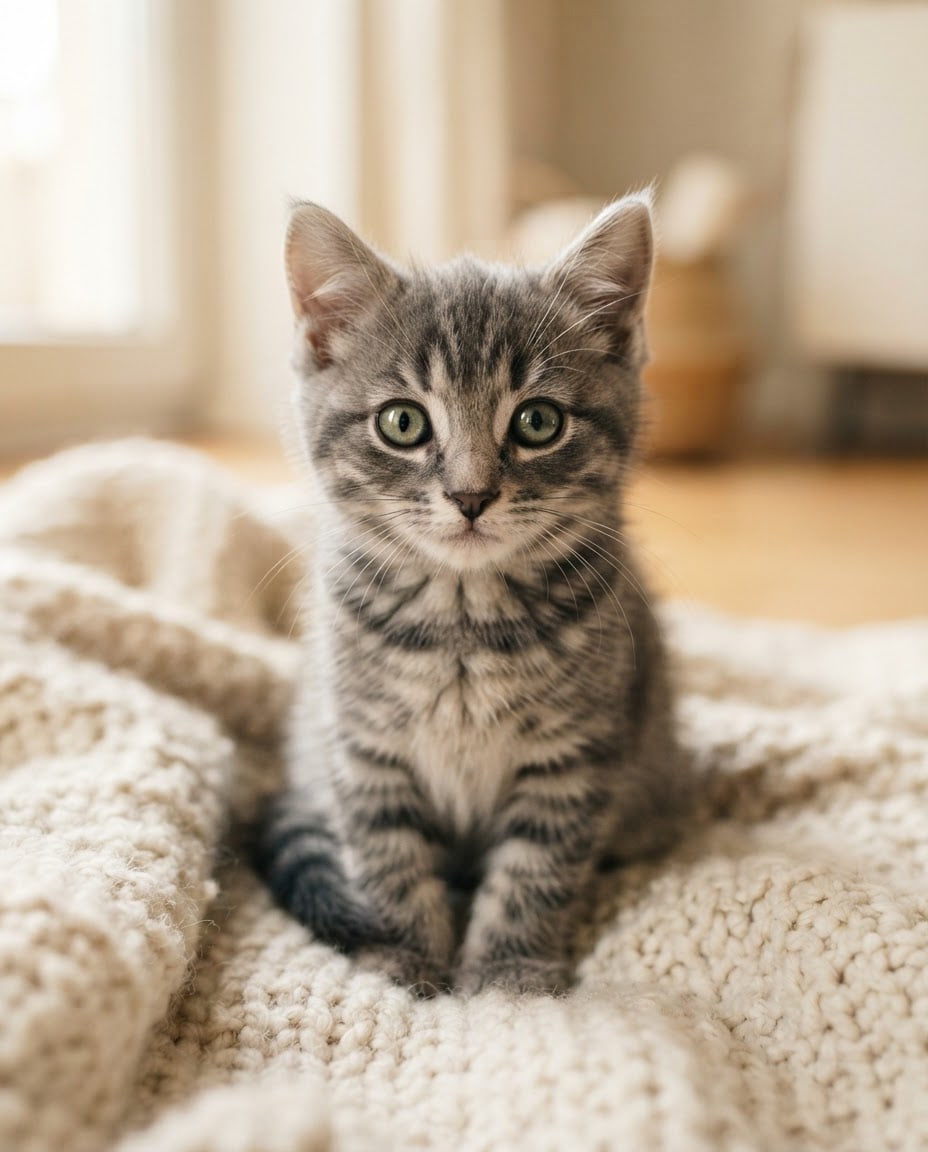
A realistic photo of a cute cat: one single frame, completely free of text. Subject: a gray tabby kitten with big green eyes. Scene: the cat is sitting on a cream knitted blanket, looking straight at the camera with a calm, curious expression. The background is plain and softly blurred. Light: natural light from the side, delicate highlights on the fur and a small catchlight in the eyes. Camera: at the cat's eye level, 85 mm lens feel, shallow depth of field; the eyes and whiskers are sharp and in focus, with individual hairs visible. Style: a natural, warm pet photo with true-to-life colors and fine fur detail. Color palette: a restrained, calm color scheme that matches the cat's coat; the eye color is the most vivid color in the frame. Composition: the cat is in the center of the frame with its eyes on the upper third line and clean, open space around it. Aspect ratio 4:5.
Image made with this prompt
What this prompt does
This prompt creates a realistic, text-free photo of a cute cat looking straight at the camera. The shot is taken at the cat's eye level with an 85 mm lens feel: sharp eyes and whiskers, a soft blurred background, and the eye color as the most vivid color in the frame. It is for social posts, screen backgrounds and pet-themed content.
Where to use it
- Cat photos for Instagram
- Phone or desktop background
- Visuals for a pet shop
- Blog post cover image
- Birthday or greeting cards
- Calendar or poster design
Fields you can fill in
The fields you can change in the form above and their default values.
- CatOne of 5 options
- a gray tabby kitten with big green eyes
- SceneOne of 5 options
- sitting on a cream knitted blanket
- Photo styleOne of 5 options
- a natural, warm pet photo with true-to-life colors and fine fur detail
- Aspect ratioOne of 5 options
- 4:5
Step by step
- 1
Choose the cat
Under Cat, pick the gray tabby kitten, the orange ginger kitten, the black adult cat, the British Shorthair or the white Van cat with odd eyes. Each option sets coat and eye color together, and since the prompt makes the eyes the most vivid color, this choice shapes the whole image.
- 2
Pair the scene with a photo style
Choose a knitted blanket, a sunny windowsill, a garden, a cardboard box or a velvet armchair under Scene, then set the mood with Photo style. A black cat in the dark, moody style makes its yellow eyes stand out; a ginger kitten on the windowsill suits bright and airy.
- 3
Pick the ratio for where you will post
Choose 4:5 for an Instagram feed post, 1:1 for a square post, 9:16 for stories and phone backgrounds, or 16:9 for a desktop. In every ratio the prompt keeps the eyes on the upper third line with clean space around the cat.
- 4
Generate with Start or Copy
Start opens the prompt in Entro Canvas; sign in, set the ratio and style, and generate. To use Gemini or ChatGPT instead, Copy the text and paste it into a chat; running the same settings in two tools makes a quick comparison.
- 5
Look closely at the eyes and paws
Zoom in to check that the eyes are sharp, the pupils match and the whiskers are crisp, and that the paws have no extra or missing toes. The cardboard box scene shows the front paws, so check it more carefully; regenerate if something is off.
Tips and variations
- For a photo that looks like your own cat, rewrite the Subject line after pasting: coat color, pattern, eye color and one distinctive mark (a white spot on the nose, a short tail) in one sentence. The light and camera settings stay the same.
- For a photo series, keep Cat and Photo style fixed and change only Scene; five scenes give you an album of a similar-looking cat in different corners of the house.
- Want the cat playing or asleep instead of looking at the camera? Replace “looking straight at the camera” with an action such as “playing with a ball of yarn”, and keep the request for sharp eyes and whiskers.
- For a calendar or poster, choose 16:9 and ask for the cat on the right third so the left side stays free for text. Do not ask the model to write the text; add it yourself in a design tool afterwards.
Frequently asked questions
How do I make a realistic cat photo with AI?
Realism comes from spelling out the camera and the light: this prompt asks for eye level, an 85 mm lens feel, shallow depth of field, natural side light and a small catchlight in the eyes. Pick the cat, scene and style in the form, then generate with Copy or Start.
Will the Van cat's two eye colors come out right?
The prompt clearly asks for one blue eye and one amber eye, but models do not always get details like this right. If both eyes come out the same color, generate again or move the eye color sentence to the start of the prompt for more weight.
Can I share AI cat pictures on social media?
Usage rights depend on the terms of the tool you generate with, so check them before posting. Because the image looks like a real photo, saying in the caption that it was made with AI keeps your followers from being misled.
Which aspect ratio works on Instagram?
4:5 is a common choice for portrait feed posts; use 1:1 for a square post and 9:16 for stories or a Reels cover. All three are in the Aspect ratio list in the form.