Truth or dare questions prompt: party game app with question cards
A truth or dare questions prompt for a party game app with ready-made truth questions and dares, player turns, scoring and your own questions. Works in the Entrobase mobile app builder.
Prompt
Fill in the fields below and the prompt updates instantly. Copy it and use it in any AI tool.
Build a truth or dare game app called Flip It: friends or family play by passing one phone around; the player whose turn it is picks truth or dare, the app flips a card and points are added when the task is done.
Screens3 tabs in the bottom tab bar (Game, Players, Questions).
Deckfriend groups (teens and adults), funny but never hurtful. Write the ready-made questions and dares for this audience.
Game screen (the core component):
At the top, the current player's name and color, the round number and a small strip with every player's score.
Turn order: players take turns in list order.
Two large buttons: Truth and Dare. When one is picked, the card in the middle opens with a smooth flip animation and the question or dare appears in large type.
An optional 60-second countdown ring on dare cards.
3 buttons under the card: "Done" (1 point for truth, 2 for dare), "Pass" (each player has 2 passes per game, with the remaining passes shown on the button) and "Another card".
No card appears twice in the same game; when the cards run out, the deck is shuffled and starts again.
An "End game" button opens a ranking card: the top 3 players and their points, with a "New game" button below.
Players screen
2-12 players: type a name and add, give each player an automatic color, press and drag to reorder, swipe left to delete.
Each row shows the player's points and remaining passes; a player added mid-game joins from the next round.
Questions screen
Truth and Dare tabs at the top, each with its card count.
An on/off switch next to every card; switched-off cards never come up in the game.
An "Add question" button: pick the type and write the text; added cards stay in the list with a "My questions" label, long-press to edit or delete.
Content
30 truth questions and 30 dares come ready; each one short, a single sentence, in English.
Dares can be done in the room within 1 minute: impressions, singing, dancing, tongue twisters, funny faces, drawing.
Rules
No questions or dares involving alcohol, sexual content, dangerous moves, touching someone or humiliating anyone.
No dares to text, call or post anything from a phone; never ask for personal details such as an address or password.
Designcolorful game cards, rounded corners, big bold headings, a tilted card stack. Accent color #ff4f7b; truth and dare cards use two different tones; follow the phone's light or dark theme; system font; buttons large enough to press easily with a thumb.
Persistencesave players, your own questions, switched-off cards and the scores of the current game with AsyncStorage so the game picks up where it left off after the app is closed.
Do not add an account screen, ads or anything that needs the internet; there is no online multiplayer mode, the game is played on one phone.
Design preview made from this prompt
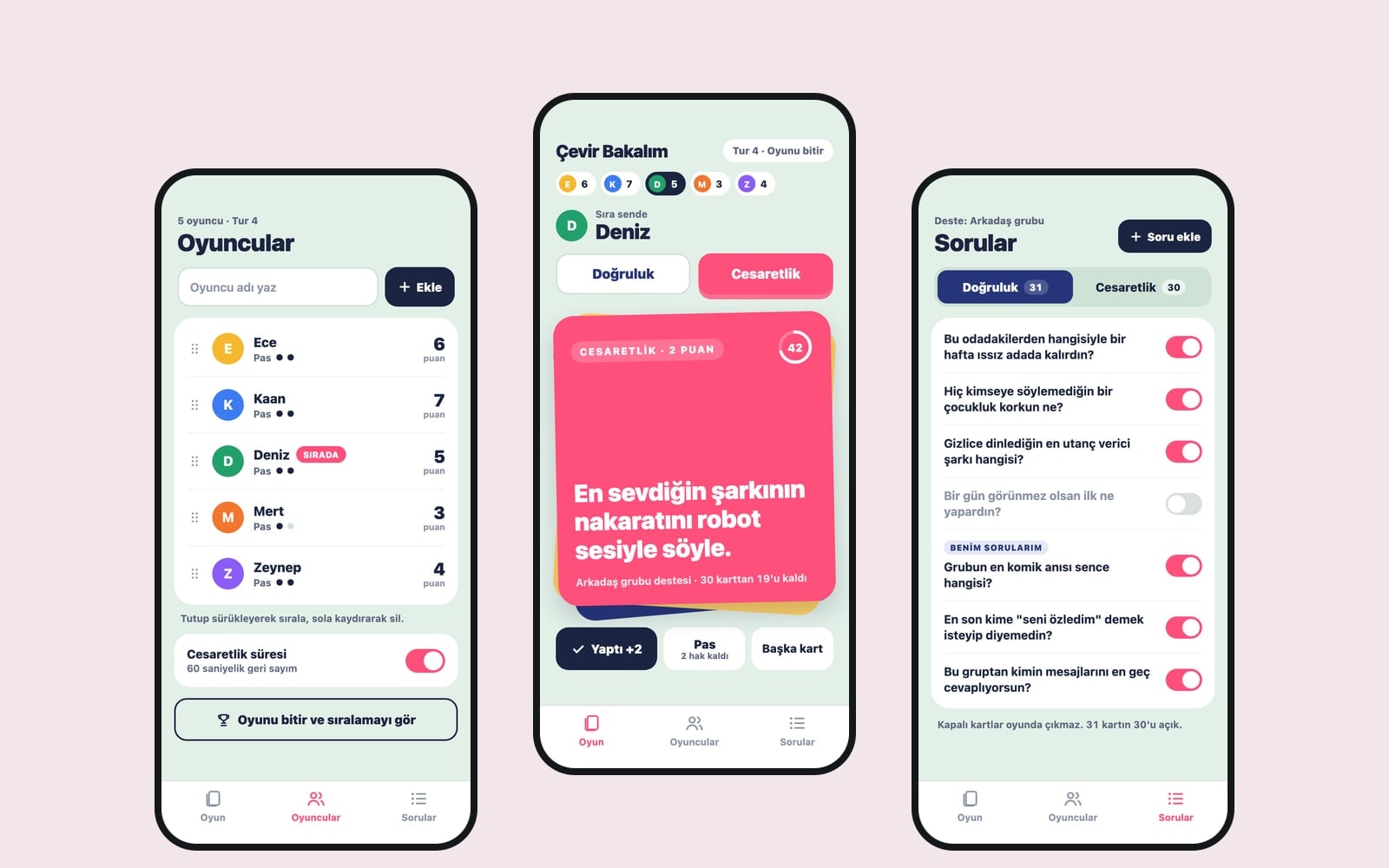
What this prompt does
This prompt builds a 3-screen truth or dare app played on a single phone. The app manages turns, flips a card of the chosen type, times dares, and keeps track of points and passes; it comes with 30 truth questions and 30 dares and lets you add your own. It is made for anyone hosting a house party, birthday, sleepover, camp night or team event.
Where to use it
- House parties and birthdays
- Family game night
- Team building events
- Sleepovers and camping trips
- Classroom activities
Fields you can fill in
The fields you can change in the form above and their default values.
- App nameFree text
- Flip It
- DeckOne of 4 options
- friend groups (teens and adults), funny but never hurtful
- Turn orderOne of 3 options
- players take turns in list order
- StyleOne of 4 options
- colorful game cards, rounded corners, big bold headings, a tilted card stack
- Accent colorColor
- #ff4f7b
Step by step
- 1
Pick the app name and deck
Type the game's name in the App name field. The Deck list decides who the ready-made questions are written for: friend groups, family and kids, the workplace, or classrooms and camps. Pick the group you will play with and the questions get gentler or more active to match.
- 2
Set the turn order and style
In Turn order, choose list order, spinning a bottle on screen or a random pick; spinning the bottle is the most fun with bigger groups. The Style list sets the look of the cards, and the accent color paints the buttons and the dare card.
- 3
Send the prompt to the builder
Use "Copy" to paste the text into ChatGPT, Gemini or Claude, or "Start" to build the app in the Entrobase Builder (a free account is required). The first version should show two large buttons and a card in the middle of the Game screen.
- 4
Play a round and check the score
Add 3-4 names on the Players screen and start the game. "Done" should add 1 point for truth and 2 for dare, the pass count on the "Pass" button should drop each time it is used, and no card should come up twice in one game.
- 5
Review the questions
Read the ready-made cards on the Questions screen; switch off any that do not suit your group and add your own inside jokes with "Add question". Play a few rounds to make sure switched-off cards never appear.
Tips and variations
- With a big group, choose the spinning bottle; seating the players in a circle on screen and stopping the bottle on a name shows everyone whose turn it is.
- To make the game last longer, raise the 30 questions in the prompt to 50; adding more cards later with "Add question" gives a cleaner result than asking for hundreds at once.
- For team events, add the line "Do not keep score, only show the turn and the card" so the game feels like an icebreaker rather than a contest.
- For parties, "Every 5 rounds, show a group dare that everyone does at once" breaks up the game and keeps people waiting for their turn involved.
Frequently asked questions
How do you play truth or dare?
Players take turns choosing truth or dare. With truth they answer the question honestly, with dare they do the task. In this app the app draws the card, points are added when the task is done, and a player who would rather skip can use a pass.
How are the truth or dare questions chosen?
The prompt asks for 30 truth questions and 30 dares written for the deck you pick. Alcohol, sexual content, dangerous moves and humiliating questions are ruled out; you can switch off any card you dislike on the Questions screen.
Is it suitable for kids?
Choose family and kids in the Deck list and the questions are written to be innocent and silly for ages 8 and up. It is still worth skimming the cards on the Questions screen before playing and switching off anything that does not fit.
Does it work offline?
Yes. The game is played on one phone, and the questions and scores are stored on the phone with AsyncStorage. The prompt deliberately leaves out online multiplayer, accounts and anything that needs the internet.
How many people can play?
The app supports 2 to 12 players. The game is most fun with 4 to 8; with bigger groups, the spinning bottle or random turns keep people from getting bored while they wait.