Notepad app prompt: notes app with folders and checklists
A notepad app prompt: a notes app with folders, pinned notes, checklist notes and instant search, 3 screens. Works in the Entrobase mobile app builder.
Prompt
Fill in the fields below and the prompt updates instantly. Copy it and use it in any AI tool.
Build a notepad app called Scribble: the user takes quick notes, sorts them into folders, keeps checklists for shopping or to-dos and finds any note in seconds. 3 screens: 2 tabs in the bottom tab bar (Notes, Folders) and a note editor screen that opens when a note is tapped.
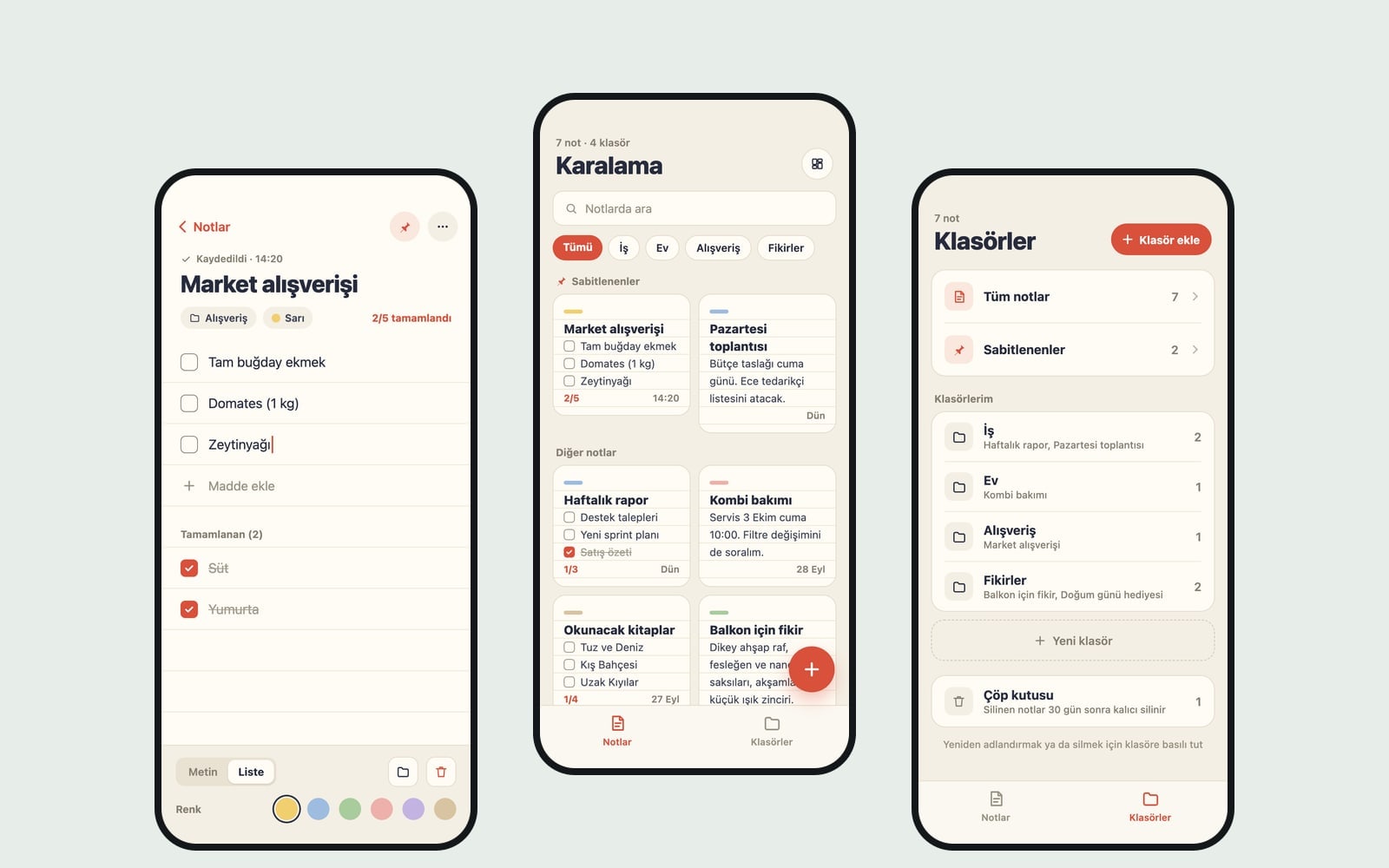
Notes screen (the core component): a search box at the top (searches titles and note text and highlights the matching word), horizontally scrolling folder chips below it (All and each folder), then "Pinned" and "Other notes" sections. Note layout: a two-column grid with note cards of different heights based on content. Each card shows the title, the first 3 lines of text or the first 3 checklist items with progress (2/5), a color label and the last edited time (14:20, yesterday, Sep 12). A round "New note" button sits at the bottom right; holding it also offers "New checklist". Long-pressing a card offers pin, pick a color, move to folder and delete. When a note is deleted, a 5-second "Undo" bar appears at the bottom.
Note editor screena large title field with the note text below it; the toolbar switches between text and checklist and has a color label (6 soft colors), folder picker, pin and delete. In a checklist every item has a checkbox; checked items get a strikethrough and move to the end of the list, and the return key at the end of a line opens a new item. No separate save button: every change is saved instantly and "Saved · 14:20" shows at the top. Leaving with an empty title and empty text creates no note.
Folders screenthe folder list with a note count for each; All notes and Pinned at the top, Trash at the bottom (deleted notes stay for 30 days and can be restored). An "Add folder" button; long-pressing a folder offers rename and delete (when a folder is deleted, its notes stay in All notes). Folders on first launch: Work, Home, Shopping, Ideas.
Contentshort labels; on first launch show 4 sample notes: a shopping checklist, a meeting note, a reading list and an idea note, spread across the matching folders; the user can delete them all. Show simple empty states for an empty folder and a search with no results.
Designa paper notebook feel, warm cream background, ruled cards, ink-toned text. Accent color #d9503b; support light and dark themes; system font, comfortable line spacing, cards large enough to pick easily with a thumb. Save notes, folders, ordering and the selected layout with AsyncStorage so everything is still there after closing and reopening the app. Do not add ads, an account screen, cloud sync or anything that needs the internet; sync can be added later with "Connect Supabase".
Design preview made from this prompt
What this prompt does
This prompt builds a notes app with three screens (Notes, Folders and a note editor) for people who want to jot things down fast, sort notes into folders and keep checklists for shopping or to-dos. It includes instant search, pinned notes, autosave and a trash that keeps notes for 30 days. Everything is stored on the phone, with no account or internet needed.
Where to use it
- Shopping and to-do lists
- Meeting and lecture notes
- Reading list
- Ideas and project scribbles
- Household chores checklist
Fields you can fill in
The fields you can change in the form above and their default values.
- App nameFree text
- Scribble
- Note layoutOne of 3 options
- a two-column grid with note cards of different heights based on content
- Starting foldersFree text
- Work, Home, Shopping, Ideas
- StyleOne of 4 options
- a paper notebook feel, warm cream background, ruled cards, ink-toned text
- Accent colorColor
- #d9503b
Step by step
- 1
Enter the App name and Starting folders
Type folder names separated by commas in Starting folders (for example Work, Home, Shopping, Ideas). The app opens with these folders and four sample notes (a shopping list, a meeting note, a reading list and an idea) spread across them; users can delete them all.
- 2
Choose the Note layout and Style
Note layout sets how cards sit on the main screen: a two-column grid with cards of different heights, a single-column list of wide cards, or compact rows with just the title, first line and date. Style sets the feel: paper notebook, minimal, sticky note board or dark.
- 3
Build the app in Builder
Press Build an app with this and Entrobase Builder reads the prompt, writes the three screens and lets you try the app on your phone (a free account is needed). When you want changes, describe them in the Builder chat. Copy works for other tools too.
- 4
Try notes and checklists
Hold the New note button: a New checklist option should appear. Add a few items and tick one; it should get a strikethrough and move to the end. With no save button, 'Saved' and a time should show at the top, and leaving an empty note should not create one.
- 5
Check search, delete and trash
Type a word in search and the match should be highlighted. Delete a note: a 5-second Undo bar should appear, and the note should show up in Trash on the Folders screen, ready to restore. Close and reopen the app; everything should still be there.
Tips and variations
- For a student version, put subject names in Starting folders (Math, Physics, Literature) and choose the single-column list layout; long lecture notes read better on wide cards.
- The sticky note board style pairs well with the grid layout; since every card has its own pastel color, color labels act as a second way to sort notes alongside folders.
- If the app is mainly for shopping lists, add 'the New note button opens a checklist by default' to the copied prompt so one tap starts a list.
- The dark style with a vivid Accent color (red, orange) keeps buttons visible for late-night notes; the paper notebook style looks more natural with a muted accent like burgundy or ink blue.
- Cloud sync and accounts are left out on purpose. To tell users their notes stay on the phone, ask the Builder chat for a short info line at the bottom of the Folders screen.
Frequently asked questions
Where does the notes app store my notes?
Notes, folders, ordering and the selected layout are saved on the phone itself with AsyncStorage. Everything is still there after you close and reopen the app, but with no cloud sync, notes do not move to another device on their own.
How is a checklist different from a normal note?
The toolbar in the note editor switches between text and checklist. In a checklist every item has a checkbox, ticked items get a strikethrough and move to the end, and the card on the Notes screen shows progress like 2/5.
Can I get a deleted note back?
Yes, in two ways. Right after deleting, a 5-second Undo bar appears at the bottom. After that, the note goes to Trash on the Folders screen and can be restored from there for 30 days.
Does search look inside the notes too?
Yes. The prompt asks for search across both titles and note text, with the matching word highlighted. When nothing matches, a simple empty state appears.
Can I build this notes app with Claude or ChatGPT?
You can Copy the prompt into Claude, ChatGPT or Gemini and they will write the code; running it and installing it on a phone is up to you. Build an app with this has Entrobase Builder write the screens so you can try the app on your phone right away.