Timetable app prompt: class schedule maker and weekly study planner
A timetable app prompt: a class schedule maker with a color-coded weekly schedule, today's classes and a study planner option, 3 screens. Works in the Entrobase mobile app builder.
Prompt
Fill in the fields below and the prompt updates instantly. Copy it and use it in any AI tool.
Build a class timetable app called Recess: the user sets up a weekly class schedule and sees today's classes and the next class at a glance. User: a middle or high school student, 40-minute classes, 08:30 start. 3 screens, 3 tabs in the bottom tab bar: Week, Today, Classes.
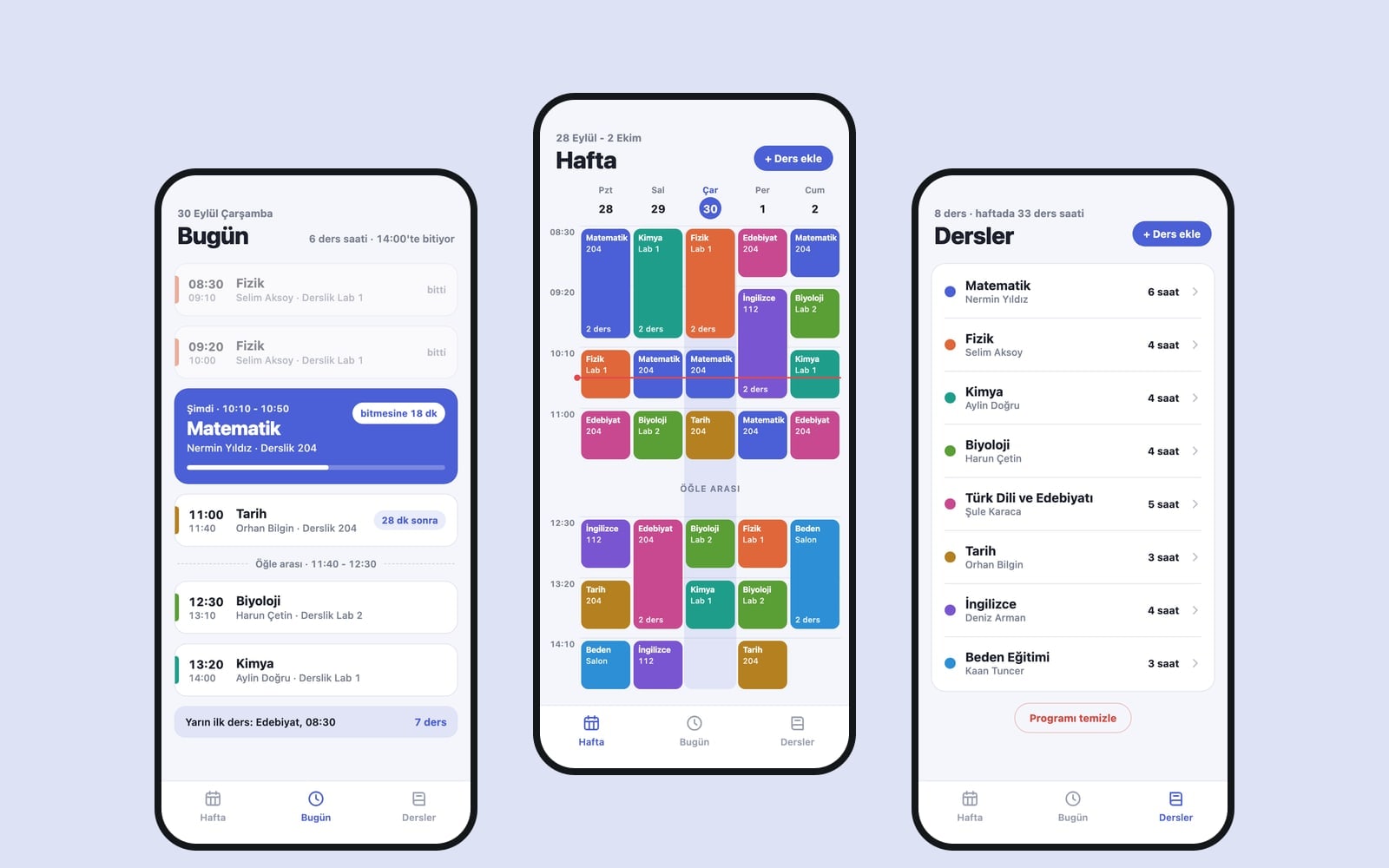
Week screen (the core component): a weekly timetable grid; columns are days (Monday to Friday, 5 days), rows are hours. Each class is a block in the class color whose height follows its start and end time; the block shows the class name and room, and the name shortens in narrow blocks. Today's column is softly highlighted and a thin line marks the current time. Tapping an empty cell opens an "Add class" bottom sheet prefilled with that day and hour: class picker, day, start and end time, room. Tapping a block opens the same sheet for editing, with "Delete" in it. If a new class overlaps another one on the same day and time, warn and do not save.
Today screendate and weekday at the top, then today's classes as cards in time order; the class in progress in the main color with the time left ("18 min left"), the next class with a label like "in 12 min", finished classes dimmed. With no classes, show a "No classes today" empty state and a summary of the next school day.
Classes screenthe class list; each row has a color dot, class name, teacher and total weekly hours. "Add class" takes a name, a teacher and a color from an 8-color palette; tapping a row edits it, swiping left deletes the class and its timetable blocks after a confirmation.
Contenton first launch a realistic sample weekly schedule that fits the user is already there (6-8 classes, real subject names, room numbers, made-up teacher names); labels are short, times in 24-hour format. "Clear schedule" on the Classes screen removes the sample so the user can start from scratch.
Designcolorful and crisp, solid rounded blocks, fine grid lines. Main color #4b5fd6; light and dark theme (dark keeps the same character in dark tones), system font, tabular digits for times. Save classes and the schedule with AsyncStorage so a closed and reopened app shows the same schedule. Do not add notifications, calendar sync or an account screen.
Design preview made from this prompt
What this prompt does
This prompt builds a timetable app with three tabs, Week, Today and Classes: a color-coded weekly schedule grid, today's classes with the next one called out, and a class list with teachers and weekly hours. The Who it is for field shapes it for a school student, a university student, a teacher or someone preparing for an exam, and it opens with a realistic sample week.
Where to use it
- High school weekly timetable
- University classes and free hours
- Teacher schedule by class group
- Exam prep study planner
- App for a tutoring center
Fields you can fill in
The fields you can change in the form above and their default values.
- App nameFree text
- Recess
- Who it is forOne of 4 options
- a middle or high school student, 40-minute classes, 08:30 start
- WeekOne of 3 options
- Monday to Friday, 5 days
- StyleOne of 4 options
- colorful and crisp, solid rounded blocks, fine grid lines
- Main colorColor
- #4b5fd6
Step by step
- 1
Name the app and pick Who it is for
Who it is for changes the sample schedule and class length: 40-minute classes from 08:30 for middle and high school, 50-minute blocks and building-coded rooms for university, class groups like 9-A instead of teacher names for a teacher, and weekly hour goals per subject for exam prep.
- 2
Choose the Week and Style
Week sets how many columns the grid has: Monday to Friday, Monday to Saturday or all 7 days. Style sets the look of the blocks: solid rounded blocks, pale blocks with a thick left stripe, a ruled notebook texture or playful thick outlines.
- 3
Hand the prompt to Builder
Build an app with this takes the text to Entrobase Builder; with a free account it writes the three screens and you can try the app on your phone. Copy puts the same text on your clipboard for ChatGPT, Gemini or Claude.
- 4
Try the Week grid
Tap an empty cell: the Add class sheet should open with the day and hour already filled. Try adding a second class at the same time; the app should warn you and refuse to save. Check that block heights match class length and the current-time line sits in today's column.
- 5
Check Today and saving
The class in progress should show in the main color with the time left, and the next one with a label like 'in 12 min'. Use Clear schedule on the Classes screen, enter your own classes, then close and reopen the app; the schedule should be unchanged.
Tips and variations
- Choosing a student preparing for an exam turns the app into a study planner; set Week to all 7 days and weekend study blocks join the grid.
- In the teacher version, the Classes screen works by class group; if you teach at more than one school, ask the Builder chat to add the school name to the room field.
- Notifications and calendar sync are left out on purpose. If you want a reminder before class, ask for it in the Builder chat once the app works; a simple first version makes bugs easier to spot.
- The notebook style with an ink-blue Main color suits younger students, while the clean stripe style with a neutral color gives university students a more grown-up look.
- Pick a Main color that clearly stands apart from the 8-color class palette so the class in progress jumps out on the Today screen.
Frequently asked questions
How do I add my own classes to the timetable app?
First add each class on the Classes screen with a name, teacher and color. Then tap an empty cell on the Week screen, pick the class and set the start time, end time and room. Clear schedule removes the sample week.
What happens if two classes overlap?
The prompt blocks any class that overlaps another on the same day and time: the app shows a warning and does not save. That keeps blocks from stacking on top of each other in the grid.
Will the app remind me before class?
Not with this prompt; notifications, calendar sync and accounts are left out on purpose. The Today screen shows the next class with a label like 'in 12 min'. You can ask for notifications in the Builder chat once the app is ready.
Does this timetable app suit university students?
Yes. Choose a university student in Who it is for and the sample week comes with 50-minute blocks, free hours and building-coded rooms. Set Week to Monday to Saturday if you have Saturday classes.
Is my schedule lost when I close the app?
No. Classes and the schedule are saved on the phone with AsyncStorage, so they are there when you reopen the app. Nothing goes to the cloud, so the schedule does not move to another phone by itself.