Fuel cost calculator prompt: fuel consumption tracker app with expense dashboard
A fuel cost calculator and fuel consumption calculator app prompt that logs fill-ups and shows average consumption, monthly spend and trip cost. Works in the Entrobase mobile app builder.
Prompt
Fill in the fields below and the prompt updates instantly. Copy it and use it in any AI tool.
Build a fuel cost calculator and fuel tracker app called Tank Log: the driver logs each fill-up in seconds, sees the car's real consumption and fuel spend at a glance and works out the cost of a trip before leaving.
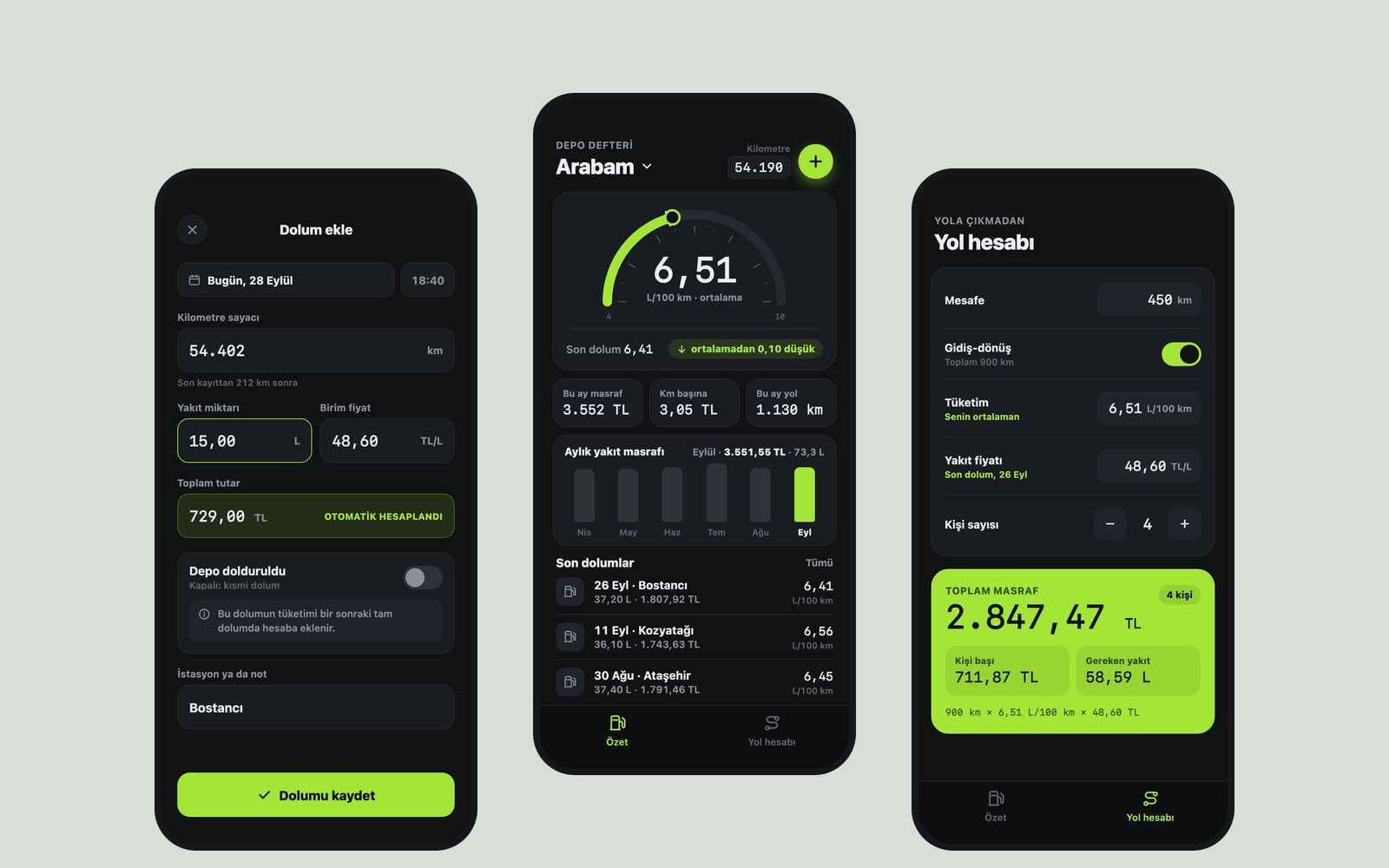
Screens3 screens. 2 tabs in the bottom tab bar (Overview, Trip cost) and an Add fill-up screen opened by the plus button on Overview.
Unitskilometers and liters, consumption in L/100 km. Currency: EUR. Show every calculation, label and chart in these units.
Overview screen (the core component):
At the top, the car name ("My car" on first launch; tap to rename) and the latest odometer reading.
A large gauge card: average consumption; below it the consumption of the last fill-up and how it compares with the average (up or down arrow).
3 small cards: spent on fuel this month, cost per distance unit, distance driven this month.
A simple bar chart: fuel spend for the last 6 months; tapping a bar shows that month's total spend and fuel amount.
Recent fill-ups list: date, station note, fuel amount, cost and that fill-up's consumption; swiping a row left offers edit and delete.
Add fill-up screen
Fields: date (today by default), odometer, fuel amount, unit price and total cost (entering one calculates the other), a "Filled the tank" switch, station or note.
If the odometer is lower than the previous entry, show a warning before saving.
Trip cost screen
Fields: distance, consumption (your own average by default, editable), fuel price (the last fill-up's price by default), a round-trip switch, number of people (1-8).
Result card: fuel needed, total cost and each person's share; values update instantly while typing.
Calculation rules
Use the full-tank method for consumption: the odometer difference between two "Filled the tank" entries and the total fuel bought in that span (partial fill-ups in between and the second full fill-up included, the first full fill-up excluded).
Until there are two full fill-ups, show "One more full fill-up needed to calculate" instead of a consumption figure.
Cost per distance unit: total cost in the calculation divided by total distance driven.
Contenton first launch include 12 sample fill-ups spread over the last 6 months so the chart and cards look full; put a "Delete sample data" link at the bottom of Overview. Short, clear labels and thousands separators in numbers.
Designa car dashboard feel, a half-circle consumption gauge, thin tick marks. Accent color #a3e635; follow the phone's light or dark theme and keep the style in both themes; system font, tabular numbers.
Persistencesave fill-ups, the car name and settings with AsyncStorage so everything is still there after closing and reopening the app.
Rules
Do not fetch live fuel prices or add location, maps or anything that needs the internet.
Do not add an account screen or ads; cloud backup can be added later with "Connect Supabase".
Design preview made from this prompt
What this prompt does
This prompt builds a 3-screen mobile app that logs fill-ups and works out the car's real fuel consumption with the full-tank method. The Overview screen shows average consumption, this month's fuel spend, cost per kilometer and a 6-month chart; the Trip cost screen calculates the fuel cost of a journey and each person's share. It is made for drivers who want to know what their car really burns, friends splitting road trip costs and anyone logging a company car.
Where to use it
- Finding your car's real mileage
- Keeping a monthly fuel budget
- Splitting road trip fuel costs
- Company car fuel log
- Comparing fuel types
Fields you can fill in
The fields you can change in the form above and their default values.
- App nameFree text
- Tank Log
- UnitsOne of 4 options
- kilometers and liters, consumption in L/100 km
- CurrencyFree text
- EUR
- StyleOne of 4 options
- a car dashboard feel, a half-circle consumption gauge, thin tick marks
- Accent colorColor
- #a3e635
Step by step
- 1
Pick the app name and units
Type a name in the App name field. Choose L/100 km, km/L or MPG in the Units list; most of Europe uses L/100 km, while the US and UK use MPG. Enter a short currency code such as EUR, USD or GBP in the Currency field.
- 2
Set the style and accent color
The Style list sets the character of the Overview screen: a car dashboard, clean cards, bold color blocks or a receipt-style fuel logbook. The accent color paints the gauge, the chart and the plus button; bright greens, yellows or oranges read best in dark mode.
- 3
Send the prompt to the builder
Use "Copy" to paste the text into ChatGPT, Gemini or Claude, or "Start" to build the app in the Entrobase Builder (a free account is required). The first version should open with Overview already filled with sample fill-ups.
- 4
Test with your own fill-ups
Delete the sample data and enter two full fill-ups: fill the tank and note the odometer the first time, then fill up again and enter the fuel you bought. Consumption should come from the odometer difference and the second fill-up's amount; with only one fill-up the notice should show.
- 5
Check the trip cost
On the Trip cost screen, work out a 280-mile or 450 km round trip with your average and the last price, then change the number of people. Each person's share should equal the total cost divided by the number of people.
Tips and variations
- Fill the tank completely and turn on "Filled the tank" for accurate figures; partial fill-ups still count, but the average only settles between two full fill-ups.
- If you drive two cars, add the line "Add a car switcher and keep each car's fill-ups separate" to the prompt; tapping the Overview title then switches cars.
- For a dual-fuel car, add "Let each fill-up choose a fuel type and calculate consumption separately for each fuel" to track gasoline and LPG apart.
- For company car expenses, add "Share the selected month's fill-ups as a CSV file"; the file goes out through the phone's share menu to email or messages.
Frequently asked questions
How do you calculate fuel consumption?
Fill the tank and note the odometer. At the next full fill-up, divide the fuel you bought by the distance driven between the two and multiply by 100 for L/100 km, or divide the miles by the gallons for MPG. This app does the same calculation automatically at every full fill-up.
How do I calculate the fuel cost of a trip?
Work out the fuel needed first: divide the distance by your MPG, or divide the kilometers by 100 and multiply by your L/100 km. Then multiply that amount by the price per gallon or liter. Double the distance for a round trip. The Trip cost screen does these steps instantly with your own average and your last fill-up price.
Does the app show live gas prices?
No. The prompt deliberately avoids anything that needs the internet; the price comes from the unit price you enter at each fill-up. The app works offline and the costs it shows are what you actually paid.
Will a partial fill-up make the consumption wrong?
No. Partial fill-ups are saved with "Filled the tank" turned off and are added in at the next full fill-up. Consumption is only calculated between two full fill-ups, with every liter in between counted.
Will I lose my data if I change phones?
Entries are stored on the phone with AsyncStorage, so they survive closing the app but do not move to a new phone on their own. To carry them over, cloud backup can be added later with "Connect Supabase".