Times tables prompt: multiplication chart and times table games site
A times tables website prompt with an interactive multiplication chart, times table games and a mastery map that tracks every fact. Works in Entrobase and other AI website builders.
Prompt
Fill in the fields below and the prompt updates instantly. Copy it and use it in any AI tool.
Build a single-page times tables website called Times Garden. Goal: primary school children explore the multiplication chart, memorize it through short game rounds and see which facts they have mastered. Table range: 1 to 10 (10 × 10 chart).
Sections in ordertop menu (links that scroll to sections), interactive multiplication chart in the hero, practice game, mastery map, memorization tips, FAQ, footer.
Designcheerful and kid-friendly (cream background, navy text, big rounded shapes). Main color #6c4bd8; use it for buttons, selected cells and the progress bar. Typography: rounded, bold, oversized headings; large tabular figures; cards with 16 px corners. Feedback colors are fixed: green for a correct answer, red for a wrong one.
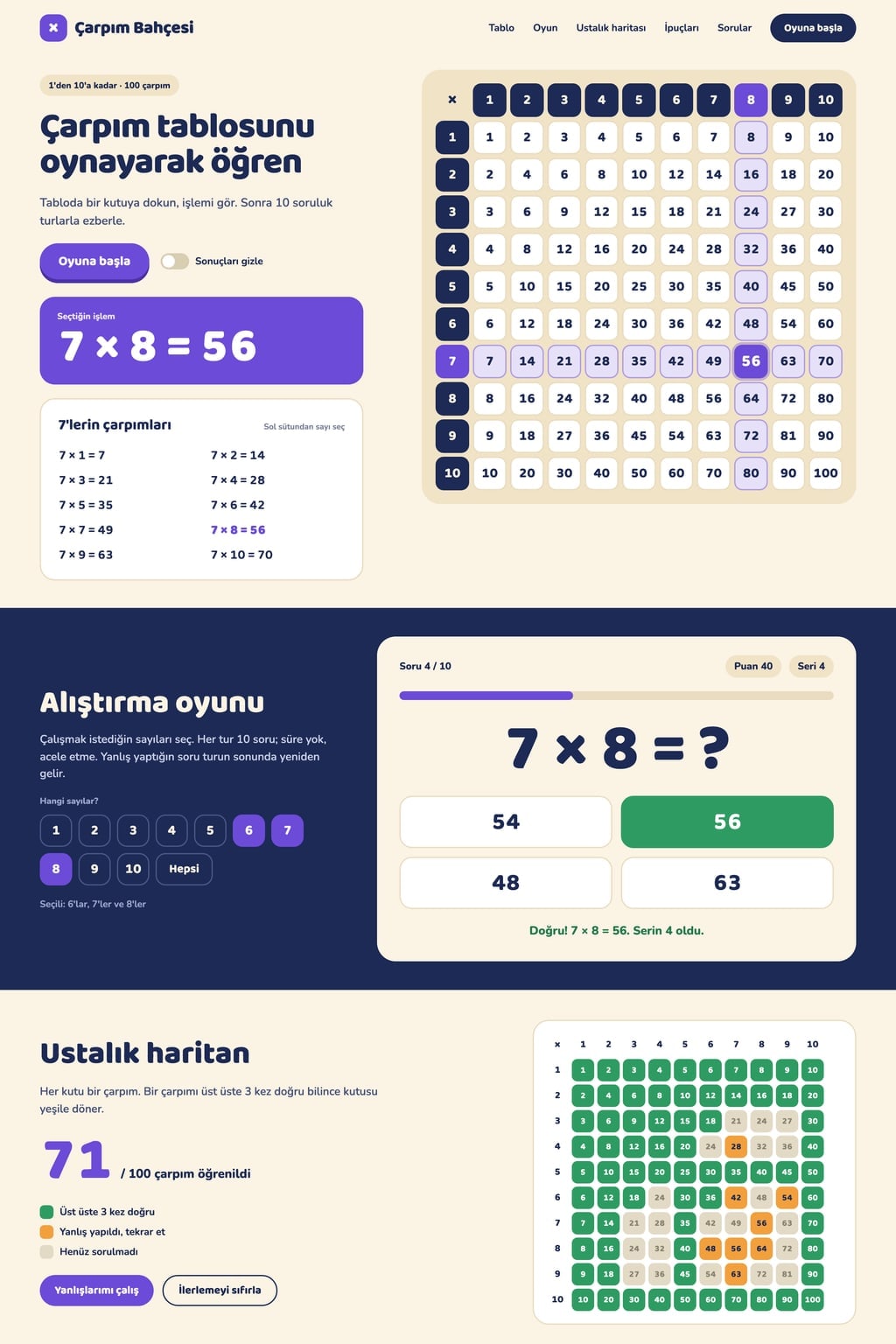
Hero (the core component): a short headline, a one-sentence intro and a "Start the game" button on the left; the multiplication chart grid on the right (the top row and left column are headers). Hovering over or tapping a cell highlights its row and column and shows the equation in large type next to the grid (7 × 8 = 56). Clicking a number in the left column opens that number's table as a vertical list. A "Hide answers" switch empties the cells; the child guesses, then taps a cell to reveal the answer.
Practice gamefirst pick the numbers to practice (multi-select buttons plus "All"), then a 10-question round starts. Answer format: multiple choice with four options (wrong options are nearby products). Give instant feedback on every answer; on a wrong answer show the correct result and add that question back to the end of the round. A question counter, score, streak and progress bar sit on top; there is no time limit. The end screen shows the number correct, time taken, the list of missed facts, and "Play again" and "Practice my mistakes" buttons.
Mastery mapa small version of the same grid; each fact is colored by its history (never asked grey, missed orange, correct 3 times in a row green). Show the number of facts mastered above it. Records are stored in the browser (localStorage) and there is a "Reset progress" button.
Memorization tips5 short cards (swapping the factors gives the same answer, the 5s end in 0 or 5, the 10s add a zero to the number, up to 9 × 10 the digits of the 9s add up to 9, square numbers sit on the diagonal). FAQ: 4 questions in an accordion.
Contentcopy is short and encouraging and speaks directly to the child. No sign-up, no ads, no real brand names. On phones the grid fits the screen; if it does not, it scrolls sideways with the header column pinned; cells are large enough to tap comfortably.
Design preview made from this prompt
What this prompt does
This prompt builds a single-page times tables website for primary school children: an interactive multiplication chart that highlights rows and columns, a 10-question practice game with no time limit, and a mastery map that colors each fact by how well it is known. Progress stays in the browser and no sign-up is needed. It is for parents practicing at home and teachers using it in class.
Where to use it
- Times tables practice at home
- Classroom use on a smart board
- Revisiting missed facts
- Summer math practice
- Going up to 12 or 20
Fields you can fill in
The fields you can change in the form above and their default values.
- Site nameFree text
- Times Garden
- Table rangeOne of 3 options
- 1 to 10 (10 × 10 chart)
- Answer formatOne of 3 options
- multiple choice with four options (wrong options are nearby products)
- ThemeOne of 4 options
- cheerful and kid-friendly (cream background, navy text, big rounded shapes)
- Main colorColor
- #6c4bd8
Step by step
- 1
Set the site name and table range
Fill in Site name and pick a 10 × 10, 12 × 12 or advanced 20 × 20 chart under Table range. The range drives the interactive grid, the game questions and the mastery map; for a child meeting times tables for the first time, start with 10 × 10.
- 2
Choose the answer format
Answer format offers multiple choice with four options, typing the result on an on-screen number pad, or marking a given equation as true or false. In multiple choice the wrong options are nearby products; typing is the tougher test of recall.
- 3
Set the theme and main color
Pick cheerful and kid-friendly, chalkboard feel, squared notebook or dark and playful under Theme; Main color is used for buttons, selected cells and the progress bar. Right answers are always green and wrong ones red, so pick a main color that differs from both.
- 4
Build the site with Start
Start takes the prompt to Entrobase Builder; with a free account, Builder writes the chart, the game and the map on one page. Ask in the chat for anything you want added or changed, such as the FAQ questions.
- 5
Play a round and check the map
Pick a few numbers and finish a round with a couple of deliberate mistakes; the missed questions should come back at the end of the round and appear on the end screen. On the mastery map, those facts should be orange and facts answered right three times in a row green.
Tips and variations
- For class use, ask the Builder chat to start with “Hide answers” switched on: the chart opens empty, and after students call out their guesses you tap a cell to reveal the answer.
- To add division practice, ask the Builder chat for a division mode that flips facts from the same chart (56 ÷ 8 = ?), with a mastery map kept separately for each operation.
- If siblings share a device, their progress mixes into one record; ask the Builder chat for a simple player name picker in the top menu that keeps records per name. No account needed, and records still stay in the browser.
- For older kids who want speed practice, change “there is no time limit” in the prompt to “an optional 60-second round”, and keep the untimed mode as the default for younger children.
Frequently asked questions
What is a good way to memorize times tables?
Short, frequent practice, going back to missed facts and spotting patterns all help. This site puts wrong answers back at the end of the round, quizzes only the gaps with “Practice my mistakes”, and shows patterns like the 5s, 9s and 10s on tip cards.
Will my child's progress be lost?
Progress is kept in the browser's local storage (localStorage), so the mastery map picks up where it left off on the same device and browser. It will not show if browser data is cleared or on another device, and the “Reset progress” button clears it too.
What do the colors on the mastery map mean?
Grey means the fact has not been asked yet, orange means it was missed, and green means it was answered right three times in a row. The number of facts mastered sits above the map so the child can see how far they have come.
Should kids learn times tables up to 12?
It depends on the curriculum: schools in England expect tables up to 12 × 12, while many other countries stop at 10 × 10. The Table range option covers both, plus a 20 × 20 chart for advanced practice.