Calorie counter app prompt: meal tracker app with a daily goal
A calorie counter app prompt: a meal tracker app that logs meals and shows the daily goal as a ring chart, 3 screens. Works in the Entrobase mobile app builder.
Prompt
Fill in the fields below and the prompt updates instantly. Copy it and use it in any AI tool.
Build a calorie counter app called Meal Diary: the user logs meals by hand and sees how much of the daily goal is left. 3 screens, 3 tabs in the bottom tab bar: Today, Add, History.
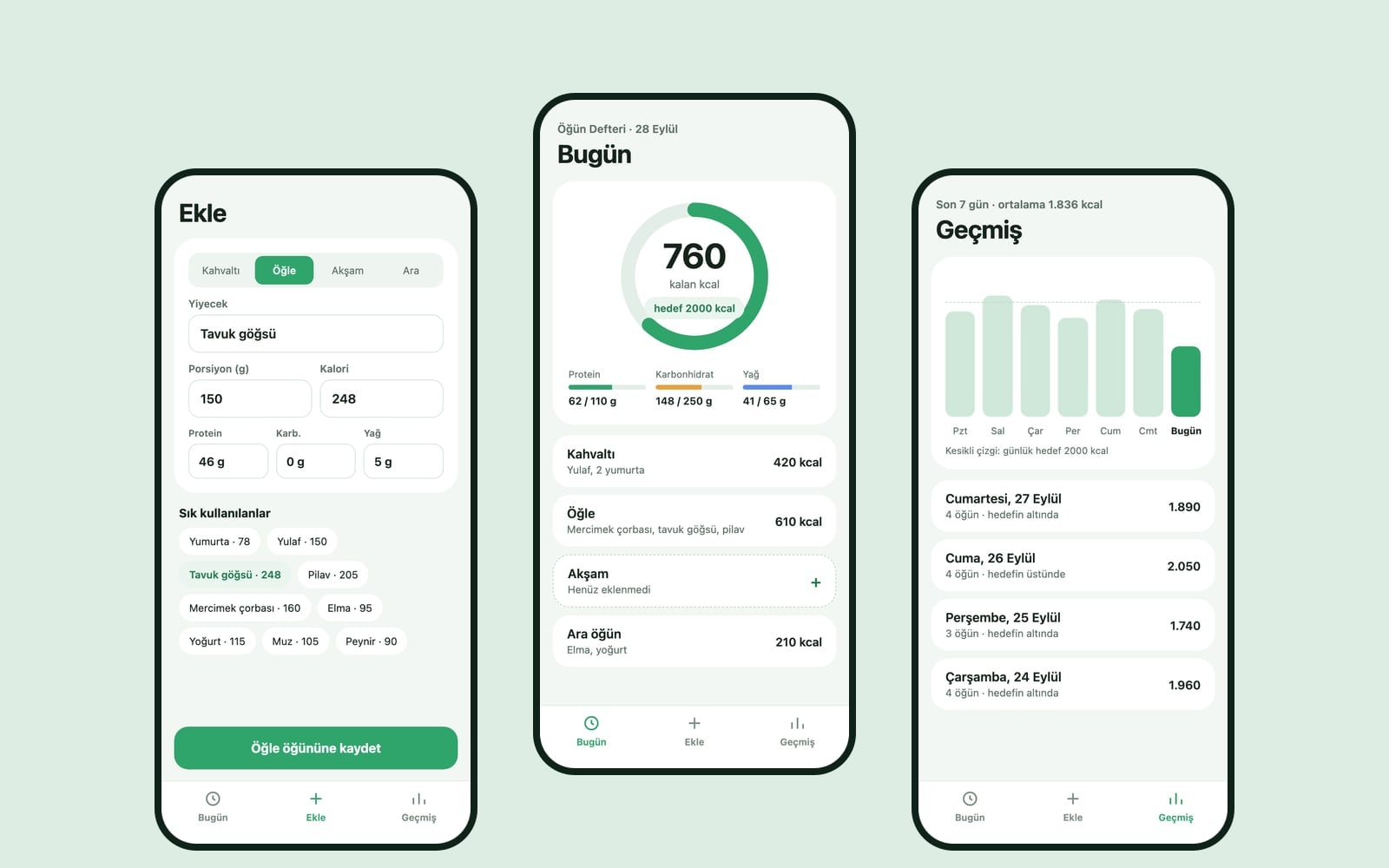
Today screen (the core component): a large ring chart at the top with the remaining calories inside and "goal 2000 kcal" below; tapping the goal lets the user change it. Under the ring, three thin bars for protein, carbs and fat. Then the meal list (Breakfast, Lunch, Dinner, Snacks): each meal shows its foods and total calories; swiping a row left deletes it. With no entries, show a simple empty state and an "Add your first meal" button.
Add screenfields for food name, portion (grams), calories, protein, carbs and fat, plus a meal picker. Below, a ready list of 12 common foods (eggs, oats, chicken breast, rice, lentil soup, apple and so on); tapping one fills the fields. Saving returns to the Today screen.
History screena simple bar chart of the last 7 days and a list of days; tapping a day opens that day's meals in a bottom sheet.
Designsoft and airy, generous spacing and large rounded cards. Main color #2fa56b; light and dark theme, system font. Store entries with AsyncStorage so they stay after the app is closed and reopened. Do not write medical advice, diet plans or weight loss promises in the content.
Design preview made from this prompt
What this prompt does
This prompt builds a 3-screen mobile app where users log meals by hand and see how much of their daily calorie goal is left on a ring chart: Today, Add and History. It suits people tracking their own eating, founders testing an app idea and anyone learning mobile app development. Entries are saved on the phone, so they are still there after the app is closed and reopened.
Where to use it
- Personal meal diary
- Mobile app prototype
- Protein, carbs and fat tracking
- Demo for an app pitch
- Mobile dev learning project
Fields you can fill in
The fields you can change in the form above and their default values.
- App nameFree text
- Meal Diary
- Daily goal (kcal)Free text
- 2000
- StyleOne of 3 options
- soft and airy, generous spacing and large rounded cards
- Main colorColor
- #2fa56b
Step by step
- 1
Fill in the App name and Daily goal (kcal)
The App name shows on launch and in the tab titles. Daily goal (kcal) goes into the "goal ... kcal" line under the ring and is the starting point for remaining calories. Users can tap the goal to change it later, so a round number is fine.
- 2
Choose a Style and Main color
Style picks soft and airy, sporty and energetic, or plain and minimal. The Main color leads the ring chart and the buttons. The app comes with both a light and a dark theme, so choose a mid-tone color that reads well on both.
- 3
Build the app and try it on your phone
"Build an app with this" sends the prompt to the Entrobase Builder, which writes the screens, and you can try the app on your phone (a free account is required). You make changes by describing them in chat.
- 4
Test the core component
Pick a few foods from the ready list on the Add screen and save them, then watch the ring and the protein, carbs and fat bars update on Today. Also try swiping a row left to delete it, tapping the goal to change it and the "Add your first meal" empty state.
- 5
Check that entries are saved
Close the app completely and open it again; entries should still be there thanks to AsyncStorage. On History, check the 7-day bar chart and the bottom sheet that opens when you tap a day. If something is missing, say in chat which screen lacks what.
Tips and variations
- To add water tracking, add a line for the Today screen after copying: "an 8-glass water counter, one glass fills per tap". It stays on the main screen without adding a tab.
- Swap the 12 ready foods for what you actually eat (oatmeal, bagel, chili, Greek yogurt) so the Add screen fills your usual meals in one tap.
- If you do not need macros, remove the protein, carbs and fat parts from the prompt; the Add screen then only asks for name, portion and calories and is quicker to fill.
- The sporty style with an orange or red main color feels like a fitness app, while the soft style with green or blue gives a calmer diary feel.
Frequently asked questions
Does the app calculate calories by itself?
No. Users type in calories and macros or pick from a ready list of 12 foods; the app adds them up and subtracts them from the goal. The ready list values are approximate, so correct them with the nutrition label when needed.
Will this calorie counter app give diet advice?
No. The prompt explicitly says not to write medical advice, diet plans or weight loss promises in the content. The app is only a logging and tracking tool; talk to a health professional to set a nutrition goal.
What should my daily calorie goal be?
It differs from person to person and depends on age, height, weight and activity level. The prompt fills in 2000 by default, but that is not a recommendation; set your own goal with a dietitian or doctor and type it into the Daily goal field.
Can I try the app on my phone?
Yes. An app you build in the Entrobase Builder with "Build an app with this" can be tried on your phone; a free account is required.
Are my meal entries sent to a server?
The prompt asks for entries to be stored on the phone itself with AsyncStorage and does not ask for accounts or cloud sync. If you want sync across devices, you need to describe it in chat separately.