BMI calculator prompt: body mass index and ideal weight calculator website
A BMI calculator website prompt: a body mass index calculator that shows the BMI, its category on a BMI chart and the healthy weight range for your height. Works in Entrobase and other AI website builders.
Prompt
Fill in the fields below and the prompt updates instantly. Copy it and use it in any AI tool.
Build a single-page body mass index (BMI) calculator website for Sage Nutrition. Site type: a dietitian practice site, with a first consultation request form. Goal: a visitor enters their height and weight and instantly sees their BMI, its category and the healthy weight range for their height.
Unitsmetric only, height in cm and weight in kg.
Sections in ordertop menu, calculator in the hero, BMI categories, ideal weight by height table, what BMI does not show, FAQ, call to action, footer.
Designclinic calm (off-white background, pale sage cards, thin lines). Main color #3b3fb6; use it for the result figure, the scale marker and the buttons. Category colors are separate and calm: underweight sky blue, healthy green, overweight amber, obese coral. Typography: a rounded grotesque; large tabular figures for the result. Cards with 20 px corners.
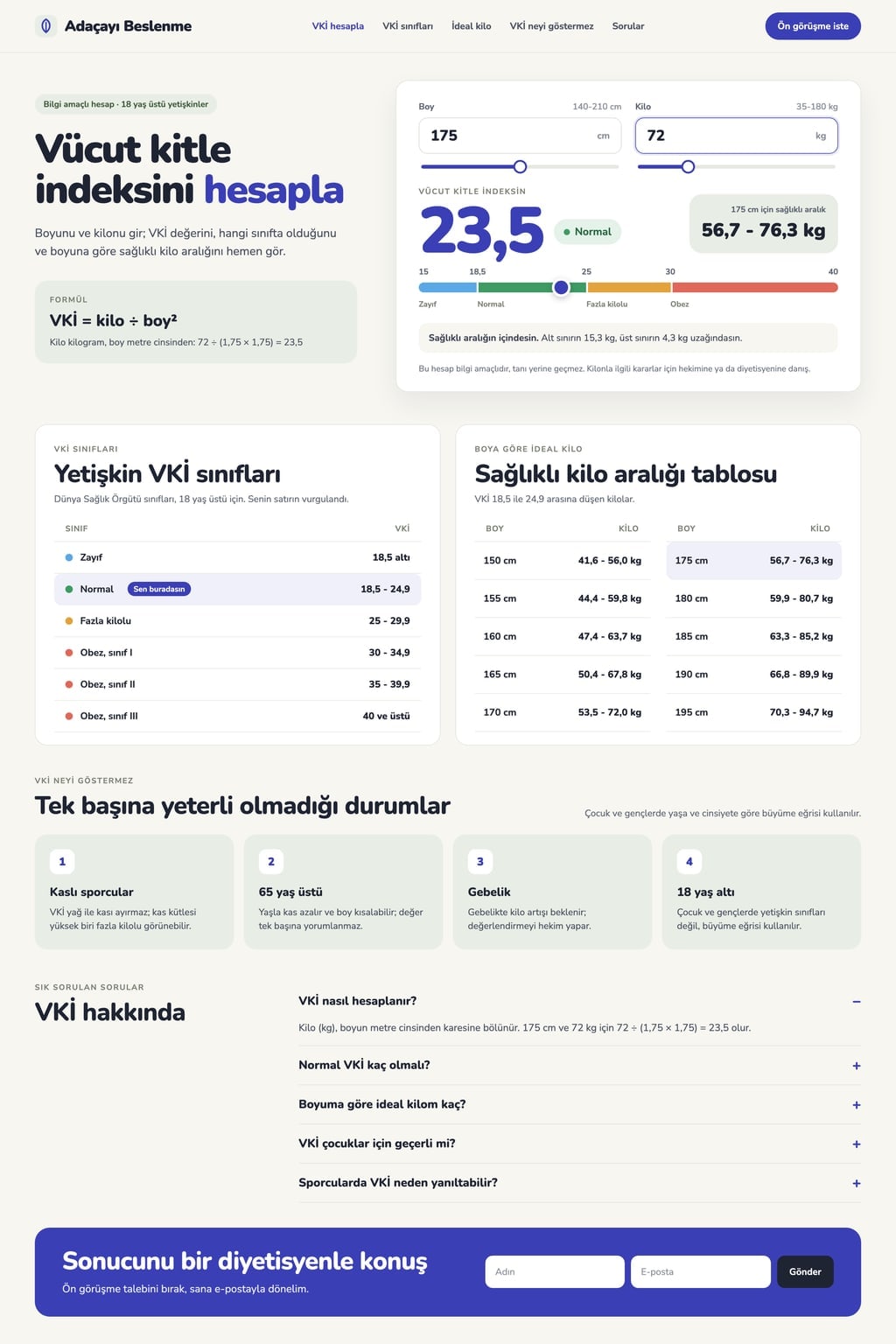
Hero (the core component): a headline ("Calculate your body mass index") and a one-sentence intro on the left, the calculator card on the right.
Height and weight fields, each with a slider below it. The result updates as values change; there is no separate calculate button.
The BMI with one decimal in large type (e.g. 23.5) with a category badge next to it.
A colored horizontal scale from 15 to 40; the marker sits at the value and the 18.5, 25 and 30 thresholds are written above the scale.
Healthy weight range: the weight that gives a BMI between 18.5 and 24.9 for that height (56.7-76.3 kg for 175 cm) and the gap to the range, in neutral wording ("2.1 kg above the range").
BMI categoriesthe World Health Organization adult categories as a table: underweight below 18.5; healthy 18.5-24.9; overweight 25-29.9; obese 30 and above (I: 30-34.9, II: 35-39.9, III: 40 and above). The visitor's row is highlighted.
Ideal weight tablethe healthy weight range from 150 to 195 cm in 5 cm steps; the row closest to the visitor's height is highlighted.
What BMI does not show: explain in 4 short points that BMI alone is not enough for very muscular athletes, people over 65, pregnancy and under 18s; say that children and teens are assessed with growth charts by age and sex. FAQ: 5 questions in an accordion.
Rules
Under every result show this note: "This calculation is for information only and is not a diagnosis. Talk to your doctor or dietitian before making decisions about your weight."
No weight loss promises, prices, client reviews, before and after images or product recommendations.
The form in the call to action (name, email, short message) shows a success message on the page when sent; no data is sent anywhere.
The last height and weight entered stay in the browser (localStorage). Copy in English, plain and calm; no real brand names. On phones the calculator is full width.
Design preview made from this prompt
What this prompt does
This prompt builds a single-page BMI calculator website that works out the body mass index to one decimal as height and weight are entered, shows the result on a colored scale and gives the healthy weight range for that height. The page also has the World Health Organization categories, an ideal weight table from 150 to 195 cm and a section on what BMI cannot tell you. It is made for dietitians, gyms, pharmacies and health information sites.
Where to use it
- Dietitian practice website
- Tool for a gym website
- Pharmacy website
- Health information blog
Fields you can fill in
The fields you can change in the form above and their default values.
- Brand nameFree text
- Sage Nutrition
- Site typeOne of 4 options
- a dietitian practice site, with a first consultation request form
- UnitsOne of 3 options
- metric only, height in cm and weight in kg
- ThemeOne of 4 options
- clinic calm (off-white background, pale sage cards, thin lines)
- Main colorColor
- #3b3fb6
Step by step
- 1
Set the brand name and site type
Brand name appears in the menu, the headline and the footer. Site type sets the call to action: a first consultation form for a dietitian, a trial session form for a gym, a newsletter sign-up for a health guide, a measurement day form for a pharmacy.
- 2
Choose the units
Units sets up the calculator fields: cm and kg only, a switch between metric and imperial, or ft, in and lb first. For US readers pick imperial first; for an international audience the switch works best.
- 3
Pick a theme and color, then send it to the builder
Choose a clinic calm, warm and soft, sporty dark or health magazine look from Theme, and the color of the result figure and the scale marker with Main color. Use "Start" to build it in Entrobase Builder (a free account is required) or "Copy" to paste it into another AI tool.
- 4
Check the math by hand
Enter 175 cm and 72 kg: the BMI should be 23.5 in the healthy category with a healthy range of 56.7-76.3 kg. For 160 cm and 82 kg the BMI should be 32.0, obese (class I). If anything differs, ask the builder to use weight divided by height in metres squared.
- 5
Check the note and the form
Make sure the for information only note sits under every result, that the page has no prices or weight loss promises, and that the call to action form only shows a success message when sent.
Tips and variations
- On a dietitian site, ask for a short box under what BMI does not show that explains how to measure waist size; end it with "talk to your dietitian" instead of printing thresholds.
- On a gym site, choose the sporty dark theme and move the point about muscular athletes to the top, so visitors see at once that BMI is not the only measure.
- To handle under 18s, ask for an age field so the calculator shows a note that children and teens are assessed with growth charts instead of a category.
- In imperial mode the BMI is weight in pounds divided by height in inches squared, multiplied by 703; checking one value by hand confirms the switch works.
Frequently asked questions
How do you calculate BMI?
Body mass index is weight in kilograms divided by height in metres squared. For 175 cm and 72 kg that is 72 ÷ (1.75 × 1.75) = 23.5. The site does this as you type and shows the result to one decimal.
What is a healthy BMI?
The World Health Organization treats 18.5 to 24.9 as the healthy range for adults. Below 18.5 is underweight, 25 to 29.9 is overweight and 30 or more is obese. These categories are for adults over 18 and are not a diagnosis on their own.
What is the ideal weight for my height?
The healthy range is the weight that keeps your BMI between 18.5 and 24.9 for your height. For 175 cm that is about 56.7-76.3 kg. The site's ideal weight table shows the range for every 5 cm from 150 to 195 cm.
Does BMI work for children and teens?
Adult categories are not used under 18. For children and teens the same formula is read against growth charts by age and sex, and a paediatrician makes that assessment.
Why can BMI be misleading for athletes?
BMI does not tell fat from muscle; it only uses height and weight. A very muscular person with low body fat can still land in the overweight category. That is why the site explains the limits of BMI in its own section and points visitors to a doctor or dietitian for decisions.