Word game prompt: daily 5 letter word guessing game
A word game prompt for a daily 5 letter word guessing game in the browser: color hints, on-screen keyboard, streak stats and a share button. Works in Entrobase and other AI website builders.
Prompt
Fill in the fields below and the prompt updates instantly. Copy it and use it in any AI tool.
Build a single-page word guessing game called Letter Hunt that plays in the browser. Goal: visitors find the hidden word in 6 tries and come back to keep their streak going. Word length: 5 letters. Game mode: daily: everyone solves the same word each day, with a countdown to the next.
Sections in ordertop bar, game area, how to play, tips, FAQ, footer.
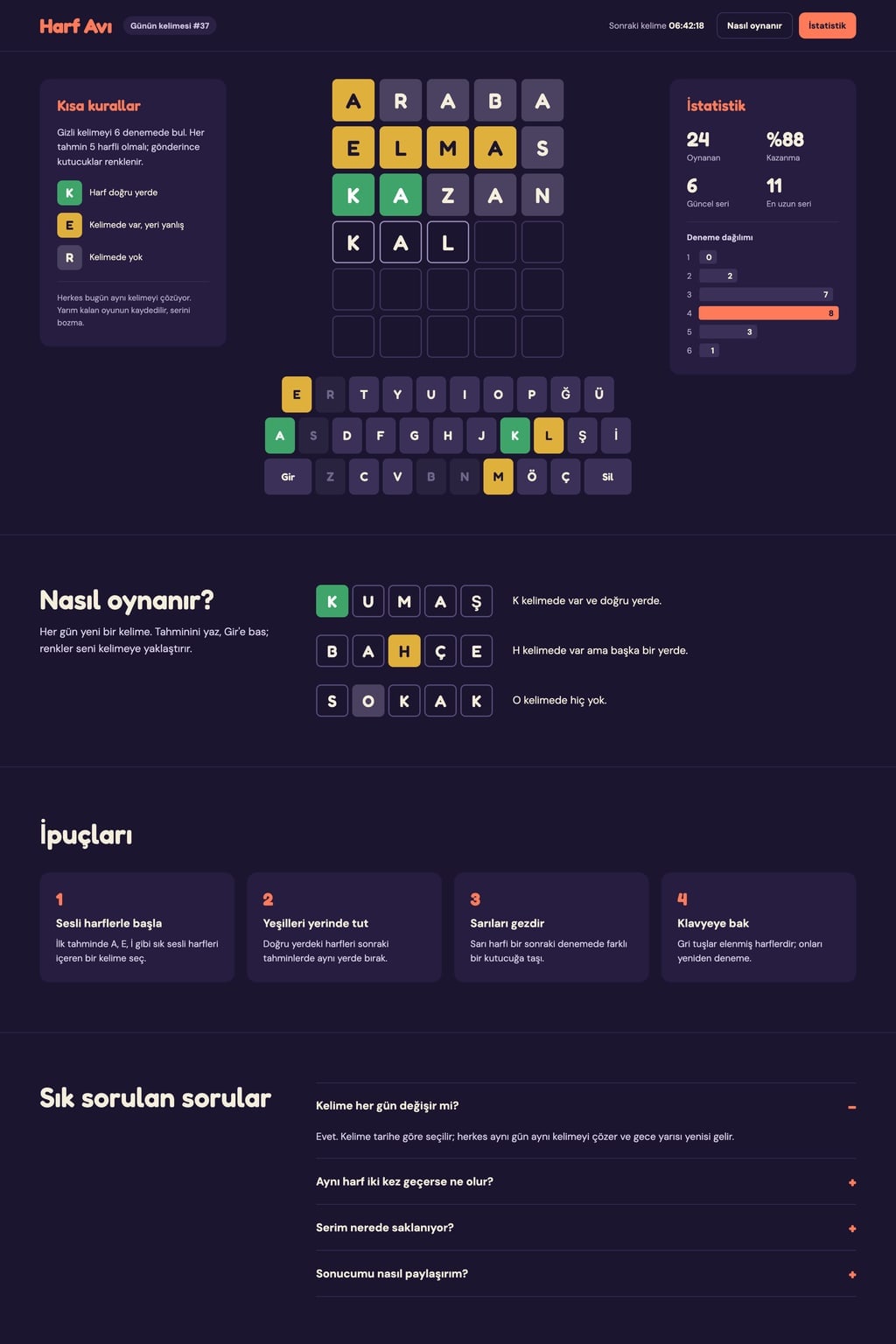
Designdark and playful: night purple background, cream text. Main color #ff7a59; use it for the game name, buttons and modal titles. Tile colors are fixed: green for the right letter in the right spot, yellow for a letter in the word but in the wrong spot, grey for a letter not in the word. Typography: bold, legible headings and tile letters; square tiles with 8 px corners.
Game area (the core component): a 6-row tile grid in the middle (each row has as many tiles as the word has letters) with a three-row on-screen keyboard below: Q W E R T Y U I O P / A S D F G H J K L / Enter Z X C V B N M Delete. The physical keyboard works too. On desktop a short rules card sits to the left of the grid and a stats card to the right; on phones these cards become modals opened from buttons in the top bar and the keyboard fits the screen width.
Rules
a row submitted with missing letters shakes and shows a short notice.
The tiles of a submitted row flip one by one to reveal their colors; if a guess repeats a letter that appears once in the word, only one of them is colored (exact matches first, then left to right).
Keyboard keys show the strongest state found for that letter.
Word listat least 150 common English words for answers (no proper nouns, no slang). Do not check guesses against a dictionary; any entry of the right length is accepted.
Endingon a win the tiles bounce in turn and a result modal opens with the number of tries and a "Share result" button (copies a grid of colored square emoji without the letters to the clipboard and says "Copied"). On a loss the word is revealed.
Statsgames played, win rate, current streak, longest streak and horizontal bars for the 1-6 guess distribution; everything is stored in the browser (localStorage) so a half-played game survives a page refresh.
Lower sectionshow to play (3 example rows explaining the colors), 4 short tips, a 4-question FAQ accordion.
Contentinterface copy is short and friendly; do not use real game or brand names.
Design preview made from this prompt
What this prompt does
This prompt builds a single-page word guessing game that plays in the browser: players find a hidden word in 6 tries while the tiles turn green, yellow or gray as hints. An on-screen keyboard, streak stats and a share button that hides the letters come built in. It suits anyone launching a word game site, teachers and brands that want a small daily game of their own.
Where to use it
- Daily word game site
- Classroom vocabulary activity
- Fun corner on a brand site
- Streak contest among friends
- Game dev learning project
Fields you can fill in
The fields you can change in the form above and their default values.
- Game nameFree text
- Letter Hunt
- Word lengthOne of 3 options
- 5 letters
- Game modeOne of 3 options
- daily: everyone solves the same word each day, with a countdown to the next
- ThemeOne of 3 options
- dark and playful: night purple background, cream text
- Main colorColor
- #ff7a59
Step by step
- 1
Choose the Game name and Word length
The Game name shows in the top bar and in shared results. Word length can be 4, 5 or 6 letters, and the tile grid and answer list follow it. Five letters is the familiar difficulty; four is easier for kids.
- 2
Pick the Game mode
Daily mode gives everyone the same word each day with a countdown to the next, unlimited shows a "New word" button after each game, and against the clock gives 3 minutes per word. If you want players to come back every day, choose daily.
- 3
Set the Theme and Main color, then build
Theme sets a night purple, paper cream or sky blue background. Tile colors are fixed, so choose a Main color that stands apart from green and yellow. Then press "Build a site with this" to build it in the Entrobase Builder (a free account is required) or "Copy" it into another tool.
- 4
Test the repeated letter rule
Repeated letters are where games like this usually go wrong. Guess a word that uses a letter twice when the answer has it once; only one tile should be colored, with the exact match turning green first. Also submit a short row and check that it shakes.
- 5
Test the keyboard and saved progress
Type with your physical keyboard as well as the on-screen one. Refresh the page mid-game; the half-played game and the stats (streak, win rate, 1-6 guess distribution) should survive thanks to localStorage. The grid copied by "Share result" should contain no letters.
Tips and variations
- To use your own word list, paste 150 words in chat and ask for answers to come only from that list; you can build a themed game around a city, a brand or a school topic.
- For a classroom, set Word length to 4, choose unlimited mode and add "words should be at an elementary school level" to the copied text.
- To change the timer in against the clock mode, edit "3 minutes" in the text; 90 seconds makes the game tense, 5 minutes makes it relaxed.
- For color-blind players, add "a high-contrast option: orange instead of green, blue instead of yellow"; tile colors are fixed in the prompt, so you need to ask for this separately.
Frequently asked questions
Are guesses checked against a dictionary?
No. The prompt does not ask for a dictionary check, so any entry of the right length is accepted. That keeps the game simple; if you want validation, ask in chat to add it with a separate list of allowed words.
How many words does the game have?
The prompt asks for at least 150 common English words as answers, with no proper nouns or slang. In daily mode that is about five months of words; ask in chat to grow the list if you want it to last longer.
Does sharing a result give away the word?
No. "Share result" copies only a grid of colored square emoji to the clipboard, without letters, so friends who play later that day do not see the answer.
Can I make the word game in another language?
The English version comes with a QWERTY keyboard and English words. For another language, change the keyboard rows and the word list in the copied text, and make sure any accented letters are on the on-screen keyboard too.
Can I publish it under a famous word game's name?
The prompt says not to use real game or brand names. Put your own name in the Game name field; borrowing a well-known game's name or look can lead to trademark trouble.