Text Effect Prompts: 7 Prompts for ChatGPT and Gemini (2026)
7 text effect prompts: gold, chrome, ice, fire, lava and glass text effect images; works in ChatGPT, Gemini and Entrobase Canvas.
Tested: EntroGen Flash, November 2026
Prompt
Fill in the fields below and the prompt updates instantly. Copy it and use it in any AI tool.
Create an image of a short word with a strong text effect applied.
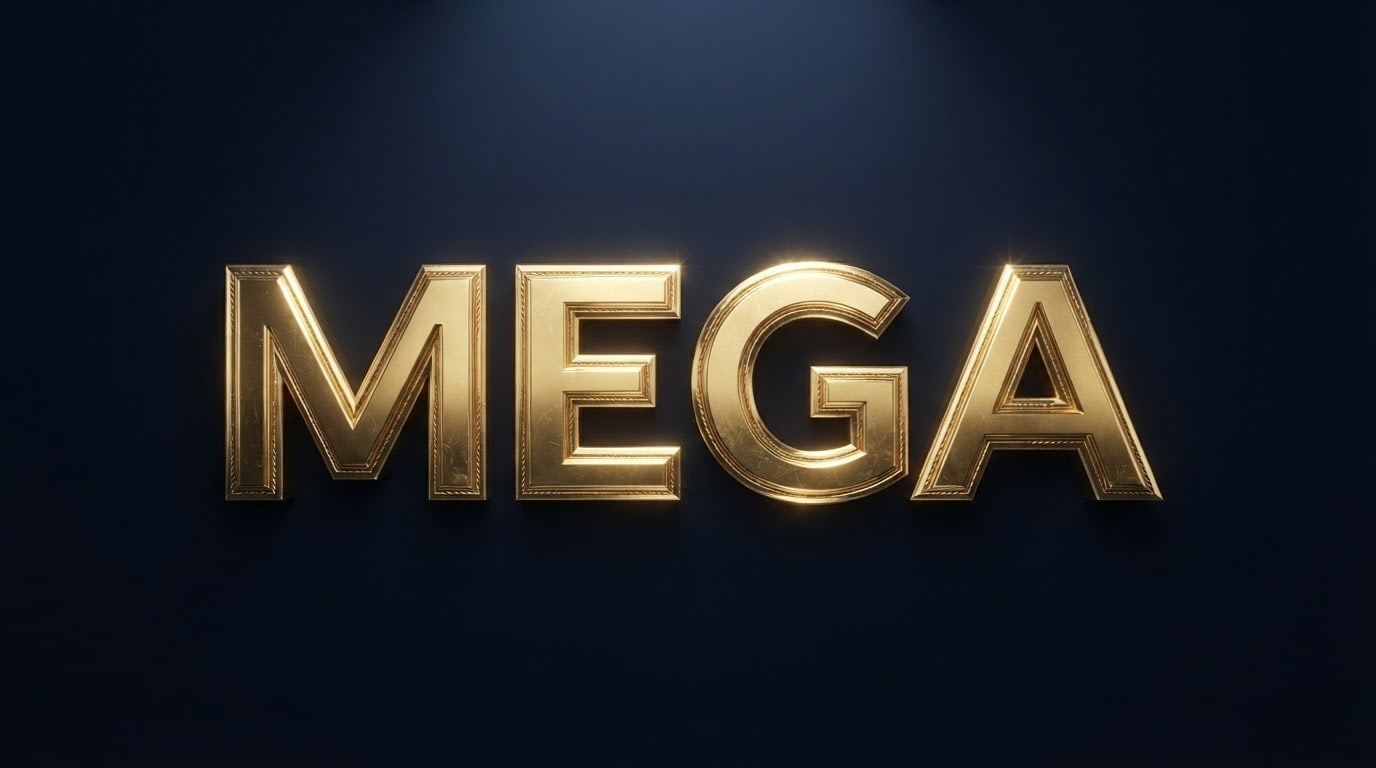
Text"MEGA", one line, bold and wide letters, every letter complete and in the right order.
Effectpolished shiny gold with fine engraved lines on the edges.
Backgroundflat, dark navy; a very faint glow around the letters matching the effect color.
Lighta hard spotlight from above, sharp highlights and reflections along the letter edges.
Camerastraight front, 85 mm feel, letters sharp.
Stylea high-detail 3D text effect render, letters with slightly beveled edges.
Palettetwo tones of the effect, the dark background and white highlights.
Compositionthe word dead center, about two thirds of the image width, equal space around it.
Rulesno letters, numbers or marks other than the given text.
Aspect ratio 16:9.
Image made with this prompt
6 more ready-to-use prompts
Different takes on the same topic. Copy any of them as is and replace the parts in square brackets.
1.Golden text effect prompt
When to use: When you want a luxury opening, anniversary or award graphic.
Create an image with a golden 3D text effect.
- Text
- "[e.g. VIP]".
- Effect
- shiny gold with small diamond-like stones along the edges.
- Background
- black velvet with gold dust floating around.
Rules
- Only the given text.
- Ratio
- 16:9
2.Neon text effect prompt
When to use: When you want a club, stream or event title.
Create an image with a neon text effect.
- Text
- "[e.g. LIVE]".
- Effect
- cyan and pink neon with light glowing inside the tubes.
- Background
- dark wet asphalt reflecting the neon.
Rules
- Only the given text.
- Ratio
- 16:9
3.Glass text effect prompt
When to use: When you want a modern headline for tech or a minimal brand.
Create an image with a glass text effect.
- Text
- "[e.g. NEXT]".
- Effect
- frosted, translucent glass; colored lights behind refract through it.
- Background
- dark purple with soft colored light spots.
Rules
- Only the given text.
- Ratio
- 1:1
4.Carved wood text effect prompt
When to use: When you want a headline for a natural, handmade product or a cafe.
Create an image with a carved wood text effect.
- Text
- "[e.g. FOREST]".
- Effect
- letters carved deep into dark walnut, light wood showing in the cuts.
- Light
- warm side light with strong shadows in the cuts.
Rules
- Only the given text.
- Ratio
- 16:9
5.Text effect prompt for ChatGPT: photo inside letters
When to use: When you want a landscape or photo showing through the letters.
Create a text image whose letters are filled with a photo.
- Text
- "[e.g. SUMMER]", very bold letters.
- Inside the letters
- a photo of [e.g. a turquoise sea and beach].
- Background
- flat white with a light shadow under the letters.
Rules
- Only the given text.
- Ratio
- 16:9
6.Text effect prompt for Gemini on your logo
When to use: When you want an effect on your own logo or lettering.
Apply an effect to the lettering in my uploaded logo.
- Keep
- the shape and arrangement of the letters.
- Effect
- [e.g. polished gold with slightly beveled edges].
- Background
- flat navy.
Rules
- Add no new text.
- Ratio
- 1:1
What this prompt does
If you want a word with a striking effect such as gold, chrome, ice or fire, the main prompt renders a short word on a dark background under a hard spotlight as a 3D text effect with glinting edges. The 6 variants below cover golden 3D text, neon, glass, carved wood, a photo inside the letters and an effect on your own logo in ChatGPT and Gemini.
Where to use it
- YouTube thumbnail and cover
- Sale and campaign graphic
- Game and stream title
- Event poster headline
Fields you can fill in
The fields you can change in the form above and their default values.
- TextFree text
- MEGA
- EffectOne of 5 options
- polished shiny gold with fine engraved lines on the edges
- BackgroundOne of 3 options
- navy
- RatioOne of 3 options
- 16:9
Step by step
- 1
Pick a short, bold word
Write a word of 3-6 letters in the Text field. Effects look best on bold letters; thin or long words lose the detail.
- 2
Pair the effect with the background
Gold shines on navy or burgundy, chrome and ice on black, fire and lava on black.
- 3
Check the letters
Make sure every letter is complete. An effect can eat part of a letter; if so, calm it down (e.g. 'flames only along the top edge of the letters').
Tips and variations
- Accented capitals break more often with heavy effects; start with words that avoid them.
- For a YouTube thumbnail pick 16:9 and shift the word slightly left, leaving room on the right for a face or product.
- To apply an effect to your own logo or lettering, upload it with the Gemini variant below.
Frequently asked questions
How do I write a text effect prompt for ChatGPT?
Put the word in quotes, then the effect, background, light and camera on separate lines. 'Slightly beveled letters' and 'hard spotlight' make the effect stand out.
What is a golden text effect prompt?
It makes the text look like polished gold. The main prompt's Effect option defaults to gold; for a richer result use the golden 3D variant below.
Do these text effects come as Photoshop layers?
No, they come as a single image (JPG or PNG). For a layered file you need to rebuild the effect in a design program.
Can I apply a text effect to a long sentence?
Image models misspell long text. Apply the effect to one word and add the rest of the sentence as plain text in a design tool.





