Sudoku game prompt: daily sudoku puzzle app with hints and notes
A sudoku game app prompt with a daily sudoku puzzle, four difficulty levels, pencil notes, hints and stats, 3 screens. Works in the Entrobase mobile app builder.
Prompt
Fill in the fields below and the prompt updates instantly. Copy it and use it in any AI tool.
Build a sudoku game app called Nine Squares: the user plays sudoku on the phone, solves a new daily puzzle every day and tracks progress. 3 screens, 3 tabs in the bottom tab bar: Play, Daily, Stats.
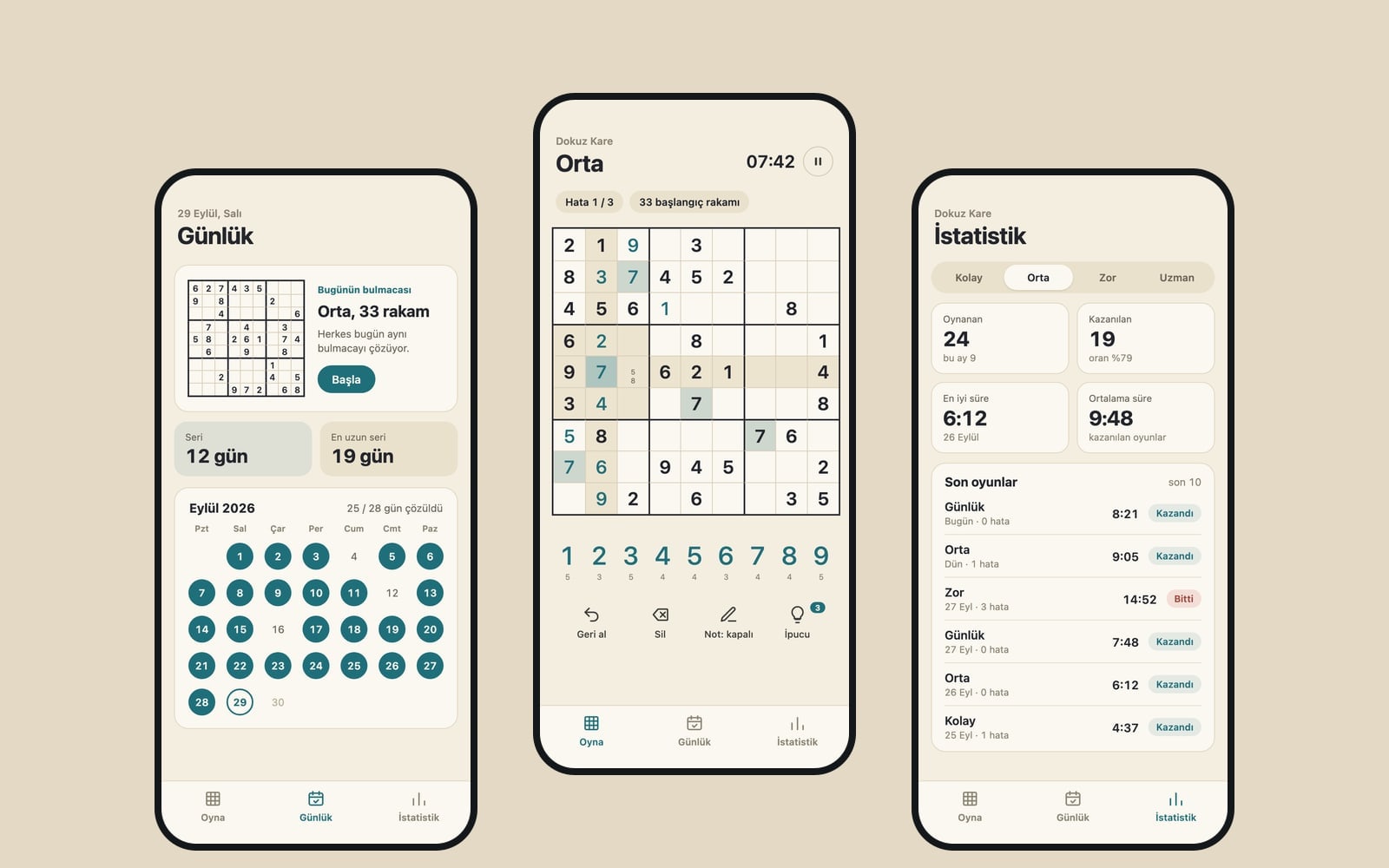
Play screen (the core component): a top strip with the difficulty name and elapsed time (with a pause button). Mistake rule: 3 mistakes allowed, the game ends on the third wrong digit; if the rule counts mistakes, the strip also shows a mistake counter. In the middle, a square 9x9 grid that fits the screen width: thick borders around the 3x3 boxes, thin cell lines; the selected cell's row, column and box are softly highlighted and every cell holding the selected digit stands out. Starting digits are dark, the user's digits use the main color. Under the grid, number keys 1-9 (a digit placed nine times fades out) and four buttons: Undo, Erase, Notes (when on, a tapped digit is written into the cell as a small pencil note), Hint (fills the selected cell with the correct digit, at most 3 per game). When the puzzle is solved, open a congratulations bottom sheet with time, mistakes and hints used, plus a "New game" button.
Generate puzzles inside the app: first build a valid full solution grid, then empty cells one by one and check after each step that the solution is still unique. Levels: Easy 40, Medium 33, Hard 28, Expert 25 starting digits; if the target cannot be reached, stop at the closest unique state. Default level: Medium. "New game" asks for the level in a bottom sheet.
Daily screena daily puzzle generated from a fixed seed derived from today's date (the same puzzle all day), this month's calendar (a check mark on solved days) and a streak count of consecutive solved days.
Stats screengames played and won per level, best and average time; below it, a list of the last 10 games.
Contentshort, friendly labels (New game, Continue, Well done); on first launch a game at the default level is already open; with no games yet, the Stats screen shows a simple empty state.
Designa newspaper puzzle feel, cream background, ink digits and fine lines. Main color #1f6f7a; light and dark theme (dark keeps the same character in dark tones), system font, tabular digits; a short haptic tap on each digit entry. Save the game in progress, the daily streak and the stats with AsyncStorage so a closed and reopened app continues where it left off. Do not add ads, purchases or an account screen.
Design preview made from this prompt
What this prompt does
This prompt describes a three-tab sudoku game app for the phone: Play, Daily and Stats. The app generates its own puzzles with a unique solution and adds pencil notes, undo, up to three hints per game and a daily puzzle that stays the same all day with a streak count. It suits anyone who wants their own puzzle app or a mobile game prototype.
Where to use it
- Your own ad-free sudoku app
- A daily puzzle with a streak
- Prototyping a mobile game
- A puzzle app for the family
- Learning game logic with Expo
Fields you can fill in
The fields you can change in the form above and their default values.
- App nameFree text
- Nine Squares
- Default levelOne of 4 options
- Medium
- Mistake ruleOne of 3 options
- 3 mistakes allowed, the game ends on the third wrong digit
- StyleOne of 4 options
- a newspaper puzzle feel, cream background, ink digits and fine lines
- Main colorColor
- #1f6f7a
Step by step
- 1
Set the app name and default level
Type the name you want on the home screen into App name, then pick Easy, Medium, Hard or Expert under Default level. A game at that level is ready on first launch; the levels start with 40, 33, 28 and 25 given digits.
- 2
Choose a mistake rule
Mistake rule has three options: 3 mistakes allowed with the game ending on the third wrong digit, no limit with wrong digits turning red right away, or hidden mistakes checked once the grid is full. If the rule counts mistakes, a counter appears in the top strip.
- 3
Set the style and main color
Pick the newspaper, classic, playful or calm look under Style; Main color is used for the digits the player enters. Starting digits stay dark, so choose a color that is easy to tell apart from them and from the background.
- 4
Send it to Entrobase Builder with Start
Start takes the prompt to Entrobase Builder. After you sign in with a free account, Builder writes the three screens and you can try the app on your phone. You can also Copy the text into another coding tool.
- 5
Test the grid and the daily puzzle
Finish a game and check the congratulations sheet for time, mistakes and hints. Close and reopen the app to confirm the game resumes. Open Daily twice on the same day to make sure the puzzle does not change, and describe any issue in the Builder chat.
Tips and variations
- To change the hint limit, edit “at most 3 per game” in the prompt to 1 or 5 for a harder or gentler game. You can also ask for the same change later in the Builder chat.
- For a kids' version, ask the Builder chat for a 6x6 grid with 2x3 boxes and number keys 1 to 6, and tell it to lower the number of starting digits to match.
- Try the same prompt with all four Style options: the high contrast of the classic look is easy to read on a small screen, while the colorful, playful style feels friendlier to children.
- Want a weekly challenge next to the daily puzzle? Ask the Builder chat for an Expert puzzle that opens every Monday, with its seed derived from the week number.
Frequently asked questions
How does the app make sure every sudoku has one solution?
The prompt asks the app to build a valid full solution grid first, then remove cells one at a time and check after each step that the solution is still unique. If the target number of givens cannot be reached, it stops at the closest state that still has one solution.
Is the daily sudoku the same for everyone?
The daily puzzle comes from a fixed seed derived from today's date, so the same device gets the same puzzle all day. Since generation depends only on the date, other phones on the same app version will usually see the same puzzle too.
Does the sudoku app work offline?
The prompt has puzzles generated inside the app and saves the game, streak and stats on the phone with AsyncStorage; it describes no server and no account screen. The game logic is therefore set up to run without a connection.
Can I add ads or in-app purchases?
The prompt leaves them out on purpose (“Do not add ads, purchases or an account screen”). If you need them, delete that last line and write what you want instead, or ask for it later in the Builder chat.
Will this prompt work in ChatGPT?
You can Copy it into ChatGPT, Gemini or Claude and they will give you code, but setting it up and running it is up to you. With Start, Entrobase Builder writes the screens and you can try the app on your phone.