Poster prompts: 10 ready-to-use prompts for ChatGPT and Gemini
Poster prompts: 10 ready-to-use prompts for movie, birthday, football, car and event posters in ChatGPT, Gemini and Entrobase Canvas, with title, scene and style options.
Prompt
Fill in the fields below and the prompt updates instantly. Copy it and use it in any AI tool.
Create a print-ready poster design.
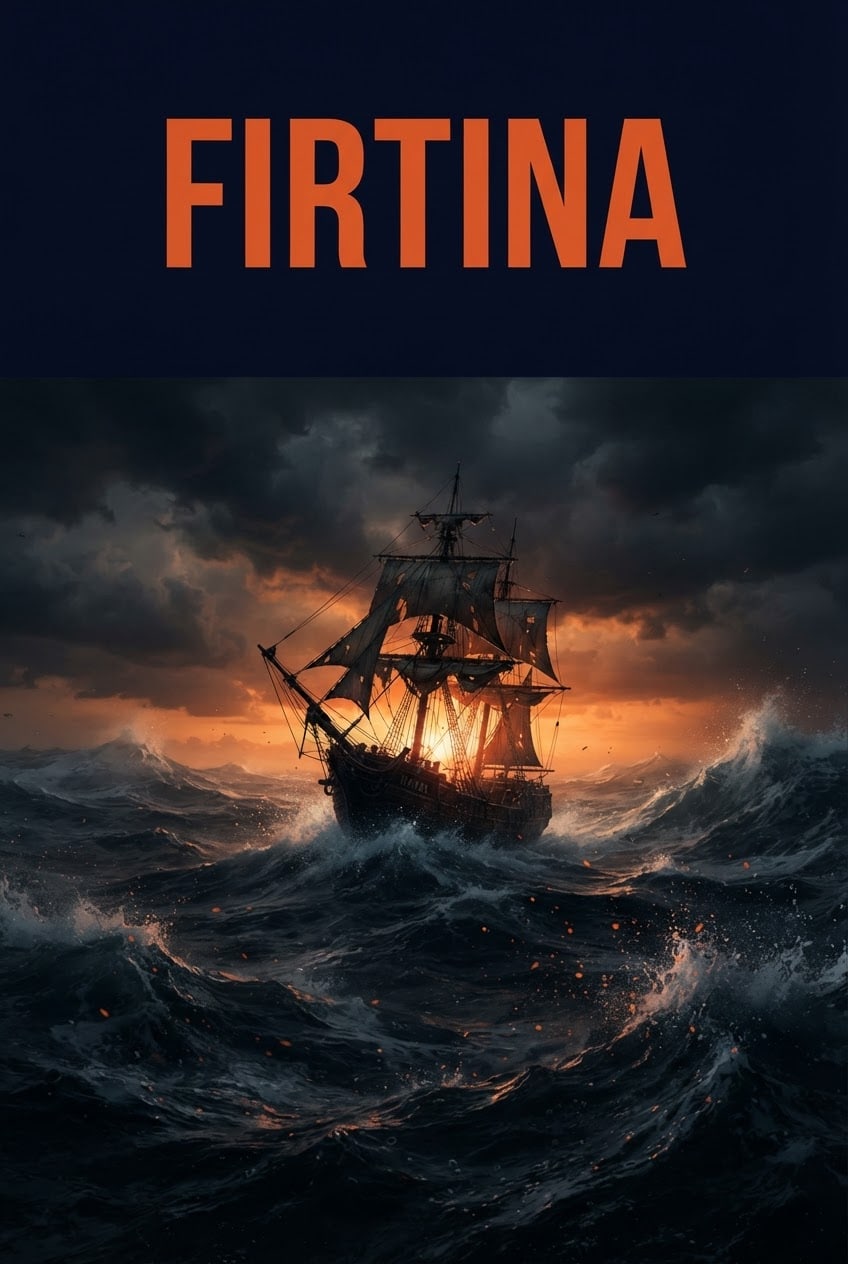
Scenea lone old sailing ship among giant waves on a stormy sea.
Titleone bold, widely spaced title centered in the upper section: "STORM".
Settingthe upper section behind the title is simple and single-toned.
Lightone strong light from behind the scene, a bright rim light around the subject, deep shadows in front.
Cameralow angle wide shot, 35 mm, subject sharp and in focus.
Stylecinematic digital painting, dramatic and realistic.
Palettemain color #e0562b spreads across the background and the light; shadows are very dark navy, small accents are off-white.
Compositionsubject centered in the lower two thirds, clear of the title.
Surfacethe design itself, edge to edge; the image runs to all four edges, with no paper edge or frame in view.
Textthis title is the only text in the image; every surface in the scene is plain and letter-free.
Aspect ratio 2:3.
Image made with this prompt
9 more ready-to-use prompts
Different takes on the same topic. Copy any of them as is and replace the parts in square brackets.
1.Movie poster prompt for ChatGPT with your own photo
When to use: You want to upload a photo to ChatGPT and star in a film poster that looks like a real cinema release.
Create a vertical movie poster that casts the person in my uploaded photo as the lead of a fictional film.
- Identity
- keep my face, hair and expression exactly as they are in the photo.
- Genre
- [e.g. thriller, action, romance, sci-fi]
- Scene
- [e.g. rainy night city with neon lights behind]
- Outfit
- [e.g. long dark coat]
- Light
- strong cinematic light on one side of the face, depth behind.
- Title
- bold letters at the top: "[MOVIE TITLE]"
- Tagline
- one line at the very bottom: "[e.g. COMING SOON]"
- Style
- a real theatrical poster with cinematic color grading.
- Ratio
- 2:3
2.Gemini poster prompt template for events
When to use: You want a ready-to-share event poster from Gemini with a title, date and venue in place.
Design a vertical poster for an event.
- Event type
- [e.g. school fair, art show, workshop]
Text, in this order and exactly as written:
- Title: "[EVENT NAME]"
- Date: "[e.g. November 14]"
- Venue: "[e.g. Harbor Hall]"
- Layout
- title at the top as the largest text, date and venue smaller and aligned at the bottom.
- Visual
- one strong element that shows the event, [e.g. a big palette and paint splashes]
- Style
- [e.g. modern graphic design, flat colors]
- Palette
- [e.g. navy, cream, orange]
- Ratio
- 3:4
Add no other text and check that every word is spelled correctly.
3.Birthday poster prompt for Gemini with a photo
When to use: You want to upload someone's photo to Gemini and surprise them with a poster showing their name and age.
Create a vertical birthday poster for the person in my uploaded photo.
- Identity
- keep their face and hair exactly as they are in the photo.
- Text
- "[NAME]" at the top, with a large "[AGE]" below it.
- Theme
- [e.g. gold and navy balloons, confetti]
- Background
- [e.g. dark midnight blue with soft bokeh lights]
- Outfit
- [e.g. smart black jacket]
- Light
- soft studio light, face sharp and bright.
- Style
- a glossy celebration poster with magazine cover quality.
- Ratio
- 4:5
The name and age are the only text in the image.
4.Football poster prompt for ChatGPT and Gemini
When to use: You want a match day style poster of yourself or a teammate in a stadium, using an uploaded photo.
Create a vertical football poster showing the person in my uploaded photo as a professional player.
- Identity
- keep the face and hair exactly as they are in the photo.
- Jersey
- [e.g. plain burgundy jersey with number 10], no club crest or sponsor.
- Pose
- [e.g. arms crossed, facing the camera]
- Background
- a night stadium, strong floodlights, smoke and sparks in the air.
- Title
- bold letters at the top: "[NAME]"
- Style
- match day promo poster, high contrast.
- Ratio
- 4:5
5.Poster prompt for boys: bold bedroom wall print
When to use: You want a bold poster for a boy's room or a teen's profile, built around a hobby and no photo.
Create a vertical poster for a teenager's bedroom wall.
- Theme
- [e.g. skateboarding, space exploration, racing]
- Subject
- one fictional hero seen from behind, face not visible, in an epic setting.
- Setting
- [e.g. a skate park at sunset]
- Title
- large bold letters at the top: "[e.g. NO LIMITS]"
- Style
- bold digital illustration with thick outlines and strong color.
- Palette
- [e.g. electric blue, black, orange]
- Ratio
- 2:3
The title is the only text in the image.
6.Car poster prompt for Gemini using your own car
When to use: You want to upload a photo of your car to Gemini and present it like a showroom poster.
Create a vertical car poster starring the car in my uploaded photo.
- Car
- keep its color, wheels and body shape exactly as they are in the photo.
- Location
- [e.g. wet night garage with neon strips]
- Framing
- front three-quarter angle, low camera, car in the lower half.
- Light
- sharp reflections running along the body.
- Title
- widely spaced letters at the top: "[e.g. MODEL NAME]"
- Style
- car magazine cover, realistic photo.
- Ratio
- 2:3
The title is the only text in the image.
7.Nano Banana poster prompt with blank space for text
When to use: You plan to set the band name and dates yourself, so you want a clean background with no broken letters.
Create the background art for a vertical concert poster.
- Genre
- [e.g. indie rock, jazz, electronic]
- Visual
- one strong symbol of the genre, [e.g. a large vinyl record and flowing sound lines]
- Style
- two-color risograph print with coarse dot texture.
- Palette
- [e.g. orange and navy]
- Composition
- symbol in the lower half; the upper third is flat, single-colored and empty.
Keep the image completely free of text and numbers, since text will be added later.
- Ratio
- 3:4
8.ChatGPT typography poster prompt for wall art
When to use: You want one giant word to carry the whole design instead of a photo, for a print on your wall.
Create a vertical typography poster.
- Word
- "[e.g. PATIENCE]"
- Layout
- giant letters that nearly fill the frame, spelled exactly like this.
- Letter style
- [e.g. bold, condensed and geometric]
- Texture
- [e.g. ink print with slightly worn edges]
- Palette
- [e.g. cream background, black letters, one orange accent]
- Element
- place one small graphic shape between the letters.
- Ratio
- 3:4
No text other than this word.
9.Poster prompt generator for ChatGPT and Gemini
When to use: You have a one-sentence idea and want ChatGPT or Gemini to write three detailed poster prompts for you.
Act as a designer who writes poster prompts.
- My idea
- [e.g. a book swap event in our neighborhood]
Write 3 poster prompts in different styles:
- 1Cinematic
- 2Minimal graphic
- 3Vintage print
Each prompt should cover
- Main subject and scene
- Title text and where it sits
- Light and palette
- Composition and aspect ratio
Keep the title to three words at most, and make each prompt ready to paste into an image tool.
What this prompt does
Most people searching for poster prompts want copy-and-paste text that makes a movie, birthday, football or car poster in ChatGPT or Gemini. The 9 variants below cover those for both tools, including ones that use your own photo. The main prompt above needs no photo: it builds a poster from scratch with the scene, style and title you choose.
Where to use it
- Movie poster mockups
- Birthday surprises
- Match and tournament promos
- Concert and event flyers
- Prints for your wall
- Instagram story visuals
Fields you can fill in
The fields you can change in the form above and their default values.
- Poster titleFree text
- STORM
- SceneOne of 5 options
- a lone old sailing ship among giant waves on a stormy sea
- StyleOne of 5 options
- cinematic digital painting, dramatic and realistic
- Main colorColor
- #e0562b
- Aspect ratioOne of 4 options
- 2:3
Step by step
- 1
Type the title
Enter one word in capitals in the Poster title field. A short title gives the cleanest result, because image models often misspell long text. The default, STORM, shows the length that works best.
- 2
Pick a scene and a style
The Scene field offers a sailing ship, a sports car, a football, a concert stage and a coastal town. Style sets the character: cinematic painting feels like a film, 1960s screen print suits travel posters, and risograph works well for gigs and events.
- 3
Set the main color and ratio
The main color spreads across the background and the light, so it changes the whole mood. Use 2:3 for movie posters and wall prints, 3:4 for standard frames, 4:5 for Instagram posts and 9:16 for stories.
- 4
Copy it or generate in Canvas
Use Copy to paste the prompt into ChatGPT or Gemini, or Start to generate it in Entrobase Canvas. For a poster with your own photo, pick the movie, birthday, football or car variant below instead: upload the photo first, then paste the text.
- 5
Judge it like a print
A good poster has a correct title you can read from a distance, a subject you get at a glance, and an image that runs to the edges. If extra text appears, reply 'remove all text except the title'. If letters break, try a shorter word.
Tips and variations
- The longer the text in the image, the more likely it breaks. The safest route is a one-word title, with the date and venue added later in a design tool.
- If you plan to add text yourself, replace the Title and Text lines with 'a flat, empty upper third'. You get a clean base for typesetting in a design tool.
- For wall prints, choose 2:3 or 3:4 from the start. Cropping later can cut into the title or the subject.
- To make a poster series, stay in the same chat and change only the scene. The color, style and title layout then stay consistent across the set.
- Leave out brand logos, real club crests and famous faces. Writing 'plain jersey' or 'unbranded car' gives a cleaner result and avoids trouble when you print.
Frequently asked questions
How do I use a poster prompt in ChatGPT?
Open a chat with image generation, paste the main prompt or a ChatGPT variant, and send it. Put every piece of poster text in quotes on its own line. If you want a change, ask for one thing at a time, such as 'darken only the background'.
Does this poster prompt work in Gemini?
Yes. Upload your photo if the variant needs one, paste the text and send. Gemini's image model (Nano Banana) generates the poster. If the title comes out wrong, repeat the correct spelling in quotes in the same chat.
Can I use my own photo in a movie poster prompt?
Yes. Upload your photo to ChatGPT or Gemini, paste the movie poster variant and ask it to keep your facial features. A clear photo where your face is large in the frame gives the closest likeness.
How do I add a name and age to a birthday poster prompt?
Fill in the square brackets in the birthday variant with the name and age. Short names come out cleanest. Skip long greetings in the image and add them afterwards in a design tool.
Is there a poster prompt generator I can use for free?
Yes. The poster prompt generator variant below works on the free plans of ChatGPT and Gemini. Describe your idea in one sentence and it writes three detailed prompts in different styles, then you can turn your favorite into an image in the same chat.





