Packaging Design Prompts: 9 Copy-Paste Prompts for ChatGPT
9 packaging design prompts for soap boxes, coffee bags, jar labels, cosmetics, chocolate and bottle labels; works in ChatGPT, Gemini and Entrobase Canvas.
Tested: EntroGen Flash, November 2026
Prompt
Fill in the fields below and the prompt updates instantly. Copy it and use it in any AI tool.
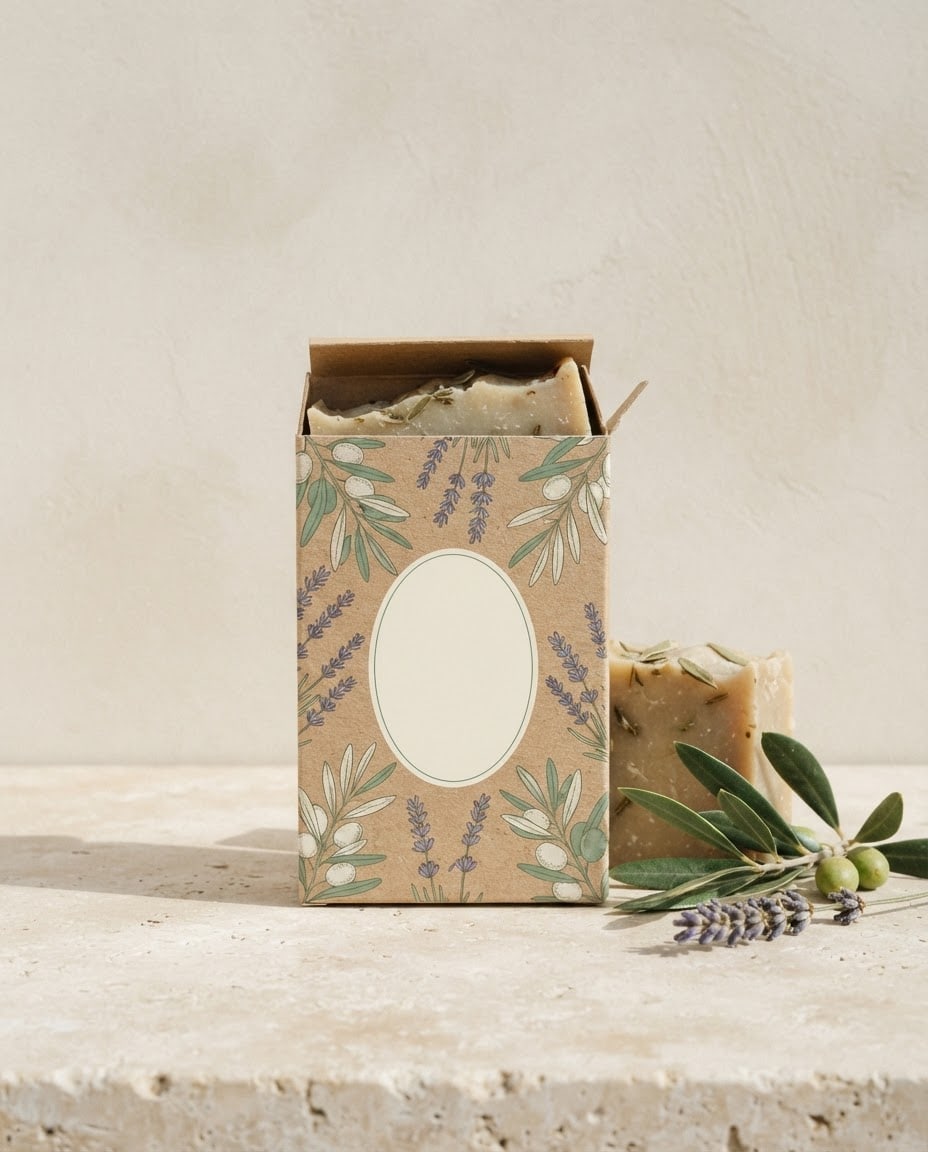
Create a packaging design concept for a product and show it in a realistic product photo.
Producthandmade olive oil soap.
Packaginga matte cardboard box with its lid slightly open; the whole front covered by the design.
Designa flat pattern on the front that tells the product, a fine-line botanical illustration; a plain, empty oval label area in the middle for the brand name.
Next to itthe product itself and one or two natural props (an olive branch, lavender).
Surfacea light stone surface and a plain wall in the same tone, one continuous backdrop.
Lightsoft studio light from the left, a light shadow on the right.
Cameraslightly above eye level, 50 mm, the packaging sharp.
Stylerealistic product photo with clear paper and board texture.
Palettemain color #7a9e7e, cream and olive green.
Compositionthe packaging centered and fully in frame, empty space around it.
Textno letters or numbers on the packaging; the label area stays empty.
Aspect ratio 4:5.
Image made with this prompt
8 more ready-to-use prompts
Different takes on the same topic. Copy any of them as is and replace the parts in square brackets.
1.ChatGPT packaging design prompt with your brand name
When to use: When you want a short brand name already written on the package.
Design product packaging and show it in a realistic product photo.
- Product
- [e.g. a honey jar].
- Brand name
- "[e.g. Hive]" (exactly this spelling), centered on the label.
- Design
- [e.g. a honeycomb pattern] in [e.g. mustard yellow and black].
- Surface
- a light wooden table.
Rules
- The only text on the packaging is the brand name.
- Ratio
- 4:5
2.Packaging redesign prompt for Gemini
When to use: When you have a photo of a blank or old package and want to see a new design on it.
Re-skin the packaging in the photo I uploaded with a new design.
- Shape
- keep the packaging's form, angle and lighting exactly.
- New design
- [e.g. a watercolor lemon pattern] in [e.g. yellow and white].
- Label
- an empty area in the middle for the brand name.
- Text
- no text on the packaging.
- Ratio
- same as the photo
3.Coffee bag packaging design prompt
When to use: When you sell whole bean or ground coffee.
Design a coffee bag and show it in a product photo.
- Packaging
- a kraft paper stand-up pouch with a valve.
- Design
- a flat illustration of [e.g. coffee plants and mountains] on the front, an empty label in the middle.
- Next to it
- scattered coffee beans and a small cup.
- Surface
- dark stone.
- Text
- no text on the bag.
- Ratio
- 4:5
4.Jar label packaging design prompt
When to use: When you sell homemade jam, pickles or sauces.
Design a label for a jam jar and show it in a product photo.
- Packaging
- a glass jar with a fabric cover and twine on the lid.
- Label
- a watercolor [e.g. cherry branch], an empty area in the middle for the name.
- Next to it
- fresh [e.g. cherries] and a wooden spoon.
- Surface
- a linen-covered table.
- Text
- no text on the label.
- Ratio
- 4:5
5.Skincare packaging design prompt
When to use: When a cream, serum or natural cosmetic needs a simple, premium box.
Design box and bottle packaging for a skincare product.
- Packaging
- a slim carton box with a glass dropper bottle next to it.
- Design
- a [e.g. blush pink] base with abstract shapes in fine gold lines and an empty label area.
- Surface
- cream stone with a dried flower.
- Light
- soft and bright.
- Text
- no text on the packaging.
- Ratio
- 4:5
6.Chocolate bar packaging design prompt
When to use: When you need colorful wrapping for chocolate or candy.
Design a chocolate bar wrapper and show it in a product photo.
- Packaging
- a paper wrapper with one corner opened to show the chocolate.
- Design
- a [e.g. retro stripes and sunburst] pattern with an empty label in the middle.
- Palette
- [e.g. orange, brown, cream].
- Background
- a plain light backdrop.
- Text
- no text on the wrapper.
- Ratio
- 1:1
7.Bottle label packaging design prompt
When to use: When you are designing a label for olive oil, vinegar or a drink bottle.
Design a label for an olive oil bottle and show it in a product photo.
- Packaging
- a dark green glass bottle with a cork stopper.
- Label
- cream paper with an engraved [e.g. olive tree], an empty area in the middle.
- Next to it
- an olive branch and a small bowl of olives.
- Surface
- an old stone counter.
- Text
- no text on the label.
- Ratio
- 4:5
8.Product family packaging design prompt
When to use: When you want to check that several products (box, jar, pouch) share one brand look.
Design a product family of three packages for one brand.
- Packages
- left to right [e.g. a cardboard box, a glass jar, a kraft pouch].
- Design
- the same [e.g. botanical line pattern] on all three, each with a different accent color.
- Label
- an empty area in the middle of each.
- Surface
- light stone and a plain wall.
- Text
- no text on the packaging.
- Ratio
- 16:9
What this prompt does
If you want to see your packaging before it goes to print, the main prompt renders a concept in a realistic product photo: the packaging type you choose, a pattern that tells the product and an empty label area for your brand name. The 8 variants below cover a ChatGPT package with your brand name, a Gemini redesign of your current packaging, coffee bags, jar labels, cosmetics boxes, chocolate, bottle labels and a product family shot.
Where to use it
- Packaging design concept
- Ecommerce product image
- Label test
- Pitch or printer presentation
- Product family look
Fields you can fill in
The fields you can change in the form above and their default values.
- ProductFree text
- handmade olive oil soap
- Packaging typeOne of 4 options
- a matte cardboard box with its lid slightly open
- PatternOne of 4 options
- a fine-line botanical illustration
- Main colorColor
- #7a9e7e
- RatioOne of 4 options
- 4:5
Step by step
- 1
Pick the product and packaging type
Write what you sell in the Product field (for example handmade olive oil soap) and choose box, pouch, jar or tin. Naming the container type stops the model from drawing mixed shapes.
- 2
Choose the pattern and main color
Botanical line art suits natural and handmade goods, geometric suits coffee and snacks, watercolor suits cosmetics and retro stripes suit drinks and candy. Match the main color to your brand.
- 3
Generate in Canvas and check the label
Open Canvas with Use Prompt and generate. The oval label should stay empty and the whole package should be in frame; if letter-like marks appear on the label, generate a new image with the same prompt.
- 4
Add your brand name and prepare for print
Type the brand name and product details into the label area with a design tool. The image is a concept; for printing you still need a dieline with cut and fold lines.
Tips and variations
- Keep brand names and ingredient lists out of the image prompt; long text gets garbled, and adding it to the label later is exact.
- Placing the product next to its packaging makes the image usable on a product page too; shoppers see the box and what is inside.
- Render the same pattern on three containers (box, jar, pouch) side by side to check that the product family looks consistent.
- Use 4:5 for Instagram and 16:9 for a website hero; the packaging stays centered in both.
Frequently asked questions
What is a good ChatGPT packaging design prompt?
Use the brand name variant on this page: it names the product, puts a short brand name in quotes with exact spelling and asks for nothing else to be written. Add ingredients and barcodes afterwards.
Can Gemini redesign my existing packaging from a photo?
Yes. Upload a photo of your current or blank packaging and paste the redesign variant; it keeps the shape and applies a new pattern and color. Google's image generation docs cover editing with reference images.
What should a product packaging design prompt include?
The product, the container type, the pattern, colors, light and an empty area for the brand name. The main prompt follows that order and works as a template.
Can I print AI-generated packaging directly?
No; it is a visual concept and a presentation photo. Printers need a dieline file with cut and fold lines, and the pattern is moved onto it in a design tool.
Are these packaging design prompts free?
Copying the prompts is free and they work in the free versions of ChatGPT and Gemini. Image limits depend on each tool's own plan.





