Name Wallpaper Prompt: 8 3D Name Wallpapers for Gemini
8 name wallpaper prompts that write your name in 3D letters for a phone lock screen or desktop: balloon letters, sky, flowers and night themes. Works in Gemini, ChatGPT and Entrobase Canvas.
Tested: EntroGen Flash, November 2026
Prompt
Fill in the fields below and the prompt updates instantly. Copy it and use it in any AI tool.
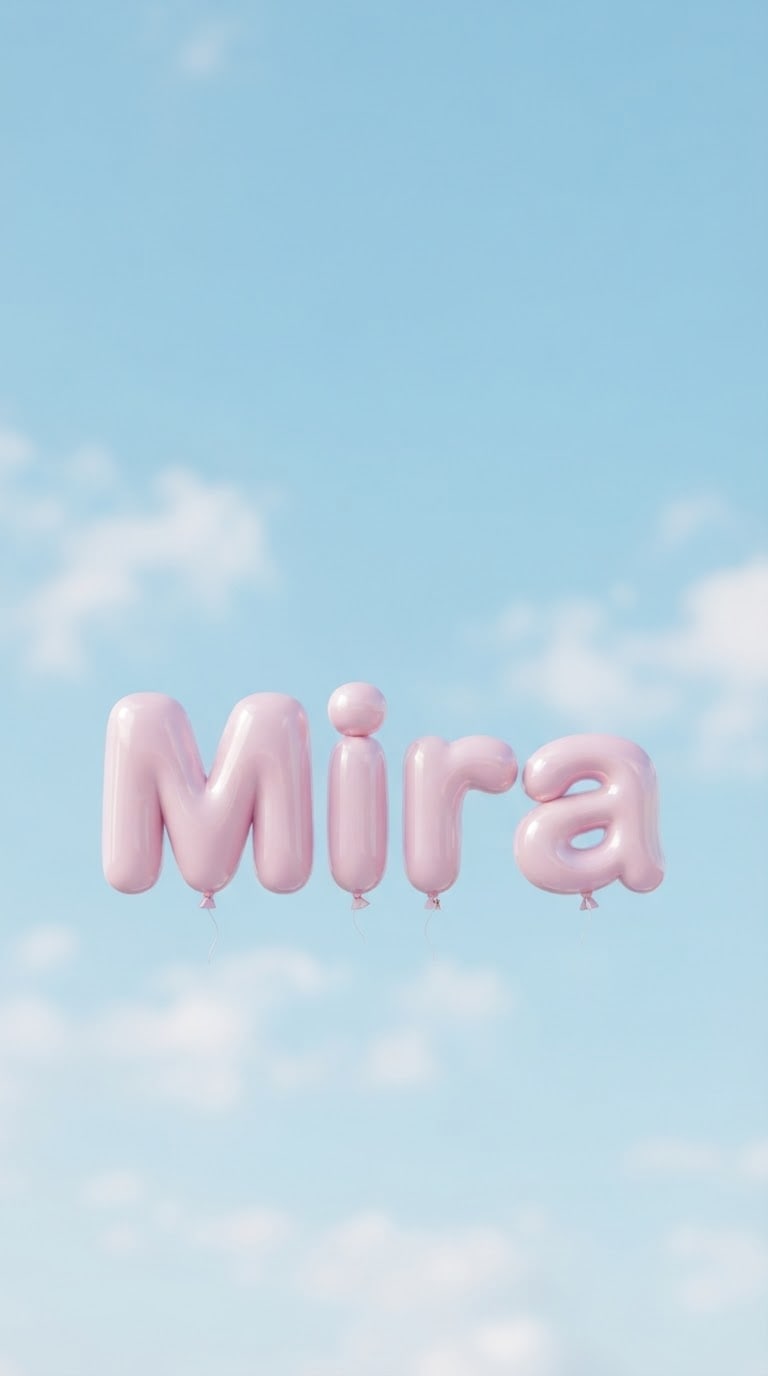
Create a phone wallpaper that shows a name in 3D letters.
Name"Mira", one line, first letter uppercase and the rest lowercase, every letter complete and in the right order.
Lettersshiny, inflated pastel pink balloon letters; thick, rounded, floating inside the scene.
Scenea pastel blue sky with a few soft clouds.
Lightsoft, diffused daylight, gentle highlights on the letters.
Camerafront view, eye level, letters sharp, background slightly blurred.
Stylecalm, aesthetic 3D render.
Palettethe letter color and two soft tones of the scene.
Compositionvertical frame; the name centered in the lower half, the top third a plain, open sky continuation of the scene (for the clock and notifications).
Rulesno letters, numbers or marks other than the given name.
Aspect ratio 9:16.
Image made with this prompt
7 more ready-to-use prompts
Different takes on the same topic. Copy any of them as is and replace the parts in square brackets.
1.Desktop name wallpaper
When to use: For a computer screen.
Create a desktop wallpaper that shows a name in 3D letters.
- Name
- "[e.g. Noah]".
- Letters
- matte navy.
- Scene
- a calm beach under an open sky.
- Composition
- the name in the lower right third, the left side empty (for icons).
- Ratio
- 16:9
2.Initial wallpaper
When to use: For a simple lock screen.
Create a phone wallpaper that shows one initial as a giant 3D letter.
- Letter
- "[e.g. A]".
- Letter
- glossy cream ceramic.
- Background
- flat terracotta.
- Composition
- the letter centered in the lower half.
- Ratio
- 9:16
3.Two-name wallpaper
When to use: A shared image for friends or siblings.
Create a phone wallpaper that shows two names in 3D letters, one above the other.
- Name 1
- "[e.g. Ella]"
- Name 2
- "[e.g. Leo]"
- Letters
- pastel balloon letters with a small heart between them.
- Scene
- a light lilac sky.
- Ratio
- 9:16
4.Night-theme name
When to use: For people who use dark mode on their phone.
Create a phone wallpaper with a name in glowing gold 3D letters in the night sky.
- Name
- "[e.g. Luna]".
- Scene
- a navy sky with a thin crescent moon and tiny stars.
- Ratio
- 9:16
5.Minimal name wallpaper (ChatGPT)
When to use: For a calm, single-color screen.
Create a minimal phone wallpaper with a name in small, elegant 3D letters on a flat background.
- Name
- "[e.g. Ava]".
- Letters
- matte white.
- Background
- flat sage green.
- Composition
- the name slightly below the center, empty space all around.
- Ratio
- 9:16
6.Kids' theme name
When to use: For a child's tablet or room poster.
Create an image of a child's name in 3D letters among toy blocks and balloons.
- Name
- "[e.g. Max]".
- Letters
- colorful, puffy plastic.
- Background
- flat light yellow.
- Ratio
- 4:5
7.Name on your photo with Gemini
When to use: To use your own landscape photo.
Place this name in 3D letters in the lower half of the landscape photo I uploaded and make it a phone wallpaper.
- Name
- "[e.g. Mia]".
- Letters
- translucent glass.
- Keep
- the landscape unchanged and the top part empty.
- Ratio
- 9:16
What this prompt does
If you want your own name, or a name you love, in 3D letters on your lock screen, the main prompt places the name in the lower half of a pastel scene and leaves a plain sky on top for the clock and notifications. The 7 variants below give a desktop wallpaper, an initial, two names, a night theme, a minimal wallpaper, a kids' theme and a name on your own photo with Gemini.
Where to use it
- Phone lock and home screen
- Desktop and tablet wallpaper
- A personalized gift image
- Instagram story background
Fields you can fill in
The fields you can change in the form above and their default values.
- NameFree text
- Mira
- LettersOne of 4 options
- shiny, inflated pastel pink balloon letters
- ThemeOne of 4 options
- a pastel blue sky with a few soft clouds
- RatioOne of 3 options
- 9:16
Step by step
- 1
Type the name
Names of 3-7 letters give the cleanest result.
- 2
Pick the letter style and theme
Balloon and cloud letters suit the sky, gold letters shine on the night theme.
- 3
Try it on the phone
Set the image as your lock screen; if the clock covers the name, move the name lower in the composition line.
Tips and variations
- Use 9:16 for phones and 16:9 for desktops.
- The clock sits on top of the lock screen, so keeping the name in the lower half avoids a clash.
- Render the same name in four themes and swap them weekly.
Frequently asked questions
How do I write a name wallpaper prompt?
Put the name in quotes, then the letter style, scene and vertical composition on separate lines, and ask for an empty sky on top for the clock.
Can Gemini make a name wallpaper?
Yes. It draws short names in 3D letters cleanly; long names may skip letters, so check them.
Can two names go on one wallpaper?
Yes; keep the names short and on separate lines, and use the two-name variant.
Is the resolution good enough?
It is fine for a phone screen. For a large desktop screen, render at a higher resolution for a sharper result.





