Instagram Post Prompts: 7 Ready-to-Use Prompts (2026)
7 Instagram post prompts for businesses: product posts, promo announcements, stories, carousel covers and opening posts; works in Gemini, ChatGPT and Entrobase Canvas.
Tested: EntroGen Flash, November 2026
Prompt
Fill in the fields below and the prompt updates instantly. Copy it and use it in any AI tool.
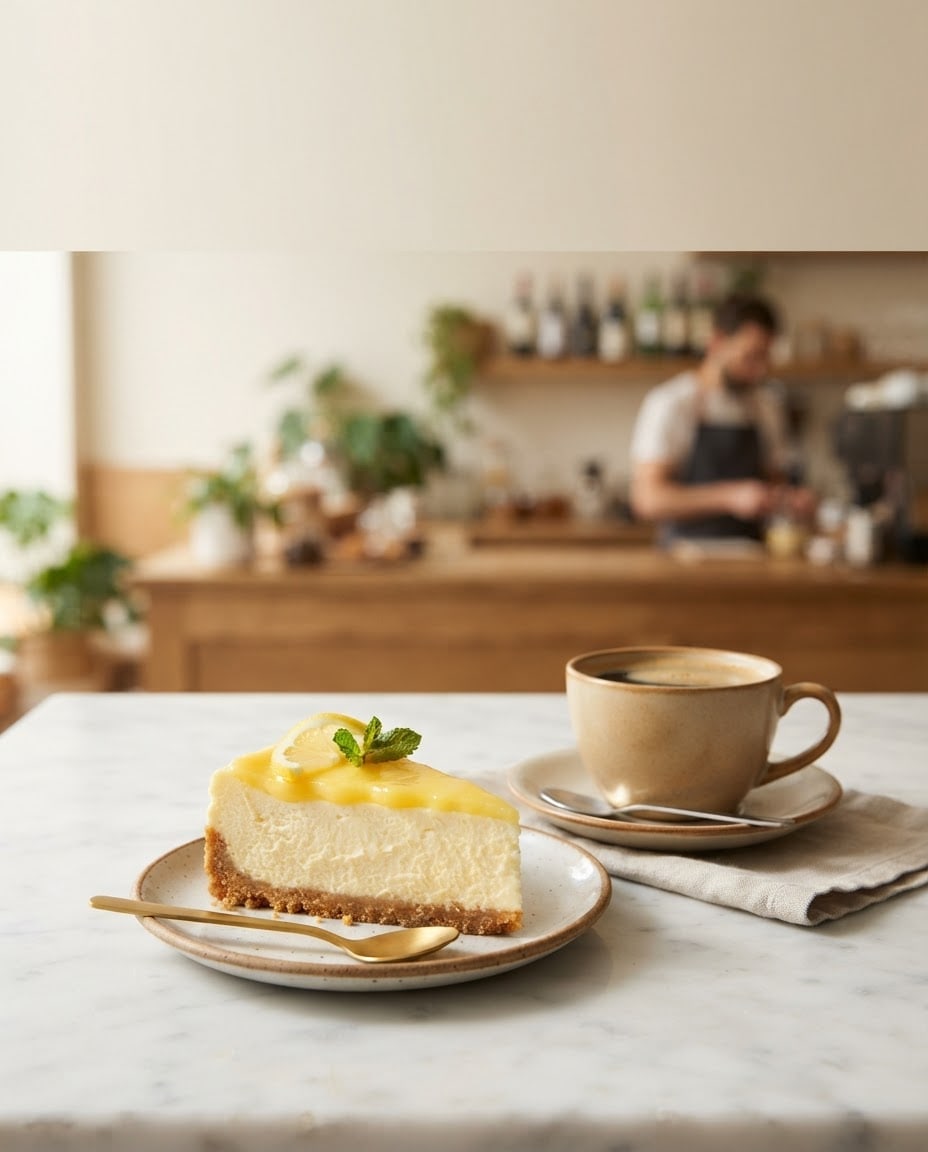
Create a promotional image for a business's Instagram post.
Producta slice of lemon cheesecake with a cup of filter coffee, crisp and appetizing, in the lower half of the frame.
Settinga white marble cafe table with a blurred counter behind.
Lightsoft daylight from the left, short soft shadows.
Cameraslightly above table height, 50 mm feel, the product sharp, the background softly blurred.
Styleeditorial product photography, natural colors.
Paletteaccent color #f2c14e with cream and warm wood tones.
Compositionthe top third shows the same scene's plain, light, evenly blurred background (a flat wall), with no separate strip or panel; this calm area stays empty for campaign text.
Textno text in the image.
Aspect ratio 4:5.
Image made with this prompt
6 more ready-to-use prompts
Different takes on the same topic. Copy any of them as is and replace the parts in square brackets.
1.Sale announcement post with ChatGPT
When to use: When you want a short promo line and the discount written inside the image.
Create a sale announcement image for a business's Instagram post.
- Product
- [e.g. a tower of macarons in three colors], centered.
- Text
- large uppercase "[e.g. 20% OFF]" at the top (exactly this text).
- Style
- clean, modern, generous space.
- Palette
- [e.g. pastel pink and cream].
Rules
- No text in the image other than this line.
- Ratio
- 4:5
2.New product post from your photo (Gemini)
When to use: When you want to upload your own product photo and turn it into a polished post.
Restyle the product photo I uploaded for an Instagram post.
- Product
- the product in the photo, shape and color kept exactly.
- New setting
- [e.g. light beige stone surface with a dried eucalyptus sprig].
- Light
- soft daylight, short shadow.
- Composition
- product lower center, the top area clean and empty.
- Ratio
- 4:5
3.Instagram story image
When to use: When you need a vertical, eye-catching product image for stories.
Create a vertical product image for an Instagram story.
- Product
- [e.g. an iced caramel latte] in a glass with condensation drops.
- Setting
- [e.g. a plain orange backdrop].
- Light
- hard studio light with a defined shadow.
- Composition
- product slightly below center; the top and bottom fifths empty.
- Text
- no text in the image.
- Ratio
- 9:16
4.Carousel cover image
When to use: When the first slide of a carousel needs to stop the scroll and leave room for a title.
Create a cover image for an Instagram carousel post.
- Subject
- [e.g. five winter drinks] lined up on a table.
- Camera
- straight overhead, flat lay.
- Palette
- [e.g. deep green and cream].
- Composition
- drinks in the bottom half, the top half plain and empty.
- Text
- no text in the image.
- Ratio
- 4:5
5.Grand opening post
When to use: When a new shop or branch wants an announcement image with one written word.
Create an Instagram announcement image for a newly opened shop.
- Scene
- the window of [e.g. a flower shop] with a ribbon and balloons at the door.
- Text
- one word on the window, "[e.g. OPEN]" (exactly).
- Light
- morning daylight.
- Style
- lively, warm photography.
Rules
- No text in the image other than this word.
- Ratio
- 4:5
6.Post for a service business
When to use: When a salon, dental clinic or gym wants to show its space instead of a product.
Create a space image for a service business's Instagram post.
- Space
- [e.g. a bright hair salon with plants], empty of people.
- Detail
- a tidy workstation and mirror in the foreground.
- Light
- daylight from large windows.
- Composition
- the top third a plain wall, empty for text.
- Text
- no text in the image.
- Ratio
- 4:5
What this prompt does
If you are making Instagram posts for a business, copy the variant that fits from the 6 below: sale announcement, new product launch, story image, carousel cover, opening post and a text post in ChatGPT. The main prompt turns your product into a 4:5 post image with empty space at the top for campaign text.
Where to use it
- Cafe and restaurant promos
- New product launch
- Instagram story
- Carousel cover image
- Opening and event announcements
Fields you can fill in
The fields you can change in the form above and their default values.
- ProductFree text
- a slice of lemon cheesecake with a cup of filter coffee
- SettingOne of 4 options
- a white marble cafe table with a blurred counter behind
- Accent colorColor
- #f2c14e
- RatioOne of 3 options
- 4:5
Step by step
- 1
Describe the product precisely
Write what it is and what sits next to it in the Product field (for example a slice of lemon cheesecake with filter coffee). Concrete detail gets you your product instead of a generic dessert photo.
- 2
Pick the setting, color and ratio
The Setting field offers marble table, wooden table, colored backdrop and windowsill. Use 4:5 for feed posts, 1:1 for square posts and 9:16 for stories and Reels covers.
- 3
Generate in Canvas and check the empty space
Open Canvas with Use Prompt and generate. The top third should stay clean; if the product or clutter lands there, generate a new image with the same prompt.
- 4
Add the campaign text
Type the headline and price in the empty top area in a design tool. Adding text afterwards keeps letters and numbers correct.
Tips and variations
- Keep the same setting and accent color for a week; your profile grid looks consistent and the brand becomes recognizable.
- If you want a short line such as a discount or price inside the image, use the ChatGPT variant and give the text in quotes, word for word.
- For 9:16 stories, place the product slightly below center; Instagram's interface covers part of the top and bottom.
- If you already have a product photo, upload it to Gemini and change only the background and light with this prompt; the product keeps its real look.
Frequently asked questions
How do I make an Instagram post with Gemini?
Open a new Gemini chat, upload your product photo if you have one and paste the Gemini variant from this page. Put 4:5 on the last line; Google's model page lists 4:5 and 9:16 among the ratios Gemini 3.1 Flash Image supports.
Will a ChatGPT Instagram post prompt spell the text correctly?
Short headlines and numbers usually come out right, while long sentences can contain letter errors. Long copy belongs in the caption, not the image.
What size should an Instagram post be?
A 4:5 portrait post takes the most space in the feed, and square 1:1 also works. Stories and Reels covers are 9:16, which is why the main prompt offers all three ratios.
Can I copy and paste these Instagram post prompts?
Yes, each variant is written to be pasted into Gemini or ChatGPT as is; just replace the bracketed parts with your own product.





