Family Tree Prompts: 7 Prompts for ChatGPT and Gemini (2026)
7 family tree prompts: an illustrated family tree with blank name plates, photo trees, simple charts, wedding and gift posters and a text template; works in ChatGPT, Gemini and Entrobase Canvas.
Tested: EntroGen Flash, November 2026
Prompt
Fill in the fields below and the prompt updates instantly. Copy it and use it in any AI tool.
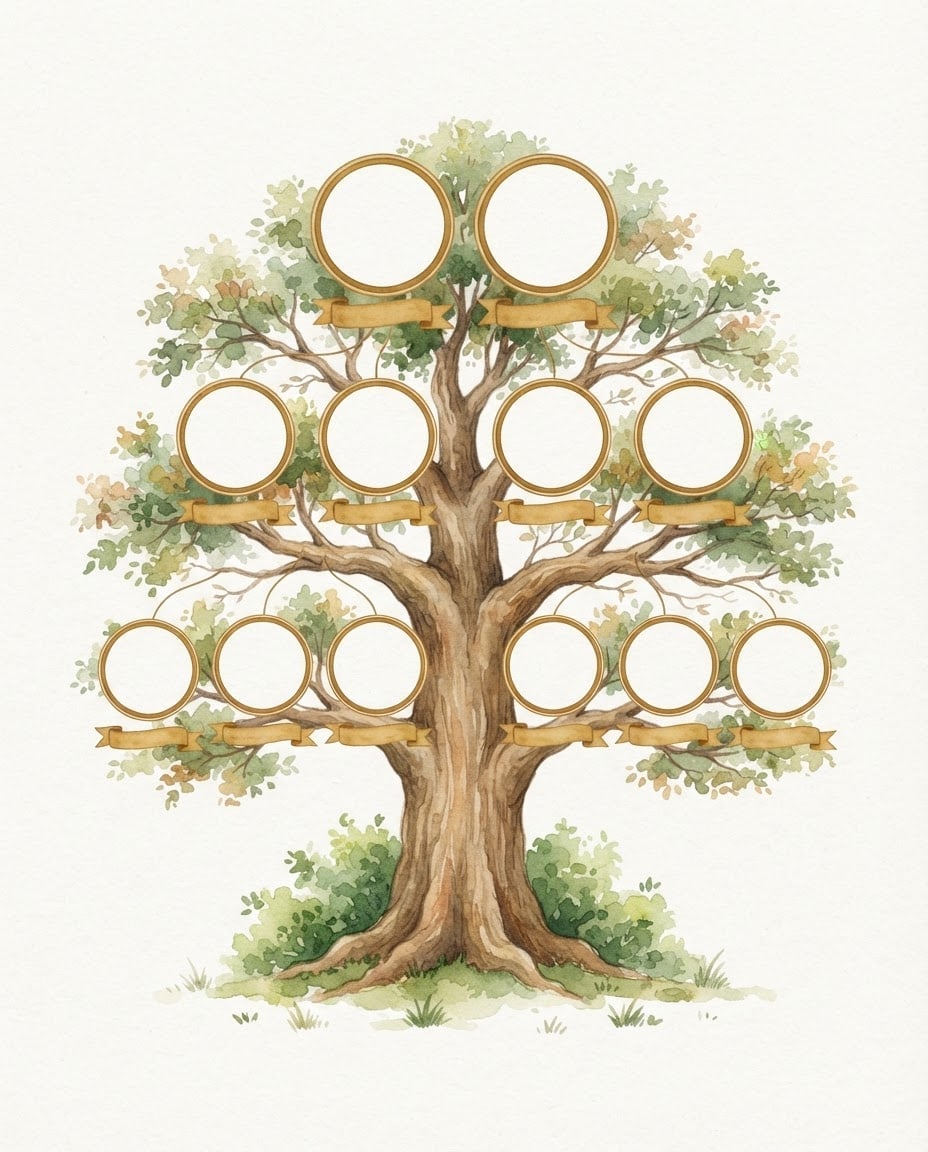
Create an illustrated family tree template image whose names will be written in later.
Treea broad-crowned old oak tree with a thick trunk; empty round frames for three generations placed on the branches: two at the top, four in the middle, six at the bottom.
Framesfilled with a flat light color and empty; a small blank name plate under each frame.
Stylesoft watercolor illustration.
Backgroundflat off-white with a few tufts of grass under the tree.
Light and angleflat, soft lighting; straight front view.
Paletteleaf greens, an earth-brown trunk, #c08a3e edges on the frames.
Compositiontree in the middle of the image, frames evenly spread, wide margins at the edges.
Textthe image is completely text-free; no names, dates, title or letters; plates and frames left empty.
Aspect ratio 4:5.
Image made with this prompt
6 more ready-to-use prompts
Different takes on the same topic. Copy any of them as is and replace the parts in square brackets.
1.Family tree prompt for Gemini with photos
When to use: When you want a tree full of family photos.
Place my uploaded family photos into a family tree.
- Tree
- a watercolor oak with round frames on the branches.
Rules
- Use the photos as they are, do not change faces.
- The oldest generation at the top.
- Name plates stay blank.
- Ratio
- 4:5
2.Simple family tree chart prompt
When to use: When you want a plain chart for school or a document.
Create a simple family tree chart with names to be added later.
- Structure
- three generations, boxes joined by straight lines; a horizontal line between spouses.
- Style
- flat vector, light gray boxes, dark lines.
- Background
- white.
- Text
- boxes empty, no text in the image.
- Ratio
- 16:9
3.Wedding family tree prompt
When to use: When you want a board that joins two families at a wedding.
Create a wedding family tree image with names to be added later.
- Structure
- two trunks joining into one crown; one family's empty frames on the left, the other's on the right, the couple's two frames in the middle.
- Style
- watercolor with eucalyptus leaves.
- Text
- no text in the image.
- Ratio
- 3:4
4.Family tree gift poster prompt
When to use: When you are making a wall poster for a grandparent.
Create a family tree poster to print as a gift.
- Tree
- [e.g. an olive tree] with empty frames inside hearts on the branches.
- Style
- vintage engraving on cream paper texture.
- Border
- a thin gold frame.
- Text
- no text, frames left empty.
- Ratio
- 4:5
5.Family tree prompt for ChatGPT (text template)
When to use: When you want to organize the family details first.
Build a three-generation family tree text from the details below.
- Details
- [names, birth years, who is married to whom, whose child].
Output
- Each generation under its own heading.
- Spouses on the same line.
- List missing details as questions.
- Format
- an indented list.
6.Family tree Mermaid code prompt
When to use: When you want the tree as an editable chart.
Draw the family below as Mermaid flowchart code.
- Family
- [e.g. grandparents, three children, four grandchildren].
Rules
- Direction top-down (TD).
- Show spouses in one node.
- Return only the code block.
What this prompt does
If you want a family tree template you can frame, the main prompt draws an illustrated tree with empty round frames and name plates for three generations on its branches; you place the names and photos. The 6 variants below cover photo trees, simple charts, wedding trees, gift posters, a text template and Mermaid code in ChatGPT and Gemini.
Where to use it
- Family gift and wall poster
- School assignment
- Wedding and reunion
- Family album cover
Fields you can fill in
The fields you can change in the form above and their default values.
- TreeOne of 3 options
- old oak tree
- StyleOne of 3 options
- soft watercolor illustration
- Frame colorColor
- #c08a3e
- RatioOne of 3 options
- 4:5
Step by step
- 1
Pick the tree and style
Oak feels strong and traditional, olive Mediterranean, plane tree airy for a big family. Watercolor suits gifts, vector suits school work, and vintage engraving suits old family photos.
- 2
Check the generations
The main prompt draws 2-4-6 frames for three generations. For a bigger family change the counts in the Tree line; more than fifteen frames get small in one image.
- 3
Add names and photos
Place the image in a design tool and put photos in the frames and names on the plates. Image models often garble names and dates; a blank template comes out clean.
Tips and variations
- For print, 4:5 fits a 16x20 inch frame exactly.
- If the old photos are black and white, choose the vintage engraving style and a warm brown frame color.
- Sort the family details first with the ChatGPT text template below so nobody lands in the wrong frame.
Frequently asked questions
How do I write a family tree prompt for ChatGPT?
Put the number of generations, people per generation, the tree style and that name areas stay blank on separate lines. For a small family you can give names in quotes, but long lists can break the letters.
Can Gemini make a family tree with photos?
Upload the family photos to Gemini and ask it to place them in the tree's frames; add 'use the photos as they are' so faces stay unchanged.
Is a family tree template free?
You copy the prompts on this page into the tool of your choice; that tool's own limits apply.
Can I draw a family tree as code?
Yes. Ask ChatGPT for Mermaid flowchart code; it turns into an editable family chart in any editor that supports Mermaid.





