Email prompts: 9 ready-to-use prompts for ChatGPT, Gemini and Copilot
Email prompts for ChatGPT, Gemini and Copilot: 9 copy-and-paste prompts for follow-up and professional emails, replies, job applications, emails to a professor and cold outreach.
Prompt
Fill in the fields below and the prompt updates instantly. Copy it and use it in any AI tool.
Write a professional email for me that is ready to send.
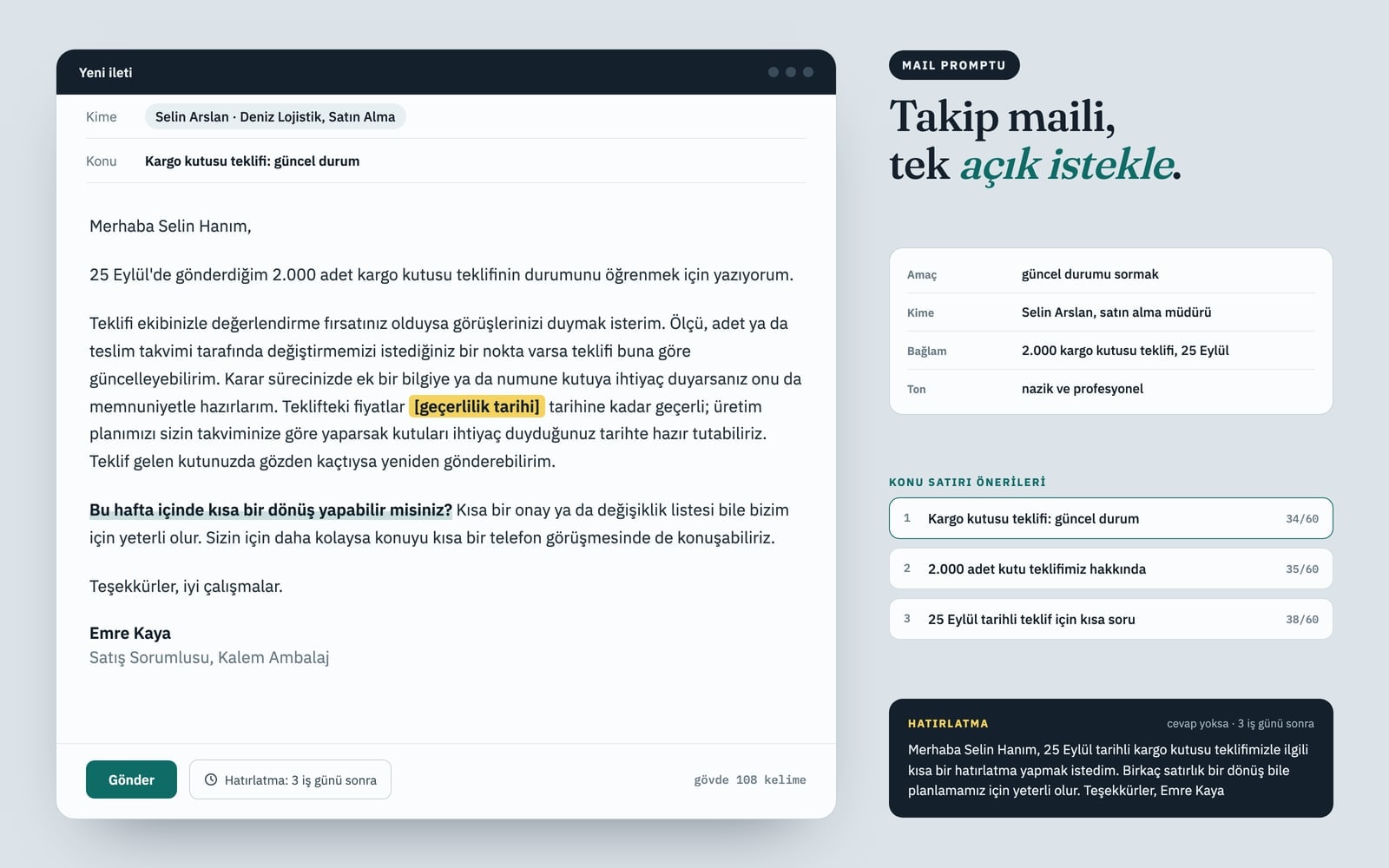
Goalfollow up and ask for an update on something I sent
RecipientSelin Arslan, purchasing manager at Deniz Logistics
Topic and contextmy quote for 2,000 shipping boxes, sent on September 25; no reply yet
SenderEmre Kaya, sales lead at Kalem Packaging
Tonepolite and professional
Output
3 subject line options, each 60 characters or fewer; put the character count in parentheses.
The full email: greeting, why I am writing in the first sentence, the details that matter, one clear ask, sign-off and signature. Keep the body between 90 and 150 words.
A polite follow-up of 3 sentences or fewer that I can send if there is no reply after 3 business days.
Rules
Use only the facts I gave; do not invent dates, numbers, prices or promises. If a detail is missing, leave a [placeholder in brackets].
Do not open with filler like "I hope this email finds you well"; get to the point in the first sentence.
One email, one ask; the recipient should know what to do after a single read.
No exclamation marks, no words in all caps, no emojis.
Match the greeting to the recipient and write in natural, fluent English.
Text made with this prompt
The text this prompt produces with its default values.
Subject line options
- 1Shipping box quote: checking in (31)
- 2Your thoughts on our 2,000-box quote (36)
- 3Following up on the September 25 quote (38)
- Subject
- Shipping box quote: checking in
Hi Selin,
I'm writing to follow up on the quote for 2,000 shipping boxes I sent on September 25.
If you and your team have had a chance to review it, I'd love to hear your thoughts. If anything on size, quantity or delivery timing needs to change, I can update the quote to match. If you need more details or a sample box to decide, I'm happy to put that together too. The prices in the quote are valid until [expiry date], and planning production around your schedule means the boxes can be ready when you need them. I can also resend the quote if it got buried in your inbox.
Could you send me a short reply this week? A quick yes or a list of changes is all we need. If it's easier, we can also go over it on a short call.
Thanks, and have a good day.
Emre Kaya
Sales Lead, Kalem Packaging
Follow-up (after 3 business days):
Hi Selin, just a quick nudge on our September 25 quote for shipping boxes. Even a two-line reply would help us plan. Thanks, Emre Kaya
8 more ready-to-use prompts
Different takes on the same topic. Copy any of them as is and replace the parts in square brackets.
1.Email reply prompt for ChatGPT: answer an email you received
When to use: You received an email and need a short, professional reply: paste it in and say in a few words what you want to answer.
Write a professional reply to the email below on my behalf.
- Email I received
- [paste the email here]
What I want to say: [e.g. I accept the quote but need to move delivery back by one week]
- Tone
- [e.g. polite and direct]
Output
- 1A complete reply from greeting to signature, 120 words or fewer.
- 2A shorter second version, 3 sentences or fewer.
Rules
- Answer every question in the email; leave a [placeholder] for anything you cannot answer.
- Do not add dates, numbers or promises I did not give.
- No filler openers like "I hope this email finds you well".
2.Make my email sound more professional: rewrite and review
When to use: You wrote the email yourself but it reads messy, too long or too blunt, and you want it cleaned up without changing what it says.
Review and rewrite my email draft so it sounds professional.
- Draft
- [paste your draft here]
- Recipient
- [e.g. a client, my manager, a colleague]
- Goal
- [e.g. shorter and warmer]
Output
- 1The rewritten email, keeping my meaning and every fact I gave.
- 23 to 5 bullet points on what you changed and why.
- 3A stronger subject line.
Rules
- Do not add new facts, numbers or promises.
- Fix grammar and punctuation, and keep my name and sign-off.
3.Job application email prompt: sending your resume
When to use: You are emailing your resume for a job posting and want a short application email that gets opened and read.
Write a job application email to send with my resume.
- Role and company
- [e.g. Sales Associate at Harbor Logistics]
Where I found the job: [e.g. the company careers page]
- About me
- [years of experience, 2 strongest skills, one relevant result]
Output
- 1A subject line with the role and my name.
- 2A 100 to 140 word body: the role I am applying for in the first sentence, why I fit in the second paragraph, a request for an interview at the end.
- 3A signature with my name, [phone] and [LinkedIn URL].
Rules
- Use only the facts I gave; do not invent experience or achievements.
- Do not repeat the resume; mention it is attached in one sentence.
4.Email to a professor: a prompt for students
When to use: You need to email a professor about a grade, a missed exam, office hours or thesis supervision and want it polite, clear and short.
Write a short, respectful email to my professor.
- Professor
- [title and last name, e.g. Professor Lee]
- Me
- [name, program, year, student ID]
- Course
- [course code and name]
- Topic
- [e.g. I missed the midterm because I was sick and want to ask about a make-up exam]
Output
- 1A subject line that starts with the course code.
- 2A body of 120 words or fewer that opens with "Dear Professor [last name]".
- 3One clear question at the end.
Rules
- No slang, no emojis and no over-apologizing.
- Mention an attachment only if I have the document.
5.Cold email prompt for Claude and ChatGPT
When to use: You are writing to a company or person you have never met and want a short, personal cold email that is built to get a reply.
Write a short cold email to someone I have never contacted.
- Recipient
- [name, role, company]
One specific thing I know about them: [e.g. they just opened a second location]
- My offer
- [what I offer, one sentence]
- My ask
- [e.g. a 15-minute call next week]
Output
- 13 subject lines, each 45 characters or fewer.
- 2A body of 90 words or fewer: the first line is about them, then my offer, then one easy ask.
- 3A 2-sentence follow-up to send 4 days later.
Rules
- No hype and no claims I cannot back up.
- Do not invent numbers, client names or results.
6.Sales follow-up email sequence: 3 emails after no reply
When to use: You sent a proposal or demo and heard nothing back, and you want three spaced follow-ups that add something new each time instead of just bumping the thread.
Write a 3-email follow-up sequence for a prospect who has not replied.
- What I sent
- [e.g. a proposal for monthly office cleaning, sent on Monday]
- Prospect
- [name, role, company]
One useful thing I can add: [e.g. a short checklist, a case summary, a new time slot]
Output
- 1Email 1 (day 3): 2 to 3 sentences, a gentle check-in with one easy question.
- 2Email 2 (day 7): adds the useful thing above, 60 words or fewer.
- 3Email 3 (day 14): a polite close-the-loop email that makes saying no easy.
- 4A subject line for each, or say which ones should stay in the same thread.
Rules
- No guilt trips and no fake urgency.
- Do not invent results, discounts or deadlines.
7.Gemini in Gmail: Help me write prompt for work emails
When to use: You use Gemini's Help me write box in Gmail and need a request that is short enough to fit but still complete.
Write a short, polite work email to [recipient name and role] about [goal, e.g. moving our meeting from Tuesday to Thursday].
- Context
- [one sentence]
Rules
- 100 words or fewer, with one clear ask.
- No filler opener; get to the point in the first sentence.
- Sign it as [your name and role].
8.Copilot in Outlook: summarize a thread and draft a reply
When to use: You use Copilot in Outlook and want a long email thread summarized before you answer, plus a draft reply; open the thread and enter this prompt.
Summarize this email thread and draft a reply on my behalf.
- My position
- [e.g. I agree to the new date but am still waiting for budget approval]
Output
- 1A 3-bullet summary: what was asked, what was decided, what is still open.
- 2The action items for me, with dates if any.
- 3A polite draft reply of 120 words or fewer that answers those items.
Rules
- Do not add anything that is not in the thread; flag what you are unsure about.
What this prompt does
Most people searching for email prompts want something they can paste into ChatGPT, Gemini or Copilot and get a professional email that is ready to send: subject line, body and signature in one go. The main prompt above takes your goal, recipient, context, name and tone from the form and returns 3 subject lines, a 90 to 150 word email and a short follow-up for when nobody replies. The variants cover replies, rewriting a draft, job applications, emailing a professor, cold emails, sales follow-ups, Gemini in Gmail and Copilot in Outlook.
Where to use it
- Follow-up after sending a quote
- Asking for a meeting
- Reporting a problem politely
- First-time introduction email
- Thank-you email with next steps
- Replying to a client email
Fields you can fill in
The fields you can change in the form above and their default values.
- Purpose of the emailOne of 6 options
- follow up and ask for an update on something I sent
- Who you are writing toFree text
- Selin Arslan, purchasing manager at Deniz Logistics
- Topic and contextFree text
- my quote for 2,000 shipping boxes, sent on September 25; no reply yet
- Your name and roleFree text
- Emre Kaya, sales lead at Kalem Packaging
- ToneOne of 5 options
- polite and professional
Step by step
- 1
Pick the purpose and the recipient
Choose what you need in Purpose of the email: an update, a meeting, approval, a fix, an introduction or a thank-you. In Who you are writing to, add the name, role and company together so the greeting and tone fit the person.
- 2
Give the context in one line
In Topic and context, write the detail the recipient will recognize: a date, a quantity, a file or order name, like "my quote for 2,000 shipping boxes, sent on September 25". Anything you leave out is not invented; it comes back as a [placeholder].
- 3
Copy it into ChatGPT, Gemini or Claude
Use "Copy" and paste the prompt into your AI tool. Pick one of the three subject lines, then refine the body in the same chat with requests like "make it shorter" or "make it more formal".
- 4
Fill the gaps and keep the follow-up
Before sending, fill in any [placeholder] such as the expiry date and double-check the recipient's name and title. Save the follow-up text; if there is no reply after 3 business days, send it as a reply to your first email.
Tips and variations
- Put a searchable detail in the subject line (a date, quote name or order number); subjects like "Quick question" or "Hello" get lost in a busy inbox.
- Keep the same context and switch the purpose: "report a problem" with the "firm but courteous" tone gives you a clear but calm email about a late delivery.
- When replying to a long thread, paste the last two emails into the prompt; without that context the reply stays generic. Never paste passwords, card numbers or confidential client data.
- For a recurring email (weekly update, invoice reminder), save the filled-in prompt and only change the context line each time.
Frequently asked questions
How do I get ChatGPT to write a professional email?
Tell ChatGPT who you are writing to, why, the context, the tone and the length, and state your ask in one sentence. The main prompt on this page fills all of that from the form, so you get subject line options, a complete email from greeting to signature and a follow-up message.
How do you write a follow-up email when someone hasn't replied?
Wait two to three business days, reply in the same thread, keep it to two or three sentences and make answering easy, for example "a quick yes or a list of changes is all we need". The main prompt writes this follow-up together with the first email.
How long should a professional email be?
Most work emails do their job in 90 to 150 words: one sentence on why you are writing, the details that matter and one clear ask. Shorter is better for a follow-up or a cold email, which is why those variants cap the body at around 90 words.
Can I use these prompts with Gemini in Gmail or Copilot in Outlook?
Yes. The Gemini variant is short enough for Gmail's Help me write box, and the Copilot variant works on an open thread in Outlook. Availability depends on your account and region; if the feature is missing, paste the main prompt into the Gemini or Copilot chat instead.
How should a student email a professor?
Use a subject line with the course code, address them by title, say who you are and which class you are in, ask one specific question and keep it under 120 words. The email to a professor variant follows this structure.