LinkedIn post prompts: 10 ready-to-use prompts for ChatGPT, Claude and Gemini
LinkedIn post prompts for ChatGPT, Claude and Gemini: 10 copy-and-paste prompts for story posts, viral-style hooks, job news, hiring posts, carousels and post ideas.
Prompt
Fill in the fields below and the prompt updates instantly. Copy it and use it in any AI tool.
Write a ready-to-publish LinkedIn post for me, in my own name.
MeElif Demir, a UX designer in Ankara who left an agency job to freelance
Topicmy first freelance year, 3 pricing changes: project fees, clear scope, deposit
Post typelesson learned (a short story and what I took from it)
Target readersmall business owners and new freelancers
Tonewarm and candid
Output
3 different opening lines (hooks), each 140 characters max, with the character count in brackets. One a concrete moment, one a question, one an unexpected observation.
The full post, starting with the first hook: 150-230 words, short paragraphs of 1-2 sentences with a blank line between them. Use one numbered list of 3 items max only if it helps.
End the body with one question that invites readers to comment.
At the very end, 3-5 hashtags specific to the topic and the target reader.
Rules
Use only the information I gave you; do not invent numbers, client names, company names or results. If a concrete detail is needed, leave a [placeholder in brackets].
No stock openers like "I'm thrilled to announce" or "Today I want to share with you"; the first line is the only part read before "see more", so make it spark curiosity.
Write in the first person, the way I would say it out loud; no corporate brochure language and no empty motivational lines.
2 emojis max, 1 exclamation mark max, no all-caps words.
If I need to share a link, keep it out of the body and add one line at the end reminding me to post it as the first comment.
Natural, fluent English that does not read like a translation.
Text made with this prompt
The text this prompt produces with its default values.
Hook options
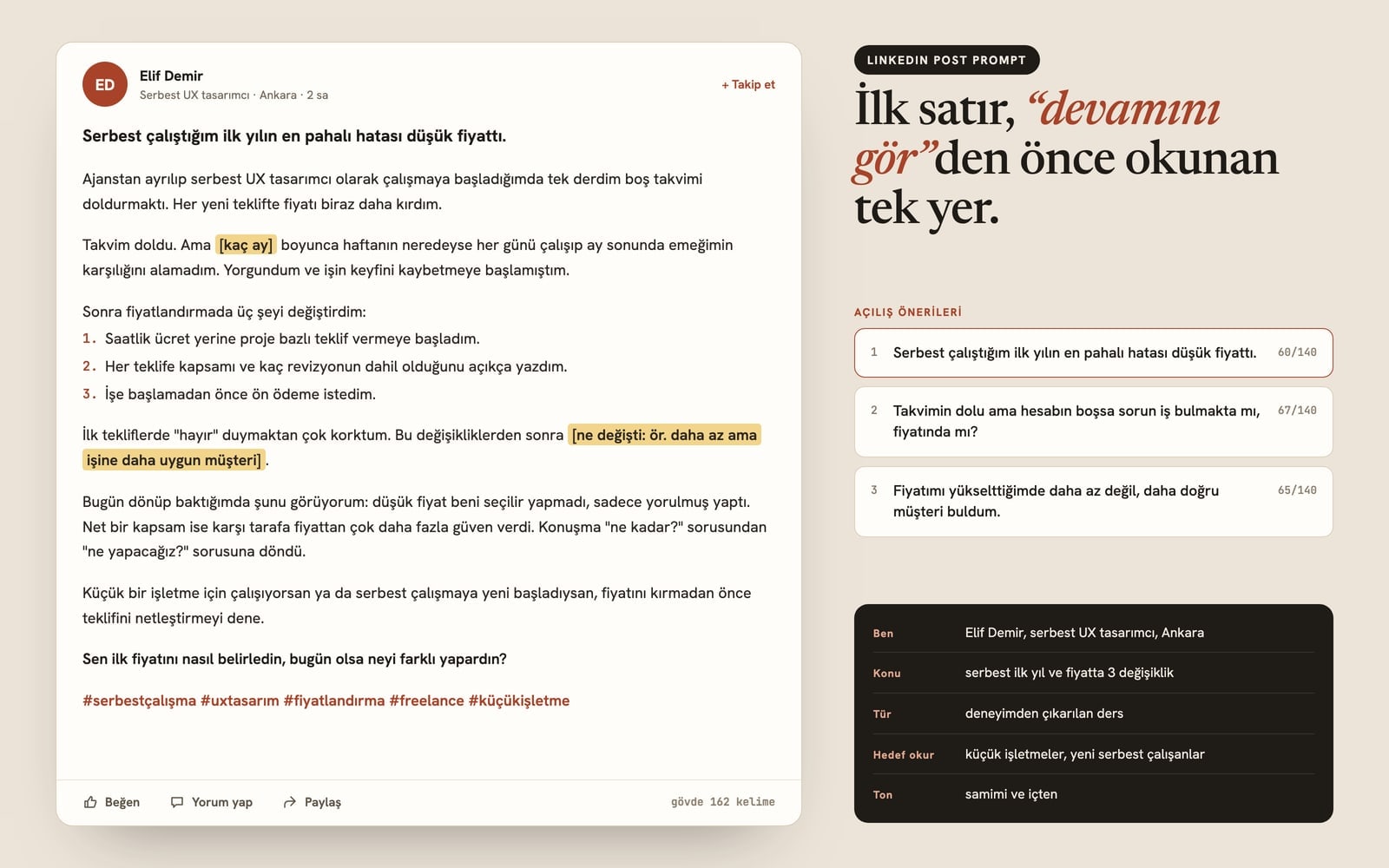
- 1The most expensive mistake of my first freelance year was a low price. (70)
- 2If your calendar is full but your account is not, is the problem work or price? (79)
- 3When I raised my rates, I did not get fewer clients. I got the right ones. (74)
Post
The most expensive mistake of my first freelance year was a low price.
When I left my agency job to go freelance as a UX designer, I had one goal: fill an empty calendar. So I cut my price with every new proposal.
The calendar filled up. But for [how many months] I worked almost every day of the week and still was not paid what the work was worth. I was tired.
Then I changed three things about my pricing:
- 1I moved from hourly rates to project-based proposals.
- 2I wrote the scope and the number of included revisions into every proposal.
- 3I asked for a deposit before starting any work.
I was scared of hearing "no" on those first proposals. After these changes, [what changed: e.g. fewer clients, but better-fitting ones].
Looking back, I see it clearly: a low price did not make me the obvious choice. It only made me tired. A clear scope built far more trust than any discount, and the conversation moved from "how much?" to "what are we building?"
If you run a small business or you have just started freelancing, try making your proposal clearer before you make it cheaper.
How did you set your first price, and what would you do differently today?
#freelancing #uxdesign #pricing #freelancelife #smallbusiness
9 more ready-to-use prompts
Different takes on the same topic. Copy any of them as is and replace the parts in square brackets.
1.Viral-style LinkedIn post prompt for ChatGPT (hook first)
When to use: When you want a post built for reach: a scroll-stopping first line, tight pacing and a closing question, without fake numbers or clickbait.
Write a LinkedIn post designed to stop the scroll.
- Topic
- [what happened or what you learned]
- Me
- [name, role]
- Audience
- [e.g. early-stage founders]
Output
- 15 hook options, each under 140 characters, using different patterns: a confession, a contrarian take, a specific moment, a question, a before/after.
- 2The full post using the strongest hook: 120-200 words, one idea, short lines, a blank line between paragraphs.
- 3One closing question that is easy to answer in a comment.
Rules
- No invented numbers, names or results; leave [brackets] for anything I did not give you.
- No bait like "comment YES" and no engagement pods language.
2.LinkedIn post prompt for Claude in your own voice
When to use: When your AI-written posts sound generic: paste a few of your old posts and let Claude learn your voice before it writes the new one.
Read my past LinkedIn posts below, describe my writing voice, then write a new post in that voice.
- My past posts
- [paste 2-3 posts]
- New topic
- [e.g. what I learned from a project I finished this month]
Output
- 15 bullet points describing my voice (sentence length, words I use often, how I open, how I close, level of formality).
- 2The new post: 150-220 words, short paragraphs, a curiosity-driven first line.
- 33 hashtags.
Rules
- Do not add phrases that never appear in my past posts.
- Do not invent numbers, names or results; use [brackets] instead.
3.LinkedIn post ideas: a 30-day content plan with Gemini
When to use: When you do not know what to post next and want a month of specific post ideas with hooks, ready to schedule.
Create a 30-day LinkedIn content plan for me.
- Me
- [name, role, industry]
- Audience
- [e.g. HR leaders at mid-size companies]
- Posts per week
- [e.g. 3]
- Output
- a table where each row has
- 1Date (week and day)
- 2Post type (story, tips, opinion, announcement, question)
- 3Topic
- 4A suggested first line
Rules
- Never put two posts of the same type back to back.
- Every idea must be specific enough to write from my own experience; no generic motivation topics.
4.LinkedIn post template prompt (hook, story, lesson, question)
When to use: When you want a reusable fill-in structure you can follow every week, plus one finished post written with it.
Give me a reusable LinkedIn post template and then use it once.
- My field
- [e.g. B2B sales]
Output
- 1A template with 5 labelled parts: hook (1 line), context (2-3 lines), turning point (1-2 lines), lesson (1-3 bullets), question (1 line). Under each part, write one sentence on what goes there.
- 2A finished post written with the template about: [topic].
- 33 alternative hooks for the same post.
Rules
- Keep the finished post between 120 and 200 words.
- Do not invent numbers or results; use [brackets].
5.New job or promotion announcement post
When to use: When you started a new role or got promoted and want to share it without sounding boastful or using the usual stock phrases.
Write a short LinkedIn post announcing my new role.
- New role and company
- [e.g. Product Manager at Kumsal Software]
- Previous role
- [e.g. 3 years as a business analyst]
People or team I want to thank: [names]
What I will work on: [one sentence]
Output
- 1An 80-140 word post that opens with a specific moment or observation, not "I'm thrilled to announce".
- 2A shorter version, 3 sentences max.
- 33 hashtags.
Rules
- Keep the thank-yous in one paragraph and spell the names exactly as given.
- No stacked superlatives and no emoji chains.
6.We're hiring LinkedIn post prompt
When to use: When your team has an opening and you want a human post that the right candidate stops to read, with the job link kept for the comments.
Write a LinkedIn post announcing that my team is hiring.
- Role
- [e.g. Senior Frontend Developer]
- Company and team
- [what we do, team size]
- Work setup and location
- [e.g. hybrid, Izmir]
3 things we are looking for: [list]
- How to apply
- [job link or email]
Output
- 1The post: the first line names the role and its most appealing part, 100-160 words, requirements as 3 bullets.
- 2A short first comment that carries the job link.
- 33-4 hashtags.
Rules
- Do not invent salary, benefits or dates; leave [brackets] for missing details.
- Avoid any wording about gender, age or marital status.
7.Turn a blog post or video into a LinkedIn post
When to use: When you already have a long article, talk or video transcript and want one LinkedIn post that works on its own in the feed.
Turn the content below into a LinkedIn post.
- Content
- [paste the article, talk notes or transcript]
- Me
- [name, role]
- Audience
- [e.g. marketing managers]
Output
- 1Pick one main idea from the content and say in one sentence why you chose it.
- 2The post: a first-line hook, 120-200 words, a list of 3 items max, one question to the reader at the end.
- 3A short first comment that shares the link to the full piece.
Rules
- Do not add anything that is not in the content.
- Do not summarise the whole piece; give one idea a reader can use on its own.
8.LinkedIn carousel post prompt (slide-by-slide text)
When to use: When you want to explain a topic as a swipeable PDF carousel and need the copy for every slide plus the caption that goes above it.
Write the copy for an 8-slide LinkedIn carousel on the topic below.
- Topic
- [e.g. 6 questions to ask on a first client call]
- Me
- [name, role]
- Audience
- [e.g. new consultants]
Output
- 1Slide 1: a title of 8 words max and one subtitle line.
- 2Slides 2-7: a heading (6 words max) and a description of 25 words max on each slide.
- 3Slide 8: a recap and one question to the reader.
- 4A 60-100 word caption for the post and 3 hashtags.
Rules
- One idea per slide.
- No invented statistics or study results.
9.LinkedIn promotion post for a product or service launch
When to use: When you are launching a product or service and want a post that explains the problem it solves, without reading like an ad.
Write a LinkedIn post introducing my new product or service.
- Product or service
- [name and what it does in one sentence]
- Who it is for
- [e.g. small accounting firms]
- The problem it solves
- [one or two sentences]
- Why I built it
- [a short personal reason]
Output
- 1A 130-190 word post: open with the problem or the moment I noticed it, then what I built, then who it helps.
- 2A one-line call to action that points to the first comment for the link.
- 33 hashtags.
Rules
- No unverifiable claims about being better than others; describe what it does.
- Do not invent prices, customer numbers or results; use [brackets].
What this prompt does
People searching for LinkedIn post prompts want a post they can paste into ChatGPT, Claude or Gemini and publish in their own name without it sounding AI-written. The main prompt above takes who you are, the topic, post type, target reader and tone from the form, then writes 3 hooks, a 150-230 word post, a closing question and hashtags. The variants cover viral-style hooks, your own voice, a 30-day ideas plan, a reusable template, job news, hiring, repurposing, carousels and launches.
Where to use it
- Lesson-learned story post
- New job or promotion news
- Product or service launch
- Practical tips post
- Industry opinion post
- Event and course takeaways
Fields you can fill in
The fields you can change in the form above and their default values.
- Who you areFree text
- Elif Demir, a UX designer in Ankara who left an agency job to freelance
- What the post is aboutFree text
- my first freelance year, 3 pricing changes: project fees, clear scope, deposit
- Post typeOne of 6 options
- lesson learned (a short story and what I took from it)
- Target readerFree text
- small business owners and new freelancers
- ToneOne of 5 options
- warm and candid
Step by step
- 1
Describe yourself and the topic in one line
In Who you are, add your name, role and city or industry. In What the post is about, name a concrete story, like "my first freelance year, 3 pricing changes: project fees, clear scope, deposit". Numbers and names you leave out are never invented.
- 2
Pick the post type and tone
Post type sets the structure: a lesson needs a story, an announcement stays short, a tips post uses a list. Add your target reader too; the hashtags and closing question are chosen for them. Then pick warm, professional, inspiring, witty or analytical.
- 3
Copy it into ChatGPT, Claude or Gemini
Press Copy and paste the prompt into your AI tool. Choose the hook that sounds most like you, then tighten the post in the same chat with requests like "make it shorter" or "cut the second paragraph".
- 4
Fill the brackets and publish
The model leaves details it does not know as [placeholders]; fill them with your real facts. Put any link in the first comment rather than the body, and reply to early comments in the first hours after posting.
Tips and variations
- The first line is the only part people read before "see more"; read all three hooks out loud and drop any you would never say yourself.
- Switch the post type and regenerate with the same topic: choosing tips instead of lesson turns the same experience into a checklist people save.
- For a post that sounds like you, paste two of your old posts under the main prompt and add "match this voice".
- Keep hashtags to 3-5 and make at least one a term your target reader actually follows, such as #smallbusiness.
Frequently asked questions
What is a good ChatGPT prompt for writing a LinkedIn post?
Tell ChatGPT who you are, what happened, who should read it and which tone to use, then set the length and the ending. The main prompt on this page fills all of that from the form and returns 3 hooks, a short-paragraph post, a closing question and hashtags.
How long should a LinkedIn post be?
Most posts that read well in the feed land between 150 and 250 words, and only the first two or three lines show before "see more". The main prompt asks for 150-230 words; short formats like job news work at 80-140 words in the variants.
How do I make an AI-written LinkedIn post sound human?
Give it a specific moment, your own numbers and your own words. The prompt leaves [placeholders] instead of invented facts, and the own-voice variant studies your past posts before writing a new one.
Does this LinkedIn post prompt work in Claude and Gemini?
Yes. It uses no tool-specific commands, so it works the same way in ChatGPT, Claude, Gemini and Copilot. Claude is handy for turning long content into a post, and Gemini's table output suits the 30-day ideas plan.
How do I come up with LinkedIn post ideas?
Start with something you did, decided or got asked about in the last month. The 30-day content plan variant on this page turns your role and audience into a dated list of topics with a suggested first line for each.