ChatGPT Flyer Prompts: 10 Ready-to-Use Prompts (2026)
Flyer prompts for ChatGPT and Gemini: 10 ready-to-use prompts for business, grand opening, sale, event, birthday party, real estate and hiring flyers, plus Entrobase Canvas.
Tested: EntroGen Flash, November 2026
Prompt
Fill in the fields below and the prompt updates instantly. Copy it and use it in any AI tool.
Design a flyer announcing a business promotion.
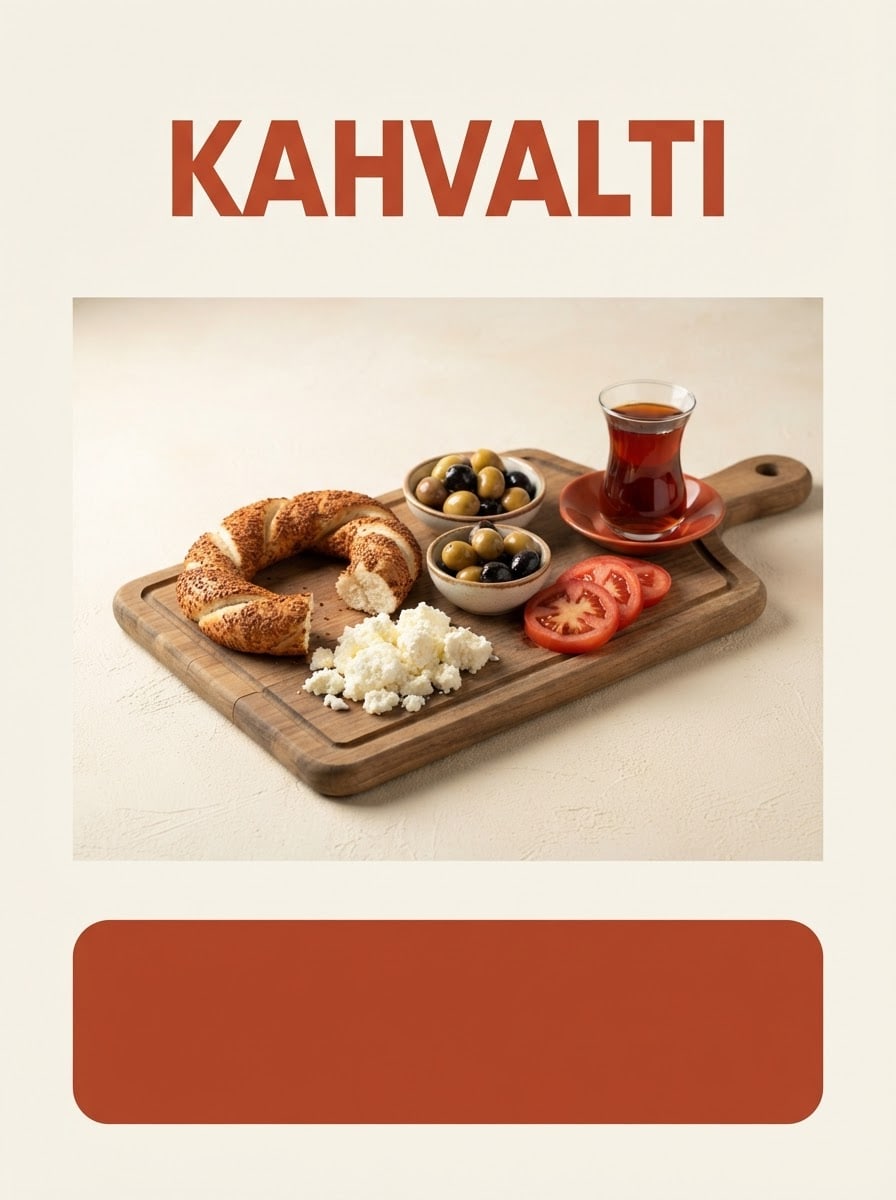
Main visualsimit, white cheese, olives, tomatoes and tea in a tulip glass on a wood board; in the middle section of the flyer, large and clear.
Headlinecentered in the top section, a single headline in bold block capitals: "BRUNCH", colored #b5452b.
Info areain the bottom quarter, a flat, empty, rounded panel in #b5452b; details added later.
Lightsoft daylight on the main visual from the left, natural shadow; main light source out of frame.
Cameramain visual slightly from above, 50 mm, sharp.
Styleclean and modern, cream background, photorealistic visual and flat color blocks.
Palette#b5452b in the headline and panel; other tones from the style's background and the main visual.
Compositionheadline, main visual and panel stacked as three sections, generous space between them.
Surfacethe design itself; the background runs to all four edges, no paper edge and no frame.
Textthe only text in the image is this headline; the panel and every surface are plain and letter-free.
Aspect ratio3:4
Image made with this prompt
9 more ready-to-use prompts
Different takes on the same topic. Copy any of them as is and replace the parts in square brackets.
1.ChatGPT business flyer prompt with all text included
When to use: Use when you want ChatGPT to deliver a finished flyer with headline, details and address already lettered, without a separate design tool.
Design a promotional flyer for [e.g. a neighborhood bakery].
- Headline
- exactly "[e.g. WEEKEND BRUNCH]", bold and large at the top.
- Subheadline
- exactly "[e.g. Saturday and Sunday, 10am to 2pm]"
- Info line
- exactly "[e.g. 12 Harbor Street]"
- Main visual
- [e.g. pancakes, fresh berries and filter coffee on a wooden table], centered, photorealistic.
- Style
- clean and modern, cream background, [e.g. brick red] accents.
Rules
- Use only the quoted text; no other words or logos.
- Keep text off the main visual.
- Aspect ratio
- 2:3
2.Gemini flyer prompt from your own product photo
When to use: Use when you have a real product photo and want Gemini to build a flyer around it without redesigning the product.
Turn the product in the photo I uploaded into the main visual of a promo flyer.
- Product
- keep its shape, color, proportions and label exactly as in the photo; do not redesign it.
- Layout
- the headline exactly "[e.g. NEW SEASON]" at the top, the product in the middle, an empty flat-colored panel for text at the bottom.
- Background
- [e.g. light beige], with a natural shadow under the product.
- Style
- simple commercial flyer, flat color areas, [e.g. olive green] accent.
Add no text other than the headline and the product's own label.
- Aspect ratio
- 3:4
3.Birthday party flyer prompt for ChatGPT and Gemini
When to use: Use when you are inviting guests to a birthday party at home, a cafe or a venue and want a themed flyer to share in group chats.
Design a birthday party flyer.
- Headline
- exactly "[e.g. LILY TURNS 7]", playful and bold at the top.
- Theme
- [e.g. tropical garden party]
- Visual
- a decorated party table with a layered cake, balloons in the theme colors and paper garlands; no people.
Details as separate lines, exactly:
- "[e.g. Saturday, June 14, 3pm]"
- "[e.g. Sunny Park Pavilion]"
- Style
- bright illustrated flyer, [e.g. coral and mint] palette.
No other text; balloons and garlands are plain.
- Aspect ratio
- 4:5
4.Party and DJ night flyer prompt
When to use: Use when a bar, club or cafe is promoting a DJ set or themed night and needs a high-energy flyer for Instagram stories.
Design a flyer for a DJ night at [e.g. a rooftop bar].
- Visual
- a DJ booth with a mixer and glowing vinyl decks, seen from the front, purple and teal stage lights, light haze; the booth surfaces and gear carry no letters or logos; no faces visible.
- Headline
- exactly "[e.g. FRIDAY NIGHT]", bold condensed capitals at the top.
- Bottom
- a flat, empty dark band for the date and lineup, added later.
- Style
- neon club poster, deep black background, glossy highlights.
The headline is the only text in the image.
- Aspect ratio
- 9:16
5.Grand opening flyer prompt for a shop or cafe
When to use: Use when you are opening a new store, cafe or salon and want a storefront flyer for the neighborhood and social media.
Design a grand opening flyer for a new [e.g. flower shop].
- Main visual
- the storefront from the front, [e.g. buckets of colorful flowers] in the window, a green garland arch over the door; photorealistic, warm late-afternoon light.
- Headline
- exactly "[e.g. GRAND OPENING]", bold and large in [e.g. deep green].
- Bottom
- a flat, empty strip for the date and address.
The window, awning and signs are letter-free; no people in the scene.
- Aspect ratio
- 3:4
6.Sale flyer prompt for Black Friday and seasonal offers
When to use: Use when you need a bold discount flyer for a storefront window or a paid social ad during Black Friday or an end-of-season sale.
Design a sale flyer for [e.g. a sneaker store].
- Main visual
- [e.g. an unbranded white sneaker] on a dark background, dramatic side light, centered.
- Headline
- exactly "[e.g. 40% OFF]", bold and huge in [e.g. neon orange].
- Background
- near-black charcoal with a soft light falloff.
- Bottom
- a flat, empty strip for the sale dates.
The sneaker and background carry no text or logos; the headline is the only text.
- Aspect ratio
- 4:5
7.Real estate flyer prompt: for sale or for rent
When to use: Use when an agent or owner needs a listing flyer for a home for sale or rent, ready to print or post.
Design a real estate listing flyer for an apartment for sale.
- Main visual
- [e.g. a bright living room with large windows and simple modern furniture]; photorealistic interior, eye level, 24 mm, vertical lines straight.
- Headline
- exactly "[e.g. FOR SALE]", bold in [e.g. navy].
- Bottom
- two empty flat panels for bedrooms, square footage and contact details.
- Style
- clean corporate layout, white background, thin rules.
Artworks are abstract and book spines are plain; the headline is the only text.
- Aspect ratio
- 3:4
8.Now hiring flyer prompt for small businesses
When to use: Use when a cafe, restaurant or shop wants a job flyer for the window and social media with role and perks listed.
Design a hiring flyer for [e.g. a coffee shop].
- Headline
- exactly "[e.g. NOW HIRING]", bold at the top.
- Role
- exactly "[e.g. Barista, full time]"
Perks as separate lines, exactly:
- "[e.g. Flexible shifts]"
- "[e.g. Free meals]"
- "[e.g. No experience needed]"
- How to apply
- exactly "[e.g. Drop your resume at the counter]"
- Visual
- a simple flat coffee cup icon in one corner.
- Style
- modern, cream background, [e.g. brown] headline; no other text.
- Aspect ratio
- 3:4
9.Flyer prompt generator: let ChatGPT write the flyer brief
When to use: Use when you know what you are promoting but not what the flyer should say, and want ChatGPT to draft the copy before designing.
Act as a flyer designer and help me make a flyer.
- Business
- [e.g. a small bakery selling homemade cakes]
- Goal
- [e.g. announce our new garden seating]
Steps
- 1Suggest 5 headlines of 2-3 words.
- 2With the headline I pick, write at most 3 short info lines (date, place, offer).
- 3Then design the flyer: headline at the top, a photorealistic main visual in the middle, info lines at the bottom; cream background, one accent color.
Rules
- Letter only the text I approve.
- Use a 3:4 aspect ratio.
What this prompt does
Looking for a flyer prompt you can paste into ChatGPT or Gemini for your business? This page has 10: a promo flyer with an empty info panel, a ChatGPT flyer with all text included, a flyer built from your own product photo, grand opening, sale, birthday party, DJ night, real estate, hiring and a flyer prompt generator. The main prompt keeps the headline short, puts one strong visual in the middle and leaves an empty panel for date, address and price; the example image was made with this exact prompt in EntroGen Flash.
Where to use it
- Cafe and restaurant promo flyer
- Grand opening announcement
- Storefront sale flyer
- Workshop and event flyer
- Instagram post and story
- Printed handout flyer
Fields you can fill in
The fields you can change in the form above and their default values.
- Main visualFree text
- simit, white cheese, olives, tomatoes and tea in a tulip glass on a wood board
- Headline (1-2 words)Free text
- BRUNCH
- Main colorColor
- #b5452b
- StyleOne of 5 options
- clean and modern, cream background, photorealistic visual and flat color blocks
- Aspect ratioOne of 5 options
- 3:4
Step by step
- 1
Describe the main visual with material and color
In Main visual, write the product or scene the flyer should show (for example iced coffee in a glass jar, a red ceramic mug). Leave out brand names and packaging text; image models garble small lettering, and adding your own logo afterwards keeps the result clean.
- 2
Keep the headline to one or two words
Type a short, all-caps headline such as BRUNCH, SALE or OPEN. Short headlines render far more reliably than full sentences; put the details in the empty panel later instead of asking the model to letter them.
- 3
Pick a style that fits the business
Clean modern or watercolor suits cafes and bakeries, quiet luxury suits boutiques and salons, bold pop suits youth events and DJ nights, and 1970s retro suits record shops and vintage stores. Pick the main color from your brand; the headline and panel take it.
- 4
Copy it or generate in Canvas
Use Copy to paste the prompt into ChatGPT or Gemini, or Start to generate it in Entrobase Canvas. If you already have a real product photo, use the Gemini variant instead and upload the photo first; the prompt asks the model to keep the product as it is.
- 5
Add date, address and price to the empty panel
After downloading, type the date, address, phone and price into the empty bottom panel in any design tool. Adding these afterwards removes typos in numbers and addresses and lets you reuse the same flyer for the next promotion.
Tips and variations
- Choose 3:4 or 2:3 for a printed flyer, 4:5 for an Instagram post and 9:16 for stories; EntroGen Flash renders 3:4 at 896x1200 pixels.
- Running several promotions in a month? Keep the style and main color fixed and change only Main visual and Headline, so your flyers read as one series in the window and on social media.
- Dark products such as coffee, chocolate or leather stand out on the cream and light yellow backgrounds; light products such as dairy or white ceramics stand out on the dark charcoal one.
- The headline is set in the main color, so it needs contrast with the background: brick red, navy or emerald read well on cream, while pale pastels fade into it.
- If the flyer shows several products, list at most three in Main visual; crowded scenes spill into the headline and squeeze the info panel.
Frequently asked questions
What is a good flyer prompt for ChatGPT?
A good flyer prompt reads like a short brief: what the flyer is for, every word of text in quotes, one main visual, a style and a color, and an aspect ratio. OpenAI's flyer guide describes the same flow: describe the flyer, add your text and reference images, then refine it in the same chat.
Can Gemini make a flyer from my own product photo?
Yes. Upload the product photo in Gemini first, then paste the Gemini variant from this page. It asks Gemini to keep the product's shape, color and label exactly as they are and build only the flyer layout around it, so a phone snapshot becomes a promo flyer.
How do I write a birthday flyer prompt for ChatGPT?
Use the birthday party variant: put the name and age in quotes, name a theme (for example tropical, disco, garden), describe one decorated table or balloon scene without people, and ask for the date and venue as separate quoted lines. Keep each line short so ChatGPT letters it correctly.
Why does the text on my AI flyer come out garbled?
Image models draw letters as shapes, so long sentences, small print and accented characters break first. Keep the headline to one or two words and add dates, addresses and prices yourself in the empty panel the main prompt leaves at the bottom.
What aspect ratio should an AI flyer use?
Printed flyers such as US Letter, A4 and A5 are portrait, so 3:4 or 2:3 is the closest choice. Google's Gemini image generation docs list portrait ratios including 2:3, 3:4, 4:5 and 9:16; just state the ratio on the last line. The example on this page was rendered at 3:4, 896x1200 pixels, in EntroGen Flash.