Business Card Prompts: 9 Copy-Paste Prompts for ChatGPT
9 business card prompts for mockups, front and back print layouts, luxury, QR and vertical cards; works in ChatGPT, Gemini and Entrobase Canvas.
Tested: EntroGen Flash, November 2026
Prompt
Fill in the fields below and the prompt updates instantly. Copy it and use it in any AI tool.
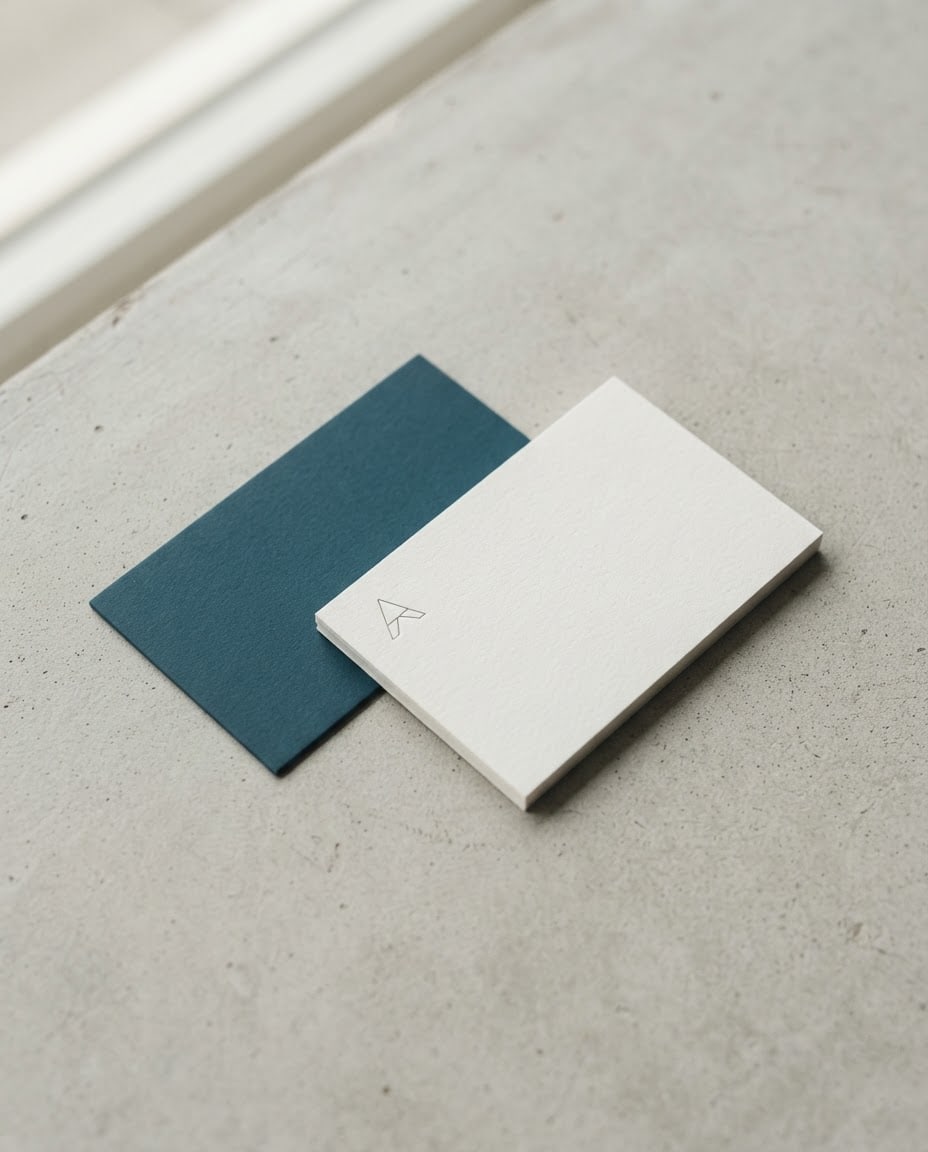
Show a business card design in a realistic mockup photo.
Cardstwo business cards, one showing the front and one the back, slightly crossed with one overlapping the other's corner.
Designminimal with generous white space and one fine line detail; a small text-free geometric symbol in the top left of the front, the rest of the front plain and empty; the back is a flat surface in the main color.
Paperthick, matte, lightly textured card stock with crisp edges.
Surfacea light gray, finely textured concrete surface.
Lightsoft window light from the left, short soft shadows under the cards.
Camera45 degrees from above, 50 mm, cards sharp, the far surface slightly soft.
Stylerealistic product photo with clear material texture.
Palettemain color #1f4e5f, off-white card and the natural tone of the surface.
Compositioncards centered and fully in frame, wide empty surface around them.
Textno letters or numbers on the cards; name and contact areas are added later.
Aspect ratio 4:5.
Image made with this prompt
8 more ready-to-use prompts
Different takes on the same topic. Copy any of them as is and replace the parts in square brackets.
1.Business card prompt for ChatGPT with your name and title
When to use: When you want your name and title already written on the card and the text is short.
Design a business card and show it flat and straight-on.
- Name
- "[e.g. Alex Morgan]" (exactly this spelling), bold on the left.
- Title
- "[e.g. Architect]" (exactly), thin below the name.
- Symbol
- a small [e.g. line-drawn house] mark at the top right.
- Palette
- [e.g. navy and off-white].
Rules
- The only text on the card is these two lines.
- Ratio
- 16:9
2.Business card prompt for Gemini with your own logo
When to use: When your logo is ready and you want to see it on a real card.
Place the logo I uploaded on the front of a business card and render a realistic mockup photo.
- Cards
- one front (logo centered), one back (plain [e.g. the logo's main color]).
- Surface
- [e.g. light gray concrete].
- Light
- soft daylight from the left.
- Camera
- 45 degrees from above.
- Logo
- keep its colors and shape exactly.
- Ratio
- 4:5
3.Business card front and back print layout
When to use: When you want to see both sides flat and side by side before sending them to print.
Show the front and back of a business card side by side as a flat print layout.
- Front
- a small [e.g. leaf] symbol at the top left, the rest empty.
- Back
- plain [e.g. olive green] with the same symbol large in the middle.
- Layout
- both cards on a plain white background with a gap between them and trim lines at the edges.
- Angle
- straight-on, no shadows.
- Text
- no text in the image.
- Ratio
- 16:9
4.Luxury gold foil business card prompt
When to use: When a boutique, jeweler or salon needs an elegant dark card.
Render a luxury business card mockup.
- Card
- thick black stock with gold-painted edges.
- Symbol
- a gold foil, embossed [e.g. crown or monogram frame] in the center, empty inside.
- Surface
- dark marble.
- Light
- narrow side light making the foil shine.
- Text
- no text on the card.
- Ratio
- 4:5
5.Business card prompt with a QR code area
When to use: When you want the card to open your website or menu.
Design a business card with a QR code area and show it in a mockup photo.
- Front
- a plain empty area on the left for the name, an empty white square on the right for the QR code.
- Back
- plain [e.g. orange].
- Surface
- a light wooden table.
- Text
- no text or code on the card; the QR code is added later.
- Ratio
- 1:1
6.Vertical business card prompt
When to use: When you are a designer, photographer or artist and want something less ordinary.
Design a vertical business card and show it in a mockup photo.
- Card
- standing vertical, an illustration of [e.g. abstract colorful shapes] in the top half.
- Bottom half
- plain and empty for the name.
- Background
- a plain [e.g. pastel pink] paper backdrop.
- Light
- soft and even.
- Text
- no text on the card.
- Ratio
- 4:5
7.Business card concept set for one profession
When to use: When you want to compare a few directions for the same job before choosing one.
Show four business card concepts for [e.g. a dentist] in a 2x2 grid, each card flat and straight-on.
- 1Minimal white with a thin line symbol.
- 2Bold color block in one corner.
- 3Soft pastel with a rounded symbol.
- 4Dark card with a light symbol.
- Each card
- one small text-free symbol, the rest empty.
- Background
- plain light gray.
- Ratio
- 1:1
8.Kraft paper business card prompt for handmade products
When to use: When you sell handmade soap, ceramics or local goods and want a natural look.
Render a business card mockup for a small handmade business.
- Card
- recycled kraft paper with slightly rounded corners.
- Symbol
- a small [e.g. lavender sprig] printed in dark ink.
- Props
- [e.g. a paper-wrapped soap bar] and dried flowers next to the cards.
- Surface
- linen fabric.
- Text
- no text on the card.
- Ratio
- 4:5
What this prompt does
If you are looking for a business card prompt, the main one makes a realistic mockup of your card on a desk: front and back side by side, a small symbol on the front and empty space for your name and contact details. The 8 variants below cover a ChatGPT card with your name, a Gemini mockup with your own logo, a flat front and back print layout, luxury, QR, vertical and industry cards.
Where to use it
- Business card mockup
- Front and back print layout
- Brand presentation image
- Instagram promo post
- Test before printing
Fields you can fill in
The fields you can change in the form above and their default values.
- Design styleOne of 4 options
- minimal with generous white space and one fine line detail
- SurfaceOne of 4 options
- a light gray, finely textured concrete surface
- Main colorColor
- #1f4e5f
- RatioOne of 4 options
- 4:5
Step by step
- 1
Pick a design style
Minimal suits consulting and law, gold foil luxury suits boutiques and salons, bold color blocks suit agencies and startups, and kraft paper suits handmade goods.
- 2
Choose the surface and main color
Concrete and marble feel modern, walnut and linen feel warmer. Match the main color to your logo; the back of the card is printed in it.
- 3
Generate in Canvas and check the cards
Open Canvas with Use Prompt and generate. Both cards should be fully in frame with nothing on the front except the symbol; if letter-like marks appear, generate a new image with the same prompt.
- 4
Add your name and details
Open the mockup in a design tool and type your name, title, phone and email into the empty front area. Skew the text slightly to match the card's perspective, or use a mockup template.
Tips and variations
- Do not ask the image model for phone numbers and emails; digits get mixed up, and one wrong digit ruins a printed card.
- A mockup is for presentations and social posts; printers need a flat front and back file, so use the print layout variant for that.
- A single-color back makes the card recognizable at a glance; repeating the symbol large in the middle of the back also works well.
- Use 4:5 for Instagram and 16:9 for a wide website image; the cards stay centered in both.
Frequently asked questions
What is a good business card prompt for ChatGPT?
Use the name variant on this page: it puts your name and title in quotes with exact spelling, adds one symbol and a palette, and asks for nothing else to be written. Add phone numbers and emails afterwards.
Can a business card prompt for Gemini use my logo?
Yes. Upload your logo to Gemini and paste the logo mockup variant; it places the logo on the front of the card and renders a realistic mockup photo. Google's image generation docs cover editing with reference images.
What is a business card mockup AI prompt?
It is a prompt that shows a card design as a photo on a real surface, with light, shadow and paper texture. The main prompt on this page is one, and it leaves the text areas empty for your details.
Should I put a QR code on a business card made with AI?
Yes, but do not let the image model draw it; a drawn code will not scan. The QR variant leaves an empty square for the real code you add later.
Are these business card prompts free?
Copying the prompts is free and they work in the free versions of ChatGPT and Gemini. Image limits depend on each tool's own plan.





