Banner Prompts: 10 Copy-Paste Prompts for ChatGPT and Gemini
Banner prompts: 10 ready-to-use prompts for website, campaign, Instagram ad, LinkedIn and Google Ads banners in ChatGPT, Gemini and Entrobase Canvas.
Tested: EntroGen Flash, November 2026
Prompt
Fill in the fields below and the prompt updates instantly. Copy it and use it in any AI tool.
Create a photorealistic product image for a website and campaign banner; the headline goes into the empty area later.
Productmatte sand-colored ceramic coffee mugs and a teapot, unlabeled and unbranded.
Themea winter and New Year mood, with pine sprigs and warm, blurred light dots.
Backdropa plain, matte #22324a wall with a floor in the same tone, blending into one surface.
Lightthe light of the chosen theme; the main light source stays outside the frame, a soft contact shadow under the products.
Cameraslightly from above, 50 mm, products sharp, backdrop slightly soft.
Stylephotorealistic advertising product photography, real material texture.
Palettebackdrop #22324a; products and props in the theme's natural tones, standing apart from the backdrop.
Compositionthe products in the right third, the left two thirds empty; the empty area shows only the same backdrop wall continuing, free of objects.
Surfacesthe image is text-free; products, props and every surface carry no letters, numbers or symbols.
Framingthe scene is people-free; the image runs to all four edges, with no frame.
Aspect ratio 21:9.
Image made with this prompt
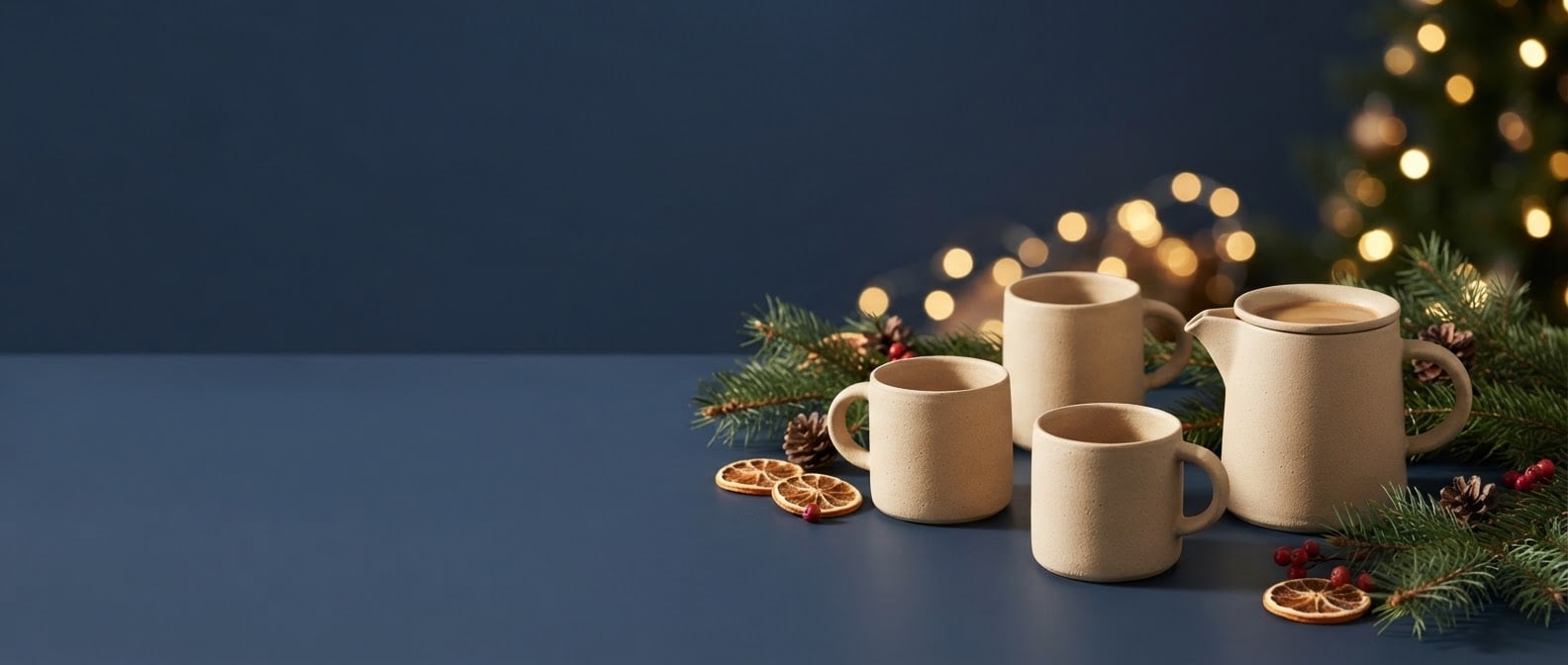
9 more ready-to-use prompts
Different takes on the same topic. Copy any of them as is and replace the parts in square brackets.
1.Banner prompt for ChatGPT: a campaign banner with the headline built in
When to use: Use this when you want the banner and its short headline in one piece, ready to drop onto your site or into an ad.
Create a horizontal campaign banner for an online store.
- Product
- [e.g. matte white ceramic vases], unlabeled and unbranded.
- Headline
- large and bold, reading exactly "[e.g. NEW SEASON]", on the left half of the banner, vertically centered.
- Layout
- the products on the right half, only the plain backdrop behind the headline.
- Backdrop
- a plain [e.g. light sand] wall and floor.
- Light
- broad, soft daylight from the left, natural shadows under the products.
- Style
- modern advertising banner, photorealistic product photography.
The headline is the only text in the image; no letters, numbers or prices on the products or the backdrop.
- Aspect ratio
- 16:9
2.Banner design prompt for Gemini: turn your product photo into a banner
When to use: Use this when you already have a photo of your product and want it placed, unchanged, in a campaign banner.
Place the product from the photo I uploaded into a website banner.
- Product
- keep its shape, color, label and proportions exactly as in the photo; do not redraw it.
- New scene
- [e.g. a plain deep green backdrop with a few fresh eucalyptus sprigs]
- Light
- soft side light that matches the product's original lighting, a natural contact shadow below.
- Layout
- the product in the right third; the left two thirds plain backdrop for a headline added later.
- Style
- photorealistic advertising image.
Do not add any text other than the product's own label.
- Aspect ratio
- 21:9
3.Banner prompt for Instagram: a 4:5 product ad
When to use: Use this for a vertical Instagram feed ad with room at the top for your campaign line.
Create a vertical product campaign image for an Instagram ad.
- Product
- [e.g. an unlabeled face serum in an amber glass bottle] on a podium.
- Scene
- [e.g. a sand-colored cylinder podium with dried pampas grass beside it]
- Backdrop
- a plain [e.g. warm peach] wall in the same family as the podium.
- Light
- soft daylight from the right, a long soft shadow across the podium.
- Layout
- the product in the bottom third; the top two thirds plain backdrop for campaign text added later.
- Style
- premium cosmetics ad, photorealistic.
The image is completely text-free.
- Aspect ratio
- 4:5
4.LinkedIn banner prompt: an abstract company page cover
When to use: Use this when your LinkedIn company page or corporate site needs a calm, abstract cover with no product in it.
Create a wide, abstract cover image for a company's LinkedIn page.
- Industry feel
- [e.g. software and data analytics]
- Imagery
- softly flowing layered shapes and thin, connected lines of light; calm and orderly.
- Palette
- [e.g. navy, ice blue and a thin gold accent]
- Layout
- the densest detail in the right third; the left and center plain and open.
- Light
- a soft glow from the right, fading darker toward the edges.
- Style
- modern corporate digital illustration, clean and crisp.
The image is completely text-free, with no letters, numbers or symbols.
- Aspect ratio
- 4:1
5.Website banner prompt: a hero image with a calm headline area
When to use: Use this for the top banner of a service business website, where a scene sets the mood and the headline sits on the left.
Create a wide hero banner image for a [e.g. specialty coffee roastery] website.
- Scene
- [e.g. a roasting room with a copper roaster, burlap coffee sacks and morning light through tall windows]
- Layout
- the main subject in the right third; the left half calm and softly out of focus for a headline added later.
- Light
- warm morning light from the right, gentle haze in the air.
- Camera
- eye level, 35 mm, shallow depth of field.
- Palette
- [e.g. copper, warm brown and cream]
- Style
- editorial, photorealistic brand photography.
The room is people-free; the sacks, machines and walls carry no letters, numbers or logos.
- Aspect ratio
- 21:9
6.Google Ads display banner prompt: a text-free product image
When to use: Use this for an image you will upload to a Google Ads responsive display ad, where the ad itself shows the headline.
Create a horizontal, text-free product image for a Google Ads display ad.
- Product
- [e.g. a brown leather backpack], unlabeled and unbranded.
- Scene
- [e.g. a light oak desk with a warmly lit, blurred office behind]
- Layout
- the product centered, filling about half of the frame, with safe margins above and below so a 1.91:1 crop never cuts it.
- Light
- window light from the left, soft shadow.
- Camera
- eye level, 50 mm, product sharp.
- Style
- natural, photorealistic product photography.
No text, logos, buttons or frames anywhere in the image.
- Aspect ratio
- 16:9
7.Black Friday sale banner prompt: dark and dramatic
When to use: Use this for a dark Black Friday banner with a short headline for your site and social channels.
Create a dark, dramatic Black Friday web banner.
- Products
- [e.g. wireless headphones and a smartwatch], unlabeled and unbranded, on black cube plinths.
- Headline
- large, bold white letters reading exactly "BLACK FRIDAY", on the left half of the banner.
- Backdrop
- a near-black charcoal wall and floor.
- Light
- a hard, narrow beam from the right, bright rim highlights on the products, deep shadows.
- Accent color
- a single thin [e.g. warm orange] light line reflected on the floor.
The headline is the only text in the image; no percent signs or prices.
- Aspect ratio
- 21:9
8.Banner prompt template: a fill-in structure you can reuse
When to use: Use this when you make banners often and want one structure you fill in each time, for any tool and any campaign.
Create a [banner type, e.g. website hero / Instagram ad / category strip] image.
- Subject
- [product or scene, with material and color]
- Backdrop
- [plain color or setting]
- Props
- [1-3 small items that match the campaign]
- Light
- [direction, softness and time of day]
- Camera
- [angle and lens, e.g. slightly from above, 50 mm]
- Empty area
- [where the headline goes, e.g. left two thirds plain]
- Text
- [none / exactly "ONE TO THREE WORDS" and where it sits]
- Style
- [e.g. photorealistic product photography / flat illustration]
- Aspect ratio
- [21:9 / 16:9 / 4:5 / 1:1 / 9:16]
9.Banner prompt generator: let ChatGPT or Gemini write the prompts
When to use: Use this when you would rather have ChatGPT or Gemini write tailored banner prompts for three sizes than build them yourself.
You are an advertising designer and product photographer. Write 3 separate banner image prompts for me.
- Product
- [e.g. hand-knitted wool beanies]
- Campaign
- [e.g. winter collection]
- Brand colors
- [e.g. burgundy and cream]
Prompts
- 1website hero banner, 21:9, empty headline area on the left
- 2Instagram ad, 4:5, empty headline area at the top
- 3story, 9:16, product in the center
Each prompt must cover these parts on separate lines:
- Product and scene
- Backdrop and color
- Light direction
- Camera angle
- Where the empty area sits
Rules
- No text in the images; I will add the headline myself.
- Put each prompt in its own code block.
What this prompt does
To get a banner image for your website, campaign, Instagram ad or LinkedIn page from ChatGPT or Gemini in one go, copy one of the 9 variants below: a campaign banner with a ready headline, a banner from your product photo, an Instagram ad, a LinkedIn banner, a Google Ads image and a prompt generator. The main prompt above builds a text-free banner image of your product in the theme and backdrop color you pick, leaving a wide empty area for the headline.
Where to use it
- Website hero banners
- E-commerce campaign banners
- Instagram ad images
- Google Ads display images
- LinkedIn company page banners
- Black Friday and holiday sales
Fields you can fill in
The fields you can change in the form above and their default values.
- ProductFree text
- matte sand-colored ceramic coffee mugs and a teapot
- ThemeOne of 6 options
- a winter and New Year mood, with pine sprigs and warm, blurred light dots
- Backdrop colorColor
- #22324a
- Headline areaOne of 4 options
- the products in the right third, the left two thirds empty
- Aspect ratioOne of 5 options
- 21:9
Step by step
- 1
Pick the product and the theme
In Product, describe what the banner shows with its material and color (e.g. matte sand-colored ceramic mugs). Theme offers winter, Black Friday, new season, summer, store opening and minimal; each theme brings its own props and light.
- 2
Match the backdrop color to your brand
The backdrop color fills most of the banner, because the headline area is the same backdrop. Enter your brand's main color: a dark backdrop (navy, charcoal) lifts a light product, a light one (sand, pale gray) lifts a dark product and leaves a clean base for white or dark headline text.
- 3
Choose the headline area and ratio for the placement
Use 21:9 or 16:9 with the left or right side empty for a website hero, 4:5 with the top empty for an Instagram ad, and 9:16 for stories. Google Ads landscape images use 1.91:1; generating 16:9 and trimming a little off the top and bottom gets you there with the least loss.
- 4
Copy it or generate in Canvas
Use Copy to paste the text into ChatGPT or Gemini, or Start to generate it in Entrobase Canvas. If you want the headline rendered on the banner, use the ChatGPT campaign banner variant below instead; if you have a product photo, upload it first and use the Gemini variant.
- 5
Check the result and add the headline
A good banner image has sharp products, a flat and object-free empty area, and no fake letters or price tags. Add the headline, a short line and the button in Figma, Photoshop or your site's own editor so the text stays crisp on every screen.
Tips and variations
- Adding the headline later instead of baking it into the image lets you crop the banner separately for mobile and desktop; Google also advises avoiding overlaid text in responsive display ad images.
- If you do want text in the image, keep the headline to 1-3 words in capitals inside quotes and add 'this headline is the only text in the image'; long sentences and prices are what breaks most often.
- When one campaign needs web, Instagram and story banners, keep the result you like in the same chat and change only the ratio and the headline area; product, light and color stay consistent across the set.
- If the product blends into the background, push the Backdrop color a shade darker or lighter; a backdrop in the product's own color family turns the banner into a single blob of color on small screens.
Frequently asked questions
What is a good banner prompt for ChatGPT?
Paste the ChatGPT campaign banner variant on this page into a ChatGPT chat with image generation and fill in the product, headline and backdrop in the brackets. Keeping the headline to 1-3 words gets clean text in most tries; the supporting line and button are safer to add afterwards.
Does a Gemini banner design prompt work with my product photo?
Yes. Upload your product photo to Gemini and paste the Gemini variant; the product is kept and the backdrop and props are rebuilt for the banner. According to Google's model page, Gemini 3.1 Flash Image added 4:1, 1:4, 8:1 and 1:8 aspect ratios, and 4:1 suits thin category and LinkedIn strips.
What size should a banner be?
It depends on the placement. Google's responsive display ad guide recommends 1200x628 pixels for 1.91:1 landscape images, 1200x1200 for square and 900x1600 for 9:16 portrait, with a maximum file size of 5120 KB. Website hero banners commonly use 16:9 or 21:9.
Can I get a LinkedIn banner prompt for a company page?
Use the LinkedIn company banner variant: it asks for an abstract, text-free cover in your brand colors with calm empty space on the left and center, so your company name and logo stay readable once the page places them. Generate it in 4:1 and crop to the size the platform asks for.
Is there a banner prompt generator or template?
Yes. The prompt generator variant takes your product, campaign, placement and brand colors and has ChatGPT or Gemini write three banner prompts for web, Instagram and story sizes. The fill-in template variant gives you one reusable structure with every part on its own line.





