Google Ads prompt: car rental search ads with sitelinks and callouts
A Google Ads prompt that writes car rental search ads: 12 headlines, 4 descriptions, sitelinks, callouts and a structured snippet within the character limits. Works in ChatGPT, Gemini and Entrobase.
Prompt
Fill in the fields below and the prompt updates instantly. Copy it and use it in any AI tool.
Write the copy for a Google Ads search campaign for Kiyi Car Rental: one responsive search ad (RSA) and the assets that show under it (sitelinks, callouts, a structured snippet).
Servicedaily and weekly car rental. Area: Antalya Airport. Main offer: 24/7 airport pickup and unlimited mileage. Tone: reassuring and clear.
Format the output so it can be pasted straight into Google Ads:
12 headlines, each at most 30 characters including spaces. At least 3 carry the service as a keyword, at least 2 the area, at least 2 the offer and at least 2 a clear call to action (like "Book Your Car Today"). Each headline must make sense on its own and not repeat the others; Google mixes and matches them.
4 descriptions, each at most 90 characters: how the service works, the offer, the area and a call to action.
4 sitelinks: link text of at most 25 characters, followed by two description lines of at most 35 characters each. Each sitelink describes a different page of the site (options, terms, pickup, booking and so on).
4 callouts, each at most 25 characters: short, concrete facts about the service and the offer; do not repeat a headline word for word.
1 structured snippet: pick the header from Google's fixed list (like "Service catalog", "Types" or "Models") and add 4 values of at most 25 characters each; derive the values from the facts I gave.
Label the lines "Headline 1:", "Description 1:", "Sitelink 1:", "Callout 1:", "Structured snippet (header):"; in a sitelink, separate the link text and the two lines with " / ". After writing, count the characters of every line and shorten anything over the limit; do not print the counts.
Rules
no exclamation marks in headlines, no words in all caps, no emoji and no phone numbers.
Do not use exaggerated claims; do not write cheapest, guaranteed, 100%, number one, the best or similar, competitor names or claims you cannot verify.
Use only the facts I gave: do not invent prices, discounts, makes and models, fleet size or terms that are not in the offer.
Do not abbreviate words; keep the English natural.
Text made with this prompt
The text this prompt produces with its default values.
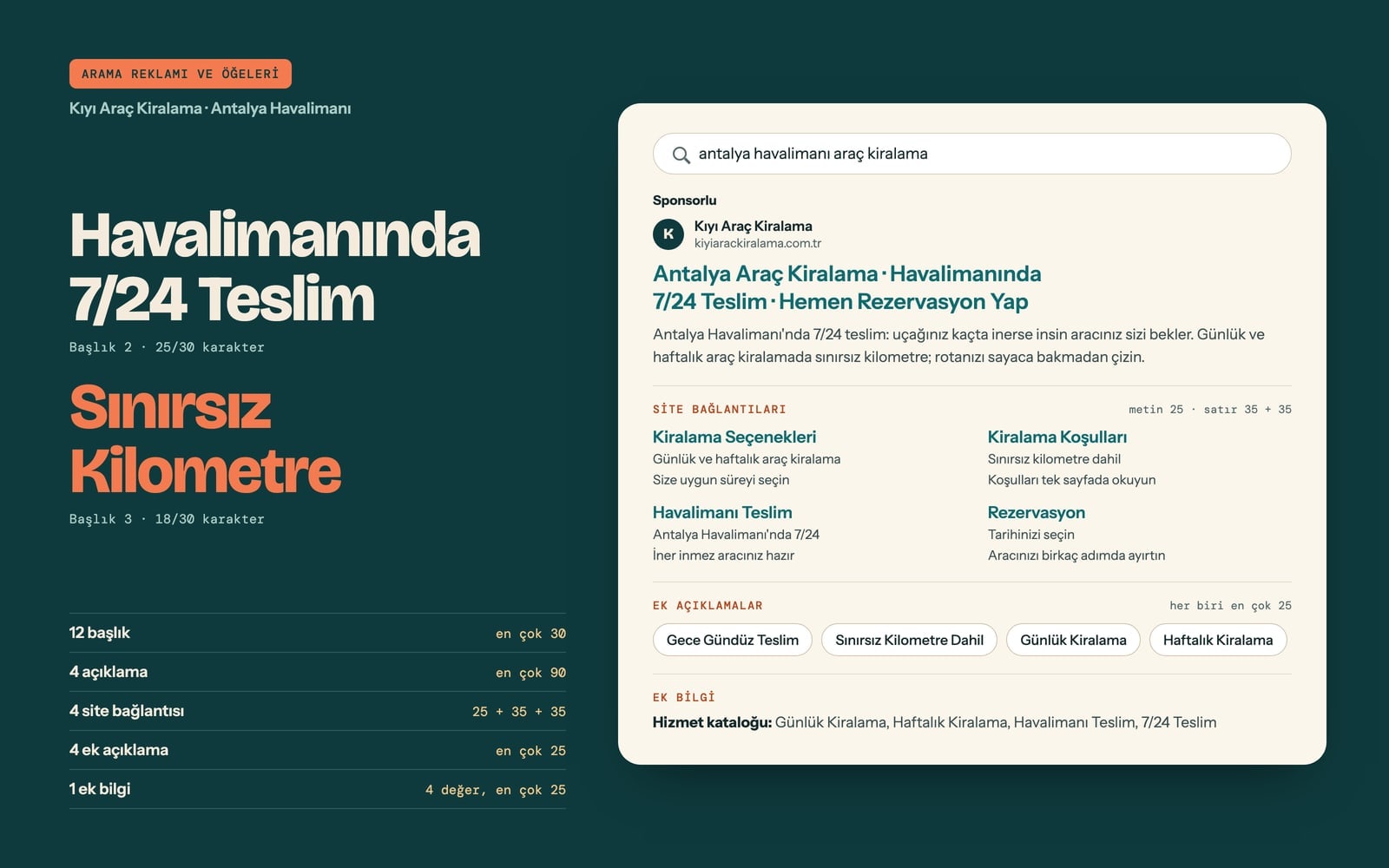
- Headline 1
- Antalya Airport Car Rental
- Headline 2
- 24/7 Airport Pickup
- Headline 3
- Unlimited Mileage Included
- Headline 4
- Kiyi Car Rental
- Headline 5
- Book Your Car Today
- Headline 6
- Daily Car Rental in Antalya
- Headline 7
- Weekly Car Rental
- Headline 8
- Pick Up at Antalya Airport
- Headline 9
- No Mileage Limits
- Headline 10
- Reserve in a Few Steps
- Headline 11
- Land and Drive Away
- Headline 12
- Late Flight? We Are There
- Description 1
- Pick up your car at Antalya Airport any time, day or night. We are there when you land.
- Description 2
- Daily and weekly car rental with unlimited mileage, so you can plan any route you like.
- Description 3
- Reserve in a few steps and collect your car at Antalya Airport as soon as you arrive.
- Description 4
- Start your holiday the moment you land with Kiyi Car Rental. Pick your dates and book.
- Sitelink 1
- Rental Options / Daily and weekly car rental / Choose the length that suits you
- Sitelink 2
- Rental Terms / Unlimited mileage included / Read the terms on one page
- Sitelink 3
- Airport Pickup / 24/7 at Antalya Airport / Your car is ready when you land
- Sitelink 4
- Book a Car / Pick your dates / Reserve your car in a few steps
- Callout 1
- Day and Night Pickup
- Callout 2
- Unlimited Mileage
- Callout 3
- Daily Rentals
- Callout 4
- Weekly Rentals
- Structured snippet (Service catalog)
- Daily Rental, Weekly Rental, Airport Pickup, 24/7 Pickup
What this prompt does
This prompt writes the full copy for a car rental Google Ads search campaign in one go: 12 headlines, 4 descriptions, 4 sitelinks, 4 callouts and a structured snippet. The output comes as labeled lines like 'Headline 1:' and 'Description 1:', each written to Google's character limits, so rental owners and the agencies running their ads can paste it straight into Google Ads.
Where to use it
- Airport car rental campaign
- Daily city rental ads
- Seasonal holiday rental push
- Long-term business rentals
- Refreshing old ads with a new offer
Fields you can fill in
The fields you can change in the form above and their default values.
- Business nameFree text
- Kiyi Car Rental
- ServiceFree text
- daily and weekly car rental
- AreaFree text
- Antalya Airport
- OfferFree text
- 24/7 airport pickup and unlimited mileage
- ToneOne of 4 options
- reassuring and clear
Step by step
- 1
Fill in Business name, Service and Area
Business name is used as the brand in at least one headline. Service feeds the keyword headlines and Area the location headlines; write the area the way people search for it, like 'Antalya Airport'. Keep both short, since headlines are capped at 30 characters.
- 2
Put only real terms in Offer
The prompt forbids inventing prices, discounts, makes, models or terms, so Offer is the only concrete fact the model can use. Write terms you can back up, such as '24/7 airport pickup and unlimited mileage', and add an end date if the promotion has one.
- 3
Choose the Tone for your customers
Reassuring and clear suits first-time renters, quick and direct fits last-minute searches, relaxed with a holiday mood works in tourist areas, and corporate and measured fits business travel campaigns.
- 4
Check every line against the limits
The prompt tells the model to count each line and shorten anything too long, but check it yourself: headlines 30, descriptions 90, sitelink text 25, sitelink lines 35, callouts and snippet values 25 characters. If two headlines say the same thing, ask for a replacement.
- 5
Use it in Entro Ads or copy it
Use in Entro Ads opens the prompt in the Entro Ads chat, which needs a connected Google Ads account. Without one, press Copy, run it in ChatGPT, Gemini or Claude and paste the result into Google Ads by hand.
Tips and variations
- To build tightly themed ad groups, run the prompt twice: once with 'daily car rental' in Service and once with 'monthly car rental'. The keyword headlines split cleanly between the two groups.
- The same prompt works for airport transfers, camper vans or scooter rentals; change Service and Offer, and the sitelink topics (options, terms, pickup, booking) still fit most rental businesses.
- If you have several pickup points, put one in Area per run (for example 'Dalaman Airport') and write a separate ad group for each; squeezing two places into a 30-character headline rarely works.
- If your fleet has classes (economy, SUV, minivan), list them in Service and add 'use Types as the structured snippet header' to the end of the prompt; since inventing is forbidden, the values can only come from the classes you give.
- Run it with the relaxed, holiday-mood Tone for summer and the corporate, measured Tone for the rest of the year, then keep both headline sets to rotate by season.
Frequently asked questions
How many characters can a Google Ads headline have?
A responsive search ad headline can have up to 30 characters and a description up to 90, spaces included. The prompt also caps sitelink text at 25, sitelink lines at 35 and callouts at 25, and asks the model to shorten any line that runs over.
Does this prompt work in ChatGPT?
Yes. Copy it into ChatGPT, Gemini or Claude and you get the same labeled lines. Use in Entro Ads takes it to the Entro Ads chat instead, which requires connecting your Google Ads account.
Why 12 headlines when Google allows 15?
Google accepts up to 15 headlines in a responsive search ad. The prompt asks for 12 that each make sense on their own without repeating each other; you can fill the rest with your own brand or seasonal lines, or change the number to 15 in the prompt.
Can I say 'cheapest' or 'guaranteed' in the ad?
The prompt deliberately blocks words like these, competitor names and claims you cannot back up. Google's ad policies can also flag unverified superlatives, and concrete terms such as 24/7 pickup tell searchers more anyway.
Does each sitelink need its own page?
Yes, each sitelink should point to a different page on your site. The prompt splits the four sitelinks into topics like options, terms, pickup and booking; if your site has no page for one of them, swap it for a page you do have before uploading.