Manga Prompts: 7 Ready-to-Use Prompts for Gemini (2026)
7 manga prompts: a black-and-white manga panel, a character drawing with screentone and speed lines, a manga cover, a page layout and color manga; works in Gemini, ChatGPT and Entrobase Canvas.
Tested: EntroGen Flash, November 2026
Prompt
Fill in the fields below and the prompt updates instantly. Copy it and use it in any AI tool.
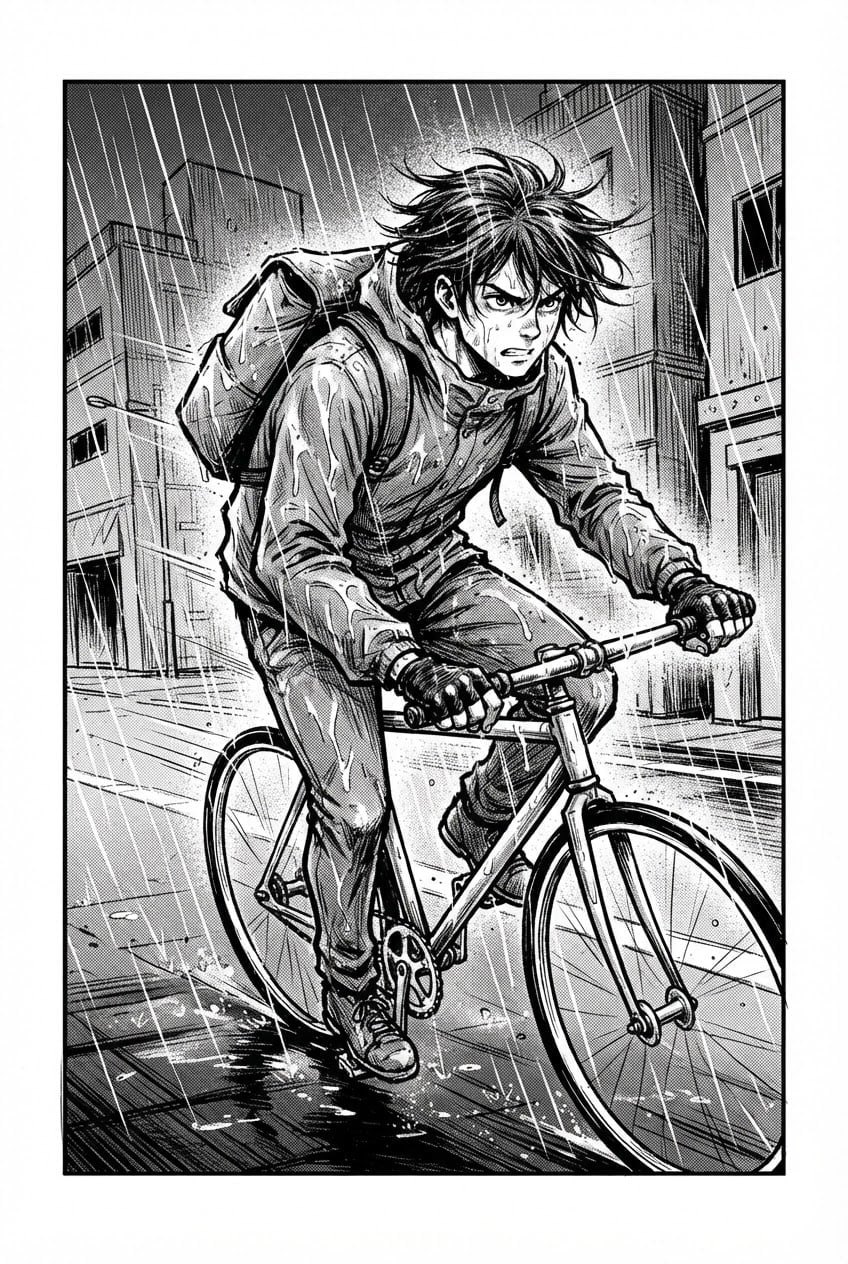
Create a black-and-white character illustration that looks like a single manga panel.
Charactera young bike courier with short windblown hair and a backpack; original, not resembling any known manga or anime character.
Scenea rainy street between plain, signless buildings, a wet pavement.
Line styledynamic, bold and energetic shonen lines.
Techniqueblack ink outlines, dotted screentone for the grays, speed lines in the background.
Lighthard side light, shadows as flat black areas.
Cameralow angle, character from the waist up, a slightly dynamic tilted frame.
Paletteonly black, white and screentone grays.
Compositionthe character fills the panel, a thin black panel border; no speech bubbles and no sound-effect lettering.
Backgroundplain buildings without signs, no marks or emblems on the bag or clothes.
Textno text in the image.
Aspect ratio 2:3.
Image made with this prompt
6 more ready-to-use prompts
Different takes on the same topic. Copy any of them as is and replace the parts in square brackets.
1.Manga cover prompt
When to use: When you need a cover for a story or volume.
Draw the cover illustration of a manga volume.
- Character
- [e.g. a young traveler carrying a sword on the shoulder], full body.
- Style
- color manga cover, bold outlines, vivid colors.
- Top area
- plain sky for the title.
- Text
- no text in the image.
- Ratio
- 2:3
2.Four-panel manga page prompt (Gemini)
When to use: When you want to split a short scene into panels.
Draw a black-and-white manga page with four panels.
- Story
- [e.g. the cat knocks over the coffee; the owner is shocked; the cat looks innocent; both laugh].
- Style
- screentone shading, clean panel borders.
Rules
- Leave the speech bubbles empty.
- Ratio
- 2:3
3.Color manga prompt
When to use: When you want manga lines with color.
Create a color manga illustration.
- Character
- [e.g. a student in an orange scarf], waist up.
- Style
- manga outlines, flat watercolor colors, a light screentone texture.
- Background
- autumn leaves.
- Ratio
- 4:5
4.Chibi manga prompt
When to use: When you want a funny little in-between panel.
Draw a black-and-white chibi manga panel.
- Character
- [e.g. a tiny angry cook with puffed cheeks].
- Style
- big head, small body, exaggerated expression, simple screentone.
- Ratio
- 1:1
5.Manga character design sheet prompt
When to use: When you want to see a character from the front and side.
Draw a design sheet for a manga character.
- Character
- [e.g. a detective with glasses and a long coat].
- Layout
- front, side and back full body, three facial expressions next to them.
- Style
- black-and-white manga lines.
- Text
- no text in the image.
- Ratio
- 3:2
6.Manga action scene prompt (ChatGPT)
When to use: When you want a dynamic, energetic panel.
Draw a black-and-white manga action panel.
- Scene
- [e.g. a ninja leaping between rooftops], mid-air.
- Technique
- heavy speed lines, strong perspective, screentone.
- Text
- no text and no sound effects in the image.
- Ratio
- 2:3
What this prompt does
If you want a character drawn like a real manga panel, in black and white with screentone shading and speed lines, the main prompt makes one panel with bold ink outlines and a dynamic angle; it leaves out speech bubbles so you can add the lettering yourself. The 6 variants below give a manga cover, a four-panel page, color manga, a chibi panel, a character design sheet and an action scene in Gemini and ChatGPT.
Where to use it
- Drafting your own manga or webtoon
- Story and fan fiction covers
- Drawing posts for social media
- Character design tests
Fields you can fill in
The fields you can change in the form above and their default values.
- CharacterFree text
- a young bike courier with short windblown hair and a backpack
- SceneOne of 3 options
- a rainy street between plain, signless buildings, a wet pavement
- Line styleOne of 3 options
- dynamic, bold and energetic shonen lines
- RatioOne of 3 options
- 2:3
Step by step
- 1
Describe the character in one line
Write the age, hair and one defining item: 'a bike courier with a backpack'. In a manga panel the character is recognized by silhouette.
- 2
Pick the line style
Shonen gives action and energy, shojo gives emotion and softness, seinen gives detail and realism. Match it to the scene.
- 3
Add the bubbles later
Models can fill bubbles with unreadable letters, so the prompt asks for none. Add the dialogue in an editor.
Tips and variations
- With several panels the character may drift between them; make each panel separately and reuse the same Character line.
- Tall 2:3 fits a manga page, 4:5 fits an Instagram post, 1:1 fits avatars and covers.
- If the grays look blurry, add 'crisp, visible screentone dots' to the Technique line.
Frequently asked questions
How do I write a manga prompt?
Put the character, the scene, the line style (shonen, shojo, seinen), techniques like screentone and speed lines, and the framing on separate lines. 'Black and white, screentone' separates it from color anime.
Can Gemini make a manga page?
Yes, Gemini draws multi-panel layouts. For consistency ask for few panels and describe the character with the same words each time.
What is the difference between a manga and an anime prompt?
An anime prompt asks for a lit, colored scene; a manga prompt asks for black ink, screentone shading and a panel border.
Can AI write text in speech bubbles?
It can write a word or two but often misspells. Adding longer dialogue yourself after generation is safer.





