Logo Prompts: 10 Copy-Paste Prompts for ChatGPT and Gemini
Logo prompts for ChatGPT and Gemini: 10 copy-paste prompts for minimal symbols, wordmarks, lettermarks, mascots, emblems and app icons, also in Entrobase Canvas.
Tested: EntroGen Flash, November 2026
Prompt
Fill in the fields below and the prompt updates instantly. Copy it and use it in any AI tool.
Design a minimal, text-free logo symbol for a business.
Businessa neighborhood coffee shop and roastery
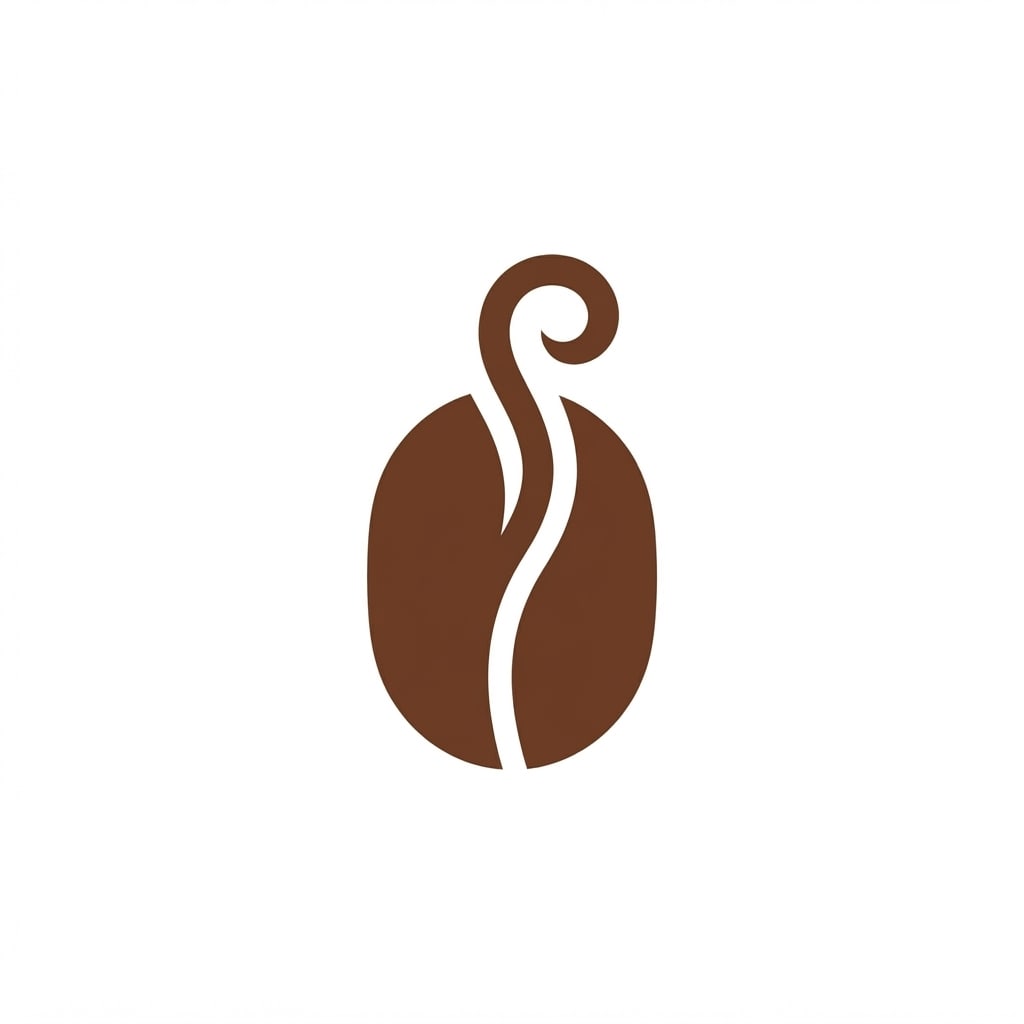
Symbola single coffee bean whose center line curls up like steam; a single shape, simple and recognizable at small sizes.
Styleminimal and geometric, a bold flat fill with rounded corners; flat vector logo idea with no shadows or gradients.
Palettethe symbol in one color, #6b3e26; a pure white background.
Light and looka completely flat graphic surface with clean, crisp edges.
Camerastraight-on, a flat front view at a right angle.
Compositionthe symbol itself, to be used as a logo; dead center at about half the frame width; generous space around it, the white background running to all four edges.
Textthe image is fully text-free, with no letters, numbers or signature; only the symbol.
Aspect ratio1:1
Image made with this prompt
9 more ready-to-use prompts
Different takes on the same topic. Copy any of them as is and replace the parts in square brackets.
1.ChatGPT logo prompt with your brand name (wordmark)
When to use: Use it when you want a horizontal logo with the business name set next to the symbol, ready to use.
Design a horizontal logo made of a symbol and a brand name for a business.
- Business
- [e.g. a neighborhood bakery]
- Symbol
- [e.g. a round loaf with a single curl of steam rising from it]; one simple shape.
- Brand name
- exactly "[e.g. CRUMB]", to the right of the symbol in a bold, clean typeface.
- Color
- symbol and name in one color, [e.g. dark brown]; a pure white background.
- Style
- flat vector, no shadows or gradients.
The brand name is the only text; check every letter and do not add a tagline or other text.
- Aspect ratio
- 16:9
2.Logo prompt for Gemini and Nano Banana: turn a sketch into a clean logo
When to use: Use it when you have a rough logo sketch on paper or a tablet and want it redrawn as a clean, one-color logo.
Turn the sketch I uploaded into a clean, print-ready logo symbol.
- Shape
- keep the main form and proportions of the sketch; straighten the lines and sharpen the edges.
- Color
- one color, [e.g. navy blue].
- Style
- flat vector, even line weight, no shadows.
- Framing
- only the symbol, dead center; a plain white background to all four edges.
If the sketch has any writing, remove it; the image stays text-free.
- Aspect ratio
- 1:1
3.Logo prompt for Claude: an SVG logo that scales
When to use: Use it when you need a vector file that stays sharp at any size; Claude does not draw images but writes and previews SVG code.
Write a minimal logo symbol for a business as SVG code and preview it in an artifact.
- Business
- [e.g. a boutique florist]
- Symbol
- [e.g. a single tulip with its stem and two leaves, built from geometric shapes]
Rules
- viewBox 0 0 512 512; only path, circle and rect elements
- one color [e.g. #7A2E3A], filled shapes, no strokes
- no text, gradients, shadows or filters
- write 3 different takes, each as its own SVG
Finally, judge in one sentence each whether every take is still recognizable at 32 pixels.
4.Logo prompt generator: ChatGPT ideas with ready image prompts
When to use: Use it when you do not know what to draw yet and want logo ideas first, each with a prompt ready for an image model.
Generate logo ideas for a business.
- Business
- [e.g. a vegan bakery in a busy city neighborhood]
- Audience
- [e.g. 25 to 40 year olds looking for healthier sweets]
- Personality
- [e.g. warm, playful and careful]
Output
- 15 different logo ideas, one sentence each: symbol, style and color
- 2Why each idea fits this business, one sentence
- 3For each idea, a ready prompt for an image model: one-piece symbol, one color, plain white background, no text, aspect ratio 1:1
Rules
- do not suggest ideas that resemble known brands
- avoid cliches such as light bulbs and globes; use a detail specific to the business
5.Gaming and esports mascot logo prompt
When to use: Use it when a gaming channel, esports team or Discord server needs a bold mascot mark with no team name baked in.
Design a text-free esports mascot logo.
- Mascot
- [e.g. a fierce wolf head with glowing eyes], front-facing, head and neck only.
- Style
- bold vector mascot with thick dark outlines, sharp angular shapes and two-tone shading.
- Colors
- [e.g. electric blue, silver and black]
- Framing
- the mascot centered on a plain white background with space around it.
The image is fully text-free, with no letters or numbers; only the mascot.
- Aspect ratio
- 1:1
6.Logo prompt for a clothing brand
When to use: Use it when you are starting a streetwear or apparel label and want a symbol that works on tags, chest prints and packaging.
Design a symbol logo for a small clothing brand.
- Brand style
- [e.g. relaxed streetwear inspired by skate culture]
- Symbol
- [e.g. a simple flame drawn with a single continuous line]
- Style
- flat vector, bold enough for a small embroidered chest logo.
- Color
- one color, [e.g. black], on a plain white background.
- Framing
- the symbol centered, about half the frame width.
The image is text-free; only the symbol.
- Aspect ratio
- 1:1
7.App icon prompt
When to use: Use it when your mobile app or website needs a square icon for the home screen and the app store.
Design an icon for a mobile app.
- App
- [e.g. a plant watering reminder]
- Symbol
- [e.g. a single leaf shaped like a water drop], centered, about half the icon area.
- Background
- a soft [e.g. light to dark green] gradient filling the square edge to edge.
- Style
- modern and simple, slightly dimensional; light from above.
The icon is text-free; render it as a full square, since the phone rounds the corners itself.
- Aspect ratio
- 1:1
8.Lettermark logo prompt (initials)
When to use: Use it when the brand name is long and you want a compact mark made only of initials that reads at small sizes.
Design a lettermark logo from two letters.
- Letters
- exactly "[e.g. AK]"; the letters interlock into one mark.
- Style
- [e.g. elegant, thin serif] letterforms, flat vector.
- Frame
- [e.g. inside a thin circle]
- Color
- letters in [e.g. gold] on a plain [e.g. deep navy] background.
These two letters are the only text; add no other letters, numbers or decorative words.
- Aspect ratio
- 1:1
9.Logo mockup prompt: see it on a shop sign (Gemini)
When to use: Use it after you have a logo and want to see how it looks on a storefront sign, a business card or a mug.
Place the logo I uploaded into a realistic usage scene.
- Logo
- keep its shape, color and proportions exactly; do not redesign it.
- Scene
- [e.g. a round wooden sign hanging on the brick front of a small cafe]
- Light
- soft daylight, realistic shadows.
- Camera
- eye level, 50 mm, the logo clearly readable.
Add no text other than the logo; no people in the scene.
- Aspect ratio
- 4:5
What this prompt does
These 10 logo prompts for ChatGPT and Gemini cover the logo types people actually need: a minimal symbol, a wordmark with your brand name, a lettermark, a gaming mascot, an app icon, a clothing brand mark, a clean logo from a sketch, an SVG logo from Claude, an idea generator and a mockup on a sign. The main prompt draws a text-free, single-color symbol that still reads at small sizes; the example image was made with it in EntroGen Flash.
Where to use it
- Cafe and shop logo
- Instagram profile picture
- Website favicon
- Business card and signage
- Product label and packaging
- First draft for a designer
Fields you can fill in
The fields you can change in the form above and their default values.
- BusinessFree text
- a neighborhood coffee shop and roastery
- SymbolFree text
- a single coffee bean whose center line curls up like steam
- StyleOne of 5 options
- minimal and geometric, a bold flat fill with rounded corners
- Logo colorColor
- #6b3e26
Step by step
- 1
Describe the business in a few words
In the Business field, say what the business does (e.g. a neighborhood bakery, a boutique florist, a bike repair shop). Leave the brand name out: the prompt asks for a text-free symbol, and a name in the prompt can leak into the symbol as letters.
- 2
Reduce the symbol to one object and one twist
In the Symbol field, name one object and one small transformation (e.g. scissors whose handle turns into a leaf, a coffee bean that curls like steam). Symbols that merge three or four objects blur together; a single object stays readable when small.
- 3
Choose the style for where the logo will live
Geometric or emblem works for signs and profile pictures, fine line art for cosmetics labels and delicate print, the hand-drawn feel for handmade goods. Negative space is the most memorable style but can take a few tries before the second shape reads clearly.
- 4
Copy it or generate in Canvas
Use Copy to paste the prompt into ChatGPT or Gemini, or Start to generate it in Entrobase Canvas. If the logo must include your brand name, use the ChatGPT wordmark variant below instead of the main prompt.
- 5
Shrink it and test readability
Scale the result down to profile picture size on your phone: if it still reads, the symbol works. If not, ask for simplification only in the same chat ("less detail, bolder shapes"); rewriting the whole prompt changes the symbol from scratch.
Tips and variations
- According to Google's Gemini image generation documentation, a 1:1 image at 1K is 1024x1024 pixels; that is enough for a profile picture or favicon, while signs and large prints need a vector (SVG) version.
- Pick a color your sector expects: earthy brown for coffee and bakeries, blue-green for cleaning and health, deep burgundy or black for boutiques and cosmetics. A one-color logo also works when flipped to white on a dark background.
- Generate the same symbol in three style options and place them side by side; it turns feedback from a partner or client into a concrete talk about line and color.
- Do not ask for a logo that looks like a known brand; it can lead to a similarity objection when you register the trademark. Describe the object, shape and color in your own words instead.
- Before printing, place the final logo on a sign or card with the mockup variant; a fine line logo that looks great on white may not read from across the street.
Frequently asked questions
What is a good logo prompt for ChatGPT?
A good ChatGPT logo prompt names the logo type, the business, one symbol, one color and a plain background, and says whether text is allowed. Paste the main prompt or the wordmark variant into a new chat, then fix one thing at a time in the same chat instead of rewriting the prompt.
How do I make a logo with Gemini or Nano Banana?
Paste a prompt from this page into the Gemini app or gemini.google.com. If you have a hand-drawn sketch, upload it first and use the sketch variant; Gemini's image model (Nano Banana) can keep the shape of your sketch and redraw it as a clean, one-color logo.
Can AI put my brand name in the logo?
Yes, but keep the name short: one short word renders far more reliably than a phrase, and accented letters often break. If your name is long, generate the symbol text-free and set the name afterwards in a design tool.
Can I get an AI logo as an SVG file?
Image models return PNG or JPG; per Google's Gemini documentation, a 1:1 image at 1K is 1024x1024 pixels. For a vector file, use the Claude variant: Claude writes the symbol as SVG code and previews it in an artifact, so it stays sharp at any size.
Is there a free logo prompt generator?
The ChatGPT generator variant on this page works as one: describe your business, audience and personality, and it returns five logo ideas, why each fits, and a ready image prompt for every idea that you can paste into ChatGPT, Gemini or Entrobase Canvas.