Kawaii Prompts: 7 Cute 3D Character Prompts (2026)
7 kawaii prompts: a cute round 3D kawaii character, kawaii avatar, chibi animal, kawaii food, stickers and a phone wallpaper; works in ChatGPT, Gemini and Entrobase Canvas.
Tested: EntroGen Flash, November 2026
Prompt
Fill in the fields below and the prompt updates instantly. Copy it and use it in any AI tool.
Create a cute 3D kawaii character to use as a profile picture.
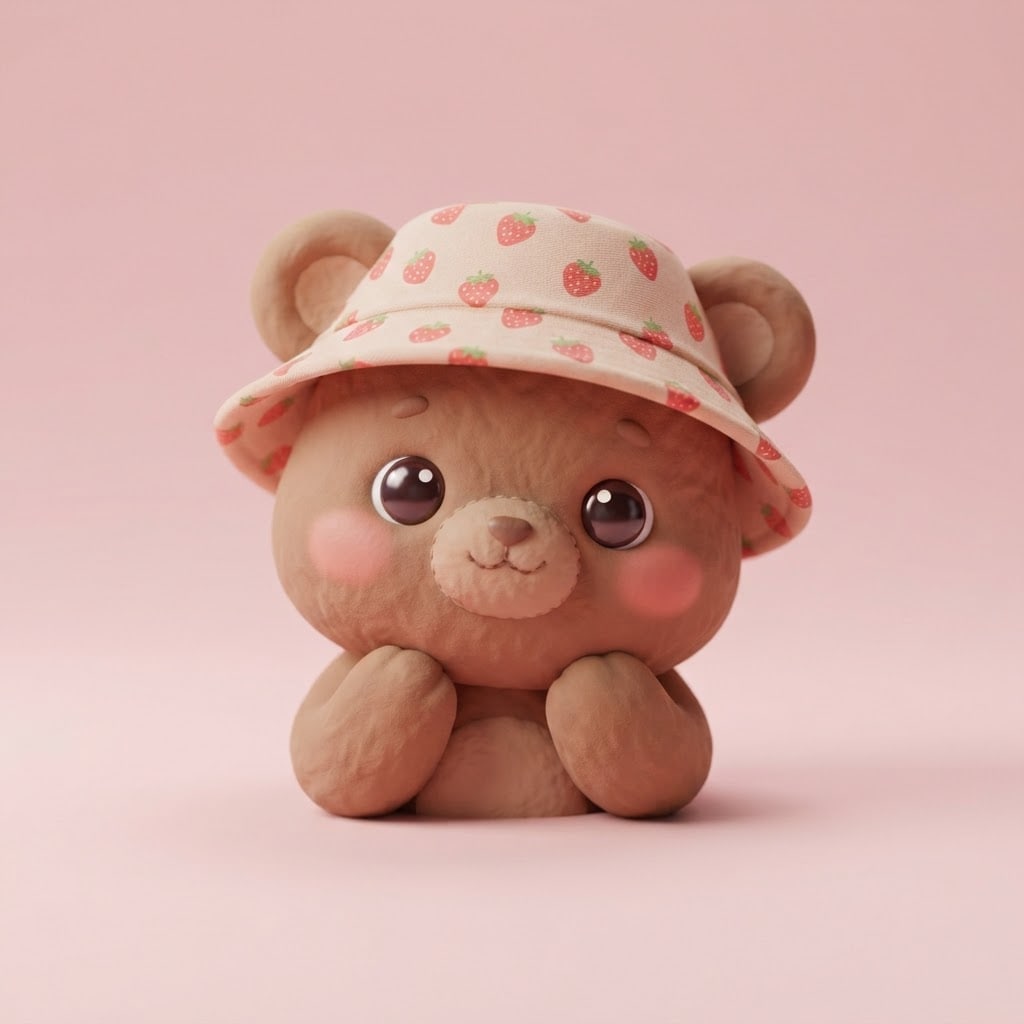
Charactera small brown bear cub wearing a strawberry-print hat; original, not resembling any known cartoon or game character.
Looka round, chubby body, big shiny eyes, pink cheeks, a small smile; head and shoulders visible.
Materialmatte, soft-textured clay.
Backgrounda flat pastel pink studio backdrop with a soft shadow under the character.
Lightbroad, soft studio light from the front and above; two small highlights in the eyes.
Cameraeye level, 50 mm feel, the character sharp.
Styleclean 3D render with a cute, toy-like kawaii look.
Palettepastel tones, the background color and the character's two main colors.
Compositionsquare frame, face dead center; ears and face stay whole when cropped to a circle.
Textno text in the image.
Aspect ratio 1:1.
Image made with this prompt
6 more ready-to-use prompts
Different takes on the same topic. Copy any of them as is and replace the parts in square brackets.
1.Kawaii food prompt
When to use: When you want a dessert or dish with a cute face.
Create a cute kawaii [e.g. slice of strawberry cake] with a smiling face.
- Style
- soft 3D render, pastel colors, big shiny eyes.
- Background
- flat cream.
- Text
- no text in the image.
- Ratio
- 1:1
2.Chibi kawaii animal prompt
When to use: When you want an animal with a big head and tiny body.
Draw a kawaii [e.g. panda] with a big head and a tiny body.
- Pose
- sitting, holding a small teacup.
- Style
- chibi proportions, pastel colors, clean 3D render.
- Background
- flat light blue.
- Ratio
- 1:1
3.Kawaii sticker set prompt
When to use: When you are making stickers of one character.
Create a sticker set of the same kawaii [e.g. bunny] with 6 expressions.
- Layout
- 3x2 grid, each sticker with a thick white border.
- Expressions
- happy, surprised, sleepy, grumpy, shy, loving.
- Background
- flat light gray.
- Text
- no text in the image.
- Ratio
- 3:2
4.Kawaii room (isometric) prompt
When to use: When you want a tiny, cute room scene.
Create a small, cute kawaii bedroom in an isometric view.
- Contents
- a round bed, plants, plush toys, a pink rug.
- Style
- soft 3D render, pastel palette.
- Background
- flat lilac.
- Ratio
- 1:1
5.Kawaii wallpaper prompt (Gemini)
When to use: When you want a cute phone background.
Create a kawaii scene for a phone wallpaper.
- Scene
- a small cat sleeping on pastel clouds, stars around it.
- Composition
- cat in the lower third, plain sky above.
- Text
- no text in the image.
- Ratio
- 9:16
6.2D kawaii drawing prompt (ChatGPT)
When to use: When you want a flat, cartoon-like kawaii drawing instead of 3D.
Draw a 2D kawaii [e.g. frog] with thick outlines and flat colors.
- Style
- simple vector drawing, pastel colors, big eyes, pink cheeks.
- Background
- flat white.
- Ratio
- 1:1
What this prompt does
If you want a cute, round kawaii character as a profile picture or brand mascot, the main prompt makes a clean 3D kawaii character with big eyes and pink cheeks on a pastel backdrop; the face sits in the middle, so it survives a circle crop. The 6 variants below give kawaii food, a chibi animal, a sticker set, a kawaii room, a phone wallpaper and a flat 2D kawaii drawing in ChatGPT and Gemini.
Where to use it
- Instagram, Discord and X profile pictures
- A small shop or brand mascot
- Sticker sets
- Phone wallpapers
Fields you can fill in
The fields you can change in the form above and their default values.
- CharacterFree text
- a small brown bear cub wearing a strawberry-print hat
- MaterialOne of 3 options
- matte, soft-textured clay
- BackgroundOne of 3 options
- pastel pink
- RatioOne of 3 options
- 1:1
Step by step
- 1
Describe the character in one line
Pick an animal or object and give it one accessory: 'a bear cub in a strawberry hat', 'a cat with headphones'. Kawaii looks cuter with fewer details.
- 2
Choose the material
Clay looks matte and handmade, vinyl looks glossy and toy-like, plush looks soft and warm. Clay or vinyl read best at profile-picture size.
- 3
Check it small
Shrink the image to 100 pixels. If the eyes and cheeks still read, it is ready; if not, use a lighter pastel background.
Tips and variations
- To make the same character with other expressions, keep the Character line word for word and add 'winking' or 'sleepy' at the end.
- A background in the same tone as the character makes it disappear; pink suits a brown bear, mint suits a white cat.
- For a wallpaper, switch to 9:16 and change the Composition line to 'character in the lower third, plain sky above'.
Frequently asked questions
How do I write a kawaii prompt?
Put the character, kawaii cues like big eyes and pink cheeks, a pastel palette and a plain background on separate lines. 'Round and chubby' is the detail that adds the most cuteness.
What is the difference between kawaii and chibi?
Chibi is a proportion: a big head on a small body. Kawaii is a wider cute style; animals, food or objects can be kawaii too.
Can ChatGPT draw kawaii art?
Yes. ChatGPT and Gemini handle short, clear kawaii descriptions well; saying the character is original keeps it from looking like a known one.
Can I use a kawaii character as a logo?
It works as a mascot or profile picture. For a logo, regenerate the same character as a one-color flat vector on a plain background.





