Isometric Prompts: 8 Copy-Paste Prompts for Gemini
8 isometric prompts: 3D isometric rooms, city dioramas, cafe buildings, isometric rooms from a photo and game map pieces; works in Gemini, ChatGPT and Entrobase Canvas.
Tested: EntroGen Flash, November 2026
Prompt
Fill in the fields below and the prompt updates instantly. Copy it and use it in any AI tool.
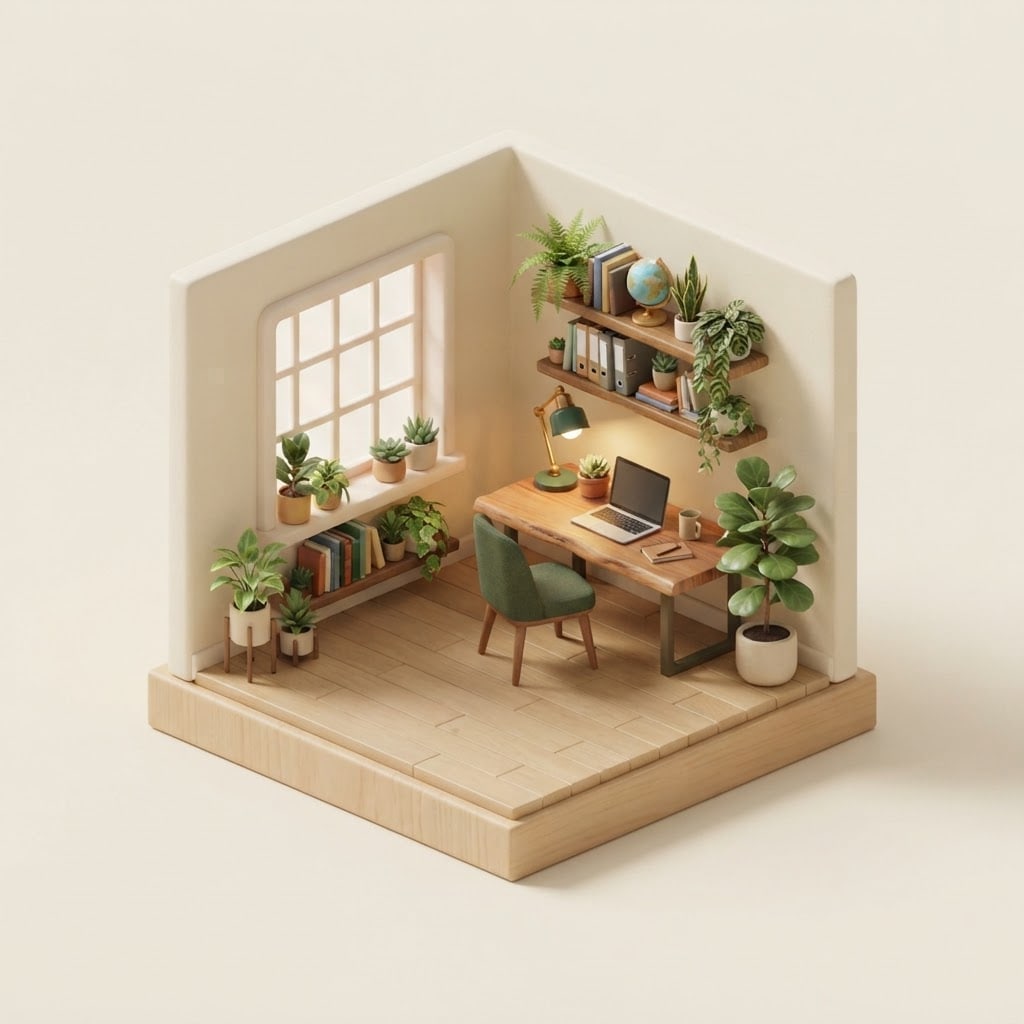
Create a miniature 3D room from an isometric angle.
Rooma small home office full of plants, with a wooden desk and books on a shelf.
Structurea cutaway room made of two walls and a floor, the two front walls open; the room sits on a thick floor block floating in space.
Stylesoft 3D render with a toy-like miniature feel.
Lightsoft daylight through the window and a warm desk lamp, soft shadows.
Cameratrue isometric view, 30 degrees, no perspective distortion.
Paletteaccent color #2f7d5b, cream walls, light wood floor.
Backgroundplain, single color light cream.
Compositionthe room dead center with generous space on all sides, no part cropped.
Textno text in the image.
Aspect ratio 1:1.
Image made with this prompt
7 more ready-to-use prompts
Different takes on the same topic. Copy any of them as is and replace the parts in square brackets.
1.Isometric prompt for Gemini: miniature city diorama
When to use: When you want a city or neighborhood as a miniature on a single block.
Create a miniature city diorama from an isometric angle.
- City
- [e.g. a hillside seaside town with red roofs].
- Structure
- on a square base block, with streets, houses, trees and a small harbor.
- Style
- soft, toy-like 3D render.
- Camera
- true isometric.
- Background
- plain [e.g. pale blue].
- Text
- no text in the image.
- Ratio
- 1:1
2.Isometric prompt for Nano Banana: your room from a photo
When to use: When you want an isometric miniature of your own room, office or shop.
Turn the room photo I uploaded into an isometric miniature 3D room.
- Objects
- the furniture, colors and layout in the photo kept.
- Structure
- a cutaway room with the two front walls open, on a thick floor block.
- Style
- soft 3D render.
- Camera
- true isometric.
- Background
- plain light cream.
- Ratio
- 1:1
3.Isometric building prompt for a cafe or shop
When to use: When you want to show your business as a cute isometric building on your site or social media.
Draw a business as an isometric 3D building.
- Building
- [e.g. a two-story corner cafe with an awning and flower pots].
- Detail
- small tables in front, a warm interior seen through the windows.
- Style
- soft 3D render, miniature.
- Camera
- true isometric.
- Background
- plain [e.g. powder pink].
- Text
- no text on the sign or in the image.
- Ratio
- 1:1
4.ChatGPT isometric prompt: office illustration for a website
When to use: When a software or service site needs an isometric illustration on its first screen.
Create an isometric office illustration for a website.
- Scene
- [e.g. an open office corner with a large screen, chart boards and a server rack]; people far away, faces not visible.
- Style
- flat-colored isometric vector with soft shadows.
- Palette
- [e.g. purple, light blue and white].
- Composition
- scene in the right half, the left half plain and empty.
- Text
- no text in the image.
- Ratio
- 16:9
5.Isometric game map prompt
When to use: When a strategy or farming game needs isometric ground and buildings.
Draw an isometric map piece for a strategy game.
- Content
- [e.g. a small farmhouse, a field, a fence and a well on grass].
- Layout
- a single diamond-shaped isometric block.
- Style
- isometric pixel art.
- Background
- plain dark green.
- Text
- no text in the image.
- Ratio
- 1:1
6.Isometric cutaway house prompt with several rooms
When to use: When you want to show the inside of a house or building floor by floor.
Draw a cutaway house from an isometric angle.
- House
- [e.g. a two-story modern house]; the front facade removed.
- Rooms
- kitchen and living room below, bedroom and study above, all furnished.
- Style
- soft 3D render, miniature.
- Camera
- true isometric.
- Background
- plain light gray.
- Text
- no text in the image.
- Ratio
- 4:5
7.Seasonal isometric miniature island
When to use: When a holiday, winter or summer post needs a fairy-tale miniature scene.
Create a miniature island floating in space from an isometric angle.
- Season
- [e.g. winter]; snowy pine trees, a small lit cabin, a frozen pond.
- Style
- soft 3D render with warm window light.
- Camera
- true isometric.
- Background
- plain dark navy.
- Text
- no text in the image.
- Ratio
- 1:1
What this prompt does
If you are looking for ready isometric prompts, the main prompt makes a miniature 3D room as a cutaway with the front walls open, sitting on a floating block in a true isometric view. The 7 variants give Gemini and ChatGPT prompts for city dioramas, cafe buildings, an isometric room from your own photo, game map pieces and website illustrations.
Where to use it
- Website hero image
- Social media post
- Game map piece
- Slides and reports
- Venue showcase (cafe, office)
Fields you can fill in
The fields you can change in the form above and their default values.
- RoomFree text
- a small home office full of plants, with a wooden desk and books on a shelf
- StyleOne of 4 options
- soft 3D render with a toy-like miniature feel
- Accent colorColor
- #2f7d5b
- BackgroundOne of 4 options
- light cream
- RatioOne of 3 options
- 1:1
Step by step
- 1
Describe the room with its objects
Put the room type and two or three signature objects in the Room field (for example a home office full of plants with a wooden desk). Longer lists crowd the miniature with tiny parts.
- 2
Pick the style and background
The Style field offers soft 3D render, clay, low-poly and isometric pixel art. A dark navy background makes lamp light stand out in night scenes.
- 3
Generate in Canvas and check the angle
Generate in Canvas with Use Prompt and check that the edges stay parallel. If lines narrow into the distance, the image is in perspective; keep the true isometric wording in the Camera line and generate again.
- 4
Turn it into a series
Keep the style and palette lines and change only the Room field to make a kitchen, bedroom and cafe series. The series forms a tidy grid on a site or profile.
Tips and variations
- If you do not say the room is a cutaway, the model may draw a closed box; 'the two front walls open' shows the inside.
- For a website, choose 16:9 and move the room to the right half so the left stays empty for a headline.
- For a night scene, write moonlight and a warm lamp in the light line and switch the background to dark navy.
- Upload a photo of your own room to Gemini with the variant below and the furniture and colors follow your room.
Frequently asked questions
How do I make an isometric room with Gemini?
Write the room, the cutaway structure, the style and a true isometric camera on separate lines. You can also upload a photo of your room and ask for its isometric miniature.
Does this isometric prompt work with Nano Banana?
Nano Banana is Gemini's image model, so the prompts on this page work with it directly. It can also turn an uploaded photo into an isometric scene.
What is the difference between isometric and perspective?
In an isometric view parallel lines stay parallel and objects do not shrink with distance; in perspective, lines meet at a vanishing point. That is why game maps and diagrams use isometric views.
Can ChatGPT draw isometric illustrations?
Yes, if you set the angle as 'true isometric, 30 degrees' and describe the scene as a cutaway or block, ChatGPT also makes isometric illustrations; if the angle drifts, state that line more firmly.
What ratio should an isometric image use?
1:1 is the most balanced for a single room or building; use 16:9 for a web hero and 4:5 for Instagram. Google's model page lists these ratios for Gemini 3.1 Flash Image.





