Gemini 3D Mascot Prompts: 8 Ready-to-Use Prompts (2026)
8 3D mascot prompts for businesses: product mascots, mascots from a logo, pose sheets, sticker sets, app and club mascots; works in Gemini, ChatGPT and Entrobase Canvas.
Tested: EntroGen Flash, November 2026
Prompt
Fill in the fields below and the prompt updates instantly. Copy it and use it in any AI tool.
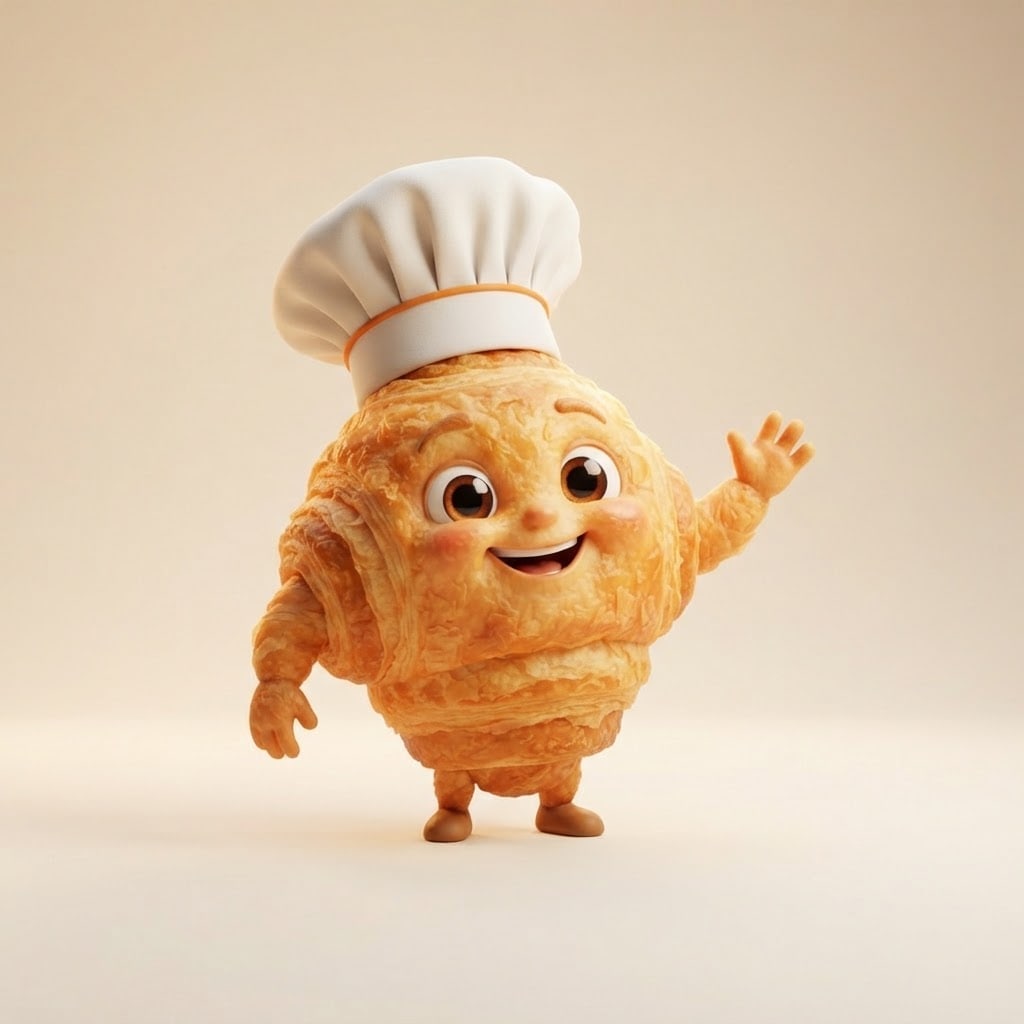
Create an original 3D brand mascot for a business.
Mascota fluffy smiling croissant with tiny arms and legs and a chef's hat; not resembling any known brand mascot or cartoon character.
Posecheerfully waving hello, the whole mascot visible.
Style3D animated film style with big expressive eyes.
Backgrounda plain, soft light cream studio backdrop with a light shadow below.
Lightsoft key light from the front left, a warm rim light from behind.
Cameraeye level, slightly from below, 50 mm feel.
Paletteaccent color #e8833a with warm, cheerful tones.
Compositionmascot centered with generous space around it.
Textno text or logo in the image.
Aspect ratio 1:1.
Image made with this prompt
7 more ready-to-use prompts
Different takes on the same topic. Copy any of them as is and replace the parts in square brackets.
1.Gemini 3D mascot prompt from your logo
When to use: When you want to bring your logo to life as a mascot that moves and talks.
Create a 3D mascot based on the logo I uploaded.
- Shape
- the logo's main shape and colors kept.
- Add
- big expressive eyes, a smiling mouth, tiny arms and legs.
- Style
- 3D animated film style.
- Pose
- cheerfully waving hello.
- Backdrop
- plain light gray.
- Text
- no text in the image.
- Ratio
- 1:1
2.Mascot prompt for ChatGPT: 4-pose sheet
When to use: When you want several poses of your mascot on one sheet for different uses.
Create a pose sheet for an original 3D mascot.
- Mascot
- [e.g. a small robot with a blue helmet].
- Layout
- 2 x 2 grid; waving, thinking, jumping for joy, sleeping.
Rules
- Same size and colors in all four poses.
- Plain white backdrop.
- No text in the image.
- Ratio
- 1:1
3.3D mascot sticker set: 6 expressions
When to use: When you want stickers of your mascot for messaging apps, Instagram or packaging.
Draw a 6-expression sticker set of a 3D mascot.
- Mascot
- [e.g. a smiling coffee cup].
- Expressions
- happy, surprised, laughing, sleepy, angry, in love.
- Layout
- 3 columns x 2 rows, each sticker with a thick white border.
- Backdrop
- plain light gray.
- Text
- no text in the image.
- Ratio
- 3:2
4.Animal mascot prompt for a school or sports club
When to use: When a school, team or club needs an energetic animal mascot.
Create an original 3D animal mascot for a sports club.
- Mascot
- [e.g. a determined brown bear cub in a red jersey].
- Pose
- one foot on a ball, confident.
- Style
- 3D animated film style with a strong silhouette.
- Backdrop
- plain [e.g. light navy].
- Text
- no text or numbers on the jersey or in the image.
- Ratio
- 3:4
5.App mascot prompt for an empty state screen
When to use: When your app's welcome or empty state screen needs a mascot.
Draw a cute 3D mascot for a mobile app.
- Mascot
- [e.g. a soft green leaf with big eyes].
- Moment
- peeking curiously into an empty box.
- Style
- soft pastel 3D render.
- Backdrop
- plain white.
- Composition
- mascot slightly above center, space below.
- Text
- no text in the image.
- Ratio
- 1:1
6.Social media post with your 3D mascot
When to use: When you want your mascot next to your product in a campaign image.
Create an Instagram post image with a business mascot.
- Mascot
- [e.g. the croissant mascot in a chef's hat].
- Scene
- standing on the counter next to fresh [e.g. pastries and cookies].
- Light
- morning daylight.
- Composition
- mascot and products in the lower half, the top the same bakery's plain, blurred wall.
- Text
- no text in the image.
- Ratio
- 4:5
7.Plush mascot toy product shot
When to use: When you want to preview your mascot as a plush toy for sale.
Show a mascot as a plush toy in a product photo.
- Mascot
- [e.g. a little fox with an orange scarf].
- Material
- soft plush, embroidered eyes, visible stitching.
- Setting
- light wooden shelf with a blurred toy shop window behind.
- Light
- soft daylight.
- Text
- no text or tags in the image.
- Ratio
- 4:5
What this prompt does
If your business needs a friendly 3D mascot, the main prompt turns your product or an animal into a character with a face and little limbs and shows it centered on a plain backdrop. The 7 variants give Gemini and ChatGPT prompts for a mascot from your logo, pose sheets, sticker sets, app, club and social media mascots.
Where to use it
- Bakery and cafe mascot
- App welcome screen
- School and sports club mascot
- Social media stickers
- Packaging and signage character
Fields you can fill in
The fields you can change in the form above and their default values.
- MascotFree text
- a fluffy smiling croissant with tiny arms and legs and a chef's hat
- PoseOne of 4 options
- cheerfully waving hello
- StyleOne of 4 options
- 3D animated film style with big expressive eyes
- Accent colorColor
- #e8833a
- RatioOne of 3 options
- 1:1
Step by step
- 1
Base the mascot on your product or an animal
Put an object or animal that says what you do in the Mascot field and give it one accessory (for example a croissant in a chef's hat). A mascot that carries your product matches your business at first glance.
- 2
Pick the pose, style and color
The Pose field offers waving, carrying a tray, jumping and pointing. Match the accent color to your logo; plush and clay styles feel warmer for kids' brands.
- 3
Generate in Canvas and test it small
Generate in Canvas with Use Prompt, then shrink the image to profile picture size. If the silhouette still reads, the mascot will work on signs and packaging.
- 4
Make the same mascot in new poses
Upload the mascot you like to Gemini and use the pose sheet variant. The reference keeps the shape and colors in new poses.
Tips and variations
- Give the mascot one signature accessory (hat, scarf, apron) and repeat it in every new prompt so it stays recognizable.
- Keep the plain backdrop for packaging or signage; the background is easier to remove later.
- For social posts, use 4:5 and place the mascot a little lower to leave room for campaign text at the top.
- Keep the face simple, two eyes and a mouth; extra detail disappears at small sizes.
Frequently asked questions
How do I make a 3D mascot with Gemini?
Write the mascot, pose, style and backdrop on separate lines and generate in Gemini. If you have a logo or an earlier mascot image, upload it and ask for the same character in new poses.
Can a ChatGPT mascot prompt make a pose sheet?
Yes, you can ask for four poses of the same mascot in a 2 x 2 grid in one image. State clearly that all four share the same size, colors and a plain backdrop.
How do I turn my logo into a mascot?
Upload your logo to Gemini and ask for a 3D mascot that keeps the logo's shape and colors and adds eyes, a mouth, arms and legs. The variants include a ready prompt for this.
What ratio should a mascot image use?
1:1 works in most places for a single mascot; use 4:5 for Instagram posts and 3:4 for a full poster. Google's model page lists all of these among the ratios Gemini 3.1 Flash Image supports.
Can I use an AI-made mascot as part of my brand?
If you described an original character and did not copy a known brand mascot, you can; if you plan to register it, talk to a trademark professional and check your tool's terms.





