Gemini 3D Logo Prompts: 9 Ready-to-Use Prompts (2026)
9 3D logo prompts for Gemini, ChatGPT and Nano Banana: turn a flat logo into 3D, glass, chrome, clay and inflated logos; works in Entrobase Canvas too.
Tested: EntroGen Flash, November 2026
Prompt
Fill in the fields below and the prompt updates instantly. Copy it and use it in any AI tool.
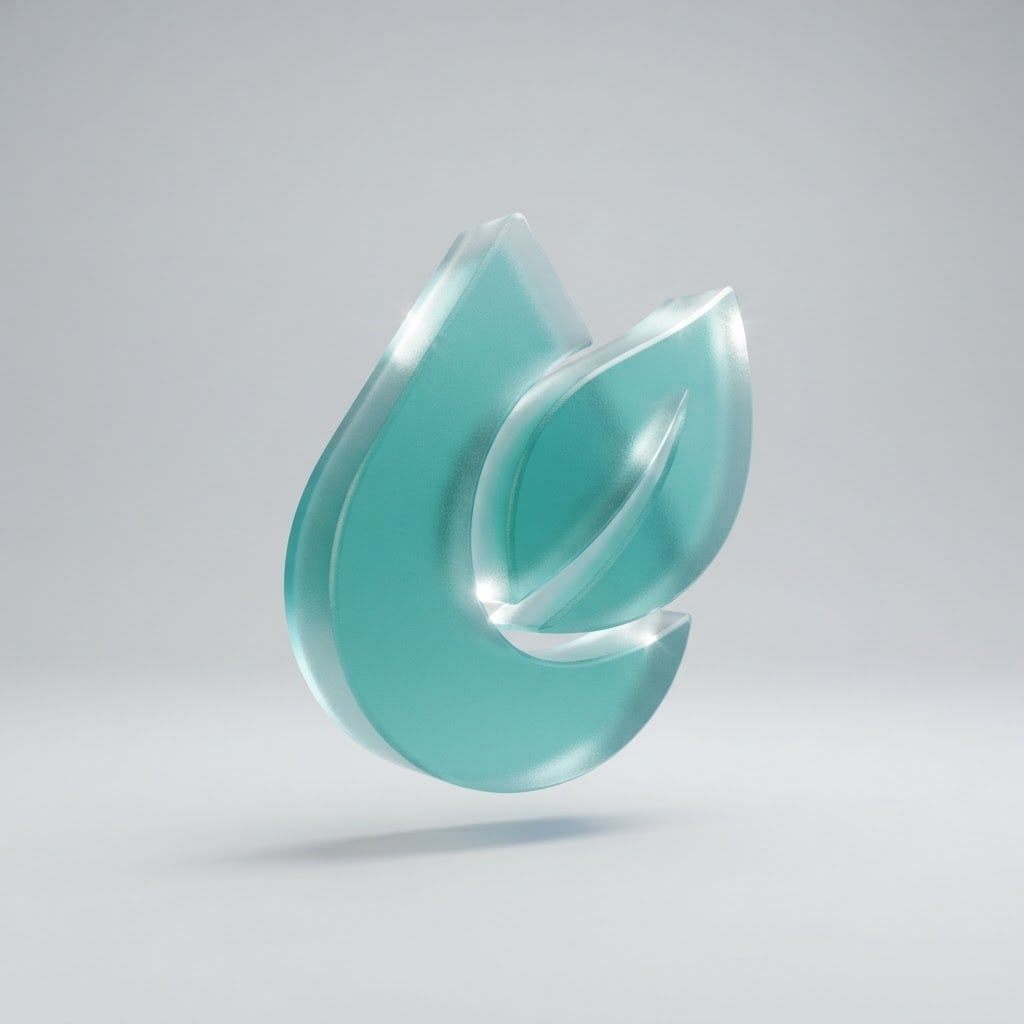
Create a wordless three-dimensional symbol logo render for a brand.
Symbola water drop and a leaf merged into one form; one piece, thick and volumetric.
Materialtranslucent frosted glass with bright refraction on the edges.
Colormain color #2a9d8f with white specular highlights; three colors at most.
Lightsoft studio lighting, key light from the upper left, a light soft shadow under the symbol.
Angleslight three-quarter view, the symbol turned about 15 degrees and floating a little above the floor.
Styleclean product render, smooth surfaces, crisp edges.
Compositionthe symbol centered with wide margins on all four sides; a seamless, plain light gray studio backdrop.
Textno letters, words or numbers in the image; the brand name is added later.
Aspect ratio 11.
Image made with this prompt
8 more ready-to-use prompts
Different takes on the same topic. Copy any of them as is and replace the parts in square brackets.
1.2D to 3D logo prompt for Gemini
When to use: When you have a flat logo and want a 3D version that keeps the same shape.
Turn the flat logo I uploaded into a 3D render.
- Keep
- the logo's shape, proportions and colors.
- Material
- [e.g. glossy glass].
- Light
- soft studio light from the upper left.
- Angle
- slightly turned, the symbol floating.
- Background
- plain light gray.
- Ratio
- 1:1
2.3D logo prompt for ChatGPT
When to use: When you want a wordless 3D brand symbol from scratch in ChatGPT.
Create a wordless 3D logo symbol for a brand.
- Symbol
- [e.g. an arrow merged with a leaf].
- Material
- [e.g. matte ceramic].
- Color
- [e.g. orange] with white highlights.
- Light
- soft studio light with a light shadow underneath.
- Text
- no text in the image.
- Ratio
- 1:1, plain cream background.
3.Nano Banana 3D logo from a sketch
When to use: When you only have a hand sketch or a rough shape and want it as a polished 3D mark.
Turn the sketch I uploaded into a polished 3D logo symbol.
- Keep
- the main silhouette of the sketch.
- Material
- [e.g. soft-touch rubber].
- Color
- [e.g. deep blue].
- Light
- soft studio light.
- Background
- plain white.
- Text
- none.
- Ratio
- 1:1
4.Chrome 3D logo design prompt
When to use: When an automotive, music or tech brand wants a shiny, reflective symbol.
Create a polished chrome 3D logo symbol.
- Symbol
- [e.g. a sharp lightning bolt].
- Surface
- mirror-like chrome with crisp edge highlights.
- Light
- strip lights from both sides in a dark studio.
- Background
- plain dark charcoal.
- Text
- none.
- Ratio
- 1:1
5.Inflated balloon 3D logo
When to use: When a playful consumer brand, game or event wants a soft, puffy symbol.
Create a 3D logo symbol that looks inflated like a balloon.
- Symbol
- [e.g. a heart merged with a star].
- Material
- glossy, puffy plastic with no seams.
- Color
- [e.g. pink and lilac].
- Light
- soft and bright.
- Background
- plain light blue.
- Text
- none.
- Ratio
- 1:1
6.Clay 3D logo
When to use: When a kids, game or handmade brand wants a warm, tactile look.
Create a 3D logo symbol that looks made of matte clay.
- Symbol
- [e.g. a smiling sun].
- Surface
- light fingerprint texture, rounded edges.
- Color
- [e.g. mustard yellow and terracotta].
- Light
- soft daylight.
- Background
- plain beige.
- Text
- none.
- Ratio
- 1:1
7.Isometric 3D logo
When to use: When a software, logistics or architecture brand wants an orderly, technical mark.
Create a 3D logo symbol in isometric view.
- Symbol
- [e.g. a staircase made of three cubes].
- Style
- flat-colored faces, each face a different shade.
- Color
- [e.g. navy, blue and light blue].
- Background
- plain white.
- Text
- none.
- Ratio
- 1:1
8.3D logo mockup on an office wall
When to use: When you want to see the chosen symbol as a 3D sign on a reception wall.
Show my logo as a 3D sign on an office reception wall.
- Logo
- [e.g. the logo I uploaded].
- Material
- [e.g. brushed brass], a few centimeters off the wall.
- Wall
- light wood panels.
- Light
- hidden light from above, a soft shadow behind the logo.
- Text
- only the logo on the wall.
- Ratio
- 4:5
What this prompt does
Need a 3D logo prompt for Gemini or ChatGPT? Copy one of the 8 variants below: turn a flat logo into 3D in Gemini, a 3D logo in ChatGPT, chrome, clay, inflated balloon and isometric options. The main prompt above renders a wordless symbol in soft studio light, slightly turned and floating above the floor.
Where to use it
- App splash screen
- Social media avatar
- Website hero image
- Brand symbol on a deck cover
- Cover frame for a promo video
Fields you can fill in
The fields you can change in the form above and their default values.
- SymbolFree text
- a water drop and a leaf merged into one form
- MaterialOne of 4 options
- translucent frosted glass with bright refraction on the edges
- Main colorColor
- #2a9d8f
Step by step
- 1
Describe the symbol as one piece
Type an idea that merges into a single form in the Symbol field (for example a water drop and a leaf). Thin, separate parts get lost in a 3D render; a thick single form carries the light best.
- 2
Choose the material
Frosted glass suits tech and health brands, chrome suits automotive and music, matte clay suits kids and games, and inflated plastic suits playful consumer brands.
- 3
Generate at 1:1 in Canvas
Open Canvas with Use Prompt and generate a square. The plain light gray backdrop makes it easy to cut the symbol out and place it on another background.
- 4
Keep a flat version too
A 3D logo loses detail at small sizes such as favicons and invoices. Generate a flat version of the same symbol and use it in small places.
Tips and variations
- Keep the light direction fixed (upper left): if shadows always fall the same way, a brand's 3D images look like one series.
- Keep the background light for glass; a glass symbol blends into a dark background.
- If you already have a flat logo, upload it to Gemini and use the 2D to 3D variant; it stays more faithful than starting from scratch.
- Google's Gemini 3.1 Flash Image page says it generates at 1K by default; upscale the 3D logo separately for a large poster.
Frequently asked questions
How do I use a 3D logo prompt in Gemini?
Open a new Gemini chat, paste one of the 3D variants and fill the bracketed parts. If you have a flat logo, upload the image first and then paste the 2D to 3D prompt.
Can ChatGPT make a 3D logo?
Yes, ChatGPT image generation can draw logos in a 3D render style. The material (glass, chrome, clay), the light direction and the background are the three lines that change the result most.
Can Nano Banana turn a flat logo into 3D?
Nano Banana is the name of Gemini's image model and it can edit uploaded images. Upload your flat logo, state the material and light, and it creates a 3D version that keeps the same shape.
Are these 3D logo prompts free?
The prompts on this page are free and work in the free versions of Gemini and ChatGPT. Generation limits depend on each tool's plan.
Can I print a 3D logo?
A 3D render looks good on screen, but its shading disappears in one-color print and at very small sizes. Prepare a flat vector version of the same symbol for print.