Game Character Prompts: 7 Ready-to-Use Prompts (2026)
7 game character prompts: RPG heroes, pixel art characters, PS2-style characters, enemies, NPCs and a game character from your own photo; works in Gemini, ChatGPT and Entrobase Canvas.
Tested: EntroGen Flash, November 2026
Prompt
Fill in the fields below and the prompt updates instantly. Copy it and use it in any AI tool.
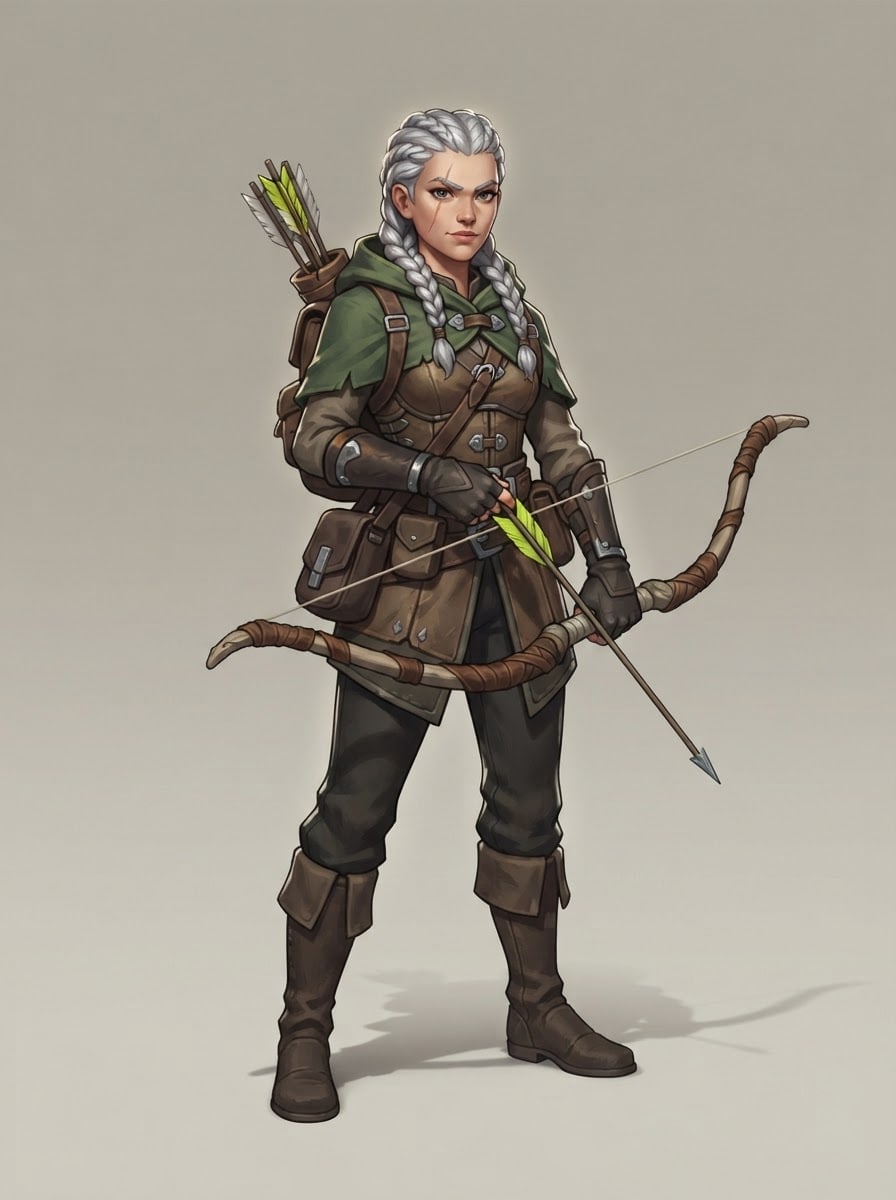
Create a concept image of an original character for a video game.
Charactera young woman with braided silver hair and a thin scar on her face; fictional, not resembling any known game character.
Class and geara forest archer; leather armor, green cloak, a longbow.
Posestanding, full body, front three-quarter angle, a confident stance; the silhouette reads clearly.
Stylea stylized 3D game character with hand-painted textures.
Backgrounda flat light gray-beige studio backdrop with a light shadow under the feet.
Lightkey light from the top left, a thin rim light from behind.
Cameraslightly below eye level, 50 mm feel, the character sharp head to toe.
Paletteat most four main character colors and one bright accent.
Compositioncharacter centered, head to toe in frame, a little space above and below.
Textno text, names or UI in the image.
Aspect ratio 3:4.
Image made with this prompt
6 more ready-to-use prompts
Different takes on the same topic. Copy any of them as is and replace the parts in square brackets.
1.Game character from your photo in Gemini
When to use: When you want to see yourself as a game hero.
Turn the person in my uploaded photo into an RPG game character.
- Keep
- facial features, hair color.
- Class
- [e.g. forest archer with leather armor and a longbow].
- Style
- stylized 3D game character.
- Pose
- full body, standing.
- Background
- flat light gray.
- Ratio
- 3:4
2.Pixel character prompt
When to use: When you need a pixel art hero for a 2D game.
Draw a pixel art hero for a 2D game.
- Character
- [e.g. a small ninja with a red scarf], fictional.
- Style
- 16-bit pixel art with crisp square pixels.
- Pose
- front view, standing, full body.
- Background
- flat [e.g. light green].
- Text
- no text in the image.
- Ratio
- 1:1
3.PS2 game character prompt
When to use: When you want a character that feels like a 2000s console game.
Create a character that looks like a PS2-era character select model.
- Character
- [e.g. a city detective in a long coat], fictional.
- Style
- low-poly model, blurry low-resolution textures.
- Pose
- full body, turned slightly.
- Background
- dark and plain with blue light from behind.
- Text
- no text or UI in the image.
- Ratio
- 3:4
4.Enemy character prompt
When to use: When your game needs an enemy design.
Design an enemy character for an action game.
- Enemy
- [e.g. a skeleton knight in rusty armor with one glowing red eye], fictional.
- Pose
- ready to attack, full body.
- Style
- stylized 3D game character.
- Palette
- cold gray with one red accent.
- Background
- flat dark gray.
- Text
- no text in the image.
- Ratio
- 3:4
5.NPC character prompt
When to use: When you need side characters to fill your game world.
Design an NPC for an RPG.
- Character
- [e.g. an old merchant carrying baskets on his back], fictional.
- Pose
- standing, full body, friendly.
- Style
- [e.g. stylized 3D with hand-painted textures].
- Background
- flat light beige.
- Text
- no text in the image.
- Ratio
- 3:4
6.Character select screen prompt for ChatGPT
When to use: When you want to compare several characters side by side.
Draw four characters side by side like a character select screen.
- Characters
- [e.g. knight, archer, mage, thief], all fictional.
- Style
- the same stylized 3D look and light.
- Layout
- all four the same size, full body, side by side.
- Background
- dark and plain.
- Text
- no text, names or UI in the image.
- Ratio
- 16:9
What this prompt does
If you are designing a hero for your game, the main prompt draws an original character with a chosen class, gear and style, full body on a flat backdrop with a clear silhouette. The 6 variants below cover a game character from your own photo in Gemini and ChatGPT, pixel art, PS2-style characters, enemies, NPCs and a character select lineup.
Where to use it
- RPG and action game hero
- Game jam character
- Tabletop RPG character
- Game pitch deck
Fields you can fill in
The fields you can change in the form above and their default values.
- CharacterFree text
- a young woman with braided silver hair and a thin scar on her face
- ClassOne of 4 options
- a forest archer; leather armor, green cloak, a longbow
- StyleOne of 4 options
- a stylized 3D game character with hand-painted textures
- RatioOne of 3 options
- 3:4
Step by step
- 1
Write the character and class separately
Put the look in Character and the role and gear in Class. Splitting them makes it easy to try the same character as an archer or a mage.
- 2
Pick a style for your engine
Stylized and realistic 3D are references for 3D games, anime for story-heavy games, and 16-bit pixel art for 2D games.
- 3
Check the silhouette
Shrink the image or picture it filled black: if the character reads from its silhouette alone, it will read in the game.
Tips and variations
- For front, side and back views use the character sheet prompt and carry the character line over word for word.
- If heroes and enemies share a game, split the palettes: warm colors for heroes, cool for enemies.
- Upload your own photo to Gemini with the variant below to turn yourself into a game character.
Frequently asked questions
How do I write a game character prompt for Gemini?
Put the look, class, pose, style and background on separate lines. The line 'the silhouette reads clearly' keeps the character simple and recognizable.
Can I turn my photo into a game character?
Yes. Upload your photo to Gemini or ChatGPT and write 'keep my face, draw me as a game character of this class'; you can pick 16-bit pixel art or 3D.
What is a PS2 game character prompt?
It asks for the low-poly, blurry-textured character look of 2000s console games; the variant below does that.
Can I use the character image in my game?
If you described an original character and did not copy a known game, you can use it as concept art and reference; also check the tool's terms.





