Game Asset Prompts: 8 Copy-Paste Prompts for Nano Banana
8 game asset prompts for indie developers: item sets, inventory icons, tiles, backgrounds, UI and character sheets; works in Nano Banana, ChatGPT and Entrobase Canvas.
Tested: EntroGen Flash, November 2026
Prompt
Fill in the fields below and the prompt updates instantly. Copy it and use it in any AI tool.
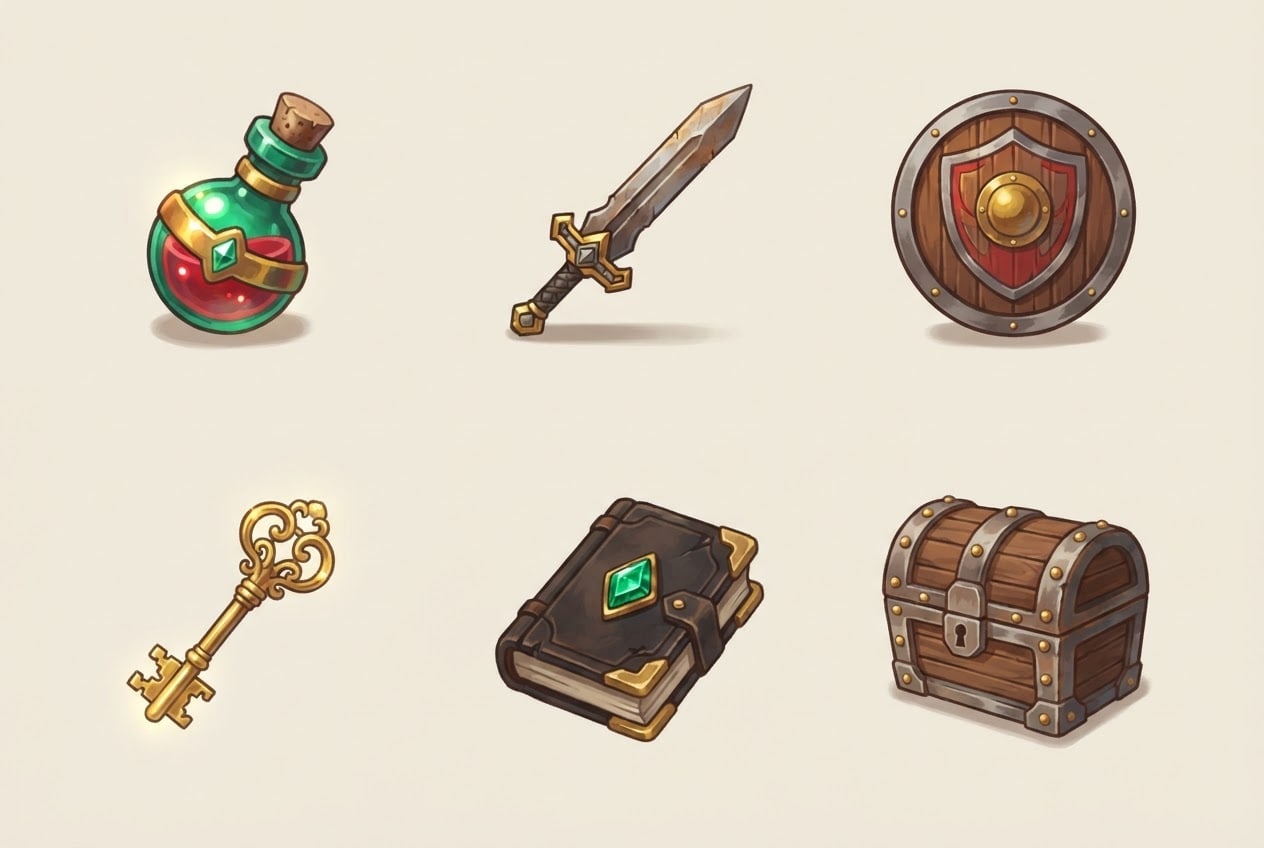
Create a six-piece item set for a 2D game.
Itemspotion bottle, iron sword, wooden shield, gold key, spell book, treasure chest; each one separate, a single object.
Layout3 columns x 2 rows grid; each item centered in its cell, all the same size, equal gaps between them.
Stylepainterly 2D game art with brush texture; the same drawing language, outline and light on all six items.
Backgroundplain, single color #f1ebdd; a small soft shadow under each item.
Lightsoft light from the top left, bright highlights on the edges.
Cameraslightly from above, 3/4 angle, each item fully visible.
Palettewarm gold, dark brown, emerald green and a red accent.
Compositionthe grid centered in the image with equal margins on all four sides.
Textno text, labels or numbers in the image.
Aspect ratio 3:2.
Image made with this prompt
7 more ready-to-use prompts
Different takes on the same topic. Copy any of them as is and replace the parts in square brackets.
1.Nano Banana game asset prompt from your own game's style
When to use: When you have a screenshot or an existing item and new assets must match it.
Use the game image I uploaded as a style reference.
- Task
- draw 4 new items in the same style: [e.g. ice staff, silver ring, arrow quiver, healing herb].
- Layout
- 2 x 2 grid, each item centered in its cell.
- Style
- the line, color and light of the reference exactly.
- Background
- flat [e.g. light gray].
- Text
- no text in the image.
- Ratio
- 1:1
2.Game icon prompt: inventory icon set
When to use: When an inventory or skill tree needs framed square icons.
Create 6 inventory icons for an RPG.
- Icons
- [e.g. health potion, mana potion, bread, arrow, bomb, map].
- Frame
- each icon inside a dark stone-textured square frame.
- Layout
- 3 columns x 2 rows, equal size.
- Style
- painterly 2D game icon with a strong silhouette.
- Background
- flat dark gray.
- Text
- no text or numbers in the image.
- Ratio
- 3:2
3.Tileset prompt for a top-down game map
When to use: When a top-down game needs grass, dirt path and water tiles.
Create a set of ground tiles for a top-down 2D game.
- Tiles
- grass, dirt path, stone floor, water, sand, flowery grass.
- Layout
- 3 columns x 2 rows, each tile a perfect square with edges that join seamlessly.
- Camera
- straight from above.
- Style
- 16-bit pixel art, soft colors.
- Text
- no text in the image.
- Ratio
- 3:2
4.Game background prompt with parallax layers
When to use: When a platformer or runner needs a layered horizontal background.
Draw a background for a side-scrolling 2D game.
- Scene
- [e.g. a pine forest at dusk with distant mountains].
- Layers
- dark tree silhouettes in front, forest in the middle, pale mountains and sky behind.
- Ground
- a flat walkable dirt strip along the bottom fifth.
- Style
- painterly 2D game art.
Rules
- No characters in the scene.
- No text in the image.
- Ratio
- 16:9
5.Game UI prompt for ChatGPT: menu panel and buttons
When to use: When you need interface pieces for a main menu or inventory window.
Create a set of interface pieces for a fantasy game.
- Pieces
- one large empty menu panel, 3 empty buttons (normal, hover, pressed), a health bar, an empty inventory slot.
- Material
- [e.g. weathered wood with a gold border].
- Layout
- pieces apart on a flat background with space between them.
Rules
- Buttons and panels are empty, no text.
- Ratio
- 16:9
6.Game character concept sheet: front, side and back
When to use: When you want one game character shown from three angles on a single sheet.
Draw a concept sheet for a game character.
- Character
- [e.g. a young hunter in leather armor with a bow on the back]; original, not resembling a known character.
- Layout
- the same character three times side by side: front, side, back; same height and stance.
- Style
- clean line, flat-colored game concept art.
- Background
- flat light gray.
- Text
- no text in the image.
- Ratio
- 16:9
7.Single prop reference image for a 3D model
When to use: When you plan to turn an item into a 3D model or brief a modeler.
Create a 3D model reference image of a single game prop.
- Prop
- [e.g. a wooden treasure chest with gold trim].
- View
- 3/4 angle, fully visible, centered.
- Style
- stylized 3D render, matte materials, clean edges.
- Background
- plain white with one soft shadow.
- Text
- no text in the image.
- Ratio
- 1:1
What this prompt does
If you need game art in one consistent style, the main prompt draws six items in a 3x2 grid with the same light and line, on a flat background that is easy to slice into separate files. The 7 variants give Nano Banana and ChatGPT prompts for inventory icons, tiles, backgrounds, UI and character sheets.
Where to use it
- RPG inventory items
- Mobile game reward icons
- Game jam prototype
- Top-down map tiles
- Game UI mockup
Fields you can fill in
The fields you can change in the form above and their default values.
- ItemsFree text
- potion bottle, iron sword, wooden shield, gold key, spell book, treasure chest
- StyleOne of 4 options
- painterly 2D game art with brush texture
- Background colorColor
- #f1ebdd
- RatioOne of 3 options
- 3:2
Step by step
- 1
List six items with commas
Type six objects in the Items field, separated by commas, and give each a material or color (for example a red potion bottle, an iron sword). The material word helps the right object land in each cell.
- 2
Match the style to your game
The Style field offers painterly 2D, pixel art, stylized 3D and flat vector. Pick the style your characters already use so the items do not look out of place.
- 3
Generate in Canvas and check the grid
Open Canvas with Use Prompt, generate, and check that all six items sit in separate cells without cropping. If one is missing or merged, shorten the list and try again.
- 4
Slice and import
Cut the image into six equal parts, make the flat background transparent and save each item as a PNG. Equal sizes keep the inventory grid aligned.
Tips and variations
- Consistency drops as the set grows; for 12 items, make two sets of six with the same style line.
- For pixel art, use nearest neighbor filtering in your engine so the edges stay crisp.
- To show rarity tiers, ask for the same item four times with gray, green, blue and purple glows.
- Upload a screenshot of your game to Nano Banana with the variant below and new items follow your palette.
Frequently asked questions
How do I write a Nano Banana game asset prompt?
Put the items, layout (for example 3 columns x 2 rows), style and a flat background color on separate lines. Nano Banana is Gemini's image model and can take an uploaded image as a style reference.
Are AI game assets consistent?
Items generated in the same image usually share light and line work, while items made one by one can drift. That is why the main prompt asks for all six at once.
Can a game asset prompt give me a transparent PNG?
Image models mostly return a flat background. If that background is a single color that is not on the item, you can make it transparent in one click in your engine or an image editor.
What size should game icons be?
Many games use 64 or 128 pixel square inventory icons. Each cell cut from a 1K image is large enough to scale down to those sizes.
Which style is easiest to import into a game engine?
Pixel art and bold-outline vector on a flat background are the easiest to slice; painterly and 3D-looking items may need their shadows cleaned up.





