Dragon Prompts: 7 3D Game Dragon Prompts for Gemini
7 dragon prompts: a 3D dragon character for games, a cute baby dragon, a flying dragon scene, a dragon figurine, pixel art and a dragon egg; works in Gemini, ChatGPT and Entrobase Canvas.
Tested: EntroGen Flash, November 2026
Prompt
Fill in the fields below and the prompt updates instantly. Copy it and use it in any AI tool.
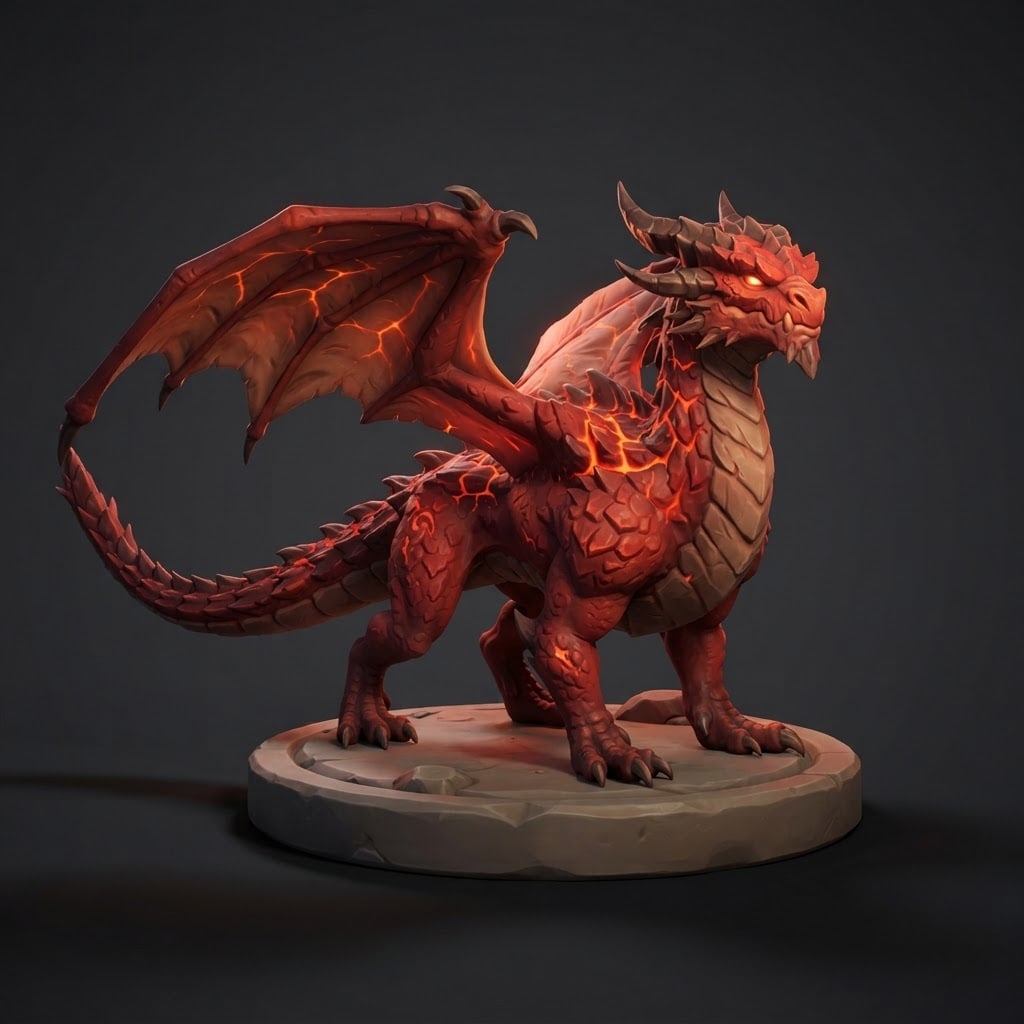
Create a 3D character model presentation image of an original dragon for a game.
Dragona fire dragon: crimson scales, lava-like glowing cracks along the back; original, not resembling any known game, film or series dragon.
Poseall four feet on the ground, wings half open, head slightly raised; the whole body and tail visible.
Stylestylized 3D game render, hand-painted textures, bold shapes.
Basea simple round stone base beneath it, like a figure presentation.
Backgrounda flat dark gray studio backdrop, a soft shadow under the base.
Lightkey light from the top left, a rim light in the dragon's accent color from behind; scales and wing membranes clear.
Camerathree-quarter front view, slightly from below, 50 mm feel, the dragon sharp from head to tail.
Palettethe dragon's two main colors, one bright accent (eyes or crystals), a dark backdrop.
Compositiondragon centered, a little space around it.
Textno text in the image.
Aspect ratio 1:1.
Image made with this prompt
6 more ready-to-use prompts
Different takes on the same topic. Copy any of them as is and replace the parts in square brackets.
1.Cute baby dragon prompt
When to use: When you want a sweet dragon for a mascot or kids' game.
Draw a cute baby dragon.
- Look
- big eyes, tiny wings, a chubby body, [e.g. mint green] scales.
- Pose
- sitting, hugging its tail.
- Style
- soft 3D render, pastel colors.
- Background
- flat cream.
- Ratio
- 1:1
2.Flying dragon scene prompt
When to use: When you want a wide, cinematic scene.
Create a cinematic scene of an original dragon flying above the clouds.
- Dragon
- [e.g. golden scales, wings fully open].
- Background
- sunset, mountain peaks in the distance.
- Camera
- wide angle, from below the dragon.
- Ratio
- 16:9
3.Dragon figurine prompt (Gemini)
When to use: When you want a collectible figure on a desk.
Create a photo of a painted dragon figurine standing on a desk.
- Figure
- [e.g. purple scales, wings open], on a wooden base.
- Setting
- a plain work desk, soft daylight.
- Camera
- close-up, shallow depth of field.
- Ratio
- 4:5
4.Pixel art dragon prompt
When to use: When you want a dragon for a retro game.
Draw an original dragon in 16-bit pixel art.
- Pose
- side view, wings open, a small flame from its mouth.
- Background
- flat dark blue.
Rules
- Crisp pixels, limited palette.
- Ratio
- 1:1
5.Dragon egg prompt
When to use: When you want an egg as a game item.
Draw a glowing dragon egg as a game item.
- Egg
- [e.g. an obsidian shell, orange light through the cracks].
- Scene
- in a stone nest among ashes.
- Style
- stylized 3D game render.
- Ratio
- 1:1
6.Dragon design sheet prompt (ChatGPT)
When to use: When you want to see a dragon from several angles.
Draw a design sheet for an original dragon.
- Dragon
- [e.g. ice blue with crystal spikes].
- Layout
- side, front and top views and a close-up of the head.
- Background
- flat light gray.
- Text
- no text in the image.
- Ratio
- 16:9
What this prompt does
If you want an original dragon design for your game, story or tabletop project, the main prompt makes a 3D game dragon on a base, whole body visible, lit like a figure presentation. The 6 variants below give a baby dragon, a flying dragon scene, a dragon figurine, a pixel art dragon, a dragon egg and a design sheet in Gemini and ChatGPT.
Where to use it
- Game character and boss design
- Board game and card art
- A reference for a 3D printed figure
- Fantasy story covers
Fields you can fill in
The fields you can change in the form above and their default values.
- Dragon typeOne of 4 options
- a fire dragon: crimson scales, lava-like glowing cracks along the back
- StyleOne of 3 options
- stylized 3D game render, hand-painted textures, bold shapes
- RatioOne of 3 options
- 1:1
Step by step
- 1
Pick a type
Fire, ice, forest or storm: the type sets the scale color, the accent color and the detail on the back together.
- 2
Match the style to your game
Stylized render suits mobile and cartoon games, realistic render suits dark fantasy, low poly suits light 3D games.
- 3
Check the silhouette
Shrink the image; if the wings, horns and tail read separately, the design will read in the game too.
Tips and variations
- To get other angles of the same dragon, keep the Dragon and Style lines as they are and change only the Camera line.
- For a card game, switch to 4:5 and change the Background line to 'flat dark backdrop, empty space at the top for a name'.
- This makes a 2D image, not a 3D model; give it to a 3D modeler or an image-to-3D tool as a reference.
Frequently asked questions
How do I write a dragon prompt?
Put the dragon's type and color, pose, style, background, light and camera on separate lines. Asking for the wings, horns and tail to be visible makes the silhouette clear.
Can Gemini draw dragons?
Yes. Gemini and ChatGPT draw a single dragon on a plain background well; crowded battle scenes lose detail.
Can this image become a 3D model?
The image is not a 3D model file. It works as a reference for an image-to-3D tool or a modeler; a three-quarter front view is good for that.
How do I keep the dragon from looking like a famous one?
Don't write film or game names, choose the colors and details yourself and keep the 'not resembling any known dragon' line.





