Claymation Prompts: 8 Copy-Paste Prompts for ChatGPT
8 claymation prompts: clay character scenes, product promos, food, miniature landscapes, character sheets and video scenes; works in ChatGPT, Gemini and Entrobase Canvas.
Tested: EntroGen Flash, November 2026
Prompt
Fill in the fields below and the prompt updates instantly. Copy it and use it in any AI tool.
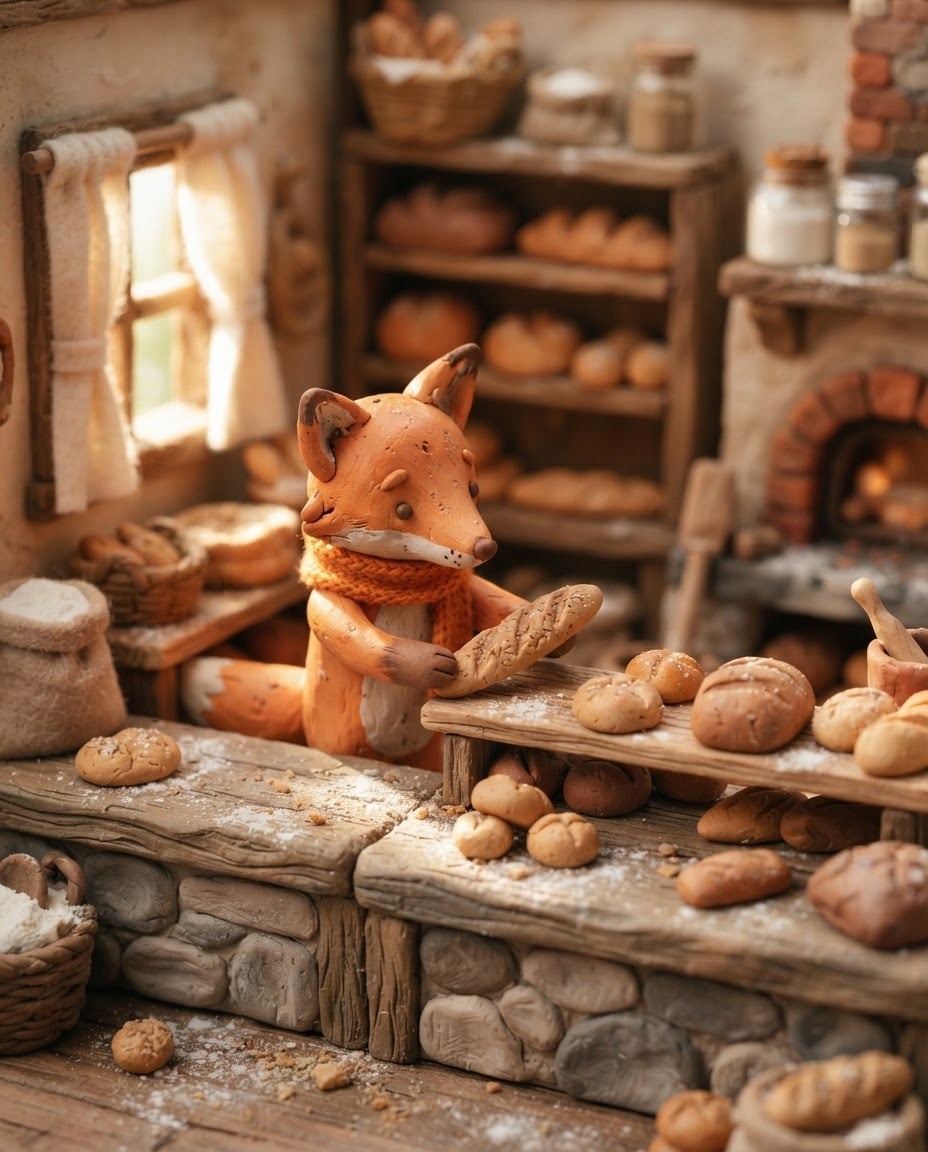
Create a claymation scene that looks like a frame from a stop-motion film.
Scenea little fox in an orange scarf lining up fresh loaves on a tiny bakery counter.
Materialeverything made of colorful modeling clay; visible fingerprints on surfaces, matte texture, slightly imperfect handmade forms.
Seta miniature model set with small felt and cardboard details.
Lightwarm morning light through a window, soft shadows.
Cameraeye level, macro lens feel, shallow depth of field, the main character sharp.
Stylehandmade stop-motion animation with toy-like proportions.
Palettewarm earth tones, orange and cream.
Compositionthe main character slightly left of center, a blurred continuation of the scene behind.
Textno text in the image.
Aspect ratio 4:5.
Image made with this prompt
7 more ready-to-use prompts
Different takes on the same topic. Copy any of them as is and replace the parts in square brackets.
1.Claymation prompt for ChatGPT: product promo image
When to use: When you want your real product inside a clay world for a playful campaign image.
Create a campaign image that shows a product in a claymation world.
- Product
- [e.g. an unlabeled glass lemonade bottle], realistic.
- World
- clay lemon trees, small clouds and a smiling sun around the product.
- Material
- clay with fingerprint texture, matte.
- Light
- bright studio light.
- Composition
- product centered, the top the same scene's plain sky.
- Text
- no text in the image.
- Ratio
- 4:5
2.Claymation food scene prompt
When to use: When a cafe, bakery or restaurant wants a cute food image made of clay.
Create an appetizing food scene made of clay.
- Food
- [e.g. a stack of pancakes topped with strawberries and a cup of hot chocolate].
- Material
- colorful clay, fingerprints, matte texture.
- Set
- a tiny wooden table with a checked cloth.
- Light
- warm morning light.
- Camera
- 45 degrees from above, macro feel.
- Text
- no text in the image.
- Ratio
- 1:1
3.Claymation miniature landscape (diorama)
When to use: When you want a town, village or nature scene as a miniature clay model.
Create a miniature landscape diorama made of clay.
- Landscape
- [e.g. a village with windmills and little houses on the hills].
- Material
- clay and felt with imperfect handmade forms.
- Light
- sunset with long soft shadows.
- Camera
- slightly from above, macro lens, shallow depth of field.
- Text
- no text in the image.
- Ratio
- 16:9
4.Claymation character sheet: three poses
When to use: When you want several poses of a clay character on one sheet.
Create a pose sheet for an original claymation character.
- Character
- [e.g. a round little frog in a blue hat].
- Layout
- three poses side by side: waving, jumping, sitting and laughing.
- Material
- clay with visible fingerprints.
- Background
- plain light cream.
- Text
- no text in the image.
- Ratio
- 16:9
5.Claymation style prompt for a children's book
When to use: When a story or children's book page needs a warm, clay-looking scene.
Create a claymation scene for a children's book page.
- Scene
- [e.g. a bear cub reading a book in the moonlight outside its cabin].
- Material
- clay, felt trees, cotton clouds.
- Light
- blue moonlight and a warm window glow.
- Composition
- character in the lower half, the upper half the same scene's plain night sky.
- Text
- no text in the image.
- Ratio
- 4:5
6.Claymation AI prompt: first frame for a video
When to use: When you need the first frame of a short single-action scene for a video tool.
Create the opening frame of a short claymation video.
- Scene
- [e.g. a clay snail about to climb onto a mushroom].
- Motion idea
- one action, locked camera.
- Material
- clay, fingerprints, matte texture.
- Light
- soft morning light, steady and consistent.
- Text
- no text in the image.
- Ratio
- 16:9
7.Claymation social media campaign image
When to use: When a holiday or sale season needs a clay-style announcement image.
Create a claymation social media image for a campaign season.
- Theme
- [e.g. New Year]; a clay pine tree, gift boxes and a snowman.
- Material
- clay with fingerprint texture, matte.
- Light
- warm string lights.
- Composition
- items in the lower half, the top the same scene's plain, blurred wall.
- Text
- no text in the image.
- Ratio
- 4:5
What this prompt does
If you want an image that looks handmade from modeling clay, like a frame from a stop-motion film, the main prompt builds your scene with fingerprinted clay characters and a miniature set. The 7 variants give ChatGPT and Gemini prompts for product promos, food scenes, miniature landscapes, character sheets, a children's book page and a video scene.
Where to use it
- Social media post
- Product and promo image
- Children's book page
- Short video pre-production
- Slide cover
Fields you can fill in
The fields you can change in the form above and their default values.
- SceneFree text
- a little fox in an orange scarf lining up fresh loaves on a tiny bakery counter
- LightOne of 4 options
- warm morning light through a window
- PaletteOne of 3 options
- warm earth tones, orange and cream
- RatioOne of 3 options
- 4:5
Step by step
- 1
Write the scene as a character and an action
Put who it is and what it does in the Scene field in one sentence (for example a fox in a scarf lining up bread on a bakery counter). The action turns a still figure into a living film moment.
- 2
Pick the light and palette
The Light field offers morning, lamp, studio and night; warm lamp light shows the clay texture best. The palette ties every color in the scene to one family.
- 3
Generate in Canvas and check the texture
Generate in Canvas with Use Prompt and look for fingerprints and a matte surface. If it came out glossy like a smooth 3D render, keep the Material line as is and generate again.
- 4
Continue the series with the same character
Upload the frame you like to ChatGPT or Gemini and ask for the same character in a new scene. That gives you consecutive frames of a story.
Tips and variations
- 'Fingerprints' and 'matte' are the keys to the claymation look; without them models usually draw smooth plastic 3D.
- Keep the macro lens and shallow depth of field to strengthen the miniature feel; the blurrier the background, the smaller the set looks.
- In product promos, do not turn the product itself into clay; keep it real and build a clay world around it so it stays recognizable.
- For a video tool, make the same scene in 16:9 and reduce the motion to one action (for example the fox placing a loaf on a shelf).
Frequently asked questions
How do I write a claymation prompt for ChatGPT?
Put the scene, clay material (fingerprints, matte texture), miniature set, light and ratio on separate lines. 'A frame from a stop-motion film' points ChatGPT to the right style.
What is the difference between claymation and a 3D render?
Claymation is a photo of handmade clay figures, with imperfect forms, fingerprints and matte surfaces, while a 3D render gives smooth, flawless surfaces; in the prompt the material line decides which you get.
Does a claymation style prompt work in Gemini?
Yes, the prompts on this page also work with Gemini's image model. Google's model page lists 4:5 and 16:9 among the ratios Gemini 3.1 Flash Image supports.
Can I make a video with a claymation AI prompt?
You can generate a frame with this prompt first and give it to a video tool as the starting frame. The variants include a ready prompt for a short video scene.
Where are claymation images used?
Kids' brands, food and bakery businesses, educational content and social posts that want a warm feel use this style often.





