ChatGPT caricature prompts: 10 ready-to-use prompts for ChatGPT and Gemini
ChatGPT caricature prompts for the viral 'me and my job' trend, plus Gemini (Nano Banana), couple, family, teacher, team and pet caricatures: 10 copy-and-paste prompts.
Prompt
Fill in the fields below and the prompt updates instantly. Copy it and use it in any AI tool.
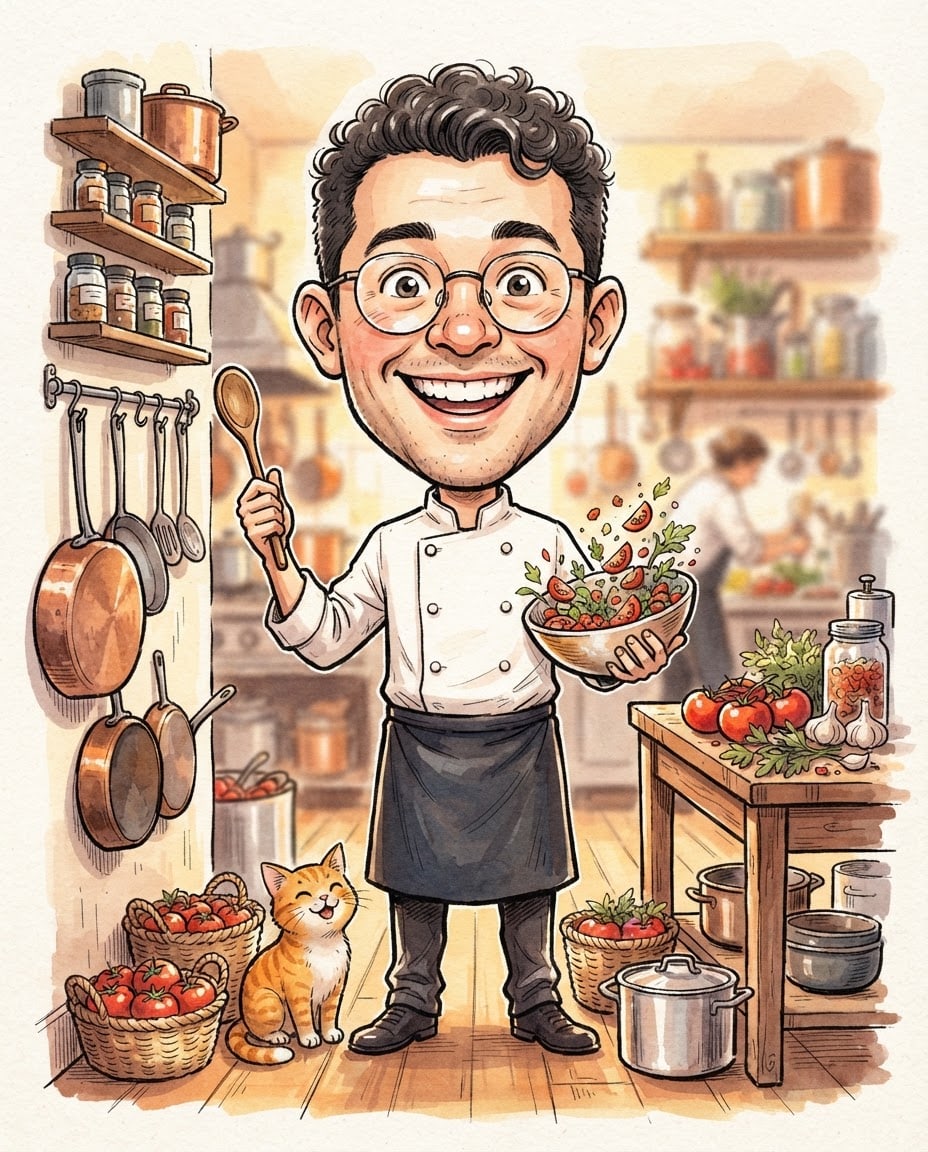
Draw an exaggerated, friendly caricature of a fictional person and their job.
Persona cheerful chef who resembles no real person; short curly hair, round glasses, work clothes.
Exaggerationhead twice the size of the body, big eyes, wide grin, small body.
Detailscopper pots, fresh tomatoes, a wooden spoon and a small orange cat, placed around the figure.
Backgroundthe workplace of the job, busy but tidy and slightly blurred.
Lightsoft front light from slightly left, warm, gentle shadows.
Cameraeye-level straight-on angle, sharp.
Stylestreet caricature artist drawing, bold ink outline, marker and watercolor fill.
Color palettecream and warm skin tones, 2-3 accent colors from the objects.
Compositionfull-body figure centered, half the frame height; objects on both sides.
Textfully text-free and unsigned; signs, jars and clothing plain and unlettered.
Aspect ratio 4:5.
Image made with this prompt
9 more ready-to-use prompts
Different takes on the same topic. Copy any of them as is and replace the parts in square brackets.
1.ChatGPT caricature trend prompt: me and my job
When to use: Use this when ChatGPT memory is on and you have a long chat history, and you want the viral job caricature from your selfie.
Create a caricature of me and my job based on everything you know about me, using the photo I uploaded.
- Likeness
- keep my face, hair, skin tone and glasses (if any) recognizable; only exaggerate the proportions.
- Exaggeration
- big head, small body, large eyes and a wide grin.
- Scene
- where I work, surrounded by small objects that show my job, my hobbies and the habits you know from our chats.
- Style
- street caricature artist drawing, bold ink outline, marker and watercolor fill.
- Text
- no text, or one short word at most.
- Aspect ratio
- 4:5, portrait.
2.Caricature prompt without ChatGPT memory
When to use: Use this if you're new to ChatGPT or memory is off, and you want a personal caricature by typing in your own details.
Draw an exaggerated caricature of the person in the uploaded photo and their job.
- Likeness
- keep the face, hair, skin tone and glasses (if any) recognizable; only exaggerate the proportions.
- Job
- [job, e.g. dentist]
- Details
- [3-5 details, e.g. coffee addiction, road bike, tabby cat, a packed calendar]
- Personality
- [2 traits, e.g. always rushing but cheerful]
- Outfit
- [e.g. white coat and colorful sneakers]
- Scene
- their workplace, with the details as small objects around the figure.
- Style
- colorful digital caricature, bold outline, big head and small body.
- Aspect ratio
- 4:5, portrait.
3.Gemini caricature prompt for Nano Banana: photo to caricature
When to use: Use this in Gemini when you want a clean, classic caricature portrait with a strong likeness and a plain background.
Turn the person in this photo into a classic caricature portrait.
- Likeness
- keep the facial features, hairstyle and skin tone; exaggerate the 2-3 most distinctive features, such as the nose, smile or eyebrows.
- Proportions
- the head about twice the size of the body, a small, lively body.
- Outfit
- a simplified version of the outfit in the photo.
- Background
- a plain, light [color, e.g. mustard yellow] backdrop with a soft shadow under the figure.
- Style
- digital caricature, bold black outline, bright flat colors, light texture.
- Aspect ratio
- 1:1, square.
4.Couple caricature prompt for an anniversary gift
When to use: Use this with a photo of you and your partner when you want a shared caricature for an anniversary gift or a joint profile picture.
Turn the two people in the uploaded photo into a cute couple caricature.
- Likeness
- keep both faces, hairstyles and skin tones recognizable; exaggerate the proportions.
- Scene
- [a shared moment, e.g. eating pizza on the couch during movie night]
- Details
- [shared hobbies, pets or city, e.g. two cats, bikes, a ferry]
- Expression
- looking at each other and laughing, warm and playful.
- Style
- colorful caricature, bold outline, big heads and small bodies.
- Aspect ratio
- 4:5, portrait.
5.Family caricature prompt from a group photo
When to use: Use this when you want a family photo turned into a print-ready caricature where everyone shows their personality.
Draw everyone in the uploaded family photo in one fun family caricature.
- Likeness
- keep each person's face, hair and skin tone recognizable; exaggerate height differences and personality details.
- People
- [number and roles, e.g. mom, dad, two kids and the dog]
- Scene
- [e.g. a picnic in the garden, each person with their favorite object]
- Layout
- side by side or in a loose triangle, nobody cropped at the edge of the frame.
- Style
- warm, colorful caricature, bold outline, big heads.
- Aspect ratio
- 4:3, landscape.
6.Caricature prompt for a teacher: appreciation gift
When to use: Use this for Teacher Appreciation Week or the end of the school year, to gift a teacher a caricature that shows their subject.
Draw the teacher in the uploaded photo as a friendly caricature in their classroom.
- Likeness
- keep their face, hair and glasses (if any) recognizable; exaggerate the smile.
- Subject
- [subject, e.g. science]; objects around them that show it (e.g. microscope, planet model, a seedling in a pot).
- Detail
- [a habit everyone knows, e.g. the travel mug always on their desk]
- Scene
- a bright classroom; the board plain green and empty, desks neatly lined up.
- Style
- colorful caricature, bold outline, big head and small body.
- Aspect ratio
- 4:5, portrait.
7.Team caricature prompt for a coworker farewell gift
When to use: Use this with a team photo when you want an office group caricature for a farewell card, a holiday post or the team channel.
Draw the people in the uploaded team photo as caricatures in one fun office scene.
- Likeness
- keep everyone's face, hair and skin tone recognizable.
- Roles
- [left to right, person and role, e.g. designer, developer, sales lead, team lead]
- Scene
- [a shared moment, e.g. around the meeting table with coffee and cake]
- Details
- next to each person, one object that shows their role (e.g. drawing tablet, headset, a packed planner).
- Style
- colorful caricature, bold outline, big heads; screens plain-colored and text-free.
- Aspect ratio
- 16:9, landscape.
8.Pet caricature prompt for cats and dogs
When to use: Use this with a photo of your cat or dog when you want a funny caricature of their personality for a profile picture or sticker.
Turn the pet in the uploaded photo into an exaggerated, funny caricature.
- Likeness
- keep the fur color, pattern and eye color exactly.
- Exaggeration
- big head, huge eyes; [a standout feature, e.g. long ears or chubby cheeks] exaggerated.
- Personality
- [e.g. greedy and lazy, dozing next to the food bowl]
- Background
- a plain, light [color] backdrop with a soft shadow below.
- Style
- colorful caricature, bold outline, soft shading.
- Aspect ratio
- 1:1, square.
9.Honest caricature prompt: how ChatGPT sees me
When to use: Use this when you want a playful, annotated caricature that exaggerates the habits ChatGPT has picked up from your chats.
Based on everything you know about me, draw me as an honest but affectionate caricature.
- Photo
- keep the face, hair and skin tone from the uploaded photo recognizable.
- Content
- show the topics I talk about most, my habits and my recurring questions as small objects and scene details.
- Tone
- playful and sweet; my habits exaggerated in a funny way, never mean.
- Style
- colorful magazine cartoon, bold outline.
- Aspect ratio
- 4:5, portrait.
- Afterwards
- once the image is generated, explain in 5 bullet points in your reply what each detail in the caricature stands for; keep this explanation out of the image.
What this prompt does
Most people searching for a ChatGPT caricature prompt want the viral trend: upload a selfie and get an exaggerated caricature of themselves and their job, built from what ChatGPT knows about them. The variants below cover that trend, a no-memory version, Gemini (Nano Banana), couples, families, teachers, teams and pets. The main prompt above needs no photo: pick a job, details, style and background to get a job caricature of a fictional character.
Where to use it
- The 'me and my job' trend
- Profile pictures and posts
- Teacher appreciation gift
- Team farewell gift
- Couple and family prints
- Pet caricatures
Fields you can fill in
The fields you can change in the form above and their default values.
- JobFree text
- chef
- DetailsFree text
- copper pots, fresh tomatoes, a wooden spoon and a small orange cat
- StyleOne of 5 options
- street caricature artist drawing, bold ink outline, marker and watercolor fill
- BackgroundOne of 5 options
- the workplace of the job, busy but tidy and slightly blurred
- Aspect ratioOne of 5 options
- 4:5
Step by step
- 1
Type the job and the details
Enter the job in a word or short phrase (chef, dentist, software developer). In Details, add 3-4 objects that say something about the job and personality; a pet or a hobby item is what makes a caricature feel personal and funny.
- 2
Pick a style and a background
The street caricature style is closest to the trend's look; the 3D render feels like a toy, chibi is cuter and the magazine cartoon is cleaner. Use the plain cream backdrop for profile pictures or stickers and the workplace background for posts.
- 3
Match the aspect ratio to where it goes
Choose 4:5 for an Instagram post, 1:1 for a profile picture and 9:16 for stories or a phone wallpaper. Use 'Copy' to paste it into ChatGPT or Gemini, or 'Generate in Canvas' to create it in Entrobase Canvas (account required).
- 4
Switch to a variant for your own photo
If you want yourself, your partner, your family or your teacher in the caricature, copy one of the variants below. Upload the photo in ChatGPT or Gemini first, then paste the prompt and fill in the square brackets.
- 5
Check the likeness and any stray text
Make sure the face is still recognizable and that no unwanted text or names appeared. If it doesn't look like you, reply in the same chat with 'keep my facial features exactly as in the photo, only exaggerate the proportions' and generate once more.
Tips and variations
- For a photo-based caricature, use a bright, sharp, front-facing photo with only you in the frame; glasses, a beard or a distinctive haircut give the artist something to exaggerate and improve the likeness.
- If your ChatGPT memory is empty, the trend prompt gives a generic result; the no-memory variant, where you type your job, two hobbies and one habit, produces a much more personal caricature.
- Keep the details to 3-5 objects; with ten objects the scene gets crowded and the figure shrinks. Put the most important object first.
- Generate the same job and details in three styles: the street caricature for posts, the 3D render for a profile picture and chibi for a sticker make a good set.
Frequently asked questions
What is the ChatGPT caricature trend?
It's the trend where people upload a selfie to ChatGPT and ask it to create a caricature of them and their job based on everything it knows about them. With memory on, ChatGPT pulls their work, hobbies and habits from past chats and adds them to the scene as small details.
What is the exact ChatGPT caricature prompt?
The viral version is a single line: 'Create a caricature of me and my job based on everything you know about me', sent together with a photo. The trend variant on this page adds likeness, style and aspect ratio lines so the result is more consistent.
Does the caricature prompt work in Gemini?
Yes. Upload your photo in Gemini and paste the Gemini caricature variant. Gemini doesn't draw on your chat history the way ChatGPT memory does, so type your job, hobbies and personality into the square brackets yourself.
Why is my ChatGPT caricature prompt not working?
Usually the photo didn't upload, the memory is empty or the image limit for the day was reached. Attach the photo again, use the no-memory variant with your details written out, and if you hit a limit, try again later or paste the prompt into Gemini.
Is it safe to upload my photo for a caricature?
Your photo and the details you type are sent to the AI service you use and fall under its privacy settings. Leave out sensitive details such as your employer's name or address; your job and hobbies are enough for a good caricature. Only use other people's photos with their permission.





