Character Sheet Prompts: 7 Prompts for Nano Banana (2026)
7 character sheet prompts: front, side and back turnarounds, expression sheets, pose sheets, costume sheets and sheets from your own drawing; works in Nano Banana, ChatGPT and Entrobase Canvas.
Tested: EntroGen Flash, November 2026
Prompt
Fill in the fields below and the prompt updates instantly. Copy it and use it in any AI tool.
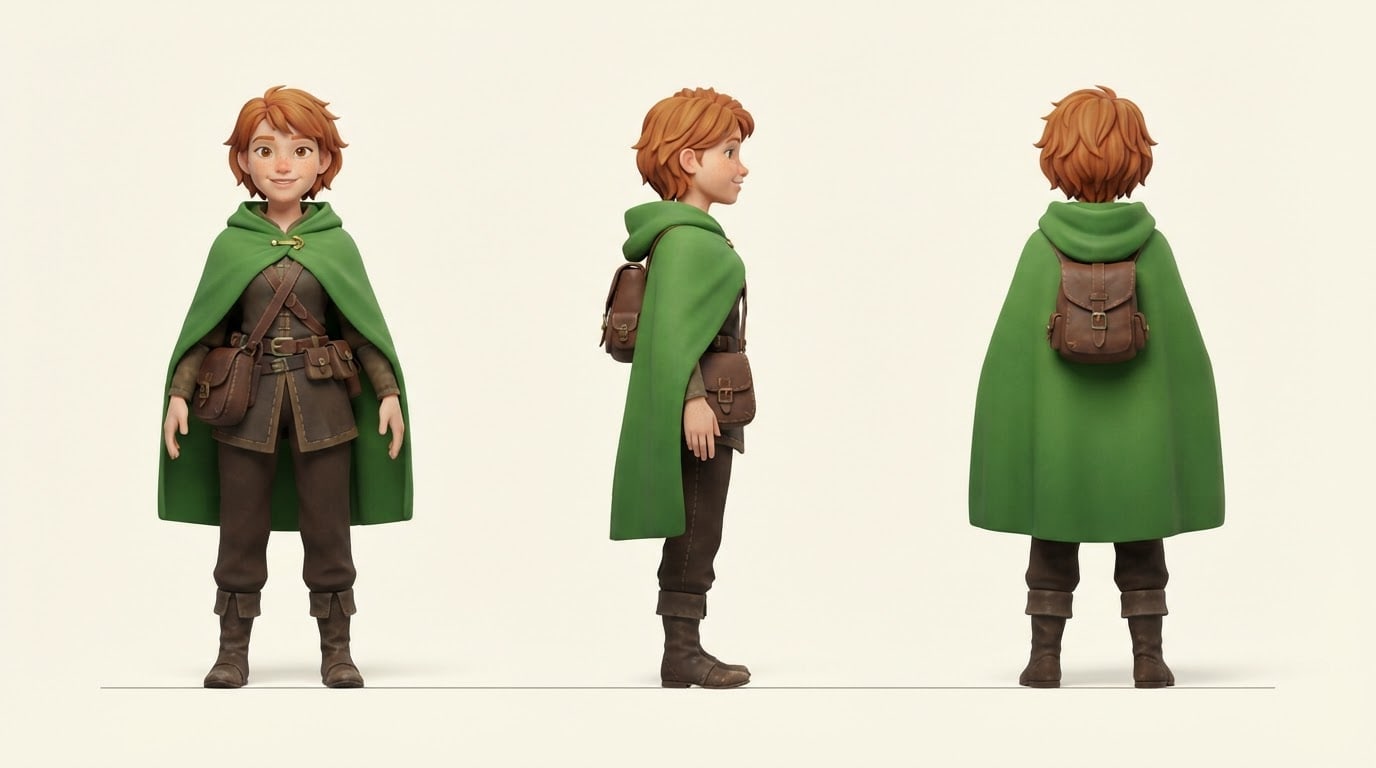
Create a design sheet (character sheet) for an original character.
Charactera young traveler with short red hair, a green cloak and a leather satchel; fictional, not resembling any known cartoon or game character.
Layoutthe same character three times in one image, left to right front, side and back; all standing, the same height, feet on one line.
Stylea soft 3D animated character render; the same colors, outfit and proportions in all three views.
Backgroundflat light cream, equal spacing between the views.
Lighteven, soft studio light with a light shadow under each view.
Cameraeye level, flat orthographic view, no perspective distortion.
Paletteat most four main character colors and the background.
Compositionthe three views centered horizontally, narrow margins above and below.
Textno text, labels or arrows in the image.
Aspect ratio 16:9.
Image made with this prompt
6 more ready-to-use prompts
Different takes on the same topic. Copy any of them as is and replace the parts in square brackets.
1.Character sheet prompt from your own drawing
When to use: When you have one drawing of a character and want to see it from every angle.
Draw a design sheet of the character in my uploaded drawing.
- Keep
- colors, outfit, proportions and face.
- Layout
- front, side, back; all the same height, side by side.
- Background
- flat [e.g. light gray].
- Text
- no text in the image.
- Ratio
- 16:9
2.Expression sheet prompt
When to use: When you want the character's emotions on the same face.
Create an expression sheet for an original character.
- Character
- [e.g. a freckled girl with a ponytail], fictional.
- Layout
- 2 rows x 3 columns, head and shoulders only.
- Expressions
- happy, surprised, angry, sad, shy, determined.
- Style
- [e.g. anime], the same hair and colors in every cell.
- Background
- flat white.
- Text
- no text in the image.
- Ratio
- 3:2
3.Pose sheet prompt
When to use: When you want the character in motion.
Create a pose sheet for an original character.
- Character
- [e.g. a young knight with a shield], fictional.
- Poses
- running, jumping, blocking with the shield, sitting, waving; five side by side, full body.
- Style
- [e.g. 3D render], the same outfit and colors in each pose.
- Background
- flat [e.g. cream].
- Text
- no text in the image.
- Ratio
- 21:9
4.Character turnaround prompt for ChatGPT
When to use: When you need a four-angle turnaround for modeling.
Draw a turnaround sheet for an original character.
- Character
- [e.g. a robot mechanic in orange overalls], fictional.
- Layout
- front, three-quarter, side, back; all four the same height.
- Camera
- flat orthographic view.
- Background
- flat light gray.
- Text
- no text or arrows in the image.
- Ratio
- 21:9
5.Costume sheet prompt
When to use: When you want to compare one character in different outfits.
Create a costume sheet for an original character.
- Character
- [e.g. a detective with short black hair], fictional.
- Costumes
- casual wear, raincoat, evening wear, winter coat; all four front view, full body, side by side.
- Style
- [e.g. 2D cartoon], the same face and hair in every costume.
- Background
- flat [e.g. pale blue].
- Text
- no text in the image.
- Ratio
- 16:9
6.Mascot character sheet prompt
When to use: When a brand mascot must look the same from every side.
Draw a design sheet for a brand mascot.
- Mascot
- [e.g. a big-eyed orange fox in an apron], fictional.
- Layout
- front, side, back and one waving pose.
- Style
- matte vinyl toy look.
- Background
- flat [e.g. light cream].
- Text
- no text or logo in the image.
- Ratio
- 16:9
What this prompt does
If you need to see one character the same from every angle, the main prompt draws it front, side and back in one image at the same height and in the same colors; the sheet becomes the reference for every later image and for 3D modeling. The 6 variants below cover expression sheets, pose sheets, costume sheets, turnarounds and sheets from your own drawing in Nano Banana and ChatGPT.
Where to use it
- Game character reference
- Comics and picture books
- Reference for a 3D modeler
- Brand mascot guide
Fields you can fill in
The fields you can change in the form above and their default values.
- CharacterFree text
- a young traveler with short red hair, a green cloak and a leather satchel
- StyleOne of 4 options
- a soft 3D animated character render
- BackgroundOne of 3 options
- light cream
- RatioOne of 3 options
- 16:9
Step by step
- 1
Limit the character to four colors
Put hair, outfit and one item in the Character field; four main colors are enough. Fewer colors make it easier to get the same character in all three views.
- 2
Pick the style for its use
3D render suits games and animation, anime and cartoon suit stories, and vinyl toy suits mascots and figures.
- 3
Compare the views
Check that height, outfit colors and the item's position match across views. If one differs, regenerate without changing the Character line; a sheet only works as a reference when it is consistent.
Tips and variations
- For a three-quarter view too, make the layout four views (front, three-quarter, side, back) and pick 21:9.
- Upload the finished sheet to Gemini and write 'draw this character in a new scene' to keep it consistent.
- For a 3D modeling reference choose the 3D render style and a light gray background; a flat background makes silhouettes easy to read.
Frequently asked questions
How do I write a character sheet prompt for Nano Banana?
Put the character, layout (front, side, back), style and background on separate lines; the line 'the same colors and proportions in all views' improves consistency. Nano Banana is the name of Gemini's image model.
Can ChatGPT make a character sheet?
Yes. ChatGPT can draw several views in one image; stating the number and order of views makes the result tidier.
What is the difference between a character turnaround and a character sheet?
A turnaround is only the rotation views (front, side, back). A character sheet can add expressions, poses or costumes; the variants below cover both.
Can a character sheet become a 3D model?
This prompt makes an image, not a 3D model file. The image serves as a reference when you start modeling in a program like Blender.





