Cartoon prompts: 10 ready-to-use prompts for ChatGPT and Gemini
Cartoon prompts to turn your photo into a cartoon in ChatGPT or Gemini, plus couples, girls, boys, kids, a character sheet, a prompt generator and video: 10 copy-and-paste prompts.
Prompt
Fill in the fields below and the prompt updates instantly. Copy it and use it in any AI tool.
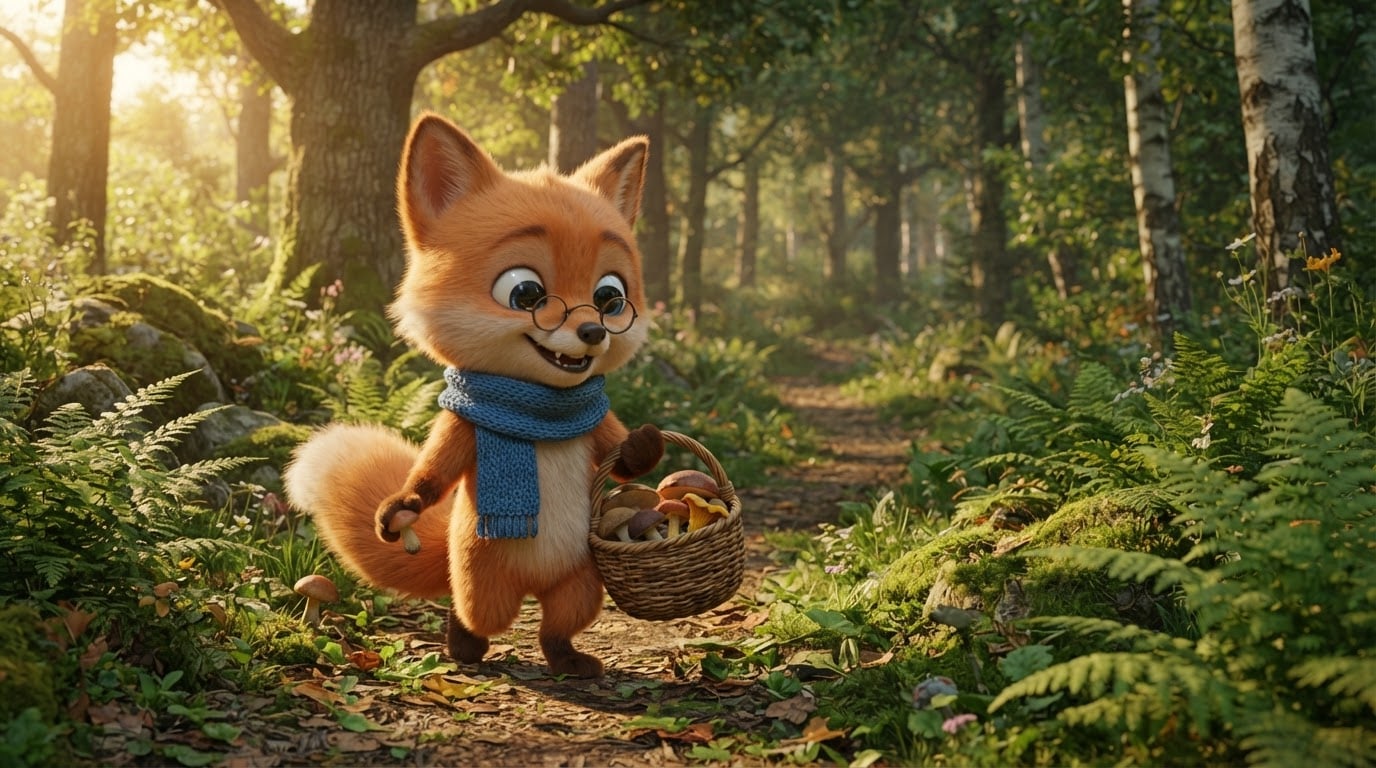
Draw an original, fictional cartoon character in its own scene.
Charactera small orange fox with round glasses and a blue scarf, unlike any known cartoon character.
Actioncheerfully picking mushrooms along a path, a wicker basket on its arm.
Lookrounded, exaggerated shapes, big expressive eyes, a clear silhouette.
Settinga lush green forest path covered in ferns and moss.
Lightwarm afternoon sun from the left, soft shadows.
Cameraeye level, 35 mm wide film frame, character sharp.
Style3D animated feature film render, soft textures and bright, lively eyes.
Color paletteat most four saturated colors; the character's main color stands out.
Compositionfull-body character in the left third, half the frame height; the only character in the scene.
Textno text and no signature; clothing, objects and surfaces plain and unlettered.
Aspect ratio 16:9.
Image made with this prompt
9 more ready-to-use prompts
Different takes on the same topic. Copy any of them as is and replace the parts in square brackets.
1.ChatGPT cartoon prompt: turn your photo into a cartoon
When to use: Use it when you want ChatGPT to turn your own photo into a recognizable cartoon character, the most searched use of cartoon prompts.
Turn the person in my uploaded photo into a cartoon character.
- Identity
- keep my face shape, hairstyle and hair color, skin tone and glasses (if any) recognizable.
- Outfit
- a simplified version of the outfit in the photo, same colors.
- Pose and expression
- [e.g. the pose in the photo, a big smile]
- Style
- [e.g. 3D animated movie look with soft textures, or a classic 2D cartoon with bold outlines]
- Background
- [e.g. a cartoon version of the place in the photo, or a plain pastel backdrop]
- Text
- no text and no logos.
- Ratio
- [e.g. 1:1 for a profile picture, 4:5 for a post]
2.Cartoon prompt for Gemini: a 3D animated character from your photo
When to use: Use it in Gemini (Nano Banana) when you want your photo to look like a frame from a 3D animated movie.
Transform the person in this photo into a 3D animated movie character.
- Identity
- keep the face, hair, skin tone and signature features (glasses, beard, moles) as in the photo.
- Look
- big expressive eyes, soft rounded shapes, detailed fabric and hair texture.
- Scene
- [e.g. a cozy, warmly lit study full of books]
- Lighting
- warm cinematic light with a gentle rim light behind the character.
- Framing
- waist up, character centered, background slightly blurred.
- Text
- no text and no logos.
- Ratio
- [e.g. 4:5, portrait]
3.Cartoon prompt for couples: your couple photo as one cartoon frame
When to use: Use it when you upload a photo of the two of you and want a cartoon version for an anniversary, a wedding invite or a shared profile picture.
Draw the two people in my uploaded photo together in one cartoon frame.
- Identity
- keep both faces, hairstyles, skin tones and the height difference recognizable.
- Scene
- [e.g. sitting side by side on a pier at sunset]
- Interaction
- [e.g. laughing at each other, sharing one ice cream cone]
- Style
- [e.g. 3D animated movie look, warm colors]
- Lighting
- golden hour, soft and warm.
- Text
- no text; if names or a date will be added later, leave a plain empty sky area at the top.
- Ratio
- 4:5, portrait.
4.Cartoon prompt for girls: an aesthetic cartoon profile picture
When to use: Use it for a soft, pastel cartoon girl avatar for Instagram or TikTok; works with or without an uploaded photo.
Draw an aesthetic cartoon girl profile picture. [If you uploaded a photo: make the face and hair look like the person in it.]
- Hair
- [e.g. shoulder-length, wavy, honey brown]
- Outfit
- [e.g. a lilac knit sweater and tiny pearl earrings]
- Expression
- turned slightly sideways, a warm smile, big shiny eyes.
- Framing
- shoulders up, face centered, fits a round profile frame.
- Style
- soft 2D cartoon, clean thin outlines, flat pastel colors.
- Background
- plain pastel [color, e.g. peach] backdrop with a few tiny stars.
- Text
- no text.
- Ratio
- 1:1.
5.Cartoon prompt for boys: a gaming and social media avatar
When to use: Use it for a confident cartoon boy character for Discord, a gaming profile or social media.
Draw a cool cartoon boy character. [If you uploaded a photo: keep the face, hair and beard as in it.]
- Hair
- [e.g. short black hair with a fade]
- Outfit
- [e.g. burgundy varsity jacket, white tee, jeans]
- Pose
- [e.g. arms crossed, one eyebrow raised, half smile]
- Style
- classic 2D cartoon, bold black outlines, vivid flat colors, a few motion lines.
- Background
- a single [color, e.g. mustard yellow] backdrop with a big circle behind him.
- Text
- no text and no logos.
- Ratio
- 1:1.
6.Cartoon prompt for kids: your child as a storybook hero
When to use: Use it to turn your child's photo into a cartoon storybook hero for a birthday invite, a nursery poster or a memory album.
Draw the child in my uploaded photo as the hero of a cartoon storybook.
- Identity
- keep the hair color and style, eye color, skin tone and smile recognizable.
- Role
- [e.g. a little explorer with a backpack and binoculars]
- Scene
- [e.g. a magical forest of giant mushrooms, a cute squirrel nearby]
- Style
- watercolor picture book art, soft rounded shapes, warm and calm colors.
- Text
- no text; if a name will be added later, leave a plain empty area at the top.
- Ratio
- 3:4, portrait.
7.Cartoon character prompt: front, side, back and expression sheet
When to use: Use it when you are designing your own cartoon character and need a model sheet so it stays consistent in later images; no photo needed.
Create a character design sheet for an original cartoon character.
- Character
- [e.g. a little hedgehog mail carrier with a red beret and huge boots]
- Top row
- the same character full body from the front, side and back; all three the same size on one baseline.
- Bottom row
- 4 facial expressions of the same character:
- 1happy
- 2surprised
- 3sad
- 4angry
- Color swatches
- at the bottom right, flat squares of the character's 4 colors.
- Style
- [e.g. classic 2D cartoon, bold clean outlines, flat colors]
- Background
- plain white.
- Text
- no text on the sheet; no labels or names.
- Ratio
- 16:9, landscape.
8.ChatGPT cartoon prompt generator: get 10 ready prompts on any theme
When to use: Use it when you do not want to write the prompt yourself and want ChatGPT or Gemini to generate ten varied cartoon prompts for your idea.
Act as a cartoon prompt generator.
- Theme
- [e.g. animals running a tiny bakery]
- Task
- write 10 different image prompts for an original cartoon on this theme.
Each prompt includes
- one fictional character (not a known cartoon character) and what it is doing
- the setting and the time of day
- a cartoon style (3D animated, classic 2D, rubber hose, flat vector or watercolor picture book)
- 3-4 colors and the aspect ratio
Rules
- no text, logos or signatures in the image
- each prompt under 60 words, ready to paste
- Output
- a numbered list from 1 to 10.
9.Cartoon video prompt: an 8-second scene for Gemini Veo or Sora
When to use: Use it when you want to turn your cartoon character or scene into a short video in Gemini's video generation (Veo), Sora or a similar tool.
Generate an 8-second cartoon video scene.
- Character
- [e.g. a small fox with glasses and a blue scarf; if you uploaded its image, use that character]
- Action
- [e.g. picking mushrooms, then a leaf lands on its nose and it sneezes]
- Camera
- one slow push-in shot at eye level.
- Style
- [e.g. 3D animated movie look, soft light]
- Sound
- birdsong, rustling leaves and a funny sneeze at the end; no dialogue.
- Text
- no on-screen text or subtitles.
- Ratio
- 16:9.
What this prompt does
Most people searching for cartoon prompts want to upload a photo to ChatGPT or Gemini and see themselves, their partner or their kids as a cartoon character. The 9 variants below cover that, plus a character sheet, a prompt generator and a short cartoon video. The main prompt above needs no photo: it draws an original cartoon frame from the character, action, style and setting you pick.
Where to use it
- Profile picture and avatar
- Picture book and story art
- Birthday invitation
- YouTube and social media mascot
- Mug, T-shirt and sticker print
- Gift for a partner or family
Fields you can fill in
The fields you can change in the form above and their default values.
- CharacterFree text
- a small orange fox with round glasses and a blue scarf
- ActionFree text
- cheerfully picking mushrooms along a path, a wicker basket on its arm
- Cartoon styleOne of 5 options
- 3D animated feature film render, soft textures and bright, lively eyes
- SettingOne of 5 options
- a lush green forest path covered in ferns and moss
- Aspect ratioOne of 5 options
- 16:9
Step by step
- 1
Describe the character and what it is doing
In Character, write the species, colors and one signature item (scarf, glasses, hat). In Action, write a single movement; asking for two or three things in one frame muddles the pose and shrinks the character.
- 2
Pick a cartoon style
3D animated feature gives a soft, glossy movie frame, classic 2D TV cartoon gives bold outlines and flat colors, 1930s rubber hose looks vintage with bendy limbs, flat vector is print-ready and watercolor picture book feels like a fairy tale.
- 3
Choose the setting and ratio
Pick the forest, pier, garden or snowy village to tell a story, or the plain cream backdrop for stickers and prints. Use 16:9 for a film frame or YouTube thumbnail, 4:5 for a post and 9:16 for stories and wallpapers.
- 4
Copy it or generate in Canvas
Use 'Copy' to paste it into ChatGPT or Gemini, or 'Generate in Canvas' to get the image in Entrobase Canvas (account required). To cartoonize your own photo, copy the matching variant below, upload the photo and fill in the brackets.
- 5
Check the result like an animator
Is the silhouette readable from a distance, are the eyes expressive, does the character's color stand out from the setting? If it looks too realistic, reply 'make the shapes rounder and more exaggerated, bigger eyes' in the same chat and generate again.
Tips and variations
- For photo to cartoon, use a bright, front-facing photo of one person; group shots and dark photos weaken the likeness.
- Describe the look instead of naming a studio or character: 'soft-textured 3D animated feature', 'bold-outline 2D TV cartoon'. Results are more consistent and you avoid copyright refusals.
- If you will reuse the character, generate the character sheet variant first, then upload that sheet with every later prompt.
- Keep the same character and action and switch only the style: a 3D profile picture, a 2D sticker and a watercolor greeting card make a nice set.
Frequently asked questions
How do I turn a photo into a cartoon with ChatGPT?
In a ChatGPT chat with image generation, upload your photo and paste the photo-to-cartoon variant. Its Identity line asks ChatGPT to keep your face shape, hair and glasses; just fill in the style, background and ratio in the brackets.
Do these cartoon prompts work in Gemini?
Yes. Gemini's image model (Nano Banana) can turn an uploaded photo into a cartoon character and can also draw scenes from the photo-free main prompt. The Gemini variant asks for a 3D animated look; for 2D, change the Look line to 'classic 2D cartoon, bold outlines'.
How do I keep the same cartoon character across images?
One prompt will not give the identical character every time. Generate the character sheet variant first, then upload it with later prompts and say 'use this character'. Describe the outfit and colors with the same words in every prompt.
Is there a free cartoon prompt generator?
The generator variant turns ChatGPT or Gemini into one: give it a theme and it writes ten different, ready-to-paste cartoon prompts with a character, setting, style, colors and ratio. You can also fill in the form above to adapt the main prompt without editing text.
Can I make a cartoon video from a prompt?
Yes. The video variant writes a single 8-second scene for Gemini's video generation (Veo), Sora or similar tools, with character, action, camera, style and sound on separate lines. Generating and uploading the character image first makes the video more consistent.





