Cartoon Avatar Prompts: 7 Prompts for ChatGPT and Gemini
7 cartoon avatar prompts: a 3D cartoon avatar in a circle badge, avatars from your own photo, gaming, anime and team avatars; works in ChatGPT, Gemini and Entrobase Canvas.
Tested: EntroGen Flash, November 2026
Prompt
Fill in the fields below and the prompt updates instantly. Copy it and use it in any AI tool.
Create an original cartoon avatar for a social media profile.
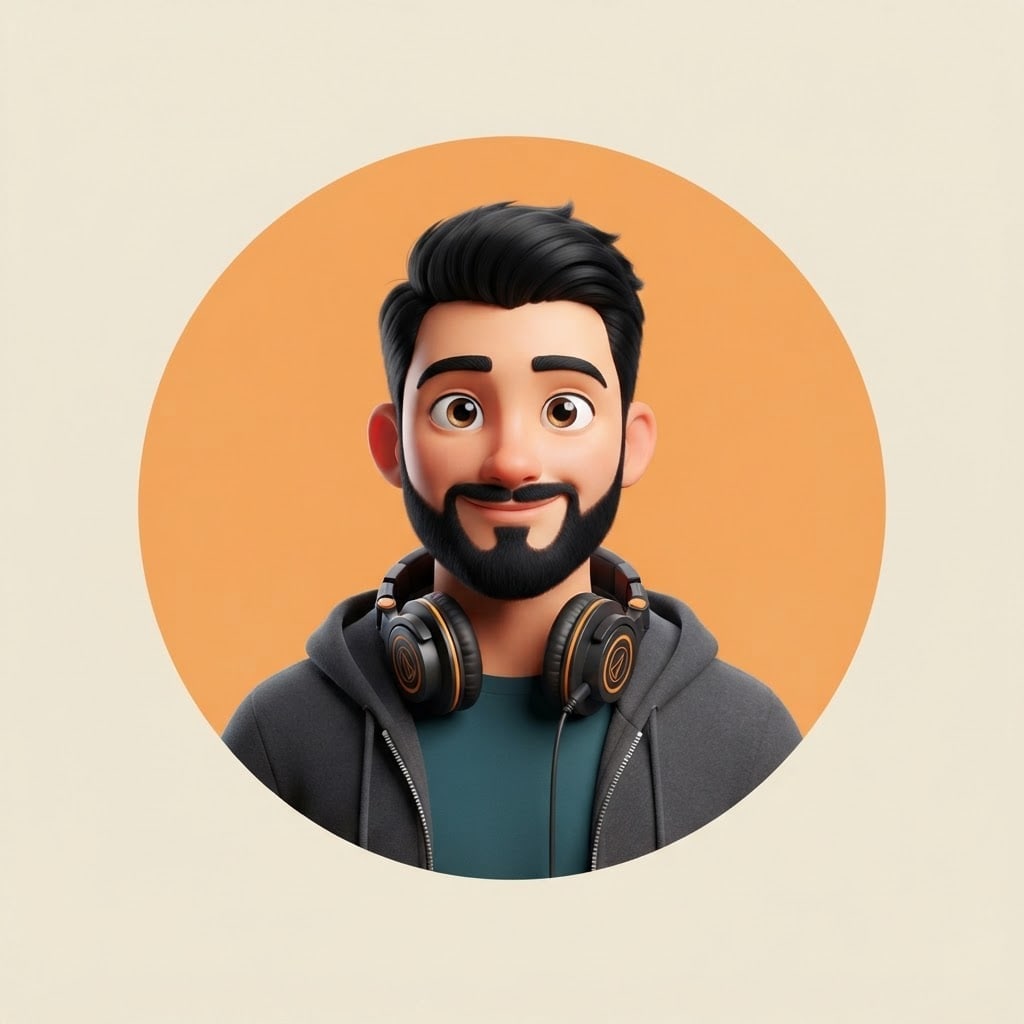
Persona podcast host with short black hair, a beard and headphones on his neck; fictional, not resembling any real person.
Stylesoft 3D cartoon character with big bright eyes.
Backgrounda large flat #f2a65a circle in the middle of a plain cream background; the person's head and shoulders sit inside the circle, shoulders reaching its lower edge.
Lightsoft studio light from the front, warm and even on the face.
Cameraeye level, 85 mm portrait feel, head and shoulders, face toward the camera and sharp.
Palettethe circle color, two tones of clothing and the cream background.
Compositionsquare frame, circle dead center, space inside the circle above the head; when cropped to a circle for a profile picture the face stays centered.
Textno text in the image.
Aspect ratio 1:1.
Image made with this prompt
6 more ready-to-use prompts
Different takes on the same topic. Copy any of them as is and replace the parts in square brackets.
1.Cartoon avatar from your photo in Gemini
When to use: When the avatar should look like you.
Turn the person in my uploaded photo into a 3D cartoon avatar.
- Keep
- face shape, hair color and style, glasses if any.
- Framing
- head and shoulders, face toward the camera.
- Background
- flat [e.g. light blue].
- Light
- soft studio light from the front.
- Text
- no text in the image.
- Ratio
- 1:1
2.Gaming avatar prompt for ChatGPT
When to use: When you want a bolder avatar for Discord, Twitch or a game profile.
Draw an original avatar for a gamer profile.
- Character
- [e.g. a young gamer in a hoodie with neon green headphones], fictional.
- Style
- vivid 3D cartoon with a sharp rim light.
- Background
- dark navy with a soft purple glow.
- Framing
- head and shoulders, slight side angle.
- Text
- no text in the image.
- Ratio
- 1:1
3.Anime avatar prompt
When to use: When you want an anime-style profile picture.
Draw an anime-style avatar for a profile picture.
- Person
- [e.g. a freckled girl with shoulder-length red hair], fictional.
- Style
- clean-line anime with soft shading.
- Background
- flat [e.g. pastel pink].
- Framing
- head and shoulders, face centered.
- Text
- no text in the image.
- Ratio
- 1:1
4.Couple cartoon avatar
When to use: When you want one shared avatar with a partner or friend.
Create a two-person cartoon avatar.
- People
- [e.g. a short-haired man with glasses] and [e.g. a woman with long wavy hair], side by side, both smiling.
- Style
- soft 3D cartoon.
- Background
- a flat [e.g. orange] circle with both inside it.
- Text
- no text in the image.
- Ratio
- 1:1
5.Team avatar set
When to use: When everyone on a team page should share one avatar style.
Create 4 avatars in the same style, in a 2x2 grid.
- People
- [e.g. a bearded developer, a designer with a bun, a sales lead with glasses, a support agent with curly hair], all fictional.
- Style
- flat 2D vector, same line weight.
- Background
- the same flat color in every cell.
- Text
- no text or names in the image.
- Ratio
- 1:1
6.Animal cartoon avatar
When to use: When you want a cute profile picture without showing your face.
Create a cute animal avatar for a profile picture.
- Animal
- [e.g. a cat with round glasses and a scarf].
- Style
- soft 3D cartoon with lightly textured fur.
- Background
- flat [e.g. mint green].
- Framing
- head and shoulders, face centered.
- Text
- no text in the image.
- Ratio
- 1:1
What this prompt does
If you want a cartoon avatar that still looks right when a profile crops it to a circle, the main prompt makes a square avatar with the face centered inside a colored circle. The 6 variants below cover avatars from your own photo in ChatGPT and Gemini, plus gaming, anime, couple and team avatars.
Where to use it
- Instagram and X profile picture
- Discord and Twitch avatar
- Team page avatars
- Podcast and channel icon
Fields you can fill in
The fields you can change in the form above and their default values.
- PersonFree text
- a podcast host with short black hair, a beard and headphones on his neck
- StyleOne of 4 options
- soft 3D cartoon character with big bright eyes
- Circle colorColor
- #f2a65a
- RatioOne of 3 options
- 1:1
Step by step
- 1
Describe the person with three details
Put the hair, one distinctive feature (beard, glasses) and one accessory in the Person field. More than three details get lost at small sizes and the avatar looks busy.
- 2
Pick the style and circle color
Style offers 3D cartoon, flat vector, anime and clay. Choose a circle color that does not clash with the clothing; an orange circle stands apart from blue and green outfits.
- 3
Check it at small size
Shrink the image to 100 pixels. If the face still reads, the avatar works as a profile picture; if not, drop the accessory and generate again.
Tips and variations
- A 1:1 square fits every profile slot; if you will also post it on Instagram, pick 4:5 and the circle stays centered.
- For team avatars keep the style and circle lines identical for everyone and change only the Person field.
- To make an avatar that looks like you, use the photo variant below in Gemini or ChatGPT and upload your picture.
Frequently asked questions
How do I write a cartoon avatar prompt for ChatGPT?
Put the person, style, background and framing on separate lines. The line 'head and shoulders, face centered, square frame' keeps the avatar from being cut off when a profile crops it to a circle.
Can Gemini turn my photo into a cartoon avatar?
Yes. Gemini's image model uses an uploaded photo as a reference; upload yours and write 'keep my face shape and hair, turn me into a 3D cartoon avatar'.
What is the best ratio for an avatar?
1:1 square. Instagram, X, Discord and LinkedIn crop profile pictures to a circle, and nothing is lost when the face sits in the middle of a square.
Do avatar prompts work in both ChatGPT and Gemini?
Yes, because the person, style and framing are written as plain sentences that both image models follow.





