Anime prompts: 10 ready-to-use prompts for ChatGPT and Gemini
Anime prompts to turn your photo into anime in ChatGPT or Gemini, plus anime girls, boys, couples, anime to real, scenery wallpapers, Sora 2 video and a prompt generator: 10 copy-and-paste prompts.
Prompt
Fill in the fields below and the prompt updates instantly. Copy it and use it in any AI tool.
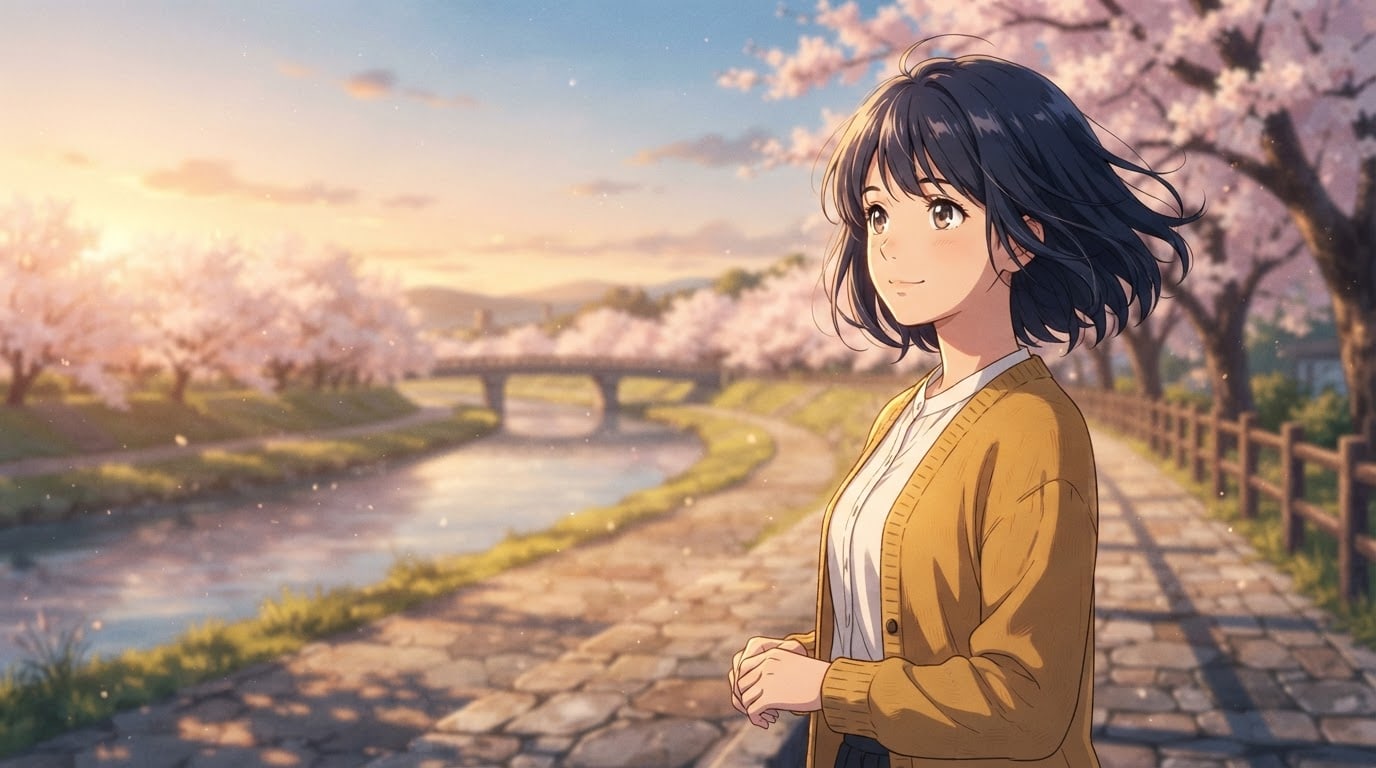
Draw an original, fictional anime character in their own scene, like a frame from an anime film.
Charactera young woman with short navy hair, a white shirt and a mustard cardigan, unlike any known anime character.
Actiongazing into the distance as the wind lifts her hair, a faint smile on her face.
Lookrealistic anime proportions (about seven heads tall), large glossy eyes, light highlights on strands of hair, clean thin linework.
Settinga stone path by a river, lined with cherry trees in full bloom.
Lightlow, warm evening sun from the left, long soft shadows.
Cameraslightly low angle, 35 mm cinematic wide shot, character sharp, background slightly soft.
Stylemodern anime film still, crisp cel shading and a detailed painted background.
Color paletteat most four harmonious colors; the light's tone carries across the whole scene, the character's outfit color stands out from the setting.
Compositioncharacter in the right third, visible from the knees up; a calm, open part of the setting on the left; the only person in the scene.
Textno text and no signature; clothing, objects and surfaces plain and unlettered.
Aspect ratio 16:9.
Image made with this prompt
9 more ready-to-use prompts
Different takes on the same topic. Copy any of them as is and replace the parts in square brackets.
1.ChatGPT anime prompt: turn your photo into anime
When to use: Use it when you want ChatGPT to turn your own photo into a recognizable anime character, the most searched use of anime prompts.
Turn the person in my uploaded photo into an anime character.
- Identity
- keep my face shape, hairstyle and hair color, skin tone and glasses (if any) recognizable.
- Look
- large glossy eyes, thin clean linework, light highlights in the hair, crisp-edged cel shading.
- Outfit
- a simplified anime version of the outfit in the photo, same colors.
- Expression
- [e.g. a soft smile, eyes on the camera]
- Background
- [e.g. cherry trees in bloom, or a plain pastel backdrop]
- Style
- [e.g. modern anime film still, or 1990s TV anime]
- Text
- no text and no logos.
- Ratio
- [e.g. 1:1 for a profile picture, 4:5 for a post]
2.Anime prompt for Gemini: your selfie as an anime film frame
When to use: Use it in Gemini (Nano Banana) when you want your selfie to look like a cinematic frame from an anime film; Gemini is good at keeping faces.
Transform the person in this selfie into a character in an anime film frame.
- Identity
- keep face shape, hairstyle, skin tone and signature features (moles, glasses, earrings) as in the selfie.
- Look
- anime eyes, a slim jaw, hair drawn in separate locks, flat cel coloring.
- Scene
- [e.g. a rain-soaked city street with no signs, early evening]
- Lighting
- warm sunset from behind, soft fill light on the face, a bright rim light in the hair.
- Framing
- chest up, person centered, background slightly blurred.
- Text
- no text and no logos.
- Ratio
- [e.g. 9:16, portrait]
3.Anime prompt for girls: an original anime girl character
When to use: Use it when you want an original anime girl for a profile, story or wallpaper without uploading any photo.
Draw an original anime girl character who looks like no existing character.
- Character
- [e.g. a young woman with long white hair, red eyes and a long black coat]
- Personality
- [e.g. calm and mysterious]
- Pose
- [e.g. turned slightly away, looking back over her shoulder]
- Setting
- [e.g. the shore of a misty lake under moonlight]
- Light
- [e.g. cool moonlight, a silver sheen in the hair]
- Style
- modern anime film still, crisp-edged cel shading, detailed painted background.
- Framing
- waist up, character in the right third.
- Text
- no text and no signature.
- Ratio
- [e.g. 9:16 wallpaper or 4:5 post]
4.Anime prompt for boys: an avatar or story hero
When to use: Use it for a gaming profile, a Discord avatar or a story you are writing when you want an original anime boy; no photo needed.
Draw an original anime boy character who looks like no existing character.
- Character
- [e.g. a young man with messy black hair, blue eyes and a dark green jacket]
- Role
- [e.g. a night courier in the city, an old bicycle beside him]
- Expression
- [e.g. confident, a slight half smile]
- Setting
- [e.g. a neon-lit night street with no signs, rain reflections on the ground]
- Style
- sharp-lined action anime, hard two-tone shadows, vivid colors.
- Framing
- chest up, face centered and filling half the frame for an avatar.
- Text
- no text and no logos.
- Ratio
- 1:1.
5.Anime prompt for couple photos: the two of you in one anime frame
When to use: Use it when you want to upload a photo of the two of you and get one anime frame for an anniversary, a shared profile or a wallpaper; works in ChatGPT and Gemini.
Draw the two people in my uploaded photo together in one anime film frame.
- Identity
- keep both faces, hairstyles, skin tones and the height difference recognizable.
- Scene
- [e.g. standing side by side on a train platform on a summer evening]
- Moment
- [e.g. watching distant fireworks, both smiling]
- Light
- violet and orange sky after sunset, warm glow on their faces.
- Style
- modern anime film still, detailed painted sky.
- Text
- no text; no signs on the platform, empty sky space left for names or a date.
- Ratio
- [e.g. 9:16 phone wallpaper or 16:9]
6.Anime to real prompt: turn an anime character into a real photo
When to use: Use it when you want to see how an original anime character you drew or generated would look as a real person.
Turn the anime character I uploaded into a realistic human portrait photo.
- Keep
- hair color and style, eye color, outfit, accessories and pose.
- Realism
- natural skin texture, real human eye size, individual strands of hair, real fabric creases.
- Light
- soft studio lighting, key light from the left, a gentle rim light.
- Camera
- 85 mm portrait, f/2, eye level, background blurred with shallow depth of field.
- Background
- [e.g. a real version of the place in the anime image]
- Text
- no text.
- Ratio
- 4:5.
7.Anime scenery wallpaper prompt: no characters
When to use: Use it when you want a phone or desktop wallpaper that looks like a painted anime film background, with no people in it.
Paint a scenery image like a background from an anime film, with no people.
- Scene
- [e.g. a summer afternoon view from a lone tree on a hill down to a seaside town]
- Sky
- big, layered cumulus clouds, deep blue sky.
- Light
- [e.g. golden beams breaking through the clouds]
- Detail
- grass bending in the wind, a small railway line in the distance, houses with no signs.
- Style
- hand-painted anime background art, soft blends, clean edges.
- Composition
- horizon in the lower third, sky above; no people in the frame.
- Text
- no text and no signature.
- Ratio
- [e.g. 9:16 for phone, 16:9 for desktop]
8.Anime prompt for Sora 2: a 10-second anime scene
When to use: Use it to turn an anime character or scene into a short video in Sora 2 or tools like Gemini's video generation (Veo).
Generate a 10-second anime video scene.
- Character
- [e.g. a young woman with short navy hair and a mustard cardigan; if you uploaded her image, that character]
- Action
- [e.g. walking along a cherry-lined river path, a gust of wind lifts the petals, she stops and looks up at the sky]
- Camera
- slow tracking shot from the side, tilting gently up at the end.
- Style
- modern anime film, flat cel coloring, detailed painted background, fluid animation.
- Sound
- wind, rustling leaves and a distant train; no dialogue.
- Text
- no on-screen text or subtitles.
- Ratio
- 16:9.
9.Anime prompt generator: 10 ready prompts from ChatGPT
When to use: Use it when you cannot decide what to draw and want ChatGPT or Gemini to write ten different anime prompts from one theme.
Act as an assistant that writes anime image prompts.
- Theme
- [e.g. a quiet love story in a rainy city]
- Output
- 10 different anime image prompts, each in its own numbered block.
Each prompt has these lines:
- 1Character (hair, eyes, outfit; original, not like any existing character)
- 2Action (one moment)
- 3Setting
- 4Light and time of day
- 5Camera angle
- 6Style (modern anime film, 1990s TV anime, watercolor storybook or action anime)
- 7Color palette (3-4 colors)
- 8Ratio
Rules
- No two prompts repeat the same setting or style.
- Ask for no text, logos or signatures in the image.
- Do not use show, studio or real people's names.
What this prompt does
Most people searching for anime prompts want to upload a selfie to ChatGPT or Gemini and see themselves as an anime character; anime girls and boys, couple pictures and Sora 2 videos are close behind. The 9 variants below cover those, plus anime to real and a prompt generator. The main prompt above needs no photo: it draws an original anime film frame from the character, style and setting you choose.
Where to use it
- Anime profile picture
- Phone and desktop wallpaper
- Story and fanfic cover
- Gaming and Discord avatar
- Anime couple picture as a gift
- Poster and notebook print
Fields you can fill in
The fields you can change in the form above and their default values.
- CharacterFree text
- a young woman with short navy hair, a white shirt and a mustard cardigan
- ActionFree text
- gazing into the distance as the wind lifts her hair, a faint smile on her face
- Anime styleOne of 5 options
- modern anime film still, crisp cel shading and a detailed painted background
- SettingOne of 5 options
- a stone path by a river, lined with cherry trees in full bloom
- Aspect ratioOne of 5 options
- 16:9
Step by step
- 1
Build the character in one line
In Character, write hair color and length, two pieces of clothing and an age feel. Contrasting hair and outfit colors make anime characters readable; navy hair with a mustard cardigan is a good pairing.
- 2
Pick a single moment
In Action, write a look or one movement: gazing into the distance, closing an umbrella, turning into the wind. An anime frame freezes one moment; asking for two or three actions breaks the pose and shrinks the character.
- 3
Match the style to the setting
Modern anime film with a painted background is the most cinematic; 1990s TV anime feels nostalgic and grainy, the watercolor storybook style dreamy, action anime hard-shadowed. For wallpapers pick the cherry path or the sea hill, for avatars the plain cream backdrop.
- 4
Set the ratio for where it will live
Choose 16:9 for a film frame or desktop, 9:16 for a phone wallpaper or story, 4:5 for a post and 1:1 for a profile picture. Then 'Copy' it into ChatGPT or Gemini, or 'Generate in Canvas' in Entrobase Canvas (account required).
- 5
Judge it with an anime eye
Check for catchlights in the eyes, separate strands of hair and crisp-edged shadows. If the result looks too realistic or half 3D, reply 'flat cel shading, hard two-tone shadows, thin outlines' in the same chat and generate once more.
Tips and variations
- For photo to anime, upload a bright, front-facing photo of one person; sunglasses, masks and harsh shadows weaken the likeness.
- Describe the look instead of naming a studio or a show: 'storybook anime film with watercolor backgrounds', '1990s TV anime, film grain'. Tools may refuse named requests, and descriptions give steadier results.
- To reuse a character across a series, describe hair, eye color and outfit with the same words every time and upload your first good result as a reference.
- For a phone wallpaper, set the ratio to 9:16 and pick the cherry path or the sea hill; the character stays in the right third, leaving room for icons on the left.
- To turn the evening into a night scene, change the Light line to 'moonlight and warm street lamps, blue shadows'; the palette line adapts on its own.
Frequently asked questions
How do I turn a photo into anime with ChatGPT?
In a ChatGPT chat with image generation, upload your photo and paste the ChatGPT photo-to-anime variant. Its Identity line keeps your face shape, hairstyle and skin tone; just fill in the style, background and ratio in the brackets.
What is a good anime prompt for Gemini?
Upload a selfie in the Gemini app and paste the Gemini selfie variant. Gemini's image model (Nano Banana) keeps your face while drawing an anime frame; if you want changes, reply in the same chat with short edits like 'slightly bigger eyes, sharper shadows'.
Can I turn an anime character into a real person?
Yes, for an original character you drew or generated, use the anime to real variant. Upload the image; the prompt keeps hair, eyes and outfit and asks for real skin texture and studio light. Tools may refuse copyrighted characters from shows.
Do these prompts work for anime videos in Sora 2?
Yes. The Sora 2 variant writes a single 10-second scene with character, action, camera move, style and sound on separate lines. Keeping it to one event and asking for ambient sound instead of dialogue helps the anime look hold for the whole clip.
Is there a free anime prompt generator?
Yes: paste the generator variant into ChatGPT or Gemini (their free plans work too), give it a theme and it returns ten different anime prompts with character, setting, light, style and ratio on separate lines. The form above also adapts the main prompt without editing any text.





