Anime Avatar Prompts: 7 Prompts for ChatGPT and Gemini
7 anime avatar prompts: a 3D anime profile avatar, anime from your own photo, anime boy and girl characters, chibi and gaming avatars; works in ChatGPT, Gemini and Entrobase Canvas.
Tested: EntroGen Flash, November 2026
Prompt
Fill in the fields below and the prompt updates instantly. Copy it and use it in any AI tool.
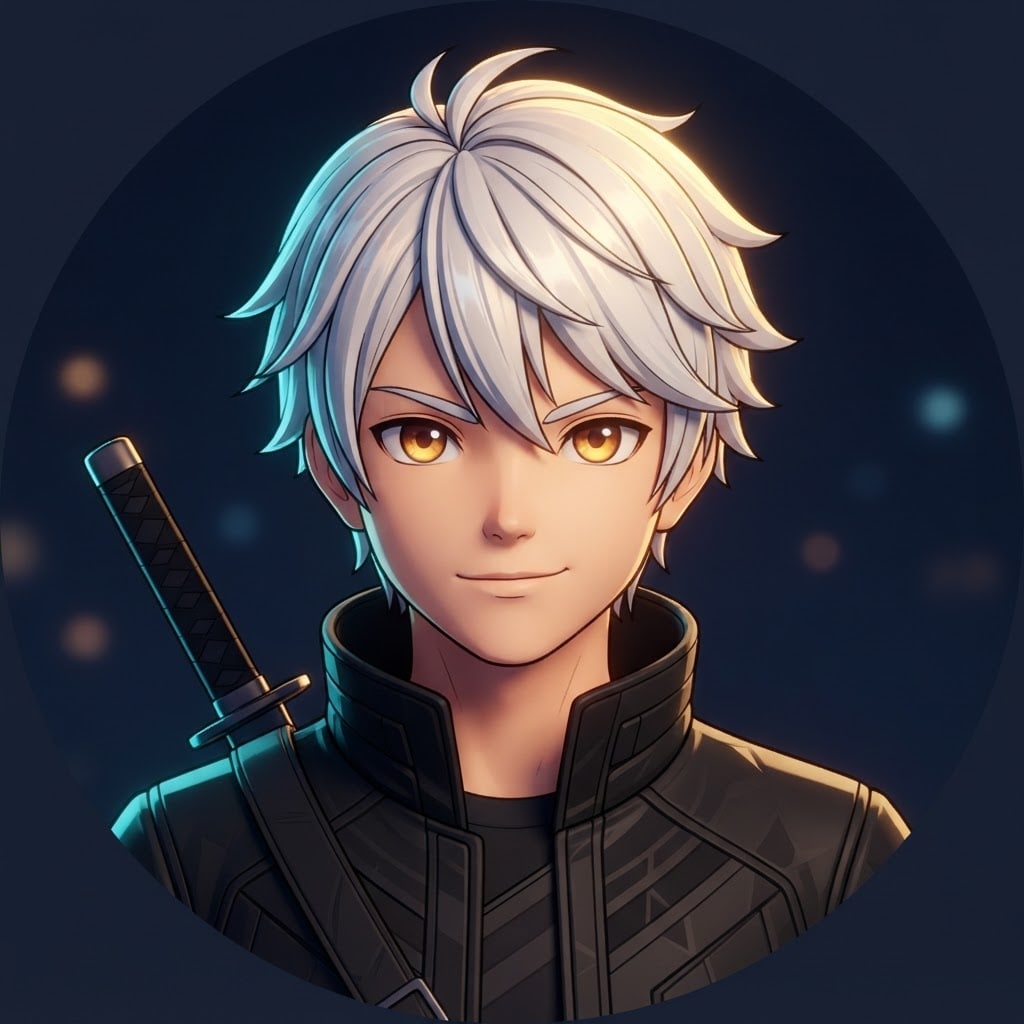
Create an original 3D anime-style avatar for a profile picture.
Charactera young swordsman with white hair, amber eyes and a black jacket; fictional, not resembling any known anime or game character.
Style3D anime render, cel shading, thin dark outlines, big bright eyes, a sharp highlight in the hair.
Backgroundflat midnight navy with a few soft, blurred spots of light behind.
Lightwarm key light from the top right, a cyan rim light from the left.
Cameraeye level, 50 mm feel, head and shoulders, face turned slightly and sharp.
Palettethe character's hair and eye colors, the background color and the rim light tone.
Compositionsquare frame, face centered, a little space above the head; the face stays centered when cropped to a circle.
Textno text in the image.
Aspect ratio 1:1.
Image made with this prompt
6 more ready-to-use prompts
Different takes on the same topic. Copy any of them as is and replace the parts in square brackets.
1.Anime avatar from your photo in Gemini
When to use: When the anime avatar should look like you.
Turn the person in my uploaded photo into an anime-style avatar.
- Keep
- hair color and style, face shape, glasses if any.
- Style
- clean-line anime with cel shading.
- Background
- flat [e.g. navy] with soft light spots.
- Framing
- head and shoulders, face centered.
- Text
- no text in the image.
- Ratio
- 1:1
2.Anime boy avatar prompt for ChatGPT
When to use: When you want a male anime character as your profile picture.
Draw a male anime character for a profile picture.
- Character
- [e.g. a young man with messy black hair, red eyes and a high-collared coat], fictional.
- Style
- sharp-outlined anime with cel shading.
- Light
- purple rim light from behind.
- Framing
- head and shoulders.
- Text
- no text in the image.
- Ratio
- 1:1
3.Anime girl avatar prompt
When to use: When you want a softly colored anime girl.
Draw a female anime character for a profile picture.
- Character
- [e.g. a girl with long pink hair, blue eyes and a ribbon], fictional.
- Scene
- a clear sky with drifting sakura petals.
- Style
- softly shaded anime.
- Framing
- head and shoulders, face centered.
- Text
- no text in the image.
- Ratio
- 1:1
4.Chibi anime avatar prompt
When to use: When you want a cute avatar with a big head and small body.
Draw a chibi anime avatar for a profile picture.
- Character
- [e.g. a blond kid in a cat-ear hat], fictional.
- Proportions
- head larger than the body, big eyes.
- Style
- soft 3D chibi render.
- Background
- flat [e.g. pastel yellow].
- Text
- no text in the image.
- Ratio
- 1:1
5.Anime gaming avatar for Discord
When to use: When you want a sharper, more energetic gamer avatar.
Draw an anime-style gamer avatar for a Discord profile.
- Character
- [e.g. a silver-haired girl with a cyberpunk visor], fictional.
- Light
- cyan and purple neon rim light.
- Background
- dark and simple.
- Framing
- head and shoulders, face centered.
- Text
- no text in the image.
- Ratio
- 1:1
6.Matching anime couple avatars
When to use: When you want two anime avatars that pair with a friend's or partner's.
Draw two matching anime avatars, two squares side by side.
- Left
- [e.g. a black-haired boy] looking right.
- Right
- [e.g. a red-haired girl] looking left.
- Shared
- the same night-sky background, light and style.
- Text
- no text in the image.
- Ratio
- 16:9
What this prompt does
If you want an anime-style avatar for your profile, the main prompt makes a 3D anime avatar with cel shading, big eyes and a rim light, with the face centered so a circle crop never cuts it. The 6 variants below cover anime avatars from your own photo in ChatGPT and Gemini, anime boy and girl characters, chibi, gaming and matching avatars.
Where to use it
- Discord and X profile picture
- Twitch and YouTube channel avatar
- In-game player card
- Anime community profile
Fields you can fill in
The fields you can change in the form above and their default values.
- CharacterFree text
- a young swordsman with white hair, amber eyes and a black jacket
- BackgroundOne of 4 options
- midnight navy
- Rim lightOne of 3 options
- cyan
- RatioOne of 3 options
- 1:1
Step by step
- 1
Describe the character with three details
Write the hair color, eye color and one clothing item. In an anime avatar hair and eyes are the character's identity and the first things that read at small size.
- 2
Match the background and rim light
A navy background with a cyan light feels like night; pink with golden light feels soft. The rim light separates the face from the background.
- 3
Check it at profile size
Shrink the image to 100 pixels. If the eyes and hair highlight still read, the avatar is ready; if not, reduce the light spots behind.
Tips and variations
- For 2D anime change '3D anime render' in the Style line to 'flat-colored anime drawing' and keep the rest.
- To make the same character with other expressions keep the Character line word for word and add the expression at the end.
- For a phone wallpaper generate the same prompt at 9:16 and change the framing line to 'waist up'.
Frequently asked questions
Can ChatGPT make an anime avatar?
Yes. Upload your photo and ask ChatGPT to turn it into an anime avatar, or describe a fictional character as on this page; describe the line, shading and eye style instead of naming a show or studio.
How do I write an anime character prompt for Gemini?
Put character, style, background, light and framing on separate lines. Gemini can also use an uploaded photo as a reference to turn your own face into anime.
Do anime boy and anime girl avatar prompts differ?
Only the Character line changes: hair, outfit and expression. Style, light and framing work the same for both.
What ratio is best for an anime avatar?
1:1 for a profile picture. Discord and X crop it to a circle; with the face centered nothing is lost.





