3D Style Prompts: 7 Cute and Chibi Prompts for ChatGPT
7 3D style prompts: cute 3D chibi style, turning a photo into 3D style, 3D anime chibi, 3D animals, 3D toys and 3D effect icons; works in ChatGPT, Gemini and Entrobase Canvas.
Tested: EntroGen Flash, November 2026
Prompt
Fill in the fields below and the prompt updates instantly. Copy it and use it in any AI tool.
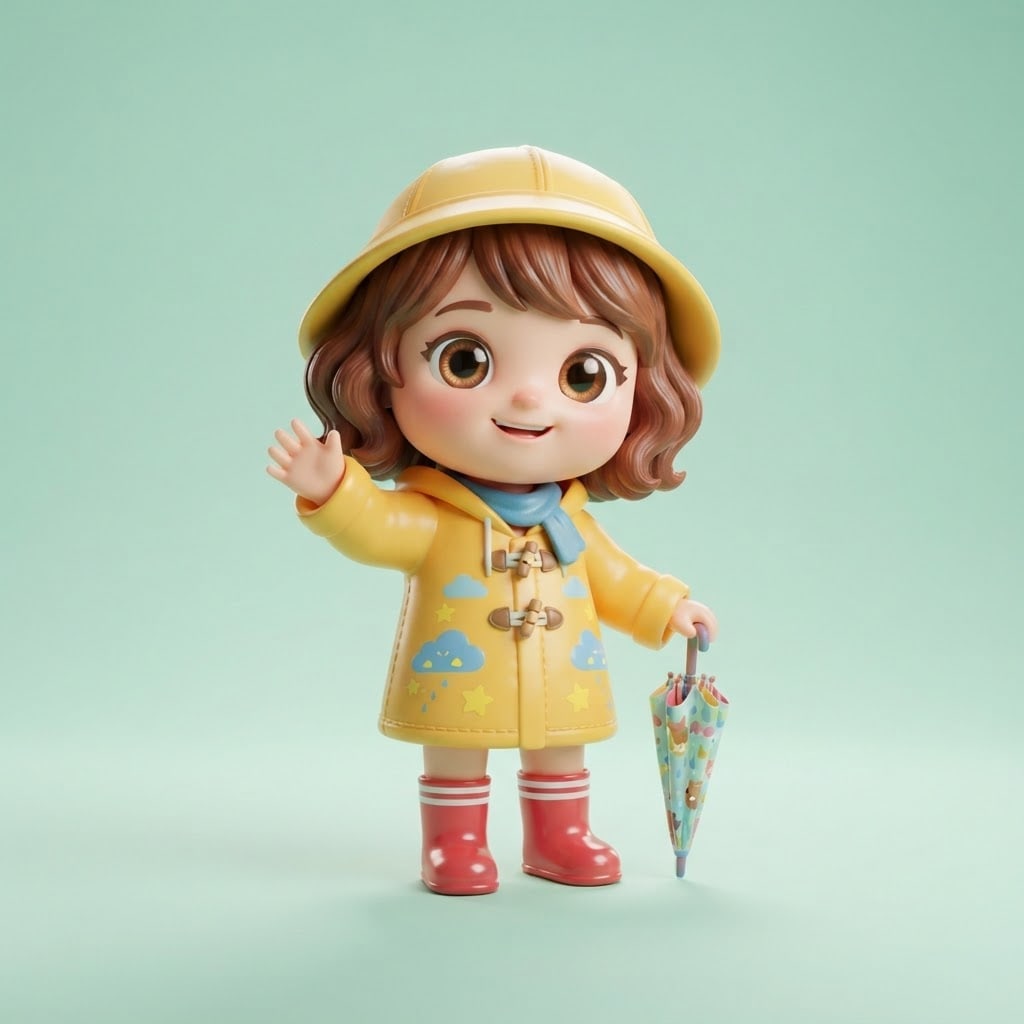
Create an image of an original character in a cute 3D chibi style.
Charactera little girl in a yellow raincoat and red rubber boots with an umbrella; fictional, not resembling any known character.
Proportionsthe head almost half the body, big shiny eyes, short arms and legs.
Stylea glossy soft plastic toy texture.
Posestanding, full body, turned slightly, waving one hand.
Backgroundflat light mint green with a soft shadow under the feet.
Lightbroad soft studio light from the front, a thin rim light from behind.
Cameraeye level, 50 mm feel, the character sharp head to toe.
Compositionsquare frame, character centered, generous space around it.
Textno text in the image.
Aspect ratio 1:1.
Image made with this prompt
6 more ready-to-use prompts
Different takes on the same topic. Copy any of them as is and replace the parts in square brackets.
1.3D style prompt for Gemini from your photo
When to use: When you want to see yourself as a cute 3D character.
Draw the person in my uploaded photo in a cute 3D chibi style.
- Keep
- hair color and style, glasses, clothing colors.
- Proportions
- big head, big eyes, short body.
- Style
- glossy soft plastic toy texture.
- Background
- flat [e.g. pastel pink].
- Text
- no text in the image.
- Ratio
- 1:1
2.3D chibi anime style prompt
When to use: When you want a small 3D character with an anime feel.
Draw an original character in 3D anime chibi style.
- Character
- [e.g. a small white-haired knight carrying a sword], fictional.
- Style
- 3D anime render, cel shading, big eyes.
- Background
- flat [e.g. lavender].
- Text
- no text in the image.
- Ratio
- 1:1
3.3D cute style animal prompt
When to use: When you want an animal as a cute 3D character.
Create an animal character in a cute 3D style.
- Animal
- [e.g. a little panda holding a coffee cup].
- Style
- plush toy texture, big shiny eyes.
- Background
- flat [e.g. cream].
- Text
- no text in the image.
- Ratio
- 1:1
4.3D toy box prompt for ChatGPT
When to use: When you want your character shown as a boxed toy.
Show an original chibi character inside a toy box.
- Character
- [e.g. a little bear in a chef's hat], fictional.
- Box
- clear front, small accessories beside it (spoon, pot), no text on the box.
- Style
- glossy plastic toy.
- Background
- flat light gray.
- Ratio
- 4:5
5.3D effect icon prompt
When to use: When you want a cute 3D-looking icon for an app or slide.
Create a single icon in a cute 3D style.
- Object
- [e.g. a smiling cloud].
- Style
- soft glossy plastic with rounded forms.
- Background
- flat [e.g. light blue].
- Composition
- icon centered with generous space around it.
- Text
- no text in the image.
- Ratio
- 1:1
6.3D sticker set prompt
When to use: When you want a sticker set with one character's expressions.
Create a sticker set for a 3D chibi character in a 2x2 grid.
- Character
- [e.g. a little cat with headphones], fictional.
- Expressions
- happy, surprised, sleepy, angry.
- Style
- glossy plastic with a thick white border around each sticker.
- Background
- flat white.
- Text
- no text in the image.
- Ratio
- 1:1
What this prompt does
If you want a character, or yourself, in a cute 3D chibi style, the main prompt draws a big-headed, short-limbed character with a plastic, clay, plush or 3D anime texture on a flat pastel backdrop. The 6 variants below cover turning a photo into 3D style, 3D anime chibi, 3D animals, a 3D toy box, 3D effect icons and a 3D sticker set in ChatGPT and Gemini.
Where to use it
- Profile picture and avatar
- Sticker and emoji set
- Brand mascot
- Social media post
Fields you can fill in
The fields you can change in the form above and their default values.
- CharacterFree text
- a little girl in a yellow raincoat and red rubber boots with an umbrella
- StyleOne of 4 options
- a glossy soft plastic toy texture
- BackgroundOne of 3 options
- light mint green
- RatioOne of 3 options
- 1:1
Step by step
- 1
Describe the character with three items
Put outfit, shoes and something it holds in the Character field. At chibi proportions small items become the character's identity.
- 2
Pick the texture
Plastic toy looks glossy and lively, clay handmade, plush soft, and 3D anime cartoon-like.
- 3
Check the proportions
The head should be about half the body and the eyes big. If the character comes out with normal proportions, keep the Proportions line and add 'chibi' to the Style too.
Tips and variations
- For an expression set keep the Character line fixed and add only the expression at the end (laughing, surprised, sleepy).
- For stickers make the background flat white and ask for a thick white border around the character.
- To turn your own photo into 3D style use the variant below in Gemini or ChatGPT with your photo.
Frequently asked questions
How do I write a 3D chibi style prompt?
Put the character, chibi proportions (big head, short limbs), texture, background and light on separate lines. Stating the proportions keeps the model from drawing normal proportions.
Can ChatGPT turn my photo into 3D style?
Yes. Upload your photo and write 'keep my face and hair, draw me in a cute 3D chibi style'.
Are 3D cute style prompts free?
You copy the prompts on this page into the tool of your choice; that tool's own limits apply.
Is a 3D effect prompt the same as a 3D style prompt?
A 3D effect usually gives volume to text or an icon; a 3D style is the character's whole look. There are variants for both below.





